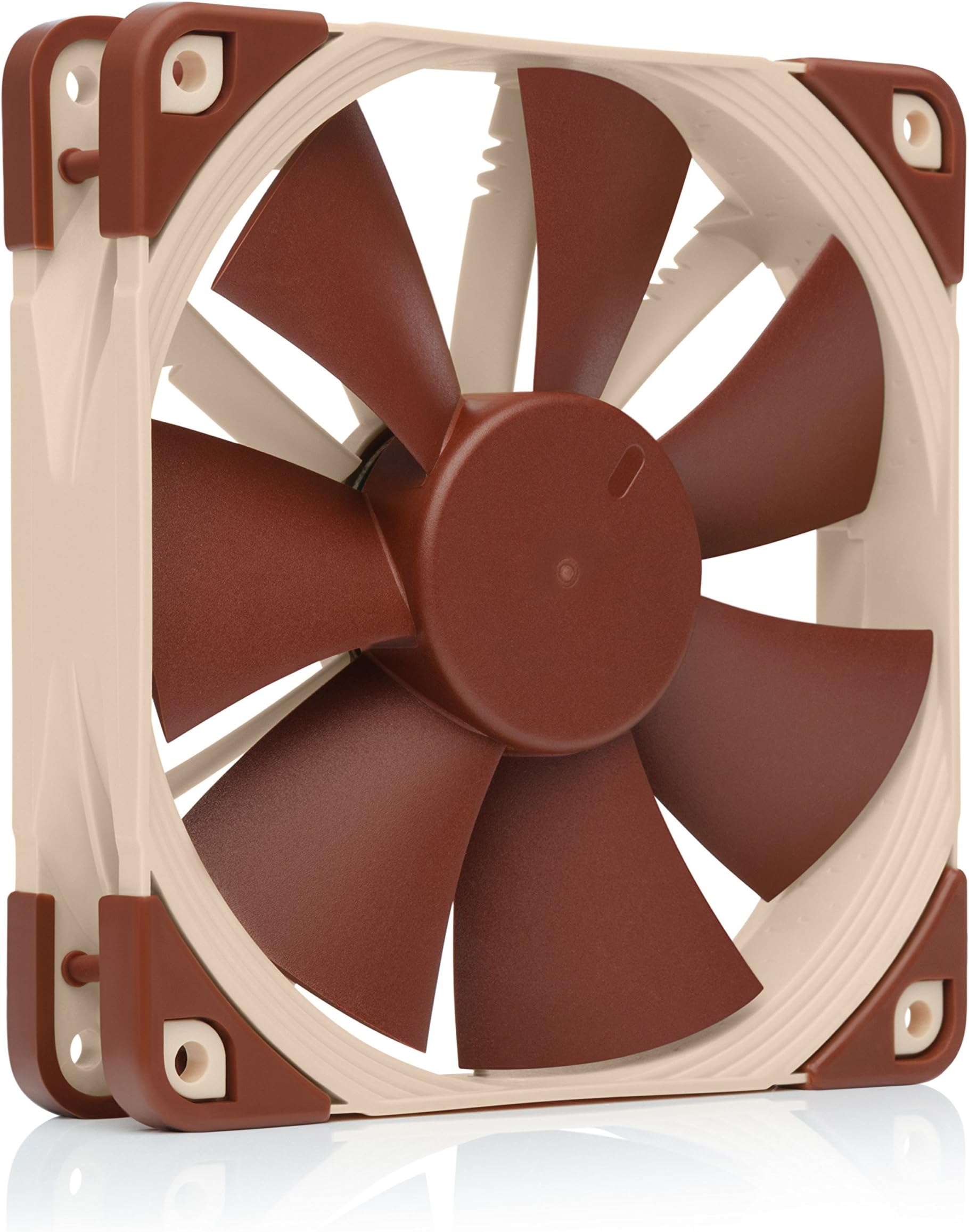
So, a computer fan. How exciting could it really be? If it spins it spins, so what difference does it really make? A big difference. Noctua is an Austrian company that specializes in making the best of the best computer cooling components. These fans, unlike the cheap ones that come bundled with computer cases, are very sturdy, professional-looking, and overall designed very well. From the moment I opened my first Noctua fan 4 years ago, I’ve been in love. The box itself is very nice looking, sturdy feeling, and just rings of high quality. Here, you won’t find any over-the-top “gamer” references, such as “XTREME TWIN FROZR FANS!” (not an exaggeration). For me, I don’t want whatever fan has the most RGB color-changing lights on it, or the most buzzwords. What I care about is the quality of the product. After marveling at the gorgeous design of the boxes for a few minutes, you move on to open them. On the front of the box, there is a flap covering the entire front, which is velcroed and hinged to the box. After ripping apart the velcro, which is of course very satisfying, you find a nice window into the box, showing you the beautiful brown and light-brown fan you bought. Similarly, on the back of the box, there is another velcroed flap, which opens to reveal more marketing material about the fan. Honestly, I’ve never read what’s on the back of these boxes, but I’ve opened the flaps more times than I can count, solely due to the satisfaction of it. After you play around with the front and back flaps fo the box for another 5 minutes, you get to opening the box. This, unfortunately, is the one negative I’ve been able to come up with of the fans. When opening the top of the box, I’ve always found it difficult to get my finger in the box to pull up on the flap, and it seems like I always end up bending the top of the box slightly to get it open. This is something that hasn’t changed in all 4 years I’ve been using these fans. However, once you get the top open, you can pull out the plastic container that the fan and accessories are stored in, and you’ll probably end up with the manual on your lap. This isn’t just any old manual though. It’s elegantly designed, with a nice cover page. On the back, a little message from the CEO is included, thanking you for your purchase, and explaining how they sincerely hope you enjoy the product, which if it isn’t evident, I LOVE. After glancing at the outside of the manual, you’re greeted with the main plastic container, holding the fan and its accessories. This plastic container consists of two overlapping pieces of plastic, similar to an iPhone box. After lifting up on the top, the bottom part containing everything gradually slides away from it, gently falling to the table after another very satisfying second or two. This is when things really get exciting. Here, you are greeted with a very well built fan, colored brown and light-brown. Other color options are available, however, anybody very into building computers will recognize that distinctive color palette, and know immediately that you only use the best of the best for cooling of your computer. I suppose it’s a status symbol of sorts. Upon taking the fan out of the snug-fitting plastic container it rests in, you can feel the quality right off the bat. The fan is pretty heavy, weighing 5.84 ounces, almost half a pound. This doesn’t sound like very much, but compared to the fans that came with the computer case I bought, made by NZXT, which weigh in at 3.92 ounces, it makes a big difference. Another really great part of these fans is the rubber corners they have. On each corner, there are small, yet thick pieces of rubber. Although these may seem unnecessary, they help (and to a great job) of reducing vibrations from the fan that are transferred into the computer case, which can make for some very frustrating noise. In addition to these rubber bits, the blades of the fans are very wide, and fewer in number compared to the NZXT fans I have. Although I know very little about aerodynamics, I’d be willing to guess that this arrangement leads to more air being sucked in/out of the computer, while making less noise due to less steep of an angle of blades. So, now you’re 10 minutes closer to dying, and all you’ve done is ogle the fan, and you’re no closer to actually installing this premium cooling solution into your computer. Time to install them I suppose! The mounting process isn’t much different from any other fan, other than the fact that it is just better. In the package, they provide you with four rubber “anti-vibration mounts”. These are somewhat hard to describe, but they look like a miniature version of something you might find at the Lion’s Den used for backend penetration testing. (That is actually a phrase I’ve used in the context of one of my IT classes in the past week). I, however, don’t like these “anti-vibration mounts” though, as they’re a pain to install and uninstall, at least compared to screws. Also, I’ve had to fix a handful of Dell computers that utilize a very similar system, where the fan has fallen off of the case due to the rubber mount giving out. Before you go screwing any fans into your case though, it is important to make sure that the fan is pointing the correct way. I could talk for a long time about the benefits of positive, negative, and neutral pressure when building computers, but as a rule of thumb, you want as many fans blowing into your case as blowing out. Figuring out the direction of airflow of fans can sometimes be a pain though, and I’ve often had to Google which way is which. Not with Noctua fans though. These fans contain two small arrows on one side, one pointing away from the fan, indicating the direction of airflow, and another pointing into the fan, indicating which way the blades spin. Although this isn’t necessarily uncommon in higher-end computer fans, it is still appreciated. So, you’ve admired the fan and figured out which way it should point in your case. Time to finally screw it in. When you purchase these fans new, the screw holes don’t have any threading that they come with. The reason for this is two-fold: it allows for the use of the anti-vibration mounts, as well as reducing the tooling necessary to manufacture these fans. In some cases, I’d call this laziness, however, with these, creating the threading is the best part. You start by just taking one of the five (they give you an extra!) screws that come in the box, and twisting it. Continue screwing it in until just tight, but not too tight. This doesn’t sound exciting, however, the experience of screwing in the fans is perhaps the best part of the whole product. It’s really difficult to describe what feels so satisfying about screwing these fans in, but it just does. So, you’ve mounted the fan, and now it’s time to wire it up to your motherboard. Normally, this would be very simple, just plugging it in, however, an extra step is typically required with Noctua fans. This may sound like a negative, but it isn’t. Noctua’s fans come from the factory with very short cables, which is really great usually only for the CPU cooling fan. However, in the box, they offer a variety of additional cables, including long and short extensions, and a splitter. The splitter is really nice for computers with lower-end motherboards with fewer fan connectors, typically for the front of the case. These different choices allow for a lot of flexibility when connecting the fans, meaning that you can make the cabling just how you want it. All of the wires included are very high quality, wrapped in a black mesh-looking sheath. Another small, yet important design feature of these cables is that they are all multiples of the length of the sides of the fan. This makes wiring multiple fans in a row up very clean, making the length of wiring perfect in a lot of cases. So you’ve wired the fan up and assembled the rest of your computer. You press the power button, and see your new motherboard’s splash screen for the first time, giddy to start using your new computer. This is when these fans really shine. And by shine, I mean that you never notice them. These fans are rated at 22dB, which is incredibly quiet, if audible at all. Even with the most demanding of loads, these fans promise to keep up. Never once have I had to worry about my computer overheating with these fans, and even when I pump everything up to full throttle, they hardly make a sound at all. During my life, I’ve bought, or convinced people to buy upwards of 20 of these fans. Although that isn’t a huge sample, it’s enough for me. Everybody I talk to also agrees that these fans are absolutely wonderful, and one of the best purchases they’ve made, at least for their computer. That all said, super high-quality fans come at a premium price, although it is still very reasonable. These fans always hover around the $20 range, which when multiplied by the three or four fans that most people have in their case, isn’t super cheap, but is well worth it. Most people undervalue fans, thinking that it doesn’t really matter which you get. However, when the longevity of the (very expensive) components of your computer is at hand and keeping them cool is one of the highest priorities, I beg to differ. Good cooling does matter, and these fans are worth every penny, and more. Frankly, in my opinion, the unboxing experience afforded by these fans is justification enough for the price tag.