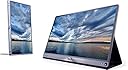
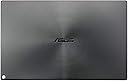
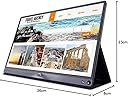
📈 Elevate Your Workspace with ASUS ZenScreen!
The ASUS ZenScreen MB16AC is a 15.6-inch portable monitor featuring a Full HD (1920x1080) IPS display. Designed for professionals, it offers USB Type-C connectivity, low blue light technology, and a sleek, lightweight design, making it the perfect companion for multitasking and enhancing productivity on the go.


| ASIN | B071R31L1G |
| Adaptive Sync | FreeSync |
| Aspect Ratio | 16:9 |
| Aspect ratio | 16:9 |
| Best Sellers Rank | 356,164 in Computers & Accessories ( See Top 100 in Computers & Accessories ) 5,443 in Monitors |
| Box Contents | ASUS Smart Case, DisplayPort over USB-C cable (USB-C to USB-C), Monitor, USB Type-C to A adapter, ZenScreen pen |
| Brand | ASUS |
| Brand Name | ASUS |
| Colour | Silver+Black |
| Compatible Devices | Devices with USB-C or USB-A ports |
| Contrast Ratio | 1000:1 |
| Customer Reviews | 4.5 out of 5 stars 457 Reviews |
| Display Technology | LED |
| Display Type | LED |
| Global Trade Identification Number | 04712900508000 |
| Hardware Connectivity | USB |
| Has Color Screen | No |
| Image Brightness | ANSI lumens |
| Image contrast ratio | 1000:1 |
| Item Dimensions D x W x H | 8.9D x 14.1W x 0.3H centimetres |
| Item Type Name | ASUS ZenScreen MB16AC 15.6" USB Type-C Portable Monitor, FHD (1920x1080), IPS, Flicker free, Low Blue Light, TUV certified, Compatible with USB Type-A |
| Item Weight | 20.81 Ounces |
| Manufacturer | ASUS |
| Maximum Display Resolution | 1920 x 1080 Pixels |
| Model Name | MB16AC |
| Model Number | 90LM0381-B01170 |
| Mounting Type | Wall Mount |
| Native Resolution | 1920x1080 |
| Network Connectivity Technology | USB |
| Picture Quality Enhancement Technology | Flicker free, Low Blue Light, freesync, IPS |
| Pixel Pitch | 0.18 |
| Product Features | Height Adjustment |
| Product Warranty | 1 Year |
| Refresh Rate | 60Hz |
| Resolution | FHD 1080p |
| Response Time | 5 Milliseconds |
| Screen Finish Type | Glossy |
| Screen Size | 15.6 Inches |
| Screen size | 15.6 Inches |
| Screen surface description | Glossy |
| Shape | Rectangular Prism |
| Specific Uses For Product | Gaming |
| Total USB Ports | 1 |
| Total Video Out Ports | 1 |
| Unit Count | 1.0 count |
| Viewing Angle | 178 Degrees |
| Voltage | 240 Volts |
M**N
Read this before purchasing any of the screens.
I've purchased two of these screens now. One of them was sent back. Here's why... First, Asus has multiple completely different screens in one listing here. The different size names correspond to completely different model numbers. Make sure you research each model before purchasing to know what you're getting. I'm a tech contractor that often works from hotels, on the road, on airplanes-etc. I run a Windows work laptop (with a USB-C port) and an older 2015 Retina Macbook Pro (with thunderbolt 2 and USB 3.0 ports). I initially purchased the ASUS MB169C+ due to reviews here, but quickly found that while the screen worked fine on my windows laptop via a USB-C to USB-C cable, connecting it to my Mac with an Anker Powerline USB 3.0 to USB-C cable (as recommended in other reviews here) didn't work. The screen requires too much power to operate on USB 3.0 and you get a flashing white light to signify this when plugging it in to any machine via a USB 3.0 port, which makes it a bit useless unless your laptop has USB-C ports. That screen got sent back to Amazon. I then purchased the ASUS MB16AC, which advertised support for USB-C and USB 3.0. Plugged it in to both my Macbook Pro and my windows laptop with the Anker Powerline USB 3.0 to USB-C cable and it turned on instantly and works perfectly. I didn't use the included USB-C to USB 3.0 adapter due to other issues other users have experienced here with display flicker. The Anker cable worked perfectly the first time round. -BUILD QUALITY- The MB169C+ is a plasticky monitor with a black plastic front bezel that looks like a thin version of a regular desktop monitor. The back is plastic with I assume a faux-brushed metal cover to make it look more high-class. The included stand is badly designed with velcro and fabric tabs to prop the screen up. It doesn't inspire confidence that the screen won't fall over. The MB16AC is built like a premium device. Brushed metal front with a really tiny bezel. The back is brushed metal and feels high quality. The included stand is a well-designed magnetic case that clicks into place reassuringly when you prop the monitor up on it. Both are extremely light and thin. Perfect if you need a large screen available on-the-go. -IMAGE QUALITY- The MB169C+ has a full HD 1080P matte screen, which is good if you work outdoors or in areas with bright lights and glare. The MB16AC has a full HD 1080P gloss screen, but is still visible outdoors quite well. -VALUE FOR MONEY- The MB169C+ might be cheaper than the MB16AC, but it feels less like a rugged portable monitor and more like a panel that's liable to break at any time. The MB16AC however feels like it's well built and will withstand being transported in a bag, rucksack or similar. Additionally, the MB16AC allows connectivity with older non-USB-C monitors with the inclusion of USB 3.0, which is extremely important if your laptop doesn't have any USB-C ports. Out of both screens, I would highly recommend spending the extra money on the MB16AC. Don't waste your time with the MB169C+ unless you really like the look of it's front bezel or you only have USB-C computers and want to save a bit of cash. If you want more information on the other models Asus offers, go to YouTube and watch reviews on them there. This is a good lineup of portable monitors, but they are all significantly different from each other. UPDATE 3 months later and my MB16AC has proven to be an invaluable purchase. Still works perfectly. No dead pixels or connectivity issues. The included origami case has done a good job of protecting it in my rucksack. I'd highly recommend it. Decided to purchase what looked like the newer model with an in-built battery (MB16AHP) to add another screen to my portable setup. That seems to only work on HDMI with my Macbook since the USB port is USB-C only (or if it is USB 3.0, it doesn't seem to like the latest Displaylink drivers). I'm debating returning the MB16AHP and purchasing another MB16AC because the MB16AC simply works whereas connecting the AHP model requires plugging it into HDMI and another USB source to maintain power when the inbuilt monitor battery dies. If you have a USB-C machine and have no need for USB 3.0 support (or want HDMI), get the MB16AHP. If you need USB 3.0 support (and don't care about HDMI or an in-built battery), get the MB16AC
A**R
Great for adding an additional screen for working from home
Really great screen. Was needed to add a second screen to a surface pro for working from home, so Wife purchased it and now I’m very jealous. I’ve stolen the study and she’s in the dining room on a smaller table so space is at a premium and the setup needs to be tidied away every evening. The slim bevel and light weight means that it’s possible to put into a tablet holder if you want to put it at eye-line above a laptop. We used a Urbo Adelaar stand which fitted really neatly. The ASUS comes with a magnetic cover that can be folded into different positions to prop up the screen as well so lots of options. Pay attention to the diagrams included in the instructions as they help with how to fold the cover as it feels a little like a little puzzle at first. :) The native connection is USB-C but it came with a USB-C to USB adaptor so was easily to setup and the 1m cable meant its easy to get it to the USB port Build quality and screen qualify is really top notch, great if you need to stare at a screen for a prolonged period.
L**D
The best bus powered portable monitor on the market - period !
If you are in the market for an ultra light and ultra slim second screen then this screen will be perfectly suited to your needs. I have been looking for a portable second screen for some time. I originally ordered the old version (thicker, heavier and the contrast/sharpness was not great) but after finding out this was due to be released, sent it back. After a long delay ASUS finally released the updated MB16AC. My primary purpose was for extra screen real estate - primarily for spreadsheet work. If you are a multi tasker then more screen estate generally correlates to more productivity - of course excluding the moments while you saviour your screen watching 4k demo videos! My screen arrived with a next day delivery from Scan Computers (via Amazon), the packaging was rather jazzy, almost like an oversized mobile phone box. The accessories included were, The screen itself, an ASUS pen (great marketing follow through, so you can prop up the screen with the pen), a USB A to USB adaptor, a USB C cable and a magnetic multi position flip case. As I handled the the screen on first touch, I was in awe on how well made and beautifully designed the screen was. The screen is extremely thin and light with a gloss glossy finish. I connected the screen to my late 2016 Macbook pro with touch ID and using the supplied USB C cable, the screen was instantly recognised and worked out of the box. The 1080P resolution was sharp and vibrant for a USB powered screen. This was the original attraction for my purchase - connection via a single cable. The pen slot may seem like a novelty factor but my use so far has proved that this feature is remarkably functional - the supplied case/stand whilst multi purpose is heavy due the the magnets that enable the different positions. Pros - Probably the best USB powered screen on the market, beautifully designed and after 3 attempts ASUS have finally got it right - Sharp and crisp display ,1080P resolution, portrait and landscape modes, brightest bus powered monitor - Relatively wide viewing angles - Plug and Play -Thinnest and lightest USB powered display -Compatible with Windows and Mac -A full 15 inch screen with extremely small bezels -Highly configurable menu to adjust screen settings Cons - Expensive - No HDMI (could have flexible uses) - Not as bright as powered monitors - Blue light filter feature unproven if this really actually has any effect on easing strain on eyes (not enough research) - Menu buttons fiddly I will be testing the screen with a HDMI to USB C adaptor to see if a HDMI signal can pass through to display this source - perhaps to power a games console or a Raspberry PI. After reading reviews for too long - I thought I would write my first! A highly recommended purchase.
F**8
Brilliant
Absolutely perfect for its intended use. I often need to work on my laptop when at home and miss having the luxury of two screens I have at work due to space restrictions. Yes I could pull out my spare 22” monitor and set this up on the dining room table, but it’s just far too inconvenient to keep doing this each time I need it, then packing it away after use. The form factor is lovely and looks stylish, but above all... quick and easy to setup and remove when not in use. The picture quality is very good and clear and also responsive. Some have said the image is dark, but to be honest it’s not really that noticeable and certainly not a deal breaker, plus you can tweak the image on screen quite a bit to negate this. I agree it’s probably not great for gaming or photo editing, but that’s not it’s intended purpose to be fair. If you just want a convenient solution for normal day to day type work to extend your display area (word excel email etc.) it’s brilliant
I**N
Working well with ancient MacBook Pro (2010)
I've only had the screen for a couple of days but so far I've had a positive experience using it with my ancient 17" 2010 MacBook Pro. I'm running Sierra rather than High Sierra as I have a third-party SSD and don't want to risk Apple's new filesystem knackering my drive. I use the Asus mostly for working on Word docs, reading academic papers and running statistics programs (that might sound boring but it isn't to me). I followed the advice of another reviewer and spent £7.99 on an Anker PowerLine+ USB-C to USB 3.0 cable (3ft) in case the supplied USB-C to -A adapter wasn't up to scratch. I downloaded and installed the Asus MB16AC Series USB Monitor Driver without a hitch. It all works fine. I use it indoors only and find that at full brightness it's about the same as 70% brightness on my MacBook. This is about where I have it normally as I find full brightness on the MacBook is too much, so I don't have any worries there. If you like your screen brighter then you might not be as happy as I am. The colours are slightly different to the MacBook but you can tweak the RGB settings of the colour temperature if you want; they're close enough for me so I haven't done any tweaking. I used the onscreen menu to set it to 'Standard' mode, 100% brightness, 100% contrast, 'cool' colour temperature. To my crude eye that's a decent enough match to my laptop screen but you might have higher standards. Scrolling is a bit janky (I like that word), which I presume is because I'm using the DisplayLink over USB-A rather than the USB-C that a more modern laptop would have. But for the low intensity work that I do it's fine and doesn't bother me at all. I tried to get it to play a movie on iTunes to see what it's like but it refused to play on the Asus, citing lack of HDCP compatibility. Again, I put that down to using USB-A rather than USB-C but I could be wrong about that. MacOS's Activity Monitor shows a decent amount of CPU activity when scrolling on the Asus, but that dies to next to nothing when I'm just looking at the screen, so with what I do I'm not worried about it contributing to the premature death of my MacBook from overheating. My MacBook battery is shot so I'm always plugged and can't comment on how much the Asus drains the battery. So, I've now joined the wonderful world of dual screen users and I'm expecting my productivity to soar!
C**S
ASUS MB16AC vs ASUS MB16ACE
I originally bought the MB16ACE screen as it is the newer ASUS model when compared to the MB16AC. The apparent “Smart Cover” that comes with the ACE is unfortunately really poorly made and in my opinion unfit for purpose. I am quite convinced it will break very quickly. A real shame really as the screen itself is fantastic. I returned the item very unsatisfied that my portable monitor isn’t very portable due to this god awful screen cover. After some further research I purchased the older MB16AC model instead which is identical in appearance and in most cases specs too. The newer ACE model is apparently brighter and according the manufacturer also has some additional anti glare film on it but you wouldn’t notice having personally used both. The HUGE difference. The most important fact is the cover is a different style, the cover with the older AC model is soooooo much better. It is very similar to style you would find with an iPad. I would argue it is much higher quality. If you are in two minds about which to buy, 100 percent buy the MB16AC model and not the ACE model as fundamentally even if the tech is a little older it performs perfectly as a screen, the key difference is the cover is one you would trust to use and the important factor is that this portable monitor is PORTABLE because of it. The AC model is a little cheaper too. The cover In the AC model is attached to the unit by magnets, there is no reason to remove it from the unit. The Cover on the ACE model detaches, is flimsy and will either get lost or broken and there are no aftermarket screen covers you can specifically buy as far as I can tell. I spend hours looking on all the usual sites etc. Hope this helps anyone looking to buy a portable screen! I find it near impossible to work off a single monitor these days and this item is a game changer.
M**N
MB16AC - Excelent, portable, and simple!
As a developer in the events industry, I often have too much open for one screen. In the office, this isn't a problem as I have 3 external monitors as well as the laptop screen, but in the field, I need something more portable that will fit in my laptop bag with my laptop. The beauty with this screen is the simplicity - get it up and running with any laptop in the amount of time it takes to get a tablet out and stood up in a typical case. Even better - it works through any Thunderbolt 3.0 enabled USB-C port as if it were connected by HDMI, meaning very quick response times, or through any USB 3 port (USB-A or USB-C) using some additional drivers on the OS (there as standard on Windows 10 "creators update"). Surprisingly, this even works with my S8 without any issues, but it seems the phone will always output portrait mode badly (as a letterboxed landscape video) whilst landscape is always fine. For the S9, I had to turn down the brightness on the monitor prior to connecting for it to work, possibly as the S9 uses more of it's power capability than the S8. I look forward to the MB16AP as the onboard battery (without adding much weight or any size) should allow improved usage on mobile devices.
C**N
A useful and highly portable addition but definitely over-priced
The screen is smaller than the other portable monitors that ASUS have produced, but it exhibits the same problem with hotspots that the less expensive monitors do. I use it with a PC Specialist Ultranotebook and find it quick and easy to set up. The case is far from useless as described in another review. I'd advise any buyer to download and install the latest Displaysync software to prevent any glitches from occurring. It works perfectly well for me through the USB-C-B converter. It stays up well with the provided pen (which somebody the nicked from me). I like the software included that enables you to tweak settings really easily. It's definitely over-priced: the screen quality should be much better for such an expensive monitor. Hotspots started showing a few months after I bought it; I use it too regularly to go through the hassle of returning it for another one. Every ASUS monitor I have bought has this weakness so I had no guarantee a replacement would be any better. I'm using it for DTP purposes so the hotspots are a minor irritation.
F**.
Perfecto
Dudaba de si comprarlo o no por algunos comentarios que no eran muy favorables, sin embargo, viendo las especificaciones finalmente me decidí. Necesitaba una pantalla adicional para trabajar en casa que no tuviera que estar ocupando espacio cuando no se usaba, y de paso para poder utilizarla en viajes. Me sorprendió bastante cuando la recibí y la abrí, es muy ligera y muy fina, un poquito más gruesa y pesada que el iPad Pro de 12" y con unas calidades muy buenas. La funda también me parece que es perfecta, y me permite llevarla en la mochila junto al portatil sin ningún problema. Algunos hablan de problemas de sujección, sin embargo yo no he tenido ningún problema con el que ofrece la propia funda a través de los imanes. En cuanto a la calidad de imagen, para mi, es perfecta (sin entrar en rangos de colores a nivel profesional), pero he de decir que la utilizo con un DELL XPS15 con pantalla 4K, y practicamente parece que son iguales, eso sí, utilizándola a través de USB-C. No he probado el adaptador de USB normal. Había leído también algunas críticas acerca del brillo o del contraste, sin embargo, yo en interiores, donde suelo trabajar siempre, me parece que da de sobra. Supongo que en exteriores la cosa cambiará, pero es algo que también me pasaría con la pantalla del portatil. En definitiva, muy contento, superó mis espectativas, y es una de las mejores compras que he hecho últimamente.
A**.
I love it!
It is incredibly! I love it. The quality in image is good, outside is very beautiful. I bought another from another brand with same specifications, but this is much more for long. I really recommend it!
N**E
Bought 2 of these
Great nifty product! I have used mine A LOT as I travel a lot for work. It has been over a year since I bought mine and it is going strong. These have become great travel friendly must haves for me as they are light and easy to pack. It has become such a staple that I have purchased another one for my husband.
B**L
Pantalla portatil USB C y A, ligera y de calidad
La estoy usando desde hace unas horas. Me ha sorprendido gratatmente la calidad de imagen (tanto con puerto USB-A como C, no noto difrencia alguna la verdad, ojo, para web, pelis, office etc va genial, para juegos super exigenres con repd¡frescos de >120Hz supongo y lo configurable que es en cuanto a brillo y filtro de azules. Brillo más que suficiente para interior (incluso a lado de una ventana día soleado ( apleno sol imagino que no, pero mi portátil tampoco:) Escelentes ángulos de visión. Pantalla de cristal (ojo si la quereis mate tendreis que comprar la MB169C+ (que SOLO funciona con puetryos USB-C que dispongan de DL, Surface Book 2, etc).
P**N
Great screen.
Brilliant display. Showed the wife and she made me buy her one too.
Trustpilot
2 weeks ago
3 weeks ago