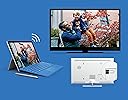
📺 Elevate your screen game—go wireless, go limitless!
The Microsoft Wireless Display V2 Adapter lets professionals effortlessly mirror or extend their Windows 10 device screens onto HDTVs or monitors using Wi-Fi certified Miracast technology. With a reliable 23-foot wireless range, plug-and-play HDMI and USB connectivity, and broad compatibility across Surface devices and other Miracast-enabled hardware, it’s designed to modernize presentations, meetings, and media streaming with minimal lag and maximum convenience.


| ASIN | B01C9YTI9S |
| Best Sellers Rank | 50,595 in Computers & Accessories ( See Top 100 in Computers & Accessories ) 399 in USB Computer Network Adapters |
| Brand | Microsoft |
| Brand Name | Microsoft |
| Colour | Black |
| Compatible Devices | Monitors, Televisions, Projectors, Set-top Box, TV Stick |
| Compatible devices | Monitors, Televisions, Projectors, Set-top Box, TV Stick |
| Connector Type | HDMI |
| Connector type | HDMI |
| Current Rating | 2 Amps |
| Customer Reviews | 4.2 out of 5 stars 4,034 Reviews |
| External Testing Certification | Não aplicável |
| Global Trade Identification Number | 00889842003192, 04058154049778 |
| Item Dimensions | 10.3 x 2.2 x 1.1 centimetres |
| Item Weight | 33.1 Grams |
| Item dimensions L x W x H | 10.3 x 2.2 x 1.1 centimetres |
| Manufacturer | Microsoft |
| Model Number | P3Q-00003 |
| Number of Items | 1 |
| Number of Ports | 2 |
| Package Quantity | 1 |
| Power Plug Type | Type A - 2 pin (North American) |
| Product Finish Type | Matte |
| Product Warranty | 1 year manufacturer warranty |
| Specific Uses For Product | Phone, Mobile Phone, PC, Projector, Monitor |
| Specific uses for product | Phone, Mobile Phone, PC, Projector, Monitor |
| UPC | 889842003192 |
| Unit Count | 1.0 Count |
| Warranty Type | Limited |
V**S
Good one, but broke shortly after purchase
UPDATE: Replacement arrived quickly and item works as expected, no crashes or anything. First, it is expensive for what it does. Bought one because our smart TV, despite having Miracast and chromecast buil-in, would not work well with one of our PCs, but did fine with others. Was really happy with the item: build quality good, but not premium, it would allow to watch video in good quality, without dropouts or disconnections, with fluent picture experience. Some lag was present, so definately the adapter would not do well for gamers. Setup was really easy, and connection from a Windows 10 PC would take some 5 to 10 seconds. However, after two days of limited use it broke. Simply it would not broadcast over wi-fi, and the only thing on display one would see was a broken Microsoft startup logo on white background. Resetting the device did not help. Ordered a replacement, and if it does not break, I will give it a 5 star rating instead of 1.
D**S
Absolutely excellent product.....absolutely
Just arrived. Bought to enable me to teach physics to my students using my Surface Pro 4. Have just ran several tests using power point presentations and associated linked videos from a variety of online video sites (youtube, vimeo etc)...All faultless, straight out of box. Audio automatically routes to the wireless display adaptor (in playback devices it is labelled as Digital Output: MSDisplayAdaptor). I bought a MPOW Bluetooth audio receiver to enable me to free roam with the SP4 and play video from anywhere in the class. I can route the audio from video on the SP4 to the main speaker input in the room (using the Bluetooth audio receiver), or play it from the SP4 speakers easily (using volume control: Playback Devices). Downloaded the display adaptor app from the store, and altered the adaptor name, and upgraded the firmware to latest release...took around 60 seconds to restart. VERY slight time lag, I could game on the SP4 with minimal issues. I can draw using the Surface pen without looking at the SP4 screen as lag is minimal, so ideal for visual artists wanting to work wirelessly on a larger monitor/projector. After typing this I no longer notice the time lag....:) almost instant response.
P**Y
Good but sensitive to power supply capability
Wanted this to mirror the screens of two tablets to a TV which had HDMI but no USB. Planned to use a separate USB power supply plug to power the device. The tablets I wanted to mirror are both Samsung. One is Android 4.4 Android 9. I wanted to use the device to mirror movies. Plugged the dongle into the HDMI port of the TV and connected it to a separate USB power plug made by a leading manufacturer. The device powered up and displayed the Microsoft landing page but was unstable. Both tablets were unable to find/see the dongle. At the time I was about one metre away from the dongle. I concluded that it might be a power supply issue. I change the power supply plug over and the device worked perfectly with both tablets. Video streamed okay with no jitter in sound or vision. Checking out the PSU plugs I saw that both were rated at 5v 1 amp. My only thought is that the first PSU I used was not 100% spec for USB voltage. Which leads me to conclude that the device may need a good strong USB voltage. If the USB voltage is slightly off then there could be problems with it working. Other than this the device does what is should do. It works with Android 4.4 and Android 9. and streams video okay. I am happy with it except it does seem to be overpriced.
A**T
Works well - easy and so far reliable
Excellent product but check your computer/laptop is able to output Miracast signals! it might be that your running windows which has the "connect App" but that doesn't mean the computer has the circuity to send a WiFi Miracast signal. I bought this Receiver along with an Anycast Receiver to compare them. The image quality is better on the Microsoft device than the Anycast device although the Anycast device does also link Apply products, this Doesn't. IF your screen or projector doesn't have a USB socket (needed to provide power) then you will also need a USB PSU and a Male-Female extension lead (1m or 2m) as the cable on this device, even with the 25mm extension is only about 150mm Long. The system is easy to set up, there is a small time lag between moving the mouse and seeing the movement on the remote screen but nothing to problematic. So far I've only used these for PowerPoint Presentation, I've not tried to send video but the Audio link works fine. So far I've not pushed to see how far this link will work but I've had a reliable connection greater than 30ft, with a Wifi Route in the same space. Jan 2017 - Alan
P**S
No longer have to use an HDMI cable for laptop to TV
I was looking at all kinds of streaming dongles with mixed reviews none of which seemed to do what I wanted. This display adapter came today and it just works as intended. Our old Samsung "smart" TV no longer connects to the ITV Hub so I have been using a Windows 11 laptop to watch via a HDMI cable and operating the plugged-in laptop with a remote mouse and keyboard. Also other channels like UKTVplay. This device just plugs into the HDMI socket and into a nearby USB socket on the back of the TV (plenty long enough but there is a short extension included). Then you press the Windows logo key plus K on the laptop and you select the adapter from the list. Very easy. This adapter doesn't have an easy connection for an Android phone but I didn't need that. I think you need the more expensive version or some paid-for software but you'd have to check on that. This device provides just what I wanted: laptop to TV. Later comment: I must add that sometimes the connection falters and freezes so it is a little unreliable. Most of the time it's OK. Watching ITVX last night it was breaking up so I had to plug in the HDMI cable which always gives perfect transmission. Might be something local to me that's affecting it.
P**K
Might be a good product but the manufaturer is absolute rubbish
10" Acer Windows tablet connected easily. Slight time lag in mouse movements but good picture and great for viewing photos, videos etc. 24" Lenovo all-in-one could not connect to it. Phoned Microsoft support. They told me that I should install the app. I informed them that the app is not necessary. No argument from them which tells me that they were just trying to get rid of me. Then they said that the computer must have miracast!! After 45 minutes of talking rubbish, putting me on hold, transferring me to others etc the tech person said that the Lenovo is not compatible with this product. Sounds like to bull to me but hey if the manufacturer can't be bothered then I'm not going to waste my time trying to find the answer. Sent it back for refund. Mr Gates, there is no point employing a bunch of monkeys to answer your phones. Either provide some proper support or non at all. Non at all seems to be the Microsoft way if you have any complaint hence this here moan. Very disappointed.
C**P
Does what it says on the tin, but not extremely well.
I brought this to extend my laptop display to my monitor to save me using a hdmi cable, and this device doesn't work very well for that purpose. To begin with I was surprised how easy it was to set up and get connected to. It's pretty much plug and play, just stick the hdmi in the display, and plug the USB in (I used an external adapter as the minister lacks usb ports). Once connected to the laptop I found the picture quality good enough, but not perfect with the occasional artifact and only slight input lag with the mouse. But after using it for a while I noticed two major problems that makes the device no good for what I want to use it for. Firstly on my laptop I use a Bluetooth mouse, and I found the connection to the display works perfectly fine if you move the mouse around slowly, but if you start being slightly erratic with the mouse it caused the image on the wireless display to have connection problems and jitter. This itself is slightly annoying, but can be worked around. This second problem is that deal breaker for me though. Using the wireless display caused the CPU usage on my laptop to be way higher than it would be if I just used a hdmi cable. Just watching a YouTube video on the second screen with the adapter had my CPU usage at around 50%, which is way higher than the normal 10% and less you get when using hdmi in the same situation. This means that using the display my laptop would both get hotter than it needs to (not good during the summer months), and also drain the battery way quicker than normal. Because of these two problem I've very quickly given up on using the device in the way I intended to use it. Thankfully though it works well at mirroring my phone display, so I can use it or doing that. So in short; not good for extending a PC display, good enough for watching videos on a larger screen without any multitasking.
C**N
Reliable and simple to use
Bought this to replace my Netgear Miracst device, which was awesome, but sadly the USB connection was becoming a little dodgy through heavy use. This Microsoft Wireless adapter is the perfect replacement, exceeding all expectations. I guess it should work well as I use it with my Microsoft Surface Pro 4, and thus both being Microsoft should work well together. I have also used it with a Samsung phone and also worked well. Video is almost perfect with rarely any stutter and for normal presentation work, nigh on perfect. It is also neat and compact and simple to set up. Unlike a number of similar devices it does not require to be connected to your wireless network, so is completely transportable, enabling me to connect to any TV or projector via an HDMI slot and powering off any available USB slot or via an adapter. Sadly the only time it wont work is through a HDMI cat5/6 Video sender, but I can live with that. After all I don't always need to project wirelessly, just like the freedom it gives me when doing presentations, and it looks very professional when I do. I highly recommend this device.
Trustpilot
3 weeks ago
2 weeks ago