

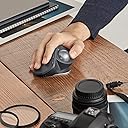


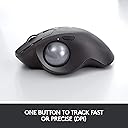

Logitech MX Ergo
Product ID: 47968801
Details
- BrandLogitech
- ColourBlack
- Connectivity technologyBluetooth
- Movement detection technologyTrackball
- Special featureWireless
🎯2048 DPI precision
🔋4-month battery life
🖐️0°–20° adjustable ergonomic tilt
Buy anything from 5,000+ international stores. One checkout price. No surprise fees. Join 2M+ shoppers on Desertcart.
Desertcart purchases this item on your behalf and handles shipping, customs, and support to Kyrgyzstan.
🖱️ Elevate your workspace comfort with precision and power — because your wrist deserves the best!
The Logitech MX Ergo is a premium ergonomic trackball mouse featuring a customizable 0°–20° tilt angle to reduce wrist strain, 2048 DPI precision for accurate cursor control, and an impressive 4-month battery life. Designed for professionals, it supports multi-device connectivity via Bluetooth and Logitech’s Unifying receiver, includes 8 programmable buttons, and offers a stable, premium feel with its weighted magnetic base. Ideal for millennial managers seeking comfort, efficiency, and seamless workflow integration.


| ASIN | B074W227RK |
| Antenna Location | Office |
| Are Batteries Included? | Yes |
| Are Batteries Required | Yes |
| Battery Average Life | 4 months |
| Best Sellers Rank | 55,307 in Computers & Accessories ( See Top 100 in Computers & Accessories ) 1,148 in Mice |
| Box Contents | Wrist rest pad, mouse pad, Unifying receiver, micro-USB cable for charging |
| Brand | Logitech |
| Brand Name | Logitech |
| Button Quantity | 8 |
| Colour | Black |
| Compatible Devices | Mac, Personal Computer, iPad with iPadOS 13.1 or later (Pointing, clicking and scrolling will be supported by enabling the “AssistiveTouch” accessibility feature.) |
| Connectivity technology | Bluetooth |
| Country of Origin | China |
| Customer Reviews | 4.5 out of 5 stars 6,004 Reviews |
| EU Spare Part Availability Duration | 4 Months |
| Enclosure Material | Plastic |
| Global Trade Identification Number | 05099206073081 |
| Hand Orientation | Right |
| Hardware Platform | PC |
| Item Dimensions L x W | 5.7L x 3.7W centimetres |
| Item Type Name | Logitech MX ERGO |
| Item Weight | 5.78 Ounces |
| Manufacturer | Logitech |
| Manufacturer Part Number | 222B231 |
| Model Name | MX Ergo |
| Model Number | 910-005179 |
| Mouse Maximum Sensitivity | 2048 Dots per Inch |
| Movement Detection | Trackball |
| Movement detection technology | Trackball |
| Network Connectivity Technology | Bluetooth |
| Number of Batteries | 1 Lithium Polymer batteries required. (included) |
| Number of buttons | 8 |
| Operating System | Windows 7 |
| Pattern | Single |
| Power Source | Batteriebetrieben |
| Product Features | Wireless |
| Product Finish Type | Smooth Plastic |
| Product Warranty | 2-year Limited hardware warranty |
| Range | 10 meters |
| Special feature | Wireless |
| Style Name | MX Ergo |
| Theme | Office Ergonomics |
| Unit Count | 1.0 count |
R**E
Trackball with a difference! Amazing results but,....costly!!
Given the price it's rather steep. Too expensive is slightly overlooked by the design and capabilities this different mouse can do! Love the short cut functions and new rested angles your hand sits on; more degrees of satisfaction. Main purchase was to solve the RSI I have been getting after using my logitech mouse on a mac. Now upgrading to this beast is exciting. Getting used to the trackball with the thumb is new and at the moment I'm adapting to it. Key Functions in apps are tailored so setting up this is little fiddly but straight forward. I also do prefer the rotating scroll which tilts left or right. None of the other trackballs do this. ie. M570, which is old now. Needed something new and refreshing! One things for sure, don't be leaving this at work after paying so so much! At the moment after using for 2 weeks it's comfortable and usefull. It's working well and I'll update this review. Update!! It's been 6 months now and now I'm charging for the first time!!! It's crazy. I've actually become accustomed to the Logitech MX Ergo device and beleive me...I haven; had any issues with RSI. It has taken some time to adjust but working within small confined spaces, this thing is an ingenious work of art! I am swaying to this style or flow of working and it's spot on for what I want. I use the full slant and haven't had issues at all. Only wished I bought an new but opened cheaper version as any small inferior marks wouldn't harm or be noticed at all with this beast of a wireless mouse! Buy it!
M**W
Very easy to use, with your arm/wrist hanging off an office chair arm
I'd bought a couple of Aptico trackballs, one for the office and one for the laptop in another room that I use with Blackstar software for managing my Blackstar ID:30 amp. But the one for the office was because I have an anti-static mat on my desk because I am an electronic engineer and my office is also my lab. A conventional mouse is quite 'grippy' on this surface so is difficult for accuracy with electronic/technical drawings. So I thought, 'make the mouse stationary, work the cursor with the thumb and increase the resolution as and when necessary. Hence the Aptico but, every other day, I have to have the ball out for cleaning and lubricating including its cavity. I found Mr. Sheen to be quite good in this respect but why does the ball stick so quickly? I have a logitech k750 wireless keyboard. And I now have a logitech MX 50 trackball, not cheap at eighty quid, but read on. I am working from home using a client laptop securely linked to my remote desktop PC at the client's office. The MX 50 offers the facility to share the USB dongle with my own wireless keyboard. Thus the MX 50's own dongle can be attached to my client's PC. There is a switch just in front of the scroll wheel that enables me to switch between doing stuff on my own PC or doing stuff on the client PC (enormous monitor attached to the client laptop so the laptop screen is virtually redundant). Wow! But it gets better. If I'm drawing, in Visio, say, for the customer or Altium at home, when greater cursor accuracy is required there is a thumb-operated switch just behind the scroll ball that increases resolution or, in other words, slows the cursor down thus allowing greater accuracy. So, you've zoomed what you are trying to do by whatever means in your application and then made the position of the desired object more precise with this button on the 'mouse'. There's more; you're an engineer, say, and you're in a website where you've selected a datasheet or something which isn't what you were hoping for and you have to wander the cursor back up to top left reverse arrow to go back to the previous page? Not so with the MX 50. It has two buttons left of the scroll wheel, easily accessible, and the nearest of these is a 'go back' button which is the one we want! Forward of this is a 'go forward' button which I must confess I've hardly used but nice to have anyway. The scroll wheel has left-right click too for those apps that support horizontal scrolling. But here is the best bit: scroll wheel stickiness. I've been using this for a month and I haven't had to have the ball out yet for a clean and lubrication. Really! But the Aptico ball was out pretty much every other day for a clean and a lube (including its cavity). I'm right-handed and the right arm of my office chair hangs over the surface of my desk so my fingers fall upon the mouse or trackball in the manner of a pianist. But not quite. The MX 50 has a (magnetically locked) 20 degree tilt facility which I do use; I just put the trackball at the ideal drop hand position on my desktop and pretty much all I have to move is my thumb. Like scrolling through your phone contacts, the cursor will move fast if you move the wheel fast. Charge via the micro-USB port. Allegedly, a 4-minute charge will give you a day and a full-charge lasts a month. Looks like I should put mine on an overnight! OVERALL VERDICT: Typical Logitech quality. Absolutely fit for purpose, clearly designed by a human and not a computer. The tactility of the left/right switches is just right, the click of of the scroll wheel is just right, the weight of the 'ball' is spot on and it hasn't stuck yet, the tiltability (magnetically 'locked) is spot on. This has been designed by people who might have to use it. It has been bought by me who does use it for >12 hours per day and it is simply superb - my wrist stays more-or-less stationary, my thumb does the walking and my fingers the switching. Bliss.
I**T
Comfortable and easy
I bought this trackball mouse to replace an M570. First impressions out the box were this MX Ergo feels significantly more substantial and weighty which was unexpected but welcome. The tactile surface of the unit has a grippy quality to it that for me is a marked improvement over the smooth surface of the M570. A huge chunk of the weight comes from the removable metal foot of the trackball which provides excellent stability. I had thought that the tilt was customisable for some reason but there are only two positions, tilt or no tilt. The metal foot is held in position magnetically so should never loosen. The non slip base is a bit of a dust and debris magnet (don't eat crumbly biscuits at your desks people!) and when wiping away some of the detritus the MX bit of the tiny rubberised MX ERGO logo on the bottom came away with it. The ball roll function is smooth and the removal of the ball itself is easy and allows access to clean the internal roller points, something you will need to do regularly with all trackballs. The buttons have a very audible click which I noticed at first but no longer do so if you have a preference for silent mouse buttons be aware of this. Spacing and ergonomics mean for me it's very comfortable to use, the precision button I was worried would be repeatedly hit accidentally but this hasn't occurred. I haven't yet tested the other buttons having different functions across different apps such as chrome and teams on my work laptop and I am not sure if this is out of the box functionality or needs the software to be able to do. Connection was simple via bluetooth to both my work and personal laptops without the need for plug in receivers and the ability to switch between both these devices using the button on the top is great. I've used the mouse for 10 days now and haven't needed to charge it yet. I didn't need to install any software to use it which is good for the work laptop where installs are restricted but on my personal laptop the software installed easily and quickly although annoyingly updated twice the morning of installation which shouldn't annoy me but it did. Overall if you have a preference for trackball devices this should probably one of the ones you consider. I was put off for a long time by the high price but this seems to have been available for £59.99 for a few weeks now so I took the opportunity to use some vouchers I had. It still feels like an expensive price for a mouse but when I consider I'm using it all day 5 days a week and it does feel like a premium product then it becomes a little more justifiable and I'm pleased I went for it.
S**S
Comfy but fragile
This is my second of these, after the first was replaced (by Amazon, great customer service) under warranty. Let's start with the good: Comfortable; very comfortable. The ergonomics are excellent: it can tilt to sit at 2 different angles, the feel under your hand is good, all the buttons are easily accessible. Battery life is good (but see the bad). No lag, at least none I can discern, and I use this for everything, including online and offline gaming. Now... The bad: Software. For years, Logitech used SetPoint; good software, lots of options, sits in your system tray, keeps you informed. For some reason, they've switched to Logitech Options for some of their newer products, including this one. It's badly misnamed; there are far fewer options than SetPoint, it's pathetic when it comes to keeping you informed, and worst of all it doesn't even minimise to the system tray! Either you leave the window open on your desktop, or you close the app & get no information at all on things like battery life. I generally find the battery is flat only when the trackball actually stops working. I can't stress enough how poorly thought out this software is! Price. This may be a deal-breaker for some; it's not cheap, but then it doesn't feel cheap. It's solid, looks good, feels good, & works well; you get what you pay for. Build quality. This is the elephant in the room for me. This review is for my second MX Ergo after the first was replaced under warranty. Logitech offer a 2-year warranty on these. After I'd been using it regularly, probably averaging about 3-4 hours a day, for around 20 months, the right button started misfiring; unless pressing hard in a fairly small area of the button, it "stuttered", opening and closing the circuit rapidly. Logitech customer support referred me to Amazon for warranty replacement, Amazon sorted it out quickly and easily, replacing it. It's not perfect; reliability (at least on my first one) was iffy, and the software is just awful. That said, when it failed under warranty, I didn't want a refund, I got a replacement; when it's working as intended it's a beautiful, comfortable, peripheral.
C**1
Excellent (but not perfect) alternative to a mouse.
For more than 2 years, I've bought ergonomic keyboards, a keyboard tray, adjustable desk and so on. All of these decisions are to maximize my comfort while working on my desk. At one point, I thought I turn to my attention to my mouse, as I was beginning to develop pain around my wrist. I tried ergonomic vertical mice and they were great for awhile but found them to be just as bad as I would overstretch my wrist when navigated the cursor to the left. Then tried the Kensington trackball devices; I like the precision of having large trackballs but I couldn't adapt to the click buttons due to their locations. Then I tried Logtech M570 and it was promising but I eventually settled on the more premium MX Ergo. I bought this product in Dec 2017, so after 10 MONTHS of use here is my review. Really Comfortable : The M570 and MX Ergo feels more like traditional mice as my hand would settle the same way as before. The MX Ergo is far more comfortable because of its tilt angle. At 20 degrees, my wrist is far more relaxed compared to the M570's flat, horizontal feel. Premium Feel : The MX Ergo is heavy so it feels like a premium product. Due to its weight, it hardly moves on my desk. But much of that weight is on the magnetic base plate, so when I remove it the product is as light as a low priced mice so it loses much of its premium feel. I like its matte finish but as expected the left click button has become shiny after repetitive use. Connectivity : As per usual with Logitech, it is supplied with a multi-device unifying dongle and can connect to 2 dongles (note: it only comes with one). This is very useful as I use one dongle at work and another at home. I wish there are more connections as I sometimes connect it to my laptop's bluetooth - to do so, I have had to re-pair it. I also wish it had a storage holster for the dongle - cheaper products have one. Cursor Navigation is Great : It took a bit of time to adapt to the MX Ergo - but not too long. For one thing, I have had to develop a aim when I move the cursor with my thumb rather than my wrist. I also had to coordinate my thumb's ball control with my index finger's click press lifting my thumb away from the ball before I click so that the cursor doesn't move (thumb-lift-finger-click). But I found moving the cursor with the trackball far more comfortable than flexing my wrists. And because the trackball device stays where it is, I don't over extend my wrist. Furthermore, moving the cursor from one end of the screen to the another is one or two flicks of the thumb, rather than two wrist strokes with a mouse (or worst, over extending the wrist) - this is such a comfort when working with large screens. Cleaning my balls :) Unlike modern mouse where it uses optical or laser sensors, the downside with having a ball is that from time to time it needs maintenance. The trackball picks up skin oil from my thumb and at times I have had to wash & polish the ball and clean the insides of the device. It certainly harks back to the days when I've had to clean my mouse ball on a regular basis; the good news is not as bad as that! I've had the MX Ergo for 10 months, and I've clean the ball 3 times. That not due to any functional failure; I cleaned it because i noticed that I lost some of the ball's smooth running. Charged for long time: I use my MX Ergo daily and I haven't had to charge it on a regular basis. I've only ran out of juice once after not charging it for a 3 months after having a new job. I miss my mouse (sometimes) : Because I use mice for decades, my cursor aim is better with them then a trackball. This became obvious when I started drawing a flow chart; my thumb was fatiguing when drawing and aligning shapes. Thumb-lift-finger-click coordination is not necessary with mice.
E**N
Best mouse - Ergonomic ball design, with 2-device Easy Switch
Best mouse around, perfect for my needs. My main interest in this was the Easy-Switch function, which unfortunately connects to only 2 devices as opposed to 3, but all the ball-designs seem to be limited to only 2 devices. I wasn't in a rush, so I waited for it to be discounted and eventually bought it for £63, which I think might've happened partially because the MX Ergo S was released shortly after. The MX Ergo S seems to be the same as the Ergo, but has a USB-C port instead of Micro-USB, and the S also uses a Logi Bolt receiver, whereas I preferred to have the standard Ergo's Unifying receiver because it's the same as what my keyboard uses, meaning they can both connect to the same receiver. I appreciate the Unifying receiver as an option so I can connect my mouse and/or keyboard easily to devices that perhaps wouldn't normally accept a connection via Bluetooth, or if I'm wanting to quickly connect and disconnect without messing around with Bluetooth pairing. A minor problem for me is that unlike older models, it has a rechargeable battery as opposed to a removable AA battery. Personally I would've preferred the AA battery, both for when I travel by aeroplane, but more importantly as batteries eventually deteriorate, and replacing a AA is easier than a built-in rechargeable battery, but it's not like that's something that affects me day-to-day anyway.
I**S
This is a good improvement over the M570 (so far!)
I have to mirror other people's reviews; this is a good improvement over the M570 (so far! - only a week of around 10 hours a day use) minus the price. Logitech's earlier wired thumb-ball lasted me over 4 years until I stupidly gave it away and purchased an M570 thinking it an upgrade. 6 x M570's in ~6 years, a 100% failure rate, and they all failed for the same reason; button problems! All 6 suffered double left-clicking issues from 6-18 months after purchase which was disappointing, and a couple also suffered from the "back"/"forward" buttons seizing too. If the switches last more than a few years, at least, then I'd recommend the MX Ergo over the M570 hands down. I like the change of angle, the buttons feel much nicer and are customisable, and there's also more buttons - with many possible functions! Edit: 05/12/17 So far things are ok. The first small issue I'm having at the moment is, I assume, to do with the power savings/low energy modes. Often I'll be through reading a page and I'll be trying to progress the page with the scroll wheel and nothing happens; it seems the "wake-up" interrupt/handler favours the left/right click buttons or a movement of the ball - not the scroll wheel. A little annoying. The second little issue is the scroll wheel decides one up/down scroll action is equal to 100's in certain software when that program isn't currently in focus. For example, I'm reading pages in the web browser, and without clicking on VLC Media player to bring it into focus, I'll try and adjust the volume by 5% (supposedly one scroll wheel advancement) and it'll either shoot up to 200% volume (from any previous volume) or, the opposite, it'll shoot all the way to 0% volume. Very annoying if the comfortable listening volume was 40% and it shoots up to 200%! So, each time I need to adjust anything, I need to click the application to bring it into focus before adjusting any scroll-wheel positions. Both those issues should be curable with a software update. Edit: 09/08/20 The left mouse button has started double clicking when single clicking like the M570's did........... So, roughly £100 ÷ 34 months = £3 per month ownership cost. Worked flawlessly (I think the second "Edit:" issue above was updated fairly quickly, but, it still sleeps and takes a second or so to wake up - sacrifice 50% battery life for instant on please 👍 ) and still recommend it. If the price is good for you, definitely go for it. It's lasted long daily use since it was bought for office and gaming, the battery still lasts forever, I sometimes think it's magic until the illusion is broken with the red-light-of-recharging after months.
M**W
Good quality, overpriced, one glaring omission
So…I've now got the set. Logitech MX Master 3, the Vertical and now the Trackball - that's knocking on £200 worth of mice (mouses?), and that's not including the rip-off vertical one I bought and junked. All to fix the forearm pains that grew with every full day spent at the computer. The MX Master is a brilliant mouse. Anything, after that, feels a bit like a let-down, and the Vertical definitely felt that way… and didn't do anything for my wrist, either. Not a restful experience. And so to the Trackball. SORRY, IT'S HOW MUCH? FOR A MOUSE? Ahem. Yeah, there's that. It has two angle settings, but why anyone would want it flat, back at the angle that causes pain for most people in the first place, is a mystery. But it's solidly made with the exception of the ugly-click forward/back buttons, and the trackball tracks as accurately as trackballs do. The 'detail' button that is supposed to allow you greater precision isn't much cop: I use the mouse for graphic design work, and it's just too slow to be useful. Unlike the main tracking, you can't adjust the speed using the otherwise good Logitech software. You can push the scrollwheel sideways to, err, scroll sideways; useful, but a bit on the slow side even at the fastest speed. And the main thing? After 3 months, my wrist pain is much improved. I'm hoping that continues. So why only 3 stars? Well... if you've ever used the MX Master you'll know it's free-spinning scrollwheel. It's fantastic. Utterly silent, lets you whizz up and down webpages and documents with just a flick. And if you're feeling old-skool, you can go back to the ratchet-effect. And going back is just what the Trackball has done, sideways scrolling notwithstanding. It's a horrible scrollwheel. Massively clicky, with loads of resistance so there's no chance of whizzing anywhere. Worse than the Vertical. I hate it. Why couldn't they use the freewheel on this massively expensive mouse? Somewhat reluctantly though, I'll be sticking with the trackball for the RSI benefits. Until they bring out one with the freewheel, when I'll probably take out another mortgage and buy a 4th Logitech mouse.
F**S
Work as expected. Good quality.
After several months of usage, I love it. I use it on MacOs. It is precise and well built. I have occasional use, not intensive.
L**.
Excelente
Muy a gusto con la compra
D**S
Nie wytrzymała na upadki
Użytkowanie ok ale lekki upadek na pdloge spowodował jej trwałe mechaniczne uszkodzenie. Co przy innych myszkach się nie zdarzało
D**E
Le top des trackballs, loin devant les autres.
J’utilise des trackballs Logitech depuis 25 ans, et ce modèle est sans conteste le meilleur que j’ai jamais utilisé, et de très loin! J’avais été déçu par le modèle précédent (M570), qui était de qualité inférieure à ce que la marque proposait habituellement (il faisait vraiment « cheap »), notamment par rapport à l’excellent « TrackMan Marble ». Oui, le MX Ergo n’est pas donné, mais il n’y a pas de mystère : pour avoir le meilleur, il faut y mettre le prix. Vous trouverez bien sûr de nombreuses marques et plein de modèles de trackballs beaucoup moins chers, fabriqués par des entreprises spécialisées dans le low-cost mais vous risquez certainement d’être déçus à cours ou moyen terme. Le MX Ergo lui respire la qualité : les matériaux utilisés sont somptueux, il est lourd (pas un problème pour un trackball, bien au contraire puisqu’il ne bouge pas). Contrairement aux modèles précédents sans fils, ici pas de piles mais un accumulateur rechargeable (génial). Le dessous du trackball est recouvert sur toute sa surface d’une couche de caoutchouc antidérapant, bien plus résistant que les 3 petits patins que l’on trouvait sur les anciens modèles qui finissaient inévitablement par se décoller. J’ai adoré la touche qui permet de passer du mode « déplacement rapide » du pointeur au mode « précision » (déplacement très lent et très précis). Un autre bouton vous permet de passer d’un ordinateur à un autre sans à avoir à changer de « dong » (récepteur Bluetooth), le MX Ergo peut être appareillé avec deux ordinateurs différents pour peu que l’on dispose d’un second dong. La molette est très confortable et précise, les boutons clic gauche et clic droit ainsi deux boutons programmables sont eux aussi solides et de grande qualité. Enfin, vous pouvez télécharger gratuitement un programme permettant la gestion de votre MX Ergo. C’est donc pour moi très largement ce qui se fait de mieux en matière de trackball, vous serez conquis. Et merci à Logitech pour avoir fait à nouveau le choix de la qualité.
R**C
Preciso e comodo
Non capisco certe recensioni. Sono rimasto molto colpito dalla qualità costruttiva e dalla precisione di utilizzo di questo articolo. Ho un mouse MX2 con il quale mi sono trovato bene, ma cercavo qualcosa di più preciso in certi particolari utilizzi (cad e simili). La possibilità di passare alla modalità di precisione con il tasto dedicato è comodissima e rende questa TrackBall più precisa di un mouse. Quando serve una precisione millimetrica muovere il cursore con il pollice e la sfera è molto più preciso di quanto si riesca a fare muovendo l'intero mouse (soprattutto dopo aver settato la precisione delle due modalità, normale ed alta precisione). Esistono anche nel mouse questi settaggi e la possibilità di passare da una all'altra con il tasto, ma con questa TrackBall tutto è più facile). Mi sono adattato subito, nonostante sia il mio primo vero utilizzo (prima ne avevo provate qualcuna solo occasionalmente). Forse chi ha recensito descrivendo difetti di movimento a scatti o imprecisione ha ricevuto dei prodotti difettosi, non mi spiego altrimenti certi commenti negativi. Io la uso sia con programmi cad che con programmi di fotoritocco ed editing video, e mi trovo benissimo in tutti gli utilizzi. Il peso è maggiore del mouse MX, ma non è pensata per essere trasportata o mossa, ma per essere posizionata e stare ferma li, quindi trovo il peso anche positivo. Inoltre il programma Logitech Options la riconosce come strumento distinto dal mouse, quindi usando un unico ricevitore usb tengo collegati al pc sia il mouse che questa TrackBall, potendo passare da una all'altra quando voglio (anche se il mouse me lo sto dimenticando). Il programma Logitech lo trovo ben fatto (lo conosco ed uso ormai da molto prima di questo acquisto), e rende questo strumento ancora più personalizzabile del mouse (i tasti offrono ancora più alternative di funzioni rispetto a quelli proposti per il mouse). Le molte possibili personalizzazioni rendono per forza il programma più pesante di una applicazione che altrimenti non servirebbe nemmeno, ma per un pc anche di media potenza è un peso del tutto ininfluente. Chi la sceglie per lavorare e la usa con programmi cad o di foto/video editing normalmente non può farlo con pc dotati di poca memoria grafica o limitate prestazioni in generale, quindi di sicuro si accorge che il software Logitech è "pesante" solo nel leggere i Mb di memoria utilizzati (logitech option 0.3Mb più logi overlay 13Mb), se questo crea rallentamenti al loro pc è un problema del pc non del software, perché al giorno d'oggi questi sono valori ridicoli e del tutto trascurabili (ed io ho la trackball, il mouse e la tastiera collegati al programmino logitech, se avessi solo la trackball collegata al portatile probabilmente userebbe meno ram). Altra cosa, io ho un movimento fluido e senza nessuno scatto, indicato in certi commenti, anche quando disattivo la funzione di scorrimento uniforme, che disattivo nelle impostazioni dedicate a certi programmi, perché determina comportamenti che non mi piacciono (come nello zoom da rotella tra i due tasti, che se attivato diventa meno gestibile, personalmente preferisco averlo disattivato nei programmi dove uso lo zoom spesso, perchè è molto più preciso. Con la funzione attivata, anche impostando scatti di sole 3 "righe" zooma decisamente troppo anche facendo un solo scatto della rotella. Invece con funzione disattivata fa solo quello che dico io senza interpretazioni). Molto bella la possibilità di scegliere l'inclinazione della posizione della mano, grazie alla base metallica magnetica. trovo ergonomico e ben studiata la posizione dei tasti, che personalmente trovo più comoda rispetto al mouse MX2, che comunque è un'ottimo strumento. Quindi la ricomprerei subito e consiglierei senza dubbio l'acquisto a chiunque, tranquillizzando chi può essere dubbioso (come lo ero io) riguardo all'utilizzo con programmi che richiedono precisione millimetrica nell'applicare certe regolazioni e comandi, in software particolari. Anzi, per me è stato un notevole passo avanti anche da quel punto di vista. Per chi lo vuole portare in giro assieme al portatile (io mi trovo così bene che la porto in giro proprio come facevo con il mouse, è consigliabile prendere anche la sua custodia, che permette di riporlo senza preoccupazioni perchè la protegge come si deve. Ache di quella mi ritengo soddisfatto
Trustpilot
1 month ago
5 days ago