We remain fully operational. Our teams are working around the clock to ensure your deliveries continue safely.

DOWNLOAD THE APP


Customer Services
Copyright © 2025 Desertcart Holdings Limited
DOWNLOAD THE APP

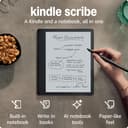


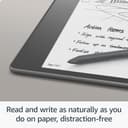

🖋️ Kindle Scribe: Where your ideas meet the page, digitally redefined.
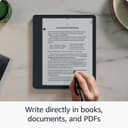
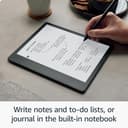
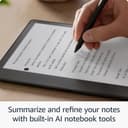
The Amazon Kindle Scribe (16 GB) is a cutting-edge 10.2" Paperwhite e-reader combined with a digital notebook, featuring a glare-free 300 ppi display and a Basic Pen with replaceable tips. It supports direct writing on books, documents, and PDFs with AI-powered note summarization tools. Designed for professionals, it offers up to 12 weeks of reading and 3 weeks of writing battery life on a single charge, making it the ultimate device for seamless reading, note-taking, and document markup.
| Display | Amazon's 10.2” Paperwhite display technology with built-in light, 300 ppi, optimized font technology, 16-level gray scale. |
| Size | Device: 7.7” x 9.0 x .22 (196 x 230 x 5.8mm excluding feet) Basic Pen: 6.4” x .35” x .33” (162 x 8.8 x 8.4 mm) |
| On-Device Storage | 16 GB, 32 GB, or 64 GB |
| Weight | Device: 15.3oz (433g device only). Basic Pen: .49oz (14g). Actual size and weight may vary by configuration and manufacturing process. |
| Wi-Fi Connectivity | Supports 2.4 GHz and 5.0 GHz networks with support for WEP, WPA, WPA2 and WPA3 security using password authentication or Wi-Fi Protected Setup (WPS). Does not support connecting to ad-hoc (or peer-to-peer) Wi-Fi networks. |
| Content Formats Supported | Kindle Format 8 (AZW3), Kindle (AZW), TXT, PDF, unprotected MOBI, PRC natively; PDF, DOCX, DOC, HTML, EPUB, TXT, RTF, JPEG, GIF, PNG, BMP through conversion; Audible audio format (AAX). Learn more about supported file types for personal documents. |
| Accessibility Features | VoiceView screen reader, available over Bluetooth audio, provides spoken feedback allowing you to navigate your device and read books with text-to-speech (available in English only). Kindle Scribe also includes the ability to invert black and white, adjust font size, font face, line spacing and margins. Learn more about Accessibility for Kindle. |
| Warranty and Service | 1-year limited warranty and service included. Optional 1-year, 2-year or 3-year Extended Warranty available for U.S customers sold separately. Use of Kindle is subject to Amazon's Conditions of Use and the terms found here. |
| Setup Technology | Amazon Wi-Fi simple setup automatically connects to your home Wi-Fi network. Learn more about Wi-Fi simple setup. |
| System Requirements | None; fully wireless and doesn't require a computer to download content. |
| Included in the Box | Includes wifi-enabled Kindle Scribe, Basic or Premium Pen, USB-C charging cable, 5 replacement tips, tip replacement tool, and built-in rechargeable battery. |
| Generation | Kindle Scribe 1st generation - 2022 release |
| Battery Life | For reading, a single charge lasts up to 12 weeks based on a half hour of reading per day, with wireless off and the light setting at 13. For writing, a single charge lasts up to 3 weeks based on a half hour period of writing per day, with wireless off and the light setting at 13. Battery life will vary and may be reduced based on usage and other factors such as Audible audiobook streaming and annotating content. |
| Charge Time | Fully charges in approximately 7 hours from a computer via USB-C cable; or fully charges in approximately 2.5 hours with a 9W USB-C power adapter. |
| Documentation | Learn more about Kindle devices with our Quick Start Guide and Kindle User Guide. |
| Available Color | Tungsten |
| Software Updates | Learn more about these software security updates. If you already own a Kindle, visit Manage Your Content and Devices for information specific to your device. |
L**E
Wonderful
I’ve had my scribe for a few weeks now and while I rarely write reviews, thought I would for this since I’ve had kindles since they came out. First, I’ve had kindles hd and the paperwhite and while I like the paperwhite better for my eyes, I’ve not found one I consistently used one, since the kindle DX (which only recently died), because the screens were so small. I have trouble with my eyes and need to enlarge the print, so the small kindles really don’t work as well for me. That said, I still have a kindle hd with my scribe. I haven’t tried the website on the scribe — I don’t see it — and I like to be able to look things up based on what I read as I’m reading so that is an advantage to the hd. I’ll have to see about the web browser on the scribe when I find it (I missed the return date on the hd too, so that’s why I have it. I love the larger size of the scribe. This and the pencil are what really sold me. I feel like I have my dx back (off only it had cellular!!!), my favorite kindle ever. It allows me to enlarge the font based on how my eyes feel, which is great when I pass the 3 hour mark. I also love the ability to change the screen from grey to a warmer color. I am one who prefers warmer colors to cool colors, so that’sa nice thing they added. What I most like is the ability to take handwritten notes and to have the notes you’ve taken across books collected together into one notebook. I need to play with this more, but I’ma writer, so this feature is amazing for me for many reason. I start with a vague idea that different books not necessarily having anything to do with each other May actually be put together to form a premise, so to have mother from those books smushed together is incredibly helpful. That’s basically how I would organize my hard paper research. I don’t know if this is possible but if not, this would be a great update, and that is to create collections of notes in different notebooks, to create a collection of books and then have a notebook within that collection with all the notes for the books in that collection. That would be pretty easy to code. Finally the pencil. I love it. I love it so much better for writing than my Apple Pencil. I feel like I’m writing on paper. It’s beautiful. I like the Apple Pencil for things like procreate and my scribe for taking notes. I’m left handed and I usually don’t have problems. Every now and then my palm will change it from a handwritten note to a text note, but it’s not a big deal. I use the pencil to tap on handwritten note and it puts me back. As a lefty you get used to dealing with these things. I’ve had worse problems trying to write in apps. I also tried the oasis. It was nice. It also worked with my eyes. The buttons for the pages was a nice added touch. It is small, but it makes great use of the real estate available on the page. I was a little frustrated because I twice ordered the cellular version and both times received the Wi-Fi version, so I gave up on the oasis and bought the scribe, which I hadn’t bought because it was Wi-Fi. I’m so glad I did. Aliso, I’m case you don’t know, you can change your kindle address to something simple like [email protected], so it’s easy to tell someone where to send documents or books to you (and easier to send things to yourself). If all you want to do is read books, the oasis is fabulous. If you like having things in color and want the ease of a quick Internet to research concepts you read about, the hd is great. If you like to research and like the idea of having your notes from different books collected in one notebook, or would appreciate a larger screen, or would enjoy a writing experience, the scribe is great. There’sa kindle out there to meet just about everyone’s needs. (I’m posting without proofing, so please forgive typos.)
E**D
Childhood dream come true!
There is only one con: it's not waterproof. It's 2025, why isn't waterproof technology the industry standard?? Anywho. This is hands down the single best purchase I have ever made. I've been dreaming of this ever since 1999 when I won a Game Boy off a Mountain Dew bottle top at a Thunder Skate USA facility. It came with a game called Wave Rider. It was because of that infuriating game that I realized my true nature- I'm a nerdy book worm to the core. Why couldn't this game be a book? The Kindle Scribe is a childhood dream come true! My favorite feature of this device is the notebooks. I have journaled since I was 8 years old. I'm now 35. Do you have any idea how difficult it is to keep nosy noses from rifling through your most private paper thoughts? I do. I had taken to burning my journals after filling them up. No need to literally hang on to my mind garbage. I have always had too many thoughts taking up space in my head, creating the need to jot them down and make them go away. Now, with the Scribe, I can click a button and the brain baggage is instantly destroyed. No more wasting paper (the poor trees!) No more searching (and stealing!) perfect pen to write with. The Scribe comes with the perfect pen! A forever pen! I got the basic pen. A basic pen for a basic... you know. The fountain pen feature is revolutionary! I've been "perfecting" my penmanship for decades and still write little better than a chicken's left foot. Woe is me and any who have to read my scratch. No more! The best part is that the ink never runs out, it always writes perfectly smooth. I also love how big this Kindle is. I'm blind as a butt in blue jeans, so this size is a huge plus for me. With my OG Kindle, setting the font to large yielded only a few sentences per page making me feel like I was back in pre school learning to read. No more! Other bonuses- I had signed up for a free month of Kindle Unlimited before ordering the Scribe. When I did order, it came with THREE months of free KU! A total of FOUR FREE MONTHS! But it got better. I ordered an OG Kindle for my mom (who is not as blind as a butt in blue jeans) and it came with another THREE MONTHS OF FREE KU! A grand total SEVEN MONTHS OF FREE KU! I was over the moon! I had also found it on sale (January of 2024) for $270. I put an $80 dollar gift card toward it and it brought my total down to $204! Woohoo! I ordered a fancy flippy pink adjustable magnetic cover for it separately. I am in love with this device. Never have issues with battery life or charging. I will say this though; I think the Scribe was marketed to the wrong demographic. I abhor writing on books, highlighting, dog-earing, and otherwise desecrating books, so I don't give a hoot in a hay storm about the sticky notes debacle other reviewers take issue with. I use this for pure entertainment purposes; sometimes I switch from reading to simply scribbling my brains out for the fun of it. Seriously. I have no idea if this is a good buy for work related tasks and I don't care. It's perfect for keeping track of what the one year old is eating, doodle notebooks for the nine year old, and reading and scribbling until there's drool pooling and crusting at the corners of my mouth for me. Like I said, it's a childhood dream come true! The only way I'd come off my Scribe is if they made a new one that is waterproof. Which reminds me- I got the software update of the new one! Thanks amazon! Seriously, best 200 bucks I've ever spent. A year of daily use and zero complaints (except the waterproof issue- grr *shakes fist*.) I can't recommend this enough. This is THE Cadillac of reading/ writing toys for adults!
S**S
Love it so far! UPDATED AFTER 2 YEARS
I bought this for several reasons; - Easily organize notes on different clients for work - Be able to write creatively and have the ability to save it digitally - Replace my unsupported very old paperwhite kindle I work with many clients in my job. I like being able to take quick notes on paper during meetings. I tried a variety of ways of organizing physical paper notebooks and pages between clients and nothing was efficient. I was always defaulting to writing on consecutive pages in one big notebook for different clients and then having to flip back through to find the spread-out information for a single client. I tried physical folders and notebooks with removeable sheets of paper. I tried multiple different paper notebooks for clients. None of this was efficient and certainly unreasonable to travel with. So I started to research digital notebooks. I almost pulled the trigger on the reMarkable 2 on two separate occasions. I got all the way through the selection process and couldn't get myself to pay the $500 plus for such a limited device. Other digital notepads had a crazy cheaper price point but were not at all comparable according to online reviews. I happened to finally come across this Kindle Scribe and after watching YouTube comparisons between this and the reMarkable notebooks, I felt the pros of this one won me over. Especially when they mentioned that the ink lags less with this one versus reMarkables. Forty minutes into my experience, I am already super happy with my decision and I know this is going to solve my multi-client note taking issues for work. Out of the box this device is super intuitive to set up and use. I looked at zero instructions before setting up and using it. (I had seen review videos but nothing too instructional.) If you follow the set up steps (your only option), it leads you to the typical overview of a device where it highlights your various settings and options. I have had kindles before, but even the new stuff on here was very intuitive and easy to navigate. The pen is quick enough (not laggy) that I do not mind writing digitally at all. IF I were using this for artistic purposes, I'd have a small issue with it. But I don't really notice the lag once I'm writing quickly and focused on work. My handwriting looks ever so slightly worse on here than in person but overall, considering I dislike lag, this device doesn't seem to lag problematically at all - it's negligible. I can tell I'm not writing on paper, but the feel isn't slippery at all. It's pleasing. I'm sure this is in part due to the pen too, which is the pen that has the eraser (more expensive of two options). The screen looks just like an old paperwhite kindle, but you can adjust the brightness and also the warmth of the screen. I love this option. I'm sure I'll be adjusting it in different lighting. It's easy to navigate from your kindle library to your notebooks for writing/drawing. You can create a folder to organize your notebooks. I have a work folder, inside of which I have a separate lined w/margin notebook for each client, plus a check box notebook for my work to-do's. Outside of the work folder, I have a personal To-Do list. I love the ability to organize work and personal notes and carry it all in one device that is smaller than the old lined notebook I was carrying. In terms of the ink styles and highlighting, there are options of thickness for ink ranging from thinner than my mechanical pencil to roughly the thickness of a regular (not fine tip) Sharpie. When you click the button on the pen, it turns into a highlighter. I didn't think I'd necessarily need an eraser because I almost never need one when writing with a pen or pencil, but on this device I've used it a lot. It's easier to erase with a digital eraser than a physical one, so I'm less apt to strike through something, and more likely to erase it (something my past writing teachers would hate). Also, because my handwriting is slightly impacted by the digital aspect, it's nice to have an eraser for cleaning up truly sloppy letters. So, it's worth it to me to have spent $15 more for the higher end stylus with the eraser. I made a few more hand-written notes on my device (see photo). As I employ this for work and fun, I'll come back to post any pertinent updates. I'm particularly interested to see the capabilities for transferring the notes off of this device and into my work google drive. After 1 solid week of use, I am comfortable with this device and absolutely love it. I ended up adding two grips to the pen to make it comfortable to write. It won't adhere magnetically to the side now, but I purchased a case that has a pen holder. Today I discovered that you can add blank pages to notebooks and reorder the pages. This is fantastic as I recently decided to add a cover page to each of my notebooks to track the top level details of each client. I so highly recommend switching to a digital notepad if you're a pen and paper note taker. It's much more versatile than trying to switch to typed note taking. Update after 2 years of use (May 2025): I am so glad I purchased this. I have used it daily for work for two years. It is easy to silo work folders and notebooks from my personal folders and notebooks. I use it while traveling because I can access all of my kindle books for personal use and I have all of my client notes for work with me. It works great, no different than when it was brand new. A charge lasts weeks! I added pen grips to the stylus for comfort. Overall, highly recommend. Side note - if you like to sketch and do creative writing, this is great because you have endless paper while traveling. If I'm in a meeting, sometimes I concentrate better if I can doodle on a page. I make doodles/marks while making my important notes and then I can easily erase the doodles later. If I randomly think of something I want to build in my yard during a meeting, I can flip one page, sketch my design, and flip back. Then later I can cut and paste or move that entire page to another notebook. Fabulous for A.D.D.
E**5
A great device - for specific users...
This is probably the most in-depth review I've made for an Amazon order. First, I absolutely love my Scribe. I was torn between this and the Remarkable 2 but decided to go with this because I'm also an avid reader with lots of Kindle books already...so that only made sense. So, as i mentioned in the title, this is a great little device for specific users. If you do a lot of drawing/sketching or graphic arts stuff, the Scribe (with the latest update) may disappoint. For heavy artistic stuff, I'd look more towards an iPad, MS Surface, etc. However, if you read a lot and need something that provides a medium to take plenty of notes, the Scribe is excellent. I take TONS of notes for work. To the point that I keep my old spiral-bound notebooks in a drawer in my office with dates of when I started and finished them. This method became unsustainable with lost notebooks during moves, pages torn out by kids cause they needed some "scratch paper", etc. I've only had this thing for about 2 weeks but I've already put it through the wringer for note taking. Books are excellent as you would expect from a Kindle and I've found the battery life is pretty decent, although not quite as good as, say, my Paperwhite. However, if there are any people @Amazon reading this, there are some improvements I really wish it had; and hope/think they could be added with future updates: - Bluetooth keyboard support - Landscape mode in notebooks - Lasso copy and paste - Ability to change the template for individual pages within a notebook - Shapes (like squares, circles, etc.) - Select and copy images/text from PDFs or books into notebooks - Make highlights and written notes in books - I bought the book...I should be able to write in it if I want. - OCR handwriting to text conversion - especially when sending notes via email - Save PDFs to folders instead of having to store them in your library - Ability to move the writing tool other than the default left and right side. I'd rather it be in a far upper right or lower left corner. As it is, I have to alternate the tool position from left to right once I'm about 1/3 down the page. - Save individual pages of notebooks as a new notebook (for example, I start taking notes in a notebook and on the 5th page, I start taking notes from a phone conference that turns into something completely unrelated to the rest of the notebook. It would be great if I could start a new notebook and choose existing pages of other notebooks to include in it.) A couple of bugs/weird things that I've noticed: - Sometimes, while writing a sentence, the last couple of letters will "erase" or just disappear. I've figured out that tapping the eraser once on the screen makes it reappear again. Not a huge deal, but is annoying cause it forces you to break concentration to correct it and restart. - Depending on where you place your hand when writing, you'll accidentally skip to a new page while writing. As above, not a big deal, but annoying. Maybe some setting to double-tap to start a new page or something would help. Anyway, overall, I think the Scribe is great for my needs and really look forward to what they can do with future software updates.
B**C
Very pleasantly surprised!
I've been searching for an e-ink tablet for a while. I tried the Remarkable, Boox, and now Scribe. After reading comparisons of the Scribe and Remarkable, I thought I would be disappointed in the Scribe since many reviewers preferred the Remarkable. I wasn't! I sent the Remarkable back for reasons I'll detail below. I never really got to try the Boox; it didn't come with the app, and I always got an error message when I tried to download it, so that went back as well. Also, the meager instructions for it are truly awful. The Scribe has been a pleasant surprise -- I've found it to be much more responsive and user-friendly than the Remarkable. Please note: I'm only using the Scribe for the notebook function; I haven't used it yet as a Kindle. My needs are pretty simple. I wanted an e-ink tablet to deal with all the clutter on my desk. I have to take a lot of notes, especially from phone conversations and Zoom meetings, and I end up with lots of notes scattered around. Yellow pads didn't work, and putting them in file folders to be stored in a file cabinet ensured they would be lost! An e-notebook was my solution, and it's worked really well. One of my issues from the start with the Remarkable was a problem with battery charging. I reported it to customer service and they wrote back with a list of things to do. None of them fixed the problem, so they sent me a link to sent it back for repair. I filled out the required information, and a few days later, got a message from their tech. dept. saying that "my request" had been denied! They sent me a list of more things to try, including one that involved buying a new cable. I wasn't about to pay more for this already expensive device. I clicked on the link they sent to respond, and it turned out to be a page for starting the process with customer service all over again! At that point, I threw up my hands and decided to return it. Some differences I've noted: On my Remarkable, swiping often didn't work the first time, even though I swiped exactly where customer service told me to. Moving from page to page could be laborious. The Scribe is lightning fast. In general, the Remarkable functions seemed clunkier and slower. I find the writing "feel" to be the same, though again, the Scribe seems more responsive in general. Maybe my Remarkable was a lemon, but dealing with customer service was so frustrating that I didn't want to pursue it. I liked the screen size on the Remarkable better. It's a little bigger, and I wish the Scribe were the same. The Scribe doesn't charge for a subscription. It bothered me that after a year with Remarkable, I'd have to start paying a monthly fee. The on/off button on the Scribe seems to be in a weird place, but I can live with that. By the way, Remarkable is located in Norway, so it takes a couple of days to get a response from customer service. Also, when you buy it, they don't tell you they are in Norway -- if you pay with a bankcard, you can get charged for a foreign transaction fee (in my case $16.00 which my bank waived when I complained). As I said, my needs are pretty simple, and the Scribe has been perfect for giving me a clutter-free desk!
K**R
Early Adopter? Gen 1 not ready, cumbersome to use, unintuitive, and not worth it.
I love my other Kindles (Signature Paperwhite and Oasis). And I REALLY wanted and tried hard to love this one and find a way to incorporate it into my day to day because, like many, the idea to combine my books, my audible, and the myriad notebooks I carry around (and lose) in a single tablet is a trifecta experience. But Generation 1 is definitely not worth it. I was able to get it substantially cheaper thanks to a holiday sale and a trade in, and if it's not worth it at almost 50% off, it's definitely not worth it at full price. Here's why. Using it as a paper notebook replacement is cumbersome, unintuitive, and time consuming. If you imagine how many people work - a textbook, laptop, or other resource on one side and a notebook for taking notes on the other, that's a process familiar to most and flows well. My thinking was that "Finally, I can keep all my notes well organized, add more details to my highlights, etc." We'll, you can't. This Kindle works the same as every kindle or fire tablet when taking notes - you highlight, add the note, with the only difference here being that you can do so with a Stylus. The real problem is that this space is limited to what you see in the picture. Even on the other kindle platforms you can type forever, or use voice, to make long notes. Here, you can't - you're limited to that tiny tiny space and can't expand it. Basically, this equates to replacing your paper notebook with tiny post it notes. It's completely impractical to say the least. You also can't change the background of this area like you can in the "notebook" support, which means no dotted or lines, etc. You're literally cramming everything onto the digital version of a Post-it-Note. So then I thought, "Ok, I'll setup a notebook and just switch between the book and the notebook, and at least the notebook will let me write as much as I want / as many pages / page background theme, etc. But no, there is no way to seamlessly switch between the book you're referencing and this kindle's notebook feature. You have to close the book, start up a notebook, find the page where the note should go, close it, start the book back up again, and keep going. If you made a manual reference in your notebook as to where in the book this is relevant, this reference becomes completely useless the minute you change your font size or orientation. As a Japanese language student, I was particularly excited about being able to practice kanji as I can't imagine acres of trees that have died just so I can practice writing characters. And, I was particularly excited that I could do so on the page of the Japanese textbook I was referencing. But alas, no again. For some reason this kindle would not work well with my eTextbooks. Some would not open, some I characters wouldn't show up. Performance wise, this tablet is abysmal. When under small to moderate load, the time it takes for pen strokes to register can be counted in full seconds. Switching screens, opening books, etc, are noticeably slower compared to other kindle versions. For students especially who need to take more notes that will fill a sticky note, and for language students especially too, this tablet completely misses the mark. The software, in general, is lacking considerably with relatively few options compared to competing eInk tablets. Amazon says so itself in the project description with comments like "Regular software updates." I want this tablet to work so all my Amazon subscriptions, books, etc, and all my notes / notebooks can accompany me, so I'll Try Gen 2 when it comes out. Honestly, this version feels like a pre-release alpha version or prototype a small group would use to give feedback on. It was released way too early and in no way is it ready for the wild. To overcome the shortcomings, I sent it back, and I use my oasis with my Remarkable 2, which feels much more natural, with my Oasis. Well, at least I'm down to two high quality products in the meantime, but looking forward to seeing if Amazon can revamp this to make it an equally usable environment. Aside from the tablet itself, I must say, the "Premium Leather Cover" that comes with the bundle is just junk. I wouldn't pay 71 cents for it much less 71 dollars. Imagine the thickness of a normal piece of leather. Amazon shaved that into 100 layers and pasted it on cardboard, and the other side is felt (so not an all leather case). It really is disappointing what a low quality item they tried to throw into making their "bundle." I'll be buying a 3rd party cover for it if I checkout later generations.
H**G
the best writing tool
First impressions review: I hesitated to get one of these when they first came out, because I couldn't see a use for it. But recently this year I took up a spiritual tradition (Buddhism) that requires a fair amount of study. As I was slogging through another text that was one abstract philosophical concept after another, I thought to myself, "You know, maybe I would get more out of this if I could take notes." Then my teacher recommended some ancient texts to read. He said they were meant to be read and digested slowly. Another case for being able to take notes. So, given my long love affair with Kindle, I suddenly had an excuse to try the Scribe. It's expensive, but I scraped together the money from my discretionary savings and purchased the refurbished version which is good as new. Wow wow wow I love it. First, that boring text I was reading? Infinitely more interesting and engaging for me to take notes as I go. When I have longer notes, I have a notebook I created that is dedicated exclusively to that book. The pen is really fluid and captures the exact idiosyncrasies of my handwriting. It really feels like writing on paper, which is such a therapeutic feeling for me. Already I feel like I'm getting more out of my reading and applying it to my own life. And I love that I can review my highlights and sticky notes in summary at any time. This has been transformative to my spiritual life. So if you like to study religious or spiritual texts I can't recommend it more highly. I also read a lot of non-fiction in general, from self-help to popular science, and I can imagine I'm going to get so much more out of my reading now that I can engage more deeply with the text. This is in contrast to how I would just rapidly consume these books in the past without really absorbing their lessons. So I got what I was hoping for out of this tool, but what I didn't expect was to be able to use it in so many other ways. Since I got the thing (only two days ago!) I have created several more notebooks, including a folder for all my Buddhist studies (including a notebook where I just write down questions I want to ask my teachers.) I created a freewrite journal to write my daily gratitude and set my intentions for the day or reflect at night. I created a work folder for me to jot down general notes during work. And I created a fiction folder for me to work on developing my novel in progress. The charm of this little machine is that you can organize all your notes about everything in one place. Until now, I have all the time been scribbling things down on random pieces of paper or in one of twenty different notebooks. With my ADHD I am all but guaranteed to lose important thoughts because I can't remember where I put them. But now - I only have one place to look! Nothing will get missed. I put it to the test yesterday because my Teams wasn't working at work, and I ended up having to take notes shorthand during a meeting. And those notes were waiting right there for me at the end of the day to review and create tasks. Finally, like the Oasis and the Paperwhite Signature, the Scribe has a dark mode, and it is a lot of fun to write with glowy handwriting in bed. I really enjoy recapping my day in the dark before drifting off to sleep. It almost makes me feel like a kid again, scribbling in my journal before bed. Only no flashlight needed. Now, constructive feedback: 1. Because this is a Kindle, the UI is not great. Some features are not intuitive to use. It took me forever to figure out how to change the pen width, another forever to figure out you can add a page to a notebook just by swiping right. For the person that said you can't change page templates within the same notebook, you can - you have to go to the page overview grid thing and you can add pages of any template. Had to figure that out too. 2. I don't love that notebooks are interspersed with books in My Library. There should be two separate categories IMO but then they couldn't advertise I guess. 3. If you are going to use a lot of sticky notes I suggest getting the premium pen, hiding the toolbar and setting the shortcut to sticky note. Now you don't have to look at the toolbar while you read. 4. I really wish there was a way to attach a notebook to a book, creating a shortcut for access, for longer notes that don't fit inside a sticky note. Either that or have infinite space in a sticky note. 5. I bought the 64GB and it appears they sent me the 30GB but I have already written too much to send it back without losing all my notes. Hopefully I will not run out of space! 6. I really don't know how this would work as a primary work tool. With my work, which is very detail oriented, I really can't write all my notes by hand. Typing is much more comprehensive. But the Scribe is great in a pinch where you need to write something short, like a reminder or phone number, or you have no other option. So I am using it at work for anything where I would normally use a pad of paper, but not when I would use a computer keyboard. Update: This little device has turned into one of my most treasured writing tools. As a fiction writer I really didn't imagine how much it would break open my creativity. It took me back to my childhood days when all I had was a pad of paper and a pen to write down my stories. Now I find myself coming back to the Scribe over and over when I need to work out a plot problem, or sometimes when I just don't feel like staring at a computer screen. I've composed many rough drafts of scenes, I've worked through themes, I've written outline sketches, it's just my catchall tool for figuring my books out. And for some reason it has massively accelerated the pace of my writing, particularly how quickly I am able to problem-solve when I get stuck. Something about the tactile freewrite experience really opens up my creativity in a way that staring at a blank computer screen does not. If you are a writer like me, I urge you to consider it!
L**Y
Hardware - OK to pretty decent. Software for writing and note taking - SUCKS
Why is it that by now we don't have a decent replacement for paper? Don't believe what you hear about either the Scribe or the Remarkable 2. Both of them suck compared to plain old paper and pen. It's not even really the stylus input - that part works fairly well. It's the rest of the note-taking and drawing software - almost unusable. I planned on using the scribe as a full replacement for books - both in normal reading and in studying. I've been interested in both higher end math and microbiology, and have found some free PDF books that are available online and are really some of the best for learning these subjects. My plan was to download the PDF versions of these documents to the scribe, then work through them, highlighting and taking notes directly on the PDF's as I go. This is a capability the scribe supposedly has. But, the usability of it sucks. First of all, I didn't find out until after I purchased the scribe that it is limited to PDF document sized of under 80MB! Now why would they limit a PDF document to only 80MB when the device itself has 32GB of storage? But, it gives an error and will not let you transfer documents that are larger (even by a slight amount). So then I tried editing a smaller PDF document on it. Very clunky. I can't just draw on top of the PDF. I have to touch somewhere in the PDF, then a window comes up where I draw what I want in the window. Then when I close the window it appears in the document as a small paper looking icon that must be clicked on to see the drawing. How can I truly take notes and highlight items in these documents with this? Basically - SUCKS! So far, the best tablet I have used for this type of studying and note taking on PDF's are the Samsung tablets with their stylus (such as the S6 lite with S Pen - just slightly more than $200. on Amazon). This tablet's built in note taking app can read and write PDF's (very large PDFs as well). And, once loaded, the interface to take notes over top of the PDF is very smooth and well polished. After opening a PDF document, just simply click on either the pen icon or highlighter icon. Then start drawing on the PDF document. There's no window that pops up - the notes just appear in the document as you would expect. Click the highlighter and then click in the document and swipe across to highlight. Simple. And, if you click again on either the pen icon or the highlighter icon a small window pops up with tons of details that you can easily change (from color of pen to pen size to pen type to pressure sensitivity - similar options with the highlighter). When done, just click save and the PDF document is saved with all of your notes, drawings, and highlights intact and viewable. I also tested opening the PDF document with normal PDF reader application and all of the notes, drawings, and highlights showed up perfectly in that as well. Simple and effective. The only negative aspect of using that tablet for this purpose is the weight. While the tablet is very well made and feels sturdy it weighs quite a bit more than a scribe or remarkable - maybe a bit too heavy for normal book or PDF reading. As a possible compromise I would recommend getting the Samsung tablet for studying and taking notes, and maybe also purchasing a cheaper Kindle paperwhite for just normal book reading. Beware though that the Kindle Scribe is a very clunky device for PDF editing and note taking - I would recommend staying away from it (until maybe some time has went by and Amazon spends the effort to make the interface work as it should).
Trustpilot
1 week ago
2 weeks ago