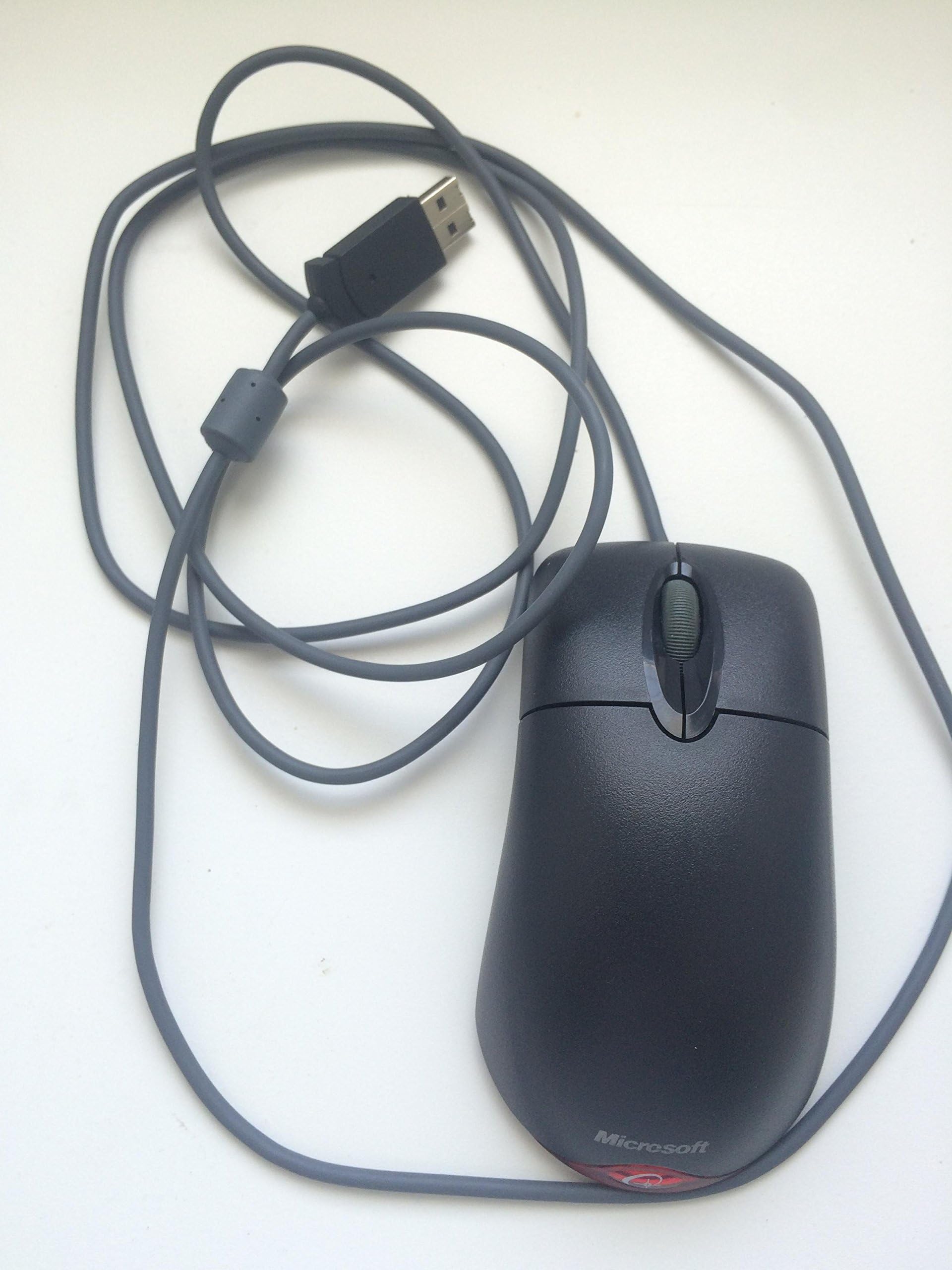

Microsoft Wheel Optical Mouse, Black
Product ID: 4727571
Details
- BrandMicrosoft
- ColorBlack
- Connectivity TechnologyUSB
- Movement Detection TechnologyOptical
- Special FeatureOptical
🔄Smooth scroll wheel
↔️Ambidextrous design
🖱️6000 DPI precision
🖱️ Upgrade your desk game with precision and comfort that never quits!
The Microsoft Wheel Optical Mouse (Model D66-00069) features IntelliEye optical technology with 6000 DPI sensitivity for precise tracking, a smooth scroll wheel for easy navigation, and an ambidextrous design for all-day comfort. Wired USB/PS2 connectivity ensures reliable, lag-free performance without batteries. Customizable buttons enhance productivity, backed by a 3-year manufacturer warranty.
| Additional Features | Optical |
| Antenna Location | Gaming, Office |
| Are Batteries Included | No |
| Are Batteries Required | No |
| Asin | B00025O7FC |
| Best Sellers Rank | #3,333 in Computer Mice |
| Brand | Microsoft |
| Built In Media | customization software |
| Button Quantity | 3 |
| Color | Black |
| Compatible Devices | Laptop, Personal Computer |
| Connectivity Technology | USB |
| Customer Reviews | 4.4 4.4 out of 5 stars (461) 4.4 out of 5 stars |
| Enclosure Material | Plastic |
| Eu Spare Part Availability Duration | 3 Years |
| Global Trade Identification Number | 00805529815988 |
| Hand Orientation | Ambidextrous |
| Hardware Platform | Ordenador, Tablet |
| Item Weight | 0.89 Pounds |
| Manufacturer | Microsoft |
| Mfr Part Number | D66-00069 |
| Minimum Required Operating System Version | Windows XP |
| Model Name | Wheel Mouse Optical |
| Model Number | D66-00069 |
| Mouse Maximum Sensitivity | 6000 Dots per Inch |
| Movement Detection | Optical |
| Operating System | Mac OS X v10.1x–10.4x, Windows Vista/XP/Pro/Home/Media Center Edition/Tablet PC Edition/Windows 2000 SP4 + |
| Power Source | Corded Electric |
| Range | 5.0 feet |
| Style Name | Modern |
| Unit Count | 1.0 Count |
| Upc | 805529815988 805529198388 |
User
It's perfect!
I had this exact mouse that was purchased in 2003 and it worked perfectly until the Spring of 2013, which is understandable since it was used in an auto repair shop. Dust, grease, hot summers and cold winters are not a good environment for electronics. The original mouse ended up causing a hardware conflict and the PC would freeze up. The two spare mice I put in its place worked just fine. So I just needed a replacement of the same kind.What's great about this mouse is the hand size and that it's wired. Mechanics can easily grab onto it and maneuver it with ease. A wired mouse eliminates the frustration of a dead battery in a business climate where the person needs it to work now and not be fiddling around looking for a battery.I figured this mouse would no longer be available, but lo and behold I found it here on Amazon, and there were lots of positive reviews on it. The cost was very reasonable so I purchased it, received it on time and plugged it in. Works great! Plus the new one doesn't have mechanics grease all over it - yet. This mouse is quite durable, so I foresee no problems for years, if ever.
User
Well-made, lightweight, great shape
I spent a great deal of time reading reviews of all the available optical "mice". I was prepared to spend whatever was necessary to get just the right mouse, too... so this Microsoft Optical Wheel Mouse wasn't chosen because it's low-priced. I chose it because it had a high percentage of positive reviews both on Amazon and on other sites. I'm not a big gamer per se (I leave that to my son), but I do play a bit online so I didn't want to buy the slowest mouse on the market. I also didn't want a notebook size mini mouse... but I am a woman and so I didn't want a mouse that fits well in Paul Bunyan's hand but not in mine. I really like the lightweight aspect of this mouse and the size is just right. It has a graceful curve to its shape that makes it a bit more streamlined (and therefore fits my hand better) than the beer belly mouse I'm replacing. And after much consideration, I opted for this standard 3-button mouse rather than a 5-button. I wanted the possibility of those added buttons... but I know me... and those extra 2 buttons are right where I rest my thumb on the mouse. I have no doubt I'd be accidentally clicking buttons with my thumb constantly. So I decided less was more and chose the 3-button. That gives me a left-click, right-click and a wheel that serves as a button, too. With that wheel button, I programmed it for the one extra web-surfing button I've always wanted: a back button. So I'm a happy camper. This mouse has great control, flies across the screen with enough speed that I can play my games, is a comfortable fit for a woman, lightweight, and nicely constructed. An excellent mouse for $20.
User
This MS Optical Mouse Matches the Picture ... and Performs Exactly Like the Old Versions
You know this mouse ... leastwise I suspect you do if you landed on the page of the mouse I bought (here's a link, Microsoft Wheel Mouse Optical).Just to assure you, the mouse linked immediately above is the real deal.(Just a sidebar: This is not always the case. Some vendors falsely provide a picture of the MS classic mouse (here's an example, Microsoft Basic Optical Mouse - Mouse - optical - wired - PS/2, USB), when they're really selling the flimsy new version. Hhhmmm ... Still haven't fixed the picture as of 10 Dec 2014 ...)Is this classic mouse now more expensive than years ago? Yes. Beyond a doubt. But the ones I received appear to be brand new. And unless you've got a time machine, this is likely the only source for other than used versions of the classic MS optical mouse.If you like/need the tracking, clickability, and "heft" of what I believe was the original MS optical mouse (marked "P/N X05-87477" on the grey-colored baseplate) or the follow-on version (marked "P/N X08-71118" on the translucent baseplate) ... this mouse will fill the bill. Exactly.The mouses (or mice <g>, I ordered several) appear to be brand new. There is no evidence that the mouses were already used ... meaning the buttons, the Microsoft marking on the palmar surface, and the bearing-pads on the baseplate appear virginal. The mouses I received appear to have been originally packaged for PC system-builder usage, as they're packaged solely in a small plastic bag -- bearing the bar-code/number "B00006B7HB" -- that also contains the USB adapter. The translucent baseplate of these mouses is marked "P/N X802382" and compares favorably with the attributes of the (above mentioned) mouses purchased some years ago at retail. The MS hologram decal on the baseplate appears to be authentic, although the upper-right quadrant of the decal is slightly raised.The price is not so good, especially when compared to the years-ago retail price (and the prices of used models available here and on e-Bay). For this reason, I suspect this mouse will likely only be a candidate for purchase by long-time classic MS optical mouse users. But this mouse lives up to the promises (e.g., of the picture). It handles exactly like my other MS optical mouses from the old days. And if the new mouse is as durable as the old versions were, it'll last for years.If you've not been able to find a mouse with the "heft" and tracking speed/resolution to comfortably replace your older MS optical mouse that has become flaky, then spend the money. It'll be worth it!If you've never used the original MS optical mouse or its old successor (not the bean-counter-inspired, cheap, new version without discrete buttons), do yourself a favor and find another brand/model to get used to. Once these mice are sold out, there will likely only be used ones (of dubious quality) to buy.
User
Great Mouse! Just do it, if the price doesn't keep going up!
Ok, I have mixed feelings about this mouse. It is a GREAT mouse, don't get me wrong. It is cheaper than other mice (?mouses?), which I have not tried, and a very good value, however each time I visit this page, the price creeps up a little higher. It installed easily and as soon as I saw how well it actually works, I couldn't stash my ball mouse away fast enough! I love the fact that it works so well and doesn't require cleaning like the ole ball mouse did. You don't need a mousepad. It reads well on every surface I have tried. I use a book wrapped in a bandana for a mouse pad and it still works perfectly. The only complaint that I have about this mouse is the same as I have about all of them. It is same unnatural shape as all the others. I guess there was some kind of study done on tiny handed people as to what the proper shape for a mouse should be, but if you have big hands and long fingers like me, they all put that pressure on your wrist and clicker fingers that aggrivates CTS. It's about time for somebody to try a different shape. I do love the scrolling button a lot. Like me, you might find it hard to break the habit of going to the scrollbar. Ok. So the only reason I had mixed feelings about this mouse was the price fluxuations. I never saw an item that was not made for collectors keep going up in value as it got older. I might be tempted to try a different mouse, IF something happened to this one (Ball Mouse revenge or something) but if somebody made a truly ergonomic mouse, I would drop it like a hot potato. As long as it is an optical mouse design. I will never buy a ball mouse again. I LOVE OPTICAL MEECES TO PIECES!
User
lasts for years, and years, and years...
I got my first computer when I was about 11 years old. This is the mouse that was given to me with the computer. I don't remember if it was brand new or if it had been used before. I would play all kinds of stupid, click-intensive games. Now, about 7 years later, the mouse has only just started to give me problems. What kind of problems? I'll click something, and it thinks I double-clicked. That's all. But it gets really annoying in some programs. So I what did I do? I went to amazon.com and ordered the exact same mouse. Because I think 7+ years is pretty good for a piece of computer hardware that's used as often as a mouse. And if you flick the scrolly wheel, it scrolls really fast :)I got my new mouse in the mail today and, after plugging it into my computer, I have noticed very few differences between the new and old mouse:1. The new mouse knows the difference between clicking and double-clicking.2. The buttons and scrolly wheel on the new mouse feel a little more stiff.But the way the mouse moves, the speed and accuracy are the same on both mice. I should probably also mention that the speed and accuracy are very good on this mouse.I would also like to mention a few random things you might want to know:1. The mouse is white, so it does get dirty. But I've found that it comes clean easily with just a damp paper towel.2. The cord is kind of short. I don't know the exact length, but my desk is built so the computer goes on the left, and the cord doesn't go far enough to bring the mouse to the right side of the keyboard. To fix this, I just use a USB extension cord, which has actually proved to be convenient, because for whatever reasons, the mouse is the one piece of hardware that I unplug the most often, and now I don't have to pull my whole computer out of my desk, which is difficult because of other short cords, just to unplug the mouse.This is a very good mouse. You know I think so, otherwise I wouldn't have bought it again :)I would recommend it to anybody.
User
The last good mouse, now discontinued. A tragedy
Such a shame this mouse isn't made anymore and only wish I bought in bulk while I still had the chance. No other mouse is the same as this one, the only thing this mouse lacks is the newer sensors of today (only for dpi) which is easily countered with a wide mouse pad (none of that normal square small garbage mouse pads) so you can flick your mouse at low sensitivities all day and own noobs EZ. After about 10 ten years of using this mouse the only two degradations that happen eventually, which are the only reasons I end up buying another and not trying to fix them since they were very cheap, are that the middle mouse button will get "used" and start "ghosting". Basically when you scroll the mouse wheel it will get "settled" in between two notches sometimes and eventually fall on one of them, making it scroll once in a direction without you doing it yourself shortly after scrolling. That only really messes with games that have weapon scrolling which is a noob mechanic anyway and should be unbound to begin with, use number keys like all high cognition people do, problem solved. (and if you want to be sure you can press down middle mouse button and it won't ghost, since you then settle it on a "notch") The other is if you ever rage by clicking the left mouse button too hard, then after about a year or less depending on frequency (and this likely will happen after years if you treat it good enough), the button will become less click-able. By click-able I mean it'll require more pressure to make a successful click, I'm still somewhat convinced it may just be dirt getting lodged in there, making a sort of squishy buffer that you have to compact every time, harder, before it hits the click pressure pad underneath, so I may be looking into opening it up and seeing if it's repairable, now that micro%#!$ stopped making this GEM of a mouse. The mouse buttons can sort of bend upwards so it may very well be repairable, how hard could it be to regenerate a pressure pad for a click, add some paper or rubber in there to reduce the depression distance maybe? It's very sobering, the ineptitude and brainwashing, when you see bad reviews for this mouse. They obviously are people of low intelligence and wouldn't know a good mouse even if it controlled well...... or smacked them in the face. Selecting text is based on the program being used, like Firefox for example, not the mouse, LOL.Razer mice? Price isn't a problem, for me at least, all of them are either "finger" controlled form (instead of palm resting form, which is actually a thing, wow...) or they also/only have those annoying side rails that serve to only get in the way of your side grip. (which doesn't exist for finger mice..) I try to scream logic to them hard and long enough through all available channels but they keep crapping out more defective mice with FORM over FUNCTION designs!!! Stop with the lights!! (those usually can be turned off with their drivers, I know this because I've returned over 3 or 4 Razer mice because they lacked hand/finger control that this mouse has, this mouse doesn't need drivers throw away the intelliwhatever disc that comes with it lol) I tried the ones like abyss but it has the stupid uncut mouse button (later) which only reduces dirt collection (fully negated because THERE'S SLITS ON THE SIDES OF THE MOUSE BUTTON LIKE TYPICAL BUTTONS HAVE) and may have been either too easy to click or too hard, I don't remember. The microsoft Habu had a full horseshoe of lights and I didn't even want to bother finding out if you can turn them off or not through drivers because... It's MICROSOFT we're talking about here. And looking at a pic of it again it does seem like it has the side rails (which are the light horseshoe on habu) which will still get in the way of the sides of your palms grip, so inept they are. Even if you somehow manage to ignore the side rails, which you won't if you know what true control of a mouse is, then the rubber texture that all their side rails have will only piss you off.This mouse would only value a side back/forward button only if it doesn't get in the way of your thumb grip like Razer mice do, ALL. THE. TIME.Any other mice that come close to emulating this mice have those dumb uncut mouse 1 and 2 buttons that are fully attached to the palm area of the mouse which only improves dust collection and definitely NOT mouse click control. Forbid a company that gets a clue and starts making simple powerful (DPI-wise) mice for once like this one because then they'd have a monopoly on a GEM, so sad.PROS: everything.CONS: Degrades based on usage severity after about a year (warranties are usually a hint) as follows:1. middle mouse ghosts between notches after scrolling, very bearable though and only happens if you stop between a notch which you can sort of feel out and avoid, or just middle click if you need to be sure, this apparently was fixed in a later version of the mouse but then they started going full insanity and putting mouse buttons and I think now on their website they have a gloss horseshoe that goes around it, because one texture wasn't enough, won't be buying that rubbish, jeez... (after about 3-5 months depending on usage frequency)2. left mouse button will become less easy to click "successfully", you need to click harder and more fully before it registers, mine as well be broken at that point and it is for me at-least. Likely due to raging and clicking it too hard, but it will happen all at once when it does happen after about a year and is not a chancy thing (a pro within a con, le sigh), which has convinced me that they intended it to happen, so people would keep buying the mouse, THEN WHY DID THEY STOP MAKING THEM, MICROSOFT YOU'RE SO INEPT!I usually use this mouse about maybe 6-9 hours (actively) every day so this mouse lasts about 1 year for me, at-least 2 years for someone who uses it a minimum of 5 hrs everyday if you have a life etc and so on. The mouse has seemed to be different, read other reviews, like jittery middle mouse this one time, So when they realized how good and sturdy this mouse is they probably got tunnel vision all of a sudden, got shocked, and said WE GOTTA DOWNGRADE THESE MICE SO THEY MEET THE PRICE RANGE OF 15 DOLLARS!!! Typical, although they are made in china so they would have plenty of diversionary EXCUSES as per the quality.I'm probably forgetting some age old "tips n' tricks".. but it's discontinued and I'm tired. The edge on the mouse can easily be cut along with a sharp blade to get the muck out once it gets dirty.It's expected that microsoft stopped production of this GEM of a mouse, because they always make a bad decision in all things they do, eventually. It's their unwritten rule to fail hard.
User
Best Mouse Ever
This is the best laser mouse ever. It's unfortunate that Microsoft stopped manufacturing it. This was absolutely the king mouse. Sure, it didn't have a bunch of extra buttons or support macros, but it was reliable, built sturdy, and precise.
User
A wonderful mouse, if it would work.
I would like to love this mouse and give it 5 stars. Like the other Microsoft optical mouse, this mouse has a great feel for my hand, simple to use, and functions great, that is until it doesn't. I have ordered two of these mice, and both of them, within 2 weeks, have stopped becoming functional. When I plug in the mouse to the USB port, the mouse stats to flicker, stays on for a few seconds, then turns off. I thought that perhaps that I had received a defective product, however, upon returning one and ordering a new one, the same story came to be. This is sad because I loved the white Microsoft optical mouse and had been using that one for a year with no problems, and I love the feel of this mouse, however, it was not to be.
Trustpilot
2 weeks ago
2 weeks ago