🔄 Swap drives like a pro — speed, security, and simplicity in one sleek bay!
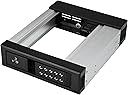
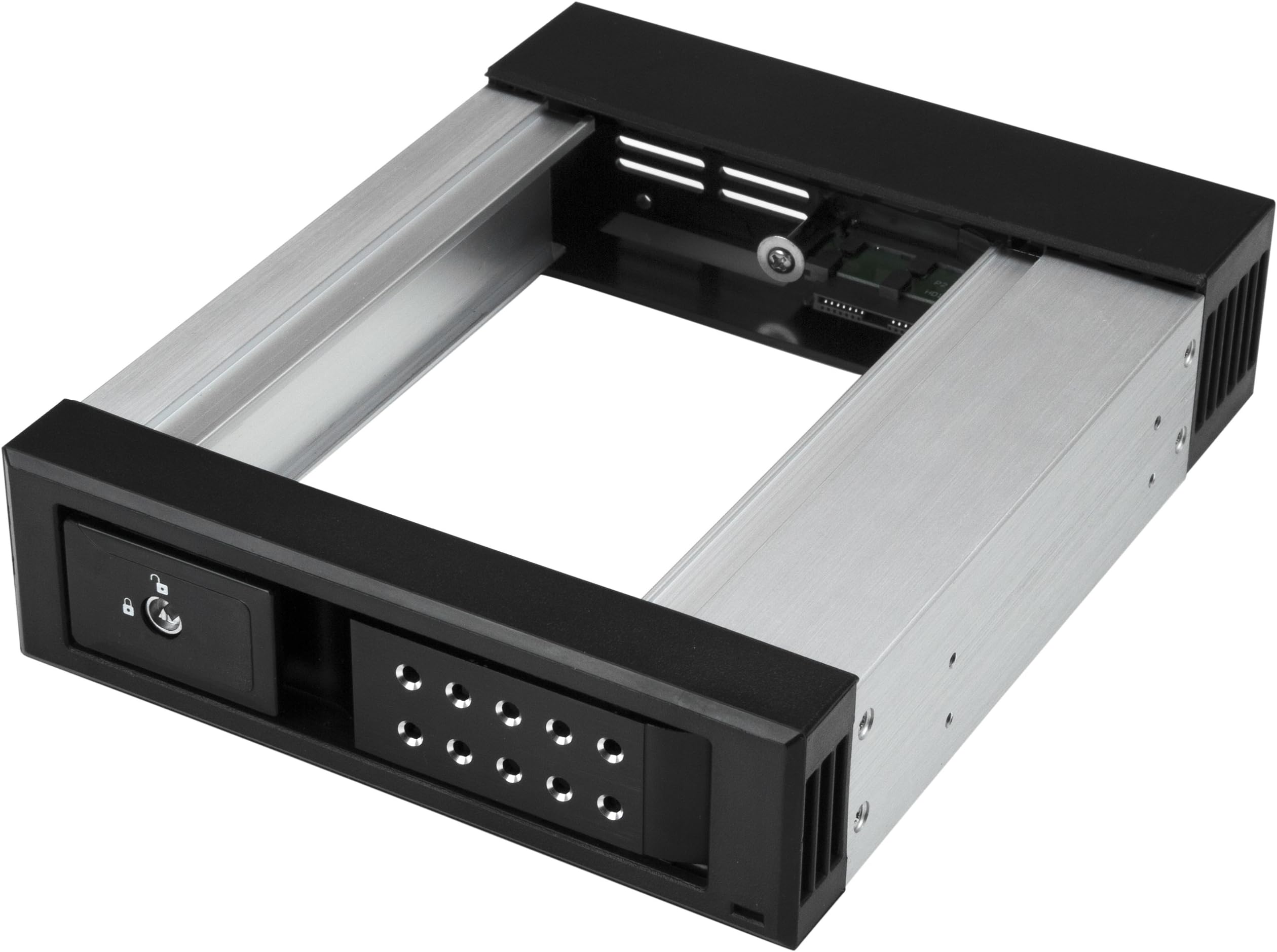
The StarTech.com 5.25" to 3.5" Trayless Hard Drive Hot Swap Bay is a professional-grade removable drive enclosure designed for 3.5" SATA and SAS drives. Featuring a trayless design for quick, tool-free swapping, it supports data transfer speeds up to 6Gbps and includes a lockable aluminum housing with ventilation for secure, cool operation. Ideal for IT professionals managing multiple systems, it offers reliable performance backed by a 2-year warranty and dedicated technical support.


| ASIN | B073JJ2FVR |
| Best Sellers Rank | #2,164 in Data Storage #5,217 in Computer Internal Components |
| Compatible Devices | Desktop |
| Connectivity Technology | SATA |
| Customer Reviews | 4.2 4.2 out of 5 stars (206) |
| Data Transfer Rate | 6 Gigabits Per Second |
| Date First Available | June 29, 2017 |
| Global Trade Identification Number | 00065030872317 |
| Hard Disk Form Factor | 5.25 Inches |
| Hard Drive Interface | Solid State |
| Is Discontinued By Manufacturer | No |
| Item Dimensions LxWxH | 7.06 x 5.75 x 1.65 inches |
| Item Weight | 11.8 ounces |
| Item model number | HSB1SATSASBA |
| Manufacturer | Startech.com |
| Max Number of Supported Devices | 1 |
| Memory Storage Capacity | 3.5 GB |
| Number of Processors | 1 |
| Operating System | OS independent; No software or drivers required |
| Product Dimensions | 7.06 x 5.75 x 1.65 inches |
| UPC | 065030872317 |
J**N
Works very well! It makes it easy to swap in a drive for a project or a backup!
I recently built a new system and one of the requirements was a "Hot Swap" bay so that I can swap in a drive temporarily for a project, or put a backup drive in the bay, make the backup, then remove the backup drive. My old case (a Thermaltake MK1 Cruiser) had a hot swap drive bay built into the top of the case, and it has been used extensively, as that hot swap drive bay has been used to make backups - insert the first 14 TB drive, start the "A" part of the backup, remove the first drive and insert the second 14 TB drive, start the "B" part of the backup, etc. That process has worked extremely well over years and I was very disappointed to not be able to find a case with a built-in hot swap drive bay. I found a case that has two 5.25" external drive bays (Thermaltake Core V71) and bought the StarTek Trayless Hard Drive Hot Swap Bay for one of the two 5.25" external drive bays. Before I continue, I should pass along some reminders regarding "Hot Swap" and Windows and drive letters. First, generally you need to go into the motherboard BIOS settings and enable "Hot Swap". In my experience every BIOS likes to call the setting something different, so read your BIOS manual until you find it. Also, sometimes it is a "SATA" setting, sometimes it is a PCI-E setting, so read the BIOS manual cover to cover. Second, in Windows 10 (I'm avoiding Windows 11) you will need to enable "Hot Swap" in Device manager. As Microsoft like to change things, and if I provide instructions today, Microsoft will change things by tomorrow, I'm just going to suggest you do a search for the "current" way to enable "Hot Swap" on a drive. Third, in Windows Microsoft likes to put "Hot Swap" devices in the list of drive letters depending upon which other devices exist. For example, all of my M.2 SSDs have low letters (C, E, F), and my mechanical 14 TB hard drive started out as drive "G", but I had to move it to "L" because when I plugged in a USB flash drive, or a camera's flash memory card, or inserted a hard drive into the "Hot Swap" drive bay, Windows decided to "change" the drive letter assigned to the 14 TB hard drive and put the USB flash drive, or memory card, or "Hot Swap" drive bay's drive where the 14 TB hard drive was, and give it a new drive letter like "H" or "J" or ... The net result was that the 14 TB internal hard drive became drive "L" (for now) and Windows assigns whatever it wants to the drive letters G, H, I, J, and K. What I'll probably do is assign a new drive letter to the 14 TB drive (which started out as "G", then became "L", and will probably end up as "S" or something like that). Thus, a word of caution... Make sure there are PLENTY of drive letters left unused between where Windows decides it wants to place your USB Flash drives, camera memory cards, and the "Hot Swap" drive when inserted into the dock, so that you don't have "drive letter chaos" where a program using your "G" drive suddenly finds "G" points to a different drive that doesn't have the directory tree structure and files it expects (been there, got clobbered by that). Just to be clear, the StarTech Hot Swap drive bay WORKS GREAT! if you have any problems it will probably be with how Windows assigns drive letters.
J**S
Excellent SATA Rack for Cloning & Test-Restoring from Images
I bought this item primarily as a fast way to access my Hard Drives for Backup purposes. I Clone my Windows OS Hard Drive every ~2 weeks (& Image less frequently) & occasionally "Test-Restore" a recent Image to one of my bare (unallocated/clean) spare Hard Drives. I've had 2 SATA Racks installed in my PC since I bought my Desktop PC ~12 years ago. I use the 2nd Rack for my 2nd Hard Drive non-OS files, mainly Photo Albums, etc and as my "Target Hard Drive" Cloning Rack. These Racks are a real time-saver for such Backup activities as they allow fast access & eliminate the necessity of accessing the internal chassis of a Desktop PC to swap out a Hard Drive. I bought this Rack to replace another brand's Rack after my original Rack's Door broke after ~10-11 years of constant usage. I've tried a couple other brand's Racks without satisfaction due to their Door Mechanism's being too hard on the plastic Door's Eject action (too stiff, causing more stress on the plastic Doors). One of the alternate brand's Racks broke 2 weeks after I installed it (Door broke). This item's Door Eject mechanical action is very smooth, thus greatly reducing mechanical stress on the Door Assembly. The only critique is one that's been mentioned in other reviews : the Power On/Off Switch is located in the rear of the Rack so there's no way to access it without going into the PC's chassis. For me though, it's not an issue as I'm not using these Racks as "Hot Swap" racks as my BIOS isn't set up for "AHCI". I rate this basically a 5-Star purchase with one exception in the "Sturdiness" category as I've only had this item for a few weeks & only time will answer that question but I anticipate getting years of trouble-free use from this item.
J**F
Aluminum light weight frame.
Installed 2 in my Windows 10 server mounted computer. Works well, had a slight issue with my system recognizing the devices. ,ot sure if that's on me or the product, probably me. After I got it working I had no issues. Constantly swapping out HDD for customers so I can transfer data. I do have a momentary freeze with the OS. It goes away, and it worried me at first. Though I received no system errors after checking system files and personal files. I will say, these could be faster, as my setup is designed for high data transfer rate. These transfer at roughly 500 - 750 Mbps. Not bad, could be better. Overall, no complaints here. Nice price. Might order more if the two I have last long enough for when I build another rack setup.
A**N
Perfect
I needed a trayless hard drive hot-swap bay for my tower, so I got this one. Trayless hot-swap bays aren't as cheap as I would like, but it's still a good price for the AMAZING convenience you get with it. It works as expected. If you are new to hot-swap bays, some computers will need to have their BIOS changed so that the SATA port will allow a hard drive addition or removal while a system is running. Otherwise your computer will freeze when you add or remove a drive through this bay. Since it doesn't have any moving parts of it's own, it doesn't make any noise, so any noise you do get is from the drive you put in it. It's put together well, so I expect it to last a long time.
K**H
Good removeable hard drive bay though not as good as their last model IMO
I love these and have been using them for years. This model works fine, though it's a little difficult to get the drive in compared to their last model, which was a lot easier to get drives in and out again. But it still works fine and does the job. I never hotswap. I use it to swap drives and always reboot when a new drive is installed. It's perfect if you like to run different operating systems or pop in other storage drives without having to open your case.
S**N
The power switch is very handy.
H**O
前面パネル左側の丸いインジケーターは、上が通電表示の緑LED、下がアクセスの赤LED。 キーロックの有無は関係なくHDDを挿入すると通電し、 前面レバーを引いて取り出そうとすると給電が止まります。 ※ hot swapには接続先のSATAポートとOSが共に対応している必要があります ファンポートにファンを接続してあると、通電時にのみファンが回ります。 ファンは付属していないので別途用意する必要があります。 取り出しは後ろからレバーで押す仕組みでスムースです。 今までガシャポンをたくさん使ってきましたが、かなりいいものだと思いました。
H**.
Wer einen dezenten (nicht mit wuchtigen Schlössern versehenen) Wechselrahmen sucht liegt hier genau richtig. Die Front ist schön flach gestaltet und passt prima in mein PC Gehäuse. Die Rückstell Federkraft des Öffnungshebels könnte meiner Meinung nach etwas höher sein deshalb sollte man die Tür nach dem Einbau der Festplatte verriegeln damit der Öffnungshebel nicht hin und her schlackert. Die Rastnase ist aus Metall was für die Wertigkeit dieses Rahmens spricht. Wem die Server Optik (silberner Öffnungshebel und durchsichtige LED Fassungen nicht gefällt) sollte zum vollkommen identischen Wechselrahmen "IB-166SSK-B" von ICY BOX greifen. Dieser ist vollkommen in schwarz gehalten was in schwarzen PC-Gehäusen besser aussieht. Diesem Rahmen liegt allerdings kein Molex Stomversorgungskabel bei sondern nur die SATA Version. StarTech hat beide Versionen beigelegt. Die LED sind in Wirklichkeit Taster mit eingebauten LED wovon nur die LED verwendet werden. (Der Grundrahmen wird von ICY BOX auch für ein geschlossenes Wechselrahmen Model mit Lüfter und Lüftersteuerung verwendet wobei der obere Taster zum Ein/Ausschalten der Festplatte und der untere für die Lüftersteuerung genutzt wird). Computerbastler können die Tastenfuktion nutzen indem zwei Kabel an die Lötpunkte des Tasters gelötet werden um diesen zum Beispiel als "Reset" Taster des Computers zu verwenden wenn das Gehäuse selbst keinen Reset Taster besitzt.
M**O
Worked perfectly with my SFF server
J**E
A few minutes to install and configure. Inserted and secured into one of my bays and hooked sata and power in, then enabled port to hot swap in BIOS. Worked like a charm! Great for backups and transfers, much quicker than USB. Note: Most systems require the sata port be enabled for hot swap in BIOS. If you don't, it will still work, but you'll have to reboot every time you put a different hard drive in.
Trustpilot
2 weeks ago
5 days ago