Buy anything from 5,000+ international stores. One checkout price. No surprise fees. Join 2M+ shoppers on Desertcart.
Desertcart purchases this item on your behalf and handles shipping, customs, and support to Kyrgyzstan.
🚗 Wirelessly drive smarter, not harder.
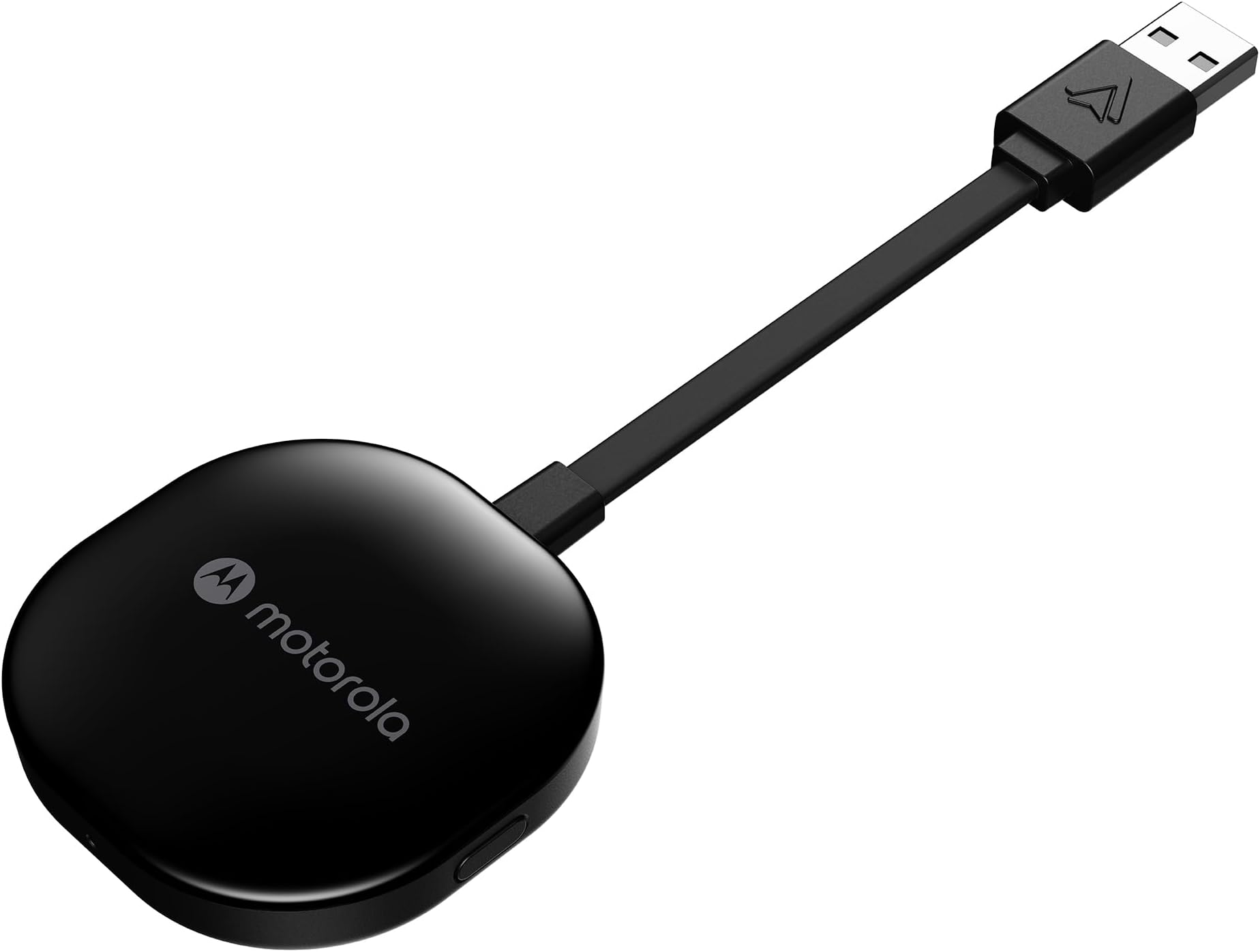
The Motorola MA1 Wireless Android Car Adapter transforms your wired Android Auto setup into a seamless wireless experience using 5 GHz WiFi. Designed for Android 11+ phones and compatible vehicles with factory-wired Android Auto, it plugs directly into your car’s USB port and pairs instantly with your smartphone. Its compact design includes a secure gel pad for stability, while Google-licensed technology ensures ongoing software updates via your phone. Perfect for professionals craving a clutter-free, connected drive with reliable, fast transmission of navigation, media, and messaging apps.


| ASIN | B09PQ95GY4 |
| Best Sellers Rank | 48 in Mobile Phone Wireless Automobile Chargers |
| Brand | Motorola Sound |
| Brand Name | Motorola Sound |
| Colour | Black |
| Compatible Devices | GPS, Headphone |
| Compatible devices | GPS, Headphone |
| Connector Type | USB Type A |
| Connector type | USB Type A |
| Current Rating | 1 Amps |
| Customer Reviews | 3.8 out of 5 stars 16,003 Reviews |
| External Testing Certification | ANATEL: 09363-2 2-08069 |
| Input Voltage | 12 Volts |
| Item Dimensions | 16 x 5.5 x 1 centimetres |
| Item Weight | 70 Grams |
| Item dimensions L x W x H | 16 x 5.5 x 1 centimetres |
| Manufacturer | Motorola Sound |
| Manufacturer Part Number | MA1 |
| Model Number | MA1 |
| Nominal Power | 230 Watts |
| Number of Items | 1 |
| Number of Ports | 1 |
| Package Quantity | 1 |
| Power Plug Type | No Plug |
| Product Finish Type | Matte |
| Smart Home Compatibility | Not Smart Home Compatible |
| Specific Uses For Product | Headphones |
| Specific uses for product | Headphones |
| UPC | 810036773140 |
| Unit Count | 1.0 count |
| Warranty Type | Limited |
D**G
Honest review, genuine purchase
Update: still working perfectly, nearly a year after purchase. Have used it on two Euro trips one of which was 15 hrs on the road. For my car it sits in the centre console to plug into the usb port, it is well ventilated. I purchased to use in a 2018 Ford Focus ST, running Sync 3.5. For some reason hardly anyone leaving a review for Motor products actually provide the car model and age. I found that with music streaming and using maps navigation with the phone plugged in to my cars USB port, the minimal charge provided by the cars port. My phone would barley increase its charge level, even a four and a half hour drive with a start charge of 54%, the phone only reached 100% ten minutes. So I decided to find a way to use Android Auto wirelessly. After researching, I found a number of devices available on Amazon varying in price. I was drawn to the Motorola MA1, because of the self learning element built in to the device. Apparently it can over time optimise everything depending upon your usage and used preferences. I am only a week in to using it. The set up was really easy (if stuck just type in Motorola MA1 set up in to YOUTUBE), I just plugged it in, opened connected devices on my phone and asked it to look for new devices. It appeared within a second, after clicking to connect and allow permissions and connect automatically, it was done. Around 10 seconds later my car showed the Android auto option and it was fully up and running. It connects automatically a few seconds after my car screen has initialised, about 8 seconds from opening the drivers door (it has become a lot faster than the first few time I used it, so I take it the self learning thing works). I have had no drop outs. Admittedly I have not bee on any long journeys since purchase and I have not tried to stream video on the car screen via the YOUTUBE app. I have had music streaming from most of my music apps whilst using a navigation app. My only grip and it is not really with the Motorola MA1, it is actually with Google and Amazon. If you use the car screen to open the Amazon music app and play your library playlists for some reason not all of my downloaded to my phone playlists show on the library list displayed by the car and then when you select a play list it does not show all the downloaded to my phone tracks and plays them in shuffle mode. I have tried every setting, I have contacted Google and Amazon, both of whom blames the other for this widely know common issue. Which occurs whether you connect via a cable or wirelessly.
M**S
A Game-Changer for Wired Android Auto Users – Seamless & Reliable!
If your car, like mine, only supports wired Android Auto but you dream of the freedom of wireless, the Motorola MA1 Wireless Android Car Adapter is an absolute must-have. I used to keep my phone in a holder on the mirror side, and the thought of running wires under the steering wheel just wasn't appealing. This little device has been the perfect solution. I used some command strips to discreetly attach it to the underside of the storage area where my car's USB port is located. It's completely hidden from view, and the storage compartment remains fully usable. Honestly, you'd never even know I have it in the car – which is exactly what I wanted. The convenience this adapter offers is truly remarkable. Being able to just turn on the car and have my Spotify music start playing and Waze maps pop up after just a few seconds is incredible. By the time I've reversed off the driveway, everything is ready to go, and I haven't even had to take my phone out of my pocket. It completely streamlines the whole driving experience. Beyond the convenience, the reliability of the Motorola MA1 has been absolutely flawless. I've never experienced a single cut-out, connection issue, or glitch. Even on long 5+ hour drives, it performs perfectly the entire way. I can confidently say this is the best thing I've bought for my car. It's a major upgrade to the overall convenience, and since it's always on and connected whenever I'm in the car, it's getting 100% of its intended usage. If you're on the fence about going wireless for Android Auto, jump on this – you won't regret it!
B**Y
Works great for 1.5 years then just died.
Works great for 1 year then just died. It was brilliant, had no dropouts stuttering or connection issues for the entire time I've had it. That was until I went on road trip last week, 1 and a half hours, to a 3hr drive and just lost all connection. Luckily I had a USB cable and switched back to wired connection on my phone. After looking at a few Reddit posts it looks like this has been a very common complaint that recommend air-frying the PCB to get the WiFi chip to rework. But it can happen again months down the line.
M**I
Connectivity, Working with two devices
Excellent device. Goes by every word of a 5 star review.
D**E
Great purchase & Fast delivery
Fast delivery device works great and easy to install A+++
A**R
Used this with two different phones on same head unit
Bought this in August 2023 and initially used it with a Samsung Galaxy A34. Before starting I restored the cars head unit to factory settings and then paired the A34 with the head unit over Bluetooth. Then I plugged the USB-C cable from the A34 into the USB socket in the car with a Crucial USB-C to USB-A adapter. Then I was able to create an Android Auto connection over USB. Then I plugged the Motorola MA1 into the USB port and paired it with the A34. Then I was prompted to start Android Auto wirelessly over the MA1. It worked this way fine for 1.5 years until I bought a new Samsung Galaxy S25. First thing I did was restore the cars head unit to factory settings to get rid of the A34. Then I paired the head unit with the S25 over Bluetooth. Then I tried to connect the S25 to the USB port using the cable that came with the S25 and the same Crucial USB-C to USB-A adapter. This is where I ran into problems, I could only plug the USB-C connection into the adapter one way otherwise it didn’t work. Anyway once I’d discovered this I plugged it in the way it worked and was able to start Android Auto over USB, however it complained about needing location services to display google maps. Location services were switched on but as I’m parked in an underground car park it couldn’t show the maps. This was resolved as soon as I left the car park, then when I got home I tried to connect the MA1 into the USB port as I’d already paired it with the S25 over Bluetooth prior to getting a USB connection running. It wouldn’t prompt me to start Android Auto on the head unit, and the phone just said look at the head unit. This foxed me but a few days later I decided to have another go and this time when I plugged the MA1 into the head unit it prompted me to start Android Auto. The problem was that I initially tried swapping from the USB cable connection to MA1 without switching off the engine and leaving the car. When I came back next time and plugged it in it had forgotten about the USB connection and started working. So yes it is possible to switch the MA1 between two different phones and it works on a modern phone like the S25 as well. One last thing is that I bought a Kenable USB-C to USB-A adapter and that works fine no matter which way you connect the cable. I use it when I want to connect the S25 into the USB-A port on my PC to transfer files, the crucial one works but only one way round.
M**N
Sadly seems no more reliable than cheap Android Auto adapters
Android auto wireless adapters are cranky bits of kit. Having failed to get a reliable connection with a relatively cheap adapter I invested in this more expensive Motorola device with great hopes. Initially the setup proceeded reasonably straightforwardly and I even managed to connect my wife's phone, though I never managed to switch between devices using the button as some have described. For a few weeks it worked, most of the time, but for the last week or so (just outside the return period of course) it has hardly worked at all. Occasionally it will spring to life and give you beautiful android auto on the car screen (a Vauxhall Corsa electric) after a minute or two of driving. Most of the time there's no connection between the device and the car, despite making a Bluetooth connection to the phone, even after 30 minutes. It's not really obvious why this is as connecting my phone directly to the car gives a 100% reliable connection. It's a nicely made piece of kit and whether the short fixed cable is to your liking will depend on the layout of the USB ports in your car. However, performance wise it doesn't seem any better than the cheap adapters I have tried. The printed manual is woefully short of the sort of troubleshooting advice you'd expect from a quality piece of kit though the online manual at motorolasound.com/support contains the following advice - handy if you have nothing else to do on a rainy day!! This does seem to have worked - for the moment. I'll update this review if there are further developments. First, confirm that the Android Auto app on your phone is updated to the very latest version available in the Google Play Store. Next, confirm that your phone is connected to the car for hands-free calling (Bluetooth HFP), simply by placing or receiving a phone call. A properly handled Bluetooth HFP phone call will use the car's own speakers and microphone. Finally, confirm that the LED light on MA1 is pulsing green. If wireless Android Auto has not started after several minutes, reboot the phone, unplug/re-plug the dongle, and power cycle the car's infotainment system, preferably all at once. If the above steps do not resolve your issue, then take the following steps to completely reset your connection. Be sure to follow every step, in sequence: 1. Unplug the MA1 from your car's USB port. 2. On your car screen, navigate to the Bluetooth phone list, and 'forget' or 'delete' all paired phones. 3. On your phone, navigate to the system settings for Bluetooth, and 'forget' or 'delete' BOTH the paired car AND the paired MA1 (which will appear in the list as AndroidAuto-XXXX). 4. On your phone, navigate to the system settings for Apps; select Android Auto; and under 'Storage', tap 'Clear data' (different phone brands may present this slightly differently). 5. Start your car, and plug in your phone with a USB cable. Navigate through the 'Welcome to Android Auto' screens on your car display, as if you were connecting for the very first time. 6. Once Google Maps appears on your car display, place a phone call to verify that Android Auto has automatically re-connected your phone for hands-free calling over the car speakers. 7. Unplug your phone from the car and re-plug the MA1 into that same USB port. Observe the LED light, which should initially shine solid white. (Your phone will remain connected to the car over Bluetooth for hands-free calling; this is expected. Do not reboot your phone.) 8. Once the LED light begins pulsing green, immediately press and hold the button on the side of the MA1. Keep it depressed for approximately 45 seconds, during which the LED light will run through a series of color changes, first flashing blue, then flashing red, then alternating colors, then off briefly, then solid red. 9. Only after the LED light turns solid red, release the button on the side of the MA1, unplug the MA1, and then re-plug it into the same USB port. Observe the LED light, which should initially shine solid white. 10. Once the LED light begins flashing blue, then, on your phone, navigate again to the system settings for Bluetooth, and scan for new Bluetooth devices; MA1 will appear in the list as AndroidAuto-XXXX. Pair your phone with the MA1. The LED light should begin pulsing green, and wireless Android should appear on your car display within 90 seconds
J**N
Gamechanger - keep your phone's USB in better shape!
I was using android auto on a Ford Fiesta (2019) with my Samsung s21 but, as I was plugging and unplugging my phone constantly with each journey I was wearing out USB C ports until I could no longer connect. I searched for a solution and some people suggested this. It's small, it fits in the hidden armrest bit of the car, powered by the usb socket and it works great. Very occasionally I need to unplug and reconnect but for the most part it picks up my phone after a few seconds. My tip would be to also get a wireless charger for the dash to keep the phone charged. This was genuinely one of the best purchases I've ever made, I can't believe I went so long without it!
Trustpilot
3 weeks ago
2 months ago