Buy anything from 5,000+ international stores. One checkout price. No surprise fees. Join 2M+ shoppers on Desertcart.
Desertcart purchases this item on your behalf and handles shipping, customs, and support to Kyrgyzstan.
๐ Discover the future of sensing with precision!
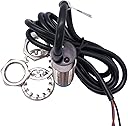
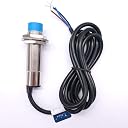
The Taiss LJC18A3-H-Z/BX Proximity Switch is a high-performance capacitive sensor designed for reliable detection of both metal and non-metal objects. With a sensing distance of 1-10mm and a robust operating temperature range of -25 to +65ยฐC, this switch is perfect for various industrial applications. It features a compact design, operates on a supply voltage of DC 6-36V, and boasts a current output of 300mA, ensuring efficiency and reliability in any environment.
| Customer Reviews | 4.2 out of 5 stars 97 Reviews |
S**N
Miss conception but works great!
Output 300ma made my head scratch, Normally open and had 12 volts on lead and when closed dropped to zero. seemed reverse. Plus it said output is 300ma. I figured it out, I have a 12volt relay with 25ma trigger coil. I put 12volts lead to + side of coil and then negative goes to output lead and it works great. The proximity sensor is designed to be the ground point not the source for relays. just reverse your concept of powering the relay. All is working very well. Sensitivity is excellent as well. I can get upto 3/4" on very capacitive devices now.
P**K
Works great on my Modded Monoprice Select Mini V2
Tried the BL touch style, ended up returning it due to terrible inconsistent sensing. Got one of these and a BAT85 diode (killed a board without one. A 20$ lesson). I have had some of the best 1st layers ever with this thing, even with a 4mm glass bed. I modded my printer to be super quiet. The BL Touch style probes make soooo much noise when you have a quiet printer. These sensors are completely quiet. They do have a long sensing distance, but you get the best accuracy if you set it as low as possible.
J**N
works well
I am using this off and on for a level probe. Tried it on a 3d printer and I could not get it to work accurately for the Z axis. Problem was that it was not repeatable. I am using this at 24 v and it works well for my Y position.
D**Y
Worked Perfectly on My Kingroon KP3
This is a great option for auto bed leveling. I paired this with a 24V Optical Isolator Module I also purchased from Amazon (https://www.amazon.com/gp/product/B07YJL3MQQ). This was easy to setup if you have some background in electronics. If not, there are plenty of videos available. I am using Marlin 2.x in my printer.
J**E
Very inconsistent probing
For reference, this is set up on a custom CoreXY machine. I'm using a polycarbonate glass laminate build plate (essentially two pieces of polycarb with a 5/16in piece of glass sandwiched in between), with no bed heater. After attaching and setting it up I tried dialing in the calibration screw. I heard the click of the relay and thought "sweet! Right where it should be". Then I went to print and, while doing it's homing and bed level probing, even though my test probing and homing before hand was perfect, it started jamming the nozzle straight into the build plate. So I readjust it again. Get it perfect, test it, perfect! Go to print....no I'm about 2mm too high. Make sure I don't have any weird home or probe offset set in marlin....nope. readjust again....perfect again...go to print, and this time it finally succeeded! Printing went great and had a near perfect first layer. Then the next day I go to print something and let it do its thing. Not paying much attention (since I thought I had it all calibrated well) I leave it be. Come back in 30 minutes to find absolutely nothing adhered to the bed. I figure at first the bed must've shifted so I kill print and go to force a home and probe....and once again...not even close. It's lost its calibration yet again and is probing too high. So I recalibrate (and decide to take a picture of the calibration screw, just to make sure it isn't like backing out or something weird) and set it to go again. Seems to go well and I get another print. A few days go by and I go to print something. Now I decide to keep a close eye on it while it proves and homes and almost immediately, on the z probing, it runs the nozzle straight into the build plate. I had to shut the machine down and restart to back off the build plate. I check the adjustment screw and find it is in fact in the same exact spot as it was when it was supposedly calibrated perfectly. I calibrate once again and it again seems to go decent. As of the I just figured some miniscule factor was throwing off calibration every now and then, until I do some reading and find that very few other people have issues like this with quality capacitive probes. A few weeks ago by of me calibrating the probe every single time I have to print, and it has gotten extremely annoying. So I've done away with this thing and gone to a crTouch, and life has been smooth sailing since. So long story short, it does work, but don't expect it to work every time without taking 30 minutes prior to adjust the screw perfectly again, and again, and again
R**R
Very susceptible to interference.
The proximity sensor on my CR10's EZABL v.1 failed. This sensor (NPN NO version) is an exact replacement. Even the wire colors are the same. I was getting a standard deviation of 0.12 with the bad sensor. The new sensor is great at 0.001828. I don't know how long it will last. The original sensor lasted a little over 3 years. UPDATE: Soon after installation I started to have reliability issues. It turns out that this sensor is very sensitive to noise. The 5V wall wart power supply was generating interference that corrupted the sensor. Switching to a toroidal power supply eliminated the problems and it has been working well since. Probably better off just switching to one of the newer high accuracy auto bed leveling kits because it's cheaper than the power supply. FAILED: The proximity switch only lasted 2-1/2 years. It failed closed.
J**E
Very capable probe for a diy ezabl.
The shipping was very fast. The accuracy of the probe is very good once you adjust the distance. As for assembly.. there is a bit of a learning curve to get this to work with a 3d printer. That is no fault of the company. Once you do get it working it is great.
G**E
Be sure to test the sensitivity!
Device works as described - important to dial up the sensitivity - it didn't trigger when mashed down on the bed but cranking up the sensitivity (clockwise on the brass screwtop) cleared it right up. Used it for a Marlin 2.0.3 install - kind of puzzled by the z-offset settings, but it is working.
Trustpilot
1 month ago
3 days ago