We remain fully operational. Our teams are working around the clock to ensure your deliveries continue safely.

DOWNLOAD THE APP


Customer Services
Copyright © 2025 Desertcart Holdings Limited
DOWNLOAD THE APP


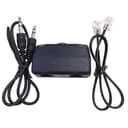

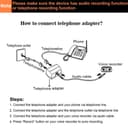

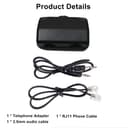
🎧 Capture Every Word, Never Miss a Call!
This Analog Telephone Adapter features dual RJ11 ports to split your phone line between a telephone and a voice recorder, plus a 3.5mm audio socket for easy connection to recording devices. Designed for single or multi-line phones, it ensures crystal-clear audio capture from both ends of your calls with simple plug-and-play setup. Ideal for professionals seeking reliable, high-quality call recording without complicated installations.
| ASIN | B0B2C3ZD5K |
| Best Sellers Rank | #32,617 in Electronics ( See Top 100 in Electronics ) #3 in VoIP Telephone Adapters |
| Item model number | Analog Telephone Adapter |
| Manufacturer | eoqo |
| Package Dimensions | 8.61 x 4.7 x 3.91 cm; 18 g |
W**.
cable defective,unable to use ,returning product.
C**E
This method is really going back a bit in history, but it does work, with some caveats. First, I have VoIP system. No problems there, but you do need your standard POTS phones, RJ11 plugs, and cables. It's easy enough to hook up. I recommend doing some test recordings. I am using a OM WS-883. That's an Olympus digital handheld recorder. Tip: Power it on and just leave it until it shuts itself off after a few minutes. Then, when the phone rings, and you wish to record the call, just press the RECORD button. The unit will fire up and start recording within 6 seconds or so (about 1 to 2 rings). This semi-off mode does not affect the battery. The unit starts up much faster and starts to record immediately. Recorder settings are important! This device records in MONO. The WS-883 is a stereo unit. My first important recording had a hum noise that I didn't notice when played back through the recorder, but was very evident when downloaded to the PC and played. There was a lot of hum in the background. There was not enough to jeopardize the recording, but it was annoying. There had to be better way. Here's the way: Set the WS-883 to 64 kbps MP3 MONO (the best of the MONO settings) under Recording Mode in the Menu. Skip down the menu to Low Cut Filter and turn that ON. The recordings will be crystal clear on BOTH sides of the conversation. I am sure other recorders have similar settings. I suspect setting your recorder to record in MONO will solve most of the hum problem. The file transfer via USB-A was a piece of cake. Plug it is and it is a drive. Drill down to the folders on the WS-883 and there is your .mp3 file. Just copy that over to your PC. This unit was well worth the price. I would buy it again.
F**A
This device plugs into a different place on the phone than my previous one. Once I figured that out, it works ok. Not the greatest quality recording (slight distortion), but ok. It'll do.
J**S
Doesn't work, returning it.
J**P
Easy way to record on PC from traditional phone line. (Like any phone recording, check local laws.)
Trustpilot
4 days ago
2 months ago