Buy anything from 5,000+ international stores. One checkout price. No surprise fees. Join 2M+ shoppers on Desertcart.
Desertcart purchases this item on your behalf and handles shipping, customs, and support to Kyrgyzstan.
⌨️ Elevate your desk game with the ultimate mini macro powerhouse!
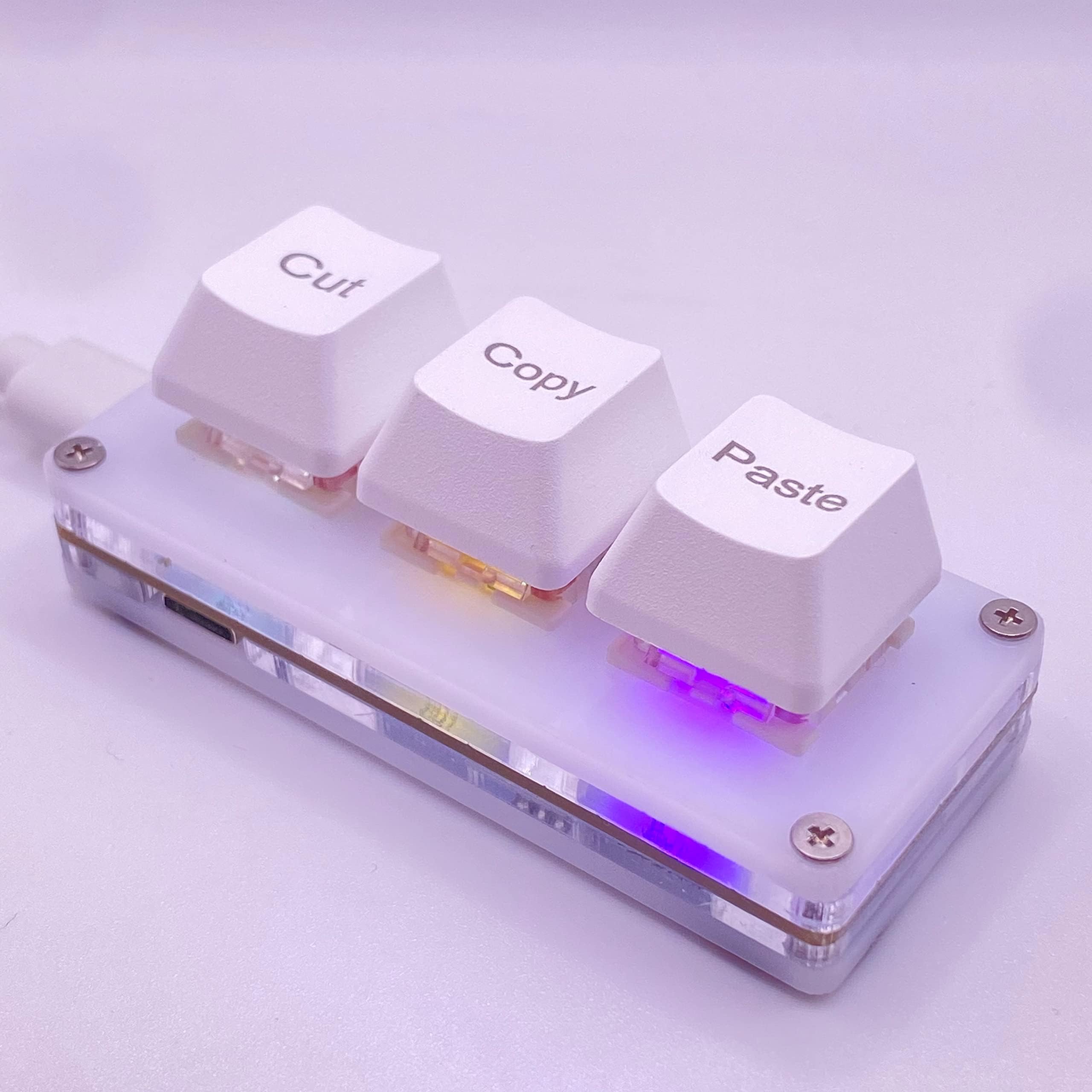
The Mini 3-Key Cut Copy Paste Ctrl X C V Macro Pad is a compact, programmable mechanical keypad designed to streamline your workflow. Measuring just 7x3x3 cm, it offers three customizable keys with default cut, copy, and paste functions, plug-and-play ease, and RGB lighting control via a cross-platform web interface. Perfect for professionals and gamers seeking ergonomic efficiency and desktop minimalism.
| ASIN | B0BBW82ZSJ |
| Additional Features | Backlit |
| Best Sellers Rank | #790 in Computer Keyboards |
| Brand | BTXETUEL |
| Built-In Media | USB Cable |
| Button Quantity | 3 |
| Color | White |
| Compatible Devices | PC |
| Compatible Operating System Family | Linux, MacOS, Windows |
| Compatible Tablet Computer Models | AAUB P30 |
| Connectivity Technology | USB-C |
| Customer Reviews | 4.3 4.3 out of 5 stars (222) |
| Enclosure Material | Acrylonitrile Butadiene Styrene |
| Hand Orientation | Ambidextrous |
| Item Dimensions L x W x H | 2.7"L x 1.1"W x 1.1"H |
| Item Weight | 2 Ounces |
| Keyboard Backlighting Color Support | RGB |
| Keyboard Description | Multi Functional |
| Keyboard Layout | QWERTY |
| Manufacturer | BTXETUEL |
| Mechanical Keyboard Switch Model | Cherry MX Red |
| Mfr Part Number | Clavier blanc à 3 touches |
| Model Name | White 3-Key Keyboard |
| Model Number | Clavier blanc à 3 touches |
| Number of Keys | 3 |
| Number of Sections | 1 |
| Power Source | Corded Electric |
| Switch Type | Mechanical |
| Unit Count | 1.0 Count |
| Warranty Description | 2 |
R**K
A very useful product that I highly recommend...
This works perfectly and I find quite useful. Yes, I can (and was up to now) pressing CTRL+C and CTRL+V with my left hand (my right hand is on the mouse), but having this next to my keyboard area, all I do is reach over and press a button (no finger gymnastics required)... it's fast and convenient. While I do not do much cutting and pasting, should I need to, that too will now be a single button press as well. The only **possible** negative is the cable that goes from the unit to the pc... I didn't measure it, but I think it is 4 feet long... my computer is on my right, and the unit is on the left, making the cable just barely long enough... a 5 (or better yet 6) foot cable would have been welcome for my particular set up.
J**R
Plug and play
I never write reviews so me taking the time to write this says a lot about this product! I needed something like this for a long time, I sometimes have to copy and paste hundreds of items 1 at a time and my hand would cramp up doing the conventional copy an past short cuts on a keyboard. This works great, no cramps! I plugged it in and it just worked, nice and easy presses of the keys (almost too easy) the keyboard does not slide around and the micro SD cable was long enough to plug in, to place the keyboard where I wanted it. Definitely worth it!
M**M
Easy programming and helpful but difficult hotswap
I really like this little attachment. If all you need is the cut copy paste then its just plug n play. But even changing the function and lights is easy because it can be done via their website using google chrome or edge, so you don't have to download software, and I really like that whatever functions you set it to can be saved to the device itself to use on other computers. My major complaint is with the hotswapping. something about the area where the pins insert is incredibly difficult to install other switches. I bent so many pins on many switches. The one style that fit was winglatch closure switches. 4 pin style housings were not fitting and kept bending. Love it overall, unfortunate that the hotswap is so tough and that it does not work properly on mac.
D**R
Oh so useful / beneficial/ time saver
Excellent. Going to buy additional key pads
S**X
This is an amazing time saving device
For anyone who does a lot of Copying and Pasting for their job, this is a must have. I did have to connect mine to a USB Hub, because I didn't have an available port on my work computer, and although some devices don't like that...this works perfectly connected directly, or to a hub. I will also say that it takes a little getting used to, meaning when you are so used to using Ctrl + C to Copy, and Ctrl + V to Paste, you sometimes do that out of force of habit instead of using the Cut, Copy, Paste Keyboard, but it does not take a long time to get used to using the keyboard at all. Also, when you consider how many times you Copy and Paste, using two buttons to do that, when you can do it with one button press...it gets your work done faster. I also like the rubber grips on the bottom of it, that do keep it in place. There are other keyboards like this, some that only have a Copy and Paste button (with no Cut button), but I like how this one feels and I believe it will last, and it also doesn't hurt if you ever need to use the Cut function. Overall I really like this keyboard, and I don't know how I ever did my job without it. I would definitely recommend it to anyone who does a lot of Copying and Pasting.
A**R
Very disappointed in product
Very disappointed…Wrong connecting cable was placed in package… A keyboard had a micro USB connector… And the cable was a USB-C… install instructions are vague… Very disappointed in the product… Hopefully can return
D**W
Great addition
As someone who users SnagIt (screen capture tool) a lot, this mini keyboard is perfect. I use the left side button for Print Screen (which calls up the SnagIt screen). Just makes it quicker and easier to do my screen caputres and when copying and pasting. I like that you can program the buttons without having to install any software. Perfect for work computers when you are not allowed to install software.
G**Y
It's A Good Thing It Works Without the Software
It's a good thing the keys function when plugged into a USB port. However, if one wants to take advantage of the supposed programming capabilities, you're out of luck. This is the documentation that comes with the device. Even though there is supposed to be an English version, I could never find it. Additionally, this is the error message displayed if one tries to install the software that is part of the download package. --------------------------------------------------------------------------------------- After researching, I found a way to program the keys to change the colors displayed and the keys' functionality. Have your keyboard plugged into a USB port, then go to this site: sayodevice.com. A screen will display, asking you to search for your device. Click on that link, and your keyboard will be paired. You can now make your changes.
西**未
めちゃくちゃ使い勝手最高です! ネットでいつでもキーの割り当て変えれるし押し心地も軽いから使いやすいです!
Z**S
No issues, sits nicely on the table, not to clacky, only thing that scared me a bit, is when I firsted used. it was when I when to use the settings. After downloading the Zip file and extracting it into a folder, you'll go to click on the program and it'll ask for internet privileges. I personally said no, because it's a 3 key keyboard, it shouldn't need that, until I realized the settings are through a local website, but even tho I denied the internet privileges, it still worked, so I'd maybe recommend just not giving it that ability, especially when you see where this device is from... but good product non the less and the lights are pretty cool, not to bright or distracting
G**A
Könnte weniger hoch sein, sonst alles sehr gut.
T**Y
Poder copiar, cortar y pegar con la mitad de los clics acelera el trabajo y pone menos presión en la mano.
T**M
Very happy, it works exactly as described, is super easy to set up and adjust through the online portal and works great with the muilti-press shortcuts (such as 'control-shift-copy', as well paste normal 'copy' and normal 'paste'). Can't fault it so far!
Trustpilot
3 weeks ago
4 days ago