


๐ Triple your screens, quadruple your productivityโstay ahead in the multitasking game!
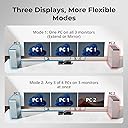
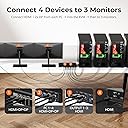
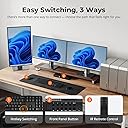
The TESmart USB 3.0 HDMI KVM Switch supports 4 computers sharing 3 monitors at up to 4K@60Hz resolution, with integrated USB 3.0 ports for high-speed peripheral sharing and phone charging. It features advanced switching modes including hotkeys and IR remote, EDID emulators for stable display settings, and a built-in wired network adapter to connect all PCs via a single Ethernet cable. Designed for professional multitasking setups, it includes all necessary cables and rack-mount hardware for immediate deployment.





| ASIN | B09JSYF8J3 |
| Actuator Type | Push Button |
| Best Sellers Rank | #914 in KVM Switches |
| Brand | TESmart |
| Brand Name | TESmart |
| Circuit Type | parallel |
| Color | Black |
| Connectivity Protocol | Wi-Fi |
| Connector Type | Plug In |
| Contact Material | Metal |
| Contact Type | Normally Open |
| Control Method | Push Button, Remote |
| Controller Type | Push Button |
| Current Rating | 3 Amps |
| Customer Reviews | 3.4 out of 5 stars 66 Reviews |
| International Protection Rating | IP54 |
| Item Dimensions | 13.78 x 5.91 x 1.77 inches |
| Item Weight | 2.98 Pounds |
| Manufacturer | TESmart |
| Material Type | Metal |
| Model | HKS403-P23 |
| Mounting Type | Rack Mount |
| Number of Positions | 7 |
| Operating Voltage | 12 Volts (DC) |
| Operation Mode | ON-OFF |
| Part Number | HKS0403A1U |
| Specification Met | Edid Emulators and Hdmi 4k@60hz Support |
| Switch Type | Push Button |
| Terminal | Solder |
| Unit Count | 1.0 Count |
| Warranty Description | TESmart (Manufacturer) warranty for 365 days from date of purchase. Always be able to contact TESmart via Amazon. |
| Wattage | 60 watts |
M**E
Excellent purchase - works as described
Almost six months ago, I signed a second client that I would eventually be given two laptops to do work on. These would be in addition to my personal laptop and my first client's laptop, so 4 in total. I hesitated on purchasing the TES 4 computer to 3 monitor KVM due to the price, but figured if it did work as described, it would be exactly what I need. I'm happy to report, the KVM worked right out of the box and had all the parts and cables I needed. Since this has the smart switching, it took a while to get used to what combo of buttons to use when I needed to be on two laptops at once while being on a conference call with video and audio, but after studying the manual, experimenting a bit, and creating a quick cheat sheet for myself, it became routine. Now, I usually don't write product reviews, but this device impressed me so much, I felt like I had to support it in some small way. There are always some features that don't match personal preferences, and for me, to have the lockable audio switch port be a 3.5mm audio jack when so many peripherals are USB now is a slight inconvenience. Luckily I had been given a Jabra headset by my client which has the right plug, but I had to loose the mute and volume buttons section of the headset cable as that part ends in a USB port. You can do USB only audio, but then that ties it in with the usb keyboard and usb mouse and when you switch you loose the audio or if you choose audio you loose keyboard and mouse. I have only had this a while, so there may be other workarounds, but haven't tried them yet. The only other drawback was the price. It is a bit steep for a KVM switch, but I didn't see any others at the time have the 3 screens show you 3 different laptops. So, in the end, for me, it is well worth the money.
T**D
Deeply Flawed KVM (You were the chosen one!)
I bought this KVM because there are very few with the exact specifications I need. This one felt very promising, and I didn't mind the high price tag. However, I spent six hours on this and was only met with failure and disappointment. My setup: 3 x QHD 1440p / 144 Hz Monitors. 1 x Windows PC. 1 x Mac Studio M1 Max. 1 x Linux Box. The Disappointment: It was clear that as soon as I opened the box, this $599 KVM was previously used. It was scratched/scuffled, had something that looked like stains, the plastic wrap was already opened, and it was missing 1 HDMI cable plus several bands and HDMI covers (parts that were easily lost after opening). The cables were already loose and sticking out in the box. The attached images show what a "new" KVM looks like. The Issues: While the video worked fine (3 x QHD 1440p @ 144 Hz), there were severe issues with getting any USB connection from the target computer to work. It didn't matter which computer I focused on, it didn't matter which cables I used, USB will not work. Since it came with 4 x KVM Cables, I tried them all, and no USB connection would pass through the box. This meant that no Keyboard or Mouse would work. I also tried multiple keyboards and mice. Nothing worked. I "reset" the KVM using its built-in screen. Didn't work. I tried every step I could find online, their manuals, and looked it up on message boards, but nothing worked. I even tried a Powered USB hub, as they suggested, but still nothing. I tried different computers on different ports, switching out all cables, and it again failed. Either this KVM's design is flawed, or the previous owner on this "new" KVM returned a faulty device, or they messed it up, which was then sent to me. Also, when using a powered USB Hub, it actually powers the KVM. When I unplugged its power supply because its screen told me to reset the box, it remained powered on. If a powered USB Hub is plugged in, the power switch doesn't turn the box off. This could be dangerous since TWO power sources can feed into the box simultaneously. This was the worst KVM experience I ever had, and this one was supposed to be the Chosen Oneโto undo the evil of my previous KVM, which began to fail. This is a hard pass. And my search continues.
D**D
Video B&C Output failed (My Fault and corrected)
Was the best KVM I have ever used until video output B&C stopped working, returning defective unit and ordering the exact same thing again in hopes to not have the same thing happen since it does work so well I am a complete idiot and did not realize that the input cables for the system that used B&C outputs had become disconnected. This units works perfect and I love it.
R**S
Works great but beware of chaining USB hubs
I bought this specially to connect my 3 X 32 in 4k Monitors to the home desktop and work laptop that requires a port extender. For the Keyboard, Mouse, and Monitors it works great! Were things break down is with my powered USB 3.0 16 port HUB. I have the hub connected to the KVM's 3.0 input port and connected the KVM 3.0 outputs to the laptop and desktop USB 3.0 ports. When connecting the KVM USB 3.0 into the Laptop Port Extender I get a error that says that Windows 11 can't recognize USB hubs that are 5 or more chained together. The USB 3.0 connector from the KVM has to be connected directly into the Laptop. When connecting the KVM USB 3.0 output directly to the laptop and the desktop USB 3.0 port, when switching between desktop and laptop I get a Windows error that says "Unknow USB Device" coming from the powered USB Hub. I am still researching this and it is a minor issue because all of the devices connected to the powered USB Hub still appears to work.
D**R
I wish that I loved this switch... I really do.
I own eleven macs in my farm's office, but with only three monitors. That would mean doing a lot of slow plugging and unplugging of monitors, keyboards and trackpads / mice. This KVM switch was supposed to be a big solution to my space issues and cable swapping frustration. The way that this TESmart switch was advertised, one guy could easily manage up to four computers with three monitors, and save a ton of time and energy. I REALLY wanted to like and use this product... BUT in order to use ANY keyboard or mouse with this KVM switch, it required me to purchase a new one from a third party. Why? Because NONE of the mice or trackpads which I had bought over the years would work with this switch... not one. The VERY narrow list of compatible mice / keyboards which they provided (see attached screenshot) were astoundingly high priced, in the several hundred dollar range! I kid you not. The least expensive "choice" was a combination keyboard / trackpad that I finally broke down and bought, which required a painful learning curve. Further, the keyboard itself was incompatible with several common keyboard commands which make any macs work. The "solution" quickly became a bigger problem. I'm researching alternatives to this switch, but my Amazon return window closed some time ago, so once I do find an alternative, I'll likely sell the TESmart switch on eBay. A several hundred dollar lesson not to listen to all of the hype.
S**T
Stay away if you need a reliable solution
Avoid, avoid, avoid, this product. If you want this to work consistently without you thinking about it, this is the wrong product for you. -- Second unit issues This is my second unit from them. It doesn't work reliably. It will randomly drop connection to keyboard, mouse or both, forcing you to "turn it off and on again" and sometimes that doesn't even work. I have to do several power cycles of the computer(s), the KVM switch itself, unplugging and replugging things to get it to work again for a bit. Originally, I was using top of the line Logitech keyboard and mouse and this product doesn't work well with them. Essentially anything with a bluetooth dongle this thing hates and doesn't work consistently. I even tried getting several wired keyboard and mice and still the drop in connection continues intermittently. Also, don't expect any high end keyboard and mice that allow for customization to work with this product even over a wired connection. I even tried connecting to the shared usb port on the back that wasn't dedicated for keyboard and mouse to preserve the ability to customize my keychron keyboard. It was working for the first day, come back the next day, keyboard and mouse lost connection completely. Had to switch back to the dedicated keyboard and mouse ports but lost ALL ability to customize the keyboard and mouse via software. -- First unit issues Another thing, with my first unit, sometimes the screen on one of my 3 monitors would go completely black or flicker for no reason using both the provided hdmi cables or other better quality cables I tried. Power cycling the KVM switch didn't fix it, changing cables didn't fix it. I returned that and bought another unit and got a completely different bag of issues. Bottom line - Don't waste your time with this like I have. Save your money
T**O
This Switch is for the Pros
If you have multiple computers (up to 4) and want a clean workspace by working with just one mouse/keyboard setup, and one group of monitors (up to 3 monitors), this is the switch to get. Yes, it is more expensive than the alternatives, but handles everything, and swaps between computers at the touch of a button. The setup instructions are easy to understand, and it comes with all the cables you'll need. There are plenty of configuration choices. I have quad video cards on all my computers, and run 3 ports from each computer through the switch. The 4th port goes to a dedicated monitor for each computer so I can see what is happening on each computer; the 3 ports going through the switch provide additional information (extended screens). If I need to interact with any of the computers, I just press a button and only the extended screen monitors change. All the monitors I use are UHD, and switch handles the higher resolution very well.
P**I
Very Good Product - However, not clear about what you need to set it up.
Works great after you set it up properly. There are a couple of items that are not explained or fully disclosed as to what you will need to connect to your PC/laptops. For each laptop or PC you will need an HDMI/USB cable which is provided in the kit to run from your PC/laptop taking up one HDMI and one USB port on your PC/laptop to the USB and HDMI -Monitor port on the KVM switch (either A/B/C depending on which monitor you want which PC/laptop to display on). This only allows you to display up to three PCs or laptops on one of the three monitors (one PC/laptop of the four PC/laptops possible to be connected to the KVM switch to display on one of the three monitors). If you want to display each of the PC/laptops across all three monitors at once - you will need to two additional HDMI-HDMI cables per PC/laptop and two additional HDMI ports on each PC/laptop. Here are the problems: One this is not made clear in the product descriptions to know this before purchase, Two: There are not enough HDMI-HDMI cables provided to connect all possible four PC/laptops. There are enough for connection of three PC/laptops with one extra HDMI-HDMI cable, to hook-up four PC/laptops you will need to purchase at least one additional HDMI-HDMI cable, and Three: You need to look at your PC/laptops carefully. Most will not have three HDMI ports and a USB port. The normal standard for laptops is two USB, one HDMI, and one USB-C. To make this work you will therefore need a USB or USB-C docking station for each PC/laptop that does not have enough HDMI ports. In my configuration of three laptops connected to three monitors in which I wanted to display each of the laptops across all of the three monitors one laptop at a time - I needed to purchase three USB-C hubs with each USB-C hub having at least two HDMI ports. I connected each USB-C hub to each of the individual laptops via a USB-C port and then connected the two additional HDMI-HDMI cables into the USB-C HDMI ports and then to the KVM Switch input ports for each PC/laptop connections for the two monitors not connected by the previous HDMI-USB cable. This was an expense that was not clearly identified in the purchase advertisement literature or even explained well in the product User-manual. I had to go out to the Web and find third party videos and articles on the set-up before this became clear.
Trustpilot
2 months ago
3 weeks ago