Buy anything from 5,000+ international stores. One checkout price. No surprise fees. Join 2M+ shoppers on Desertcart.
Desertcart purchases this item on your behalf and handles shipping, customs, and support to Kyrgyzstan.
🎮 Elevate your screen game — all your feeds, one seamless view!
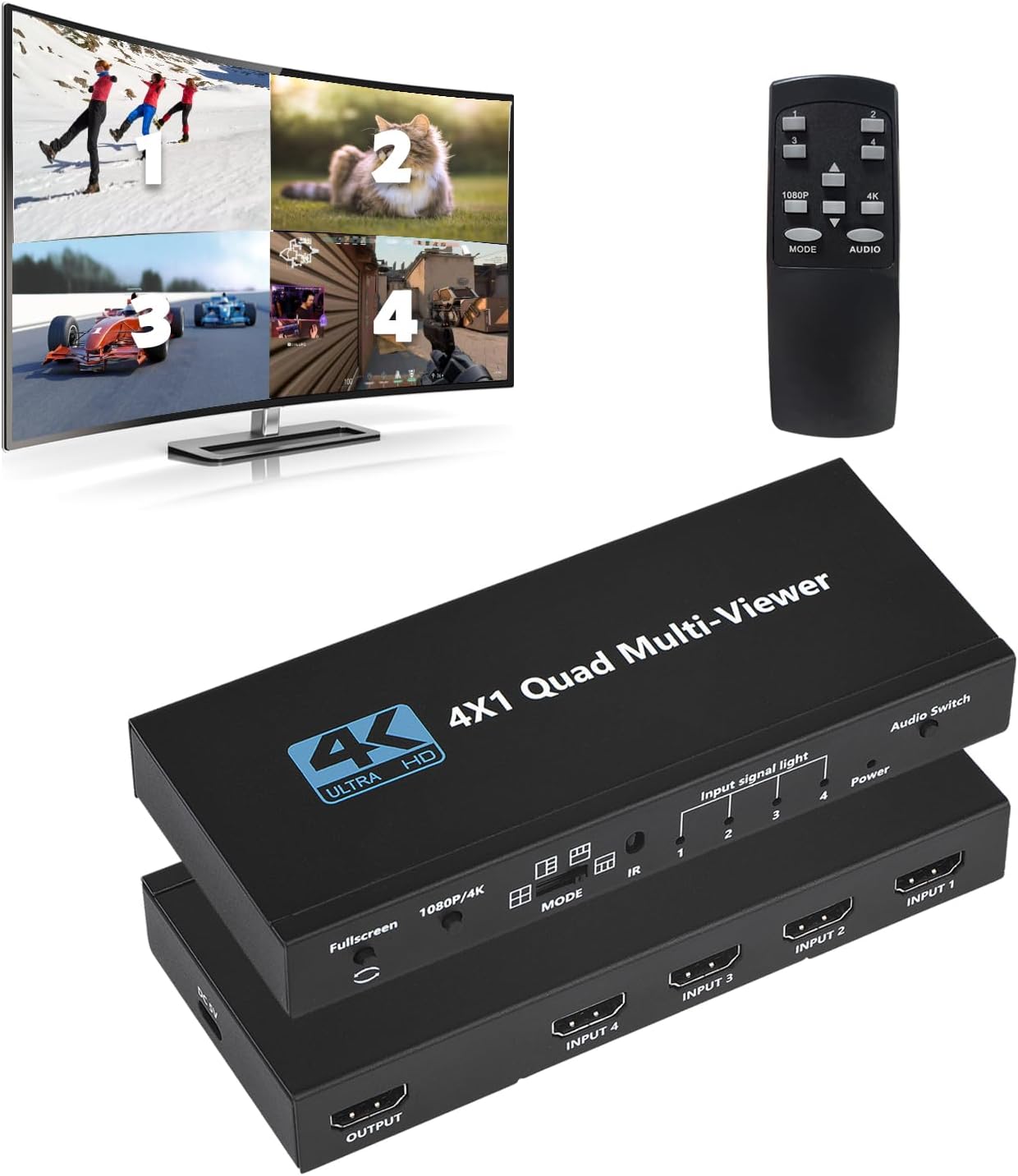
The HDMI Multiviewer Switch 4x1 is a professional-grade quad HDMI switcher that supports up to 4K@60Hz resolution and offers 5 versatile display modes. It enables seamless switching between four HDMI sources with both button and IR remote control, making it ideal for security monitoring, gaming setups, and conference rooms. Powered via USB-C, it delivers stable performance and easy installation for multitasking millennials who value efficiency and high-definition clarity.


| ASIN | B0B145ZNT9 |
| Best Sellers Rank | #304 in Audio & Video Selector Boxes |
| Brand | Groza |
| Cable Type | HDMI |
| Color | black |
| Compatible Devices | Camera |
| Connector Type | HDMI |
| Connector Type Used on Cable | HDMI |
| Customer Reviews | 3.6 out of 5 stars 62 Reviews |
| Item Dimensions D x W x H | 7"D x 4"W x 1"H |
| Manufacturer | Groza |
| Number of Ports | 4 |
K**.
(Updated-Audio Quirk) Does the job but takes practice to figure out how to operate it efficiently
I want to be able to watch all four NCAA basketball channels simultaneoulsy and this little gadget does the job. I plugged four Roku streaming devices into the intput ports and sent the ouput to my television. This device does the job but the learning curve with the remote is somewhat arduous. The instructions (if you can call them that) are sparse beyond belief. It labels the ports on the box and the buttons on the remote but that's about it. The way to figure out how it works - cycles through the myriad display mode, audion selction, etc - is pretty much learned only by experimentation. The buttons on the remote sometimes "stick" because they get hung up on the body of the remote: ber sure to press straight down on the buttons to avoid this. One addition that would REALLY improve its usability would be to add an "ID" button to the remote so each image temporarily (or permanently?) gets a small number 1-4 in the corner to show which input a particular image is. I'm continually having to figure out which of my Roku remotes is the one I need to change the channel on a particular window. There are a bunch of switches on the box itself but I find I can do everything with the remote. For the price, this thing is amazing and if you are willing to play with the remote to learn it you'll really enjoy using it. Th photos show four of the display modes: 4-squares, 1 large and 3 small with large on on top or bottom, and 1 large to the side of 3 stacked windows. Also, since having used it for a while now I've discovered a minor bug with the audio: sometimes when you switch from one feed to another the audio stays behind with the previous video, so you're watching one video but getting audio from another feed. Changing back and forth fixes it but this is somehwat annoying.
J**O
Great
Why did you pick this product vs others?: Does the job
A**H
Not compatible with video from Blackmagic 6K cameras
I purchased this with the intention of monitoring multiple blackmagic design cameras, specifically the BMPCC 6K and BMCC 6K full frame. The cameras output video over HDMI downscaled to 1080p, but this multiviewer does not accept the signal.
T**E
Doesn’t play audio from all inputs at the same time
Audio only outputs 1 hdmi input at a time. It does not do simultaneous audio output. Otherwise a great device, simple and functional. Runs via 5V usbc. Also if an input is unused, it displays vertical bars of colors, not just a black screen, God forbid you only use 3 inputs, it’s very annoying to have on screen.
I**E
I should have bought a higher quality kvm
The video KVM works, but the mouse and keyboard functionality is awful. If you are buying it for the video function, it works fine. Avoid it if you want a mouse and keyboard KVM.
M**Y
Works excellent
I wanted the option to view my cameras and watch TV while I do hair with sound and this did what I needed it to do
B**S
As A Switch, OK - As A Combiner, NO
You get what you pay for, and I would not recommend for anyone using heavy video or for productivity purposes. But, if you're wanting a general display where people aren't getting close to screen, it might work for you. When unit in fullscreen mode, it appears to bypass the box, creating a clean 1080 signal; however, when using the various quad display modes, all screens are blurry and low pixel rate. I suspect the box is down-sampling the inputs, then combining into a quad 1080 picture. Then, that 1080 version is then up-sampled to 4k to allow the button to switch between 1080/4k. Display can see that signal is changing between 1080 & 4k, but visually it is the same. (I.E. - it appears like the inputs are scaled to 960x540, then combined to create 1920x1080 and then upsampled to create a 4k picture.)
C**S
Opinión
Tenía otra espectativa sobre su funcionamiento, pero se puede usar para algunas cosas
Trustpilot
4 days ago
2 months ago