Buy anything from 5,000+ international stores. One checkout price. No surprise fees. Join 2M+ shoppers on Desertcart.
Desertcart purchases this item on your behalf and handles shipping, customs, and support to Kyrgyzstan.
🖱️ Elevate your workspace with the ELECOM HUGE — where precision meets comfort in wireless style!
The ELECOM HUGE Trackball is a premium 2.4GHz wireless input device featuring a large 52mm optical trackball with adjustable DPI (500-1500), 8 customizable buttons including advanced scroll functions, and a soft ergonomic palm rest designed for right-hand use. Compatible with Windows and macOS, it offers long battery life on 2 AA batteries and delivers precise cursor control with minimal hand movement, ideal for professionals seeking comfort and efficiency in their daily computing.


| ASIN | B0735584RM |
| Additional Features | 4 Way Scrolling, Ergonomic Design, Programmable Buttons, Wireless |
| Antenna Location | Office, Personal, School |
| Are Batteries Included | Yes |
| Are Batteries Required | Yes |
| Best Sellers Rank | #10 in Computer Trackballs |
| Brand | ELECOM |
| Built-In Media | AA battery (2), Receiver, Trackball mouse, user manual |
| Button Quantity | 8 |
| Color | Black |
| Compatible Devices | Laptop, Personal Computer |
| Connectivity Technology | USB |
| Customer Reviews | 4.2 out of 5 stars 3,258 Reviews |
| Enclosure Material | Plastic |
| Global Trade Identification Number | 04953103308152 |
| Hand Orientation | Right |
| Hardware Platform | Laptop, PC |
| Item Dimensions L x W | 7.2"L x 4.5"W |
| Item Type Name | ELECOM 2.4GHz Wireless Finger-operated Large size Trackball Mouse 8-Button Function with Smooth Tracking, Precision Optical Gaming Sensor (M-HT1DRBK) |
| Item Weight | 9.12 ounces |
| Manufacturer | ELECOM |
| Mfr Part Number | M-HT1DRBK |
| Minimum Required Operating System Version | Windows 7 |
| Model Name | M-HT1DRBK |
| Model Number | M-HT1DRBK |
| Mouse Maximum Sensitivity | 1500 Dots per Inch |
| Movement Detection | Optical |
| Movement Detection Technology | Optical |
| Number of Batteries | 1 AAA batteries required. (included) |
| Number of Buttons | 8 |
| Operating System | Windows 10, Windows 7, Windows RT8.1, Windows XP, macOS 10.12 Sierra |
| Power Source | Battery Powered |
| Range | 10.0 meters |
| Special Feature | 4 Way Scrolling , Ergonomic Design, Programmable Buttons, Wireless |
| Style Name | Wireless Trackball Mouse |
| Unit Count | 1.0 Count |
| Warranty Description | 1 year manufacturer |
N**M
As an MS Trackball Explorer user since The Win98/PS2 days, this is an excellent "replacement"
Quick Summary: MSTE users who don't have an MSTE - get this mouse as it's the closest "replacement" to date. Obviously, if one wants a mouse like the MSTE, then get an MSTE. But even a used MSTE costs a bit and you have to be careful of the cord. If one wants something Less Expensive that closely resembles the MSTE and is also cordless, then this is the best mouse on the scene since the MSTE itself. Update2: Trying to add some slightly better pictures and others that show the MS Trackball Explorer, Logitech Cordless Optical Trackmall, and the smaller Elecom "DEFT" trackball mouse. But some pictures are not loading to the site. Sorry. :( Update1: IMPORTANT NOTE: Waaay down in the comments (the oldest one at the "bottom" should be a link to the Elecom software download page and the English PDF manual. As this mouse is "very new" you *DO* need a more recent Elecom proprietary software to recognize this mouse if you wish to use it's three proprietary function buttons (F1-F3). Long Winded Review =============== This new Elecom Fingerball wireless mouse - the M-HT1DRBK - appears to have been released is June 2017 and has been available on Amazon since July 2017. In August I was about to order a second of the smaller Elecom M-DT2DRBKs when I stumbled over this new **larger** "HUGE" mouse and figured it was worth a try. The M-HT1DRBK just arrived and after giving it a ten minute test spin I just ordered two more. No clue if it will take "1-2 months" for the next batch to arrive, or if the price will drop from $85.99, but would say it is certainly worth the investment. FYI: It actually does say "HUGE" on the mouse itself. :) Comparisons to the MSTE (MS Trackball Explorer) ====================================== 1) It has a nice large "red ball" like a certain MSTE we all know and love. In fact, the Elecom ball is slightly BIGGER than the MS one. There were many reviews about the smaller Elecom mouse's "grey ball" having issues, and several people purchased a "blue" M570 ball to swap with the "grey" one. From my quick tryout of this new mouse with it's "red ball", would say that the quality looks to be significantly better than that of the smaller mouse's "grey" one. An excellent improvement. 2) This mouse is *MUCH LARGER* than the smaller "grey ball" M-DT2DRBK. Excellent for people with "larger" (aka normal sized) hands. 3) It is a bit wider than the MSTE, and Elecom moved one of the three proprietary "Function Buttons" to the right side of the ball. If you use their proprietary software, this would give you "two buttons to the right of the ball" just like the MSTE. 4) MOST IMPORTANT OF ALL. This mouse has a PALM REST. As this seems to be an alien concept to most mouse manufacturers I will state it again - this mouse actually has a place for the palm of one's hand to "rest" while using the mouse, so for the first time since the MSTE, there is actually a trackball that not only fit's one's hand, it is actually COMFORTABLE. Plus it doesn't have teeny tiny thumb-killing buttons like a certain L*git*ch Trackman. Wish I could show a decent side-view of the palm rest, but this can also be seen with via the pics on Elecom's web site. 5) ??? I would assume that being a wireless device, there may be an occasional "lag" in response times, but cannot say for certain. However there does appear to be a wired version of this mouse as well. It's part number (August 2017) is M-HT1URBK. Usage ===== Bulk of this review was written after only ten minutes of mouse use, so haven't had the time to give it an extended run, but observations so far are positive. "Weeks later" - Still great. Haven't tried the Elecom software yet myself (not using the F1-F3 buttons). - Seems to respond MUCH better than the smaller Elecom version (blue or grey ball). - Range seems to be about the same as the smaller one. About nine feet out it gets tricky and Line of Sight is critical. - The "left" button isn't as "tall" as the MSTE's, so my clumsy thumb is hitting the wheel, but this should be a minor issue. - ??? I read elsewhere that the "left" and "right" mouse buttons are "better quality" than the other buttons, that one should be able to tell the difference, that they should have made *all" the buttons "better quality", etc. Haven't noticed any difference between buttons yet. Too busy enjoying having a wireless mouse that actually fits the shape of my hand for a change. Customization - aka The Buttons ======================== So far as remapping buttons, "drivers", and support for various operating systems... Would assume this mouse works as a basic mouse in anything from XP up to Win10. You've got your Left, Right, Forward, Back and Wheel Buttons, plus the three Extra Proprietary Function Buttons F1-F3. Remapping the eight buttons and basic customization is where it gets interesting. Would assume one needs at least version 5.1.0 of Elecom's proprietary software to use/control all eight buttons. For now I am sticking with X-Mouse Button Control which allows configuration of everything except the three extra Function Buttons. Both programs allow for the use of multiple profiles for easy customization across different applications. Elecom's software (and English PDF manual) is available from their website. I will try adding possible links as a "comment" later as this review is too long as it is. Odd Future Issue (?) ================ Since the palm-rest is made of a "soft" material vs plastic, I wonder how it might hold up over time. Will it wear out? Time will tell.
N**.
Amazing product, love the feel!
I love this, I have both wired and wireless versions, the former being used with my desktop computer and the latter my laptop. This has the feel of my old Microsoft TrackMan, and works very well. I'm a gamer and for me it's much easier to use than a mouse (and doesn't aggravate my carpal tunnel as much). It's simple to connect using the provided dongle that plugs into a standard USB port, and the dongle stores tightly in the bottom of the unit, so minimal chance of it coming loose and getting lost. It's plug and play, so for basic use you can use the Windows (I haven't tested it on a Mac) default mouse driver to adjust button assignments, but the manufacturer has it's own software that gives you far greater flexibility. If you have either version of this unit (wireless or wired), and travel with it, I highly recommend getting the Hermitshell case (search Amazon for M-HT1DRBK) to protect it, you won't regret it. I've been using the same case since 2018 when I bought my first of these trackballs, and it's still in fantastic shape. Note: If you have the wired version you just have to coil the cord on the bottom of the unit. The fit will be tight, but it does work. The only downside to this unit is that it will eat batteries if you have it on high performance mode. It would be much nicer if it had an internal rechargeable battery. I'm not taking anything off for that as it works perfectly well for me in the standard mode (I don't compete in e-sports any longer, so no need for high precision), and I get about 4 months out of a 1 set of batteries. It might be longer if I didn't forget to turn it off occasionally. This is a product I highly recommend, or I wouldn't have purchased 4 of them (2 of each over the years). This was a replacement for one that I'd had for a couple of years, but it got dropped and the buttons broke, otherwise I think it would still be going strong.
J**R
Nice and big, but a little off kilter for me.
I have been searching for a good trackball replacement and wanted to switch from a thumbball to a fingertip ball. The big ball square didn't work for me so I decided to try the Huge. Unfortunately it isn't working out for my thumb and hand. Quality: As for the build and feel of the trackball, it has a good weight and feel to it. It does not move around as I am using it. It looks very durable and would last a long time. I cannot comment on battery life as I have only had it for a short time, but the AA batteries seem to be doing very well even staying on the whole time and being ready when I reboot the computer. Connection: It only has the 2.4ghz dongle and no bluetooth, so the connection was a little spotty when plugged into my usb hub from my Mac Mini. I did get better connection when plugged into the main SSD hub on the bottom with a faster communication speed. Settings and speed: Once connected well, it is very responsive and the mid setting for me was perfect. Value: I think it is a good value for a large trackball. If your hand is very flexible in your thumb, it may work very well for you and the buttons and customization is great. Scrolling: That's where my main issue comes in. When Your hand is on the soft pad and resting near the ball, it is very comfortable, but to actuate the scroll and the button on the scroll, it puts my thumb in an awkward position and I have to reposition to get at it with more accuracy. Once I reposition, the heel of my hand falls off the pad and puts my hand at an angle for the upper buttons. Sadly I may have to return to a thumbball trackball. It did connect well with my Mac Mini and the forward and back buttons worked out of the box. With the Elecom software I was able to customize all the buttons to my liking. Al-in-all, this is another trackball I really wanted to like and be my main input device, but my weird hands will not let me. Hope this was helpful.
L**N
The best computer input device I have used in over 30 years of programming.
This is by far, the best computer input device I have used in over 30 years of programming. And I say this despite a few negatives. That is how good this trackball is. The pros: - The trackball is very large, allowing both rapid movement across the screen and very fine, delicate, movements to move the cursor with great precision. - The scroll wheel is not only adjustable for degree of vertical scrolling, but the wheel can be also moved up and down for horizontal scrolling. Pressing the wheel like a button toggles the page and line scrolling. 5 functions in one wheel. - In addition to the 5 function scroll wheel, there are 7 (more than I have ever seen on this class of device) different buttons so with this device you can perform many different functions. There is software that allows you to set each of the 7 buttons to perform any of several functions, or emulate any key, or any combination of up to 3 keys (like Control Shift K). I set it for Left Click, Right Click, Copy, Insert (Paste), Enter, Delete, and I use one button to call a highly used Macro shortcut key combination. In addition the software allows other settings. - The HUGE (yes that is the name) device is just that. It is brilliantly designed so it fits your right hand (left handers are out of luck) with your wrist on a very soft pad and the trackball and all the buttons are manipulable with your fingers only, No wrist or device movement so the seemingly larger footprint is really the same as or less than the area needed by a mouse. Unlike a mouse however, you do not need a flat or smootth surface for the trackball to rest on. It's fine on a pillow, on youir leg, on the arm of a chair, on a table, on top of a book or newspaper, and can operate at almost any angle. -- I have had very bad luck with wireless input devices as I am very sensitive to the latency time between the movement of the mouse and the movement on the screen. This is not a problem with a USB or otehr wired input defice, but with no wire there is always some latency. The Japanese engineers of this Huge trackball have reduced the latency period so much, that I never even notice it on most movements and it is quite small in the 1 out of 70 or 80 moves where Windows or the Apple OS is adjusting and cleaning up its memory. A first class achievement. There is another problem with most wireless input devices: They are energy hogs. If the battery is not rechargable, you might go through batteries very rapidly and expensively. I almost did not buy this for that reason. This requires 2 AA batteries. I have used mine for over 3 months with the original cheap "no-name" batteries that come with the device. Duracell or other class batieries will last even longer and I cannot yet report on this point, but it cannot be too bad as a pair of batteries will last at least substantially longer than a 3 months. It is important that you use the on-off switch to turn the device off if you are finihsed for a session. I generally turn mine on when I boot up in the morning and do not turn it off until I retire at night -- typically about 14 hours. With that, my batteries have lasted over 3 months, so this is pretty impressive. My great enthusiasm exists despite the following negatives: - The instrcutions are not bad. They are terrible! - The website that you have to go to download the software is also terrible and hard to find your way around. - When you do download the software, it is not intuitive as a Microsoft program would be. So you have to work your way through some trial and error and struggle with the on line instructions. Fortunately it is not that complicated. - I am pretty sophisticated with computers and it took me about 4 hours to finally get the device installed and the software configured. Don't worry at first about how you configure the buttons. Use the factory defaults. Then when you get the hang of it and see how time saving it can be, then play with different configurations of the buttons. The Huge trackball is a little pricey, more than twice what a lower-end, wireless, Logitec mouse costs and about 10 percent more than other upscale devices cost. There are plenty that are more expensive and not as good. But I think that if there was ever a good trade off to pay a little more momey for getting quality and functionality, this is it.
J**S
Great ergonomics, but...
I am leaving a review of the Elecom Huge after over a week of intensive "testing" of several trackball mice. Let me begin by stating that I am new to the trackball world so these are my observations from that point of view and I'm leaving these reviews in hopes that it will help someone else who might find themself in a similar situation to what I was in a week ago with no experience with trackballs in a world of opinions. I have mid-sized hands with somewhat thicker "carpenter" fingers and I bought this item to replace a mouse for general and light CAD use. I have a CAD mouse for more intricate work but over the years of design and IT work I'm beginning to develop wrist discomfort. This was the first finger trackball that I tried after testing a Logi M575 that a friend brought over try for Fusion work. I was hooked on the ball, but I wanted a little more control so I went with the finger style. I found the thumb style to fatigue my thumb joint a little too much. Right out of the box I was impressed by how relaxed my wrist felt on the Huge. I liked the size of the ball and the smoothness of the scroll wheel. It seemed very intuitive to someone new to the trackball realm. The two things I couldn't get over were the stretch of the side buttons with my somewhat shorter fingers and of course, what many of the other reviews talk about, the "stiction" of the ball itself. I did like to overall ergonomics, but decided to defer to the Deft Pro for my next try. I'll leave a review there as well, but essentially I found the Deft Pro to be a better fit for my shorter fingers and the ball a little easier to control for more intricate commands in Fusion while cradling it between my first and middle finger and occasionally passing it off to my right ring finger. I also liked the way that my hand relaxed in a "cradle" position over the Deft Pro while allowing me to rest my wrist lightly on the table. The Huge allowed a straighter relaxed wrist on the device overall, but the Deft Pro felt like it was easier to control for smaller movements. Again though, the bearings on the Deft Pro were too sticky for me and I ordered the bearings to replace them as many have suggested, but decided to return both units before I modified them after finally settling on a combination of a much smoother out-of-the box Slimblade pro for general use and a 3dconnexion CAD and Space mouse combo for design work. The CAD mouse has a really nice form factor for a mouse and I was immediately able to find a comfortable relaxed position on the ambidextrous Slimblade Pro. I didn't have to 'hover' on the Slimblade as many reviews have noted. I realize that this type of setup isn't easy to obtain for a lot of people so I'll leave with this final word based on my spending a week with all three trackballs. Both the Deft Pro and the Huge are great trackballs and a lot of people like them once they are modified to fix the sticky ball issues. As a CAD guy I didn't like the click of the Deft Pro scroll wheel and I though that it feel cheap compared to other scroll wheel mice I've used, but I could have gotten used to that because of the Deft Pro's overall precise control factor if it weren't for the "stiction". Elecom makes track balls feel intuitive, even for new believers like myself, I just couldn't get past the quality issues with the bearings right out of the box. I was either going to spend less for a mouse than the price of Elecoms and deal with the issues they might have caused or spend more and get the performance that I was looking for without having to modify a unit right from the start. These are just my opinions, but I hope this helps someone else who may have been reading reviews for hours, and testing units like I was just to find a suitable replacement.
J**E
Working good!
Update: I just purchased my 5th Huge wireless trackball; I have one in my home office, and use three at work in different locations, two that are just a few feet from each other. I love them and 4 of the 5 work exactly as expected. The 5th one was bought used and was likely returned for the same problem I encountered with it, but thought it might be a set up problem on my end...its not, its the trackball. Whenever I plug my laptop into the system that trackball is attached to, I have to unplug and replug the usb transceiver to get it to work. Once its working, I can go all day with it working fine, even if the laptop isn't used for a while and goes to sleep, but once I disconnect the laptop and reconnect it, i have to also disconnect the transceiver and reconnect it to get it to work again. Some other reviews mention that. The other four work perfectly, especially after a week or so of use to 'break them in' to where the ball responds without sticking when first trying to move it. They do break in. My oldest one is a couple of years old now, so I am also happy with durability. I previously bought the huge version and the smaller original deft, both wired. I bought the wireless one I am reviewing about a week ago, as "used--very good". I'm very happy with it; its a keeper, if set up correctly. First, make sure the transceiver is located in a position where there isn't interference of some kind. I originally placed it in the back of a caldigit T3 thunderbolt dock and it was working, but had the slow start and perhaps hard to be precise with like some people have talked about. For various reasons, I replaced that dock with the new Plugable thunderbolt dock, and noticed how poorly my logitech wireless keyboard was working when I placed its transceiver and this trackball transceiver to the back of the plugable dock. I moved both transcievers to a 4-port USB hub so they are still out of the way but not behind objects, and this trackball is now working excellently, with no hesitancy at all. the slow start and imprecision is completely gone--BTW, I have always had it set to the middle position in the back (for precision), and the middle position for speed. It doesn't emit the high pitch hum that came from the small wired deft, and I have found it comfortable to use for hours on end. I downloaded the software ( I am using mac OS Big Sur) and quickly programmed the keys. For me, I have both of the far right keys set to function as a right click just because its less confusing for me to do so. I have the smaller function keys programmed to cut and paste...but it will take me some time to get used to using them for that--I am coming most recently from a logitech trackman that is only 2 button, so I have to rewire my brain to use the extra functionality. Same with the track wheel. It works great, I just have to train myself to use it. I've been using trackballs for 20+ years, and can't get the hang of thumb-balls. If logitech had a more advanced finger driven trackball than the trackman, I probably would have gone that route, but the whole point of moving from the trackman was to go wireless. The new kensington is having mixed reviews and was too pricy to try sight unseen. I'm quite satisfied with how this telecom is working. My use over the past week has included some graphics work where precision is needed, not just documents, spreadsheets, and webpages. Thumbs up. Update July 2021--I must like these because I now have three of these (plus 2 wired ones) for different work stations I work from during a typical week.
S**O
Great fingertip trackball
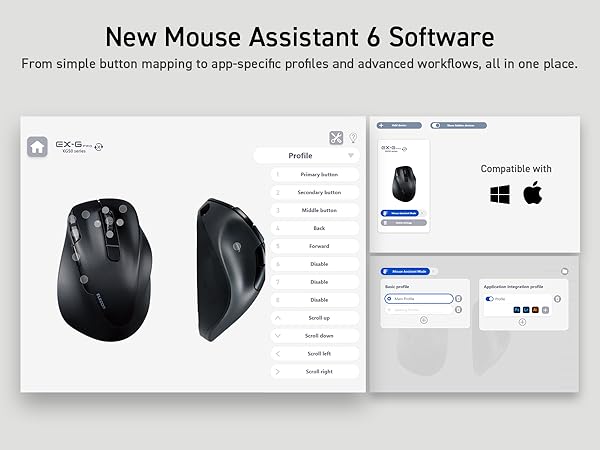
First, I’m a long time trackball guy due to rsi from my job going back to the MS intellimouse trackball explorer in the early 2000’s. Wore a few of those out. I dislike the thumb-ball varieties that are much more common as I prefer the fingertip precision more. Tried the square trackball (Kensington expert) for many years and it was the best option until the Elecom huge. I love the feel (i have large hands) and have been using this every day since i bought it in 2020. Still holds up!! Wearing out the padding a little, but still mechanically excellent. The button setup is a little wonky (been using mouse assistant 5, but upgrading to 6 later today), but once you get it sorted, it just works and I very much enjoy it. I do wish it had a battery charge indicator as it just stops working when the battery dies. Might upgrade to the huge plus…. If you have large hands and prefer fingertip trackballs, this is what you want.
I**A
Great overall but hard dive-in expirience
I'm using this trackball for around a year already. So hope my review helps somebody. I went to Huge after my old Microsoft Explorer trackball which became really old. The transfer was not that much easy and soft as buttons are not in same place they were before, shape of device is "same but different", but the most issue was position of the wrist. I have to make angled support for Huge as I started feel pain after several hours of work. That last for several weeks, then I got used to Huge and now I feel this is great trackball in overall. I'm not using macro functions and additional buttons but software is capable and advanced. As for built quality - it is high, I have no complaints, no cheapo-feel buttons and flimsy plastic. Battery life is decent, I'm using rechargeable batteries and they last at least for month or longer. Wireless connection is stable even with "low power" mode, at least on my desktop within 1 meter in between. So 4 stars only for ergonomics as I wish body could be more angled like a vertical mouse, while I don't have any problems using it right now, dive-in experience was not smooth for me. But this is really really great product and purchase so I never regret it.
Trustpilot
5 days ago
3 weeks ago