

Buy anything from 5,000+ international stores. One checkout price. No surprise fees. Join 2M+ shoppers on Desertcart.
Desertcart purchases this item on your behalf and handles shipping, customs, and support to Kyrgyzstan.
🎮 Capture Every Frame, Stream Without Limits!
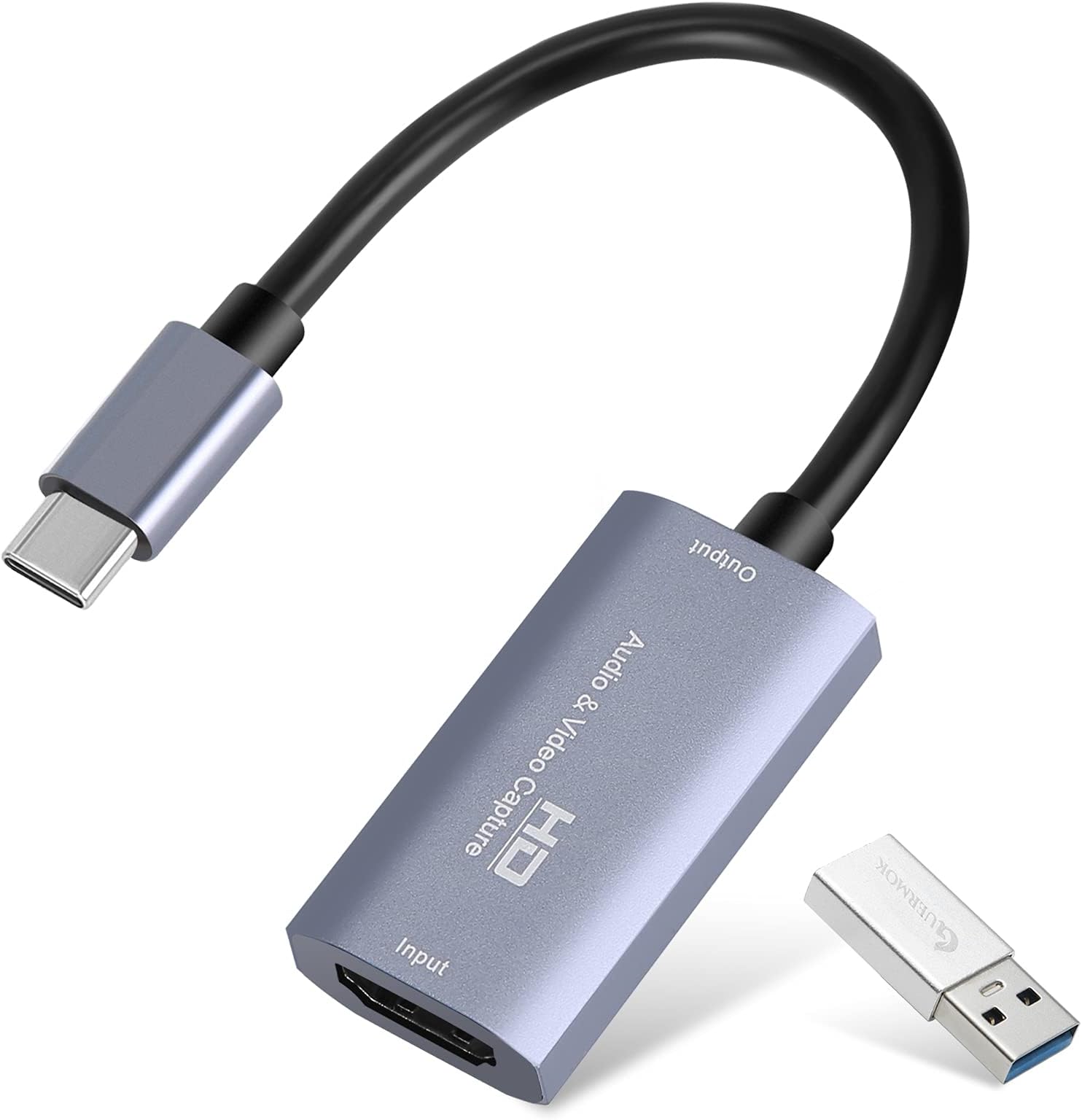
The Guermok Video Capture Card delivers professional-grade 4K video capture at 30Hz and 1080p at 60FPS via USB 3.0 with ultra low latency. Its plug-and-play design supports Windows, Mac, Linux, and Android, making it ideal for gamers, streamers, and content creators who demand crisp visuals and lag-free performance across consoles and cameras. Lightweight and portable, it’s your ultimate tool for seamless live streaming, recording, and video conferencing.


| ASIN | B08Z3XDYQ7 |
| AV Output | MPEG-4, MOV |
| Antenna Location | Video Recording |
| Best Sellers Rank | 2,304 in Computers & Accessories ( See Top 100 in Computers & Accessories ) 3 in External TV Tuners & Video Capture Cards |
| Box Contents | Capture Card, Installation Guide, USB Adapter |
| Brand Name | Guermok |
| Compatible Devices | [Gaming Console, Personal Computer, Camera, Webcam, DSLR, Switch, TV Box, HDTV] |
| Country of Origin | China |
| Customer Reviews | 4.4 4.4 out of 5 stars (3,137) |
| Hardware Interface | USB 3.0 |
| Item Weight | 30 Grams |
| Manufacturer | Guermok |
| Manufacturer Part Number | Xbox Series |
| Minimum System Requirements | A computer system with one of the following operating systems: Windows 7 or later, Mac OS, Linux, or Android. Compatible devices such as Xbox One, PS3/PS4/PS5, Camera, Webcam, DSLR, Switch, TV BOX, HDTV, Potplayer/VLC, ZOOM, OBS Studio etc. are also required. |
| Model Name | Xbox Series |
| Model Number | GM-29A |
| Operating System | Windows, Linux |
| Other Special Features of the Product | Lightweight, Portable |
| Platform | Android, Mac, Meta Quest, Nintendo Switch, PlayStation, Steam Deck, Windows, Xbox, iOS |
| Product Warranty | No Warranty |
| Tuner Type | ATSC |
| UPC | 711731466194 |
| Unit Count | 1.0 count |
| Video Capture Resolution | 4K |
J**N
No hassles, no problems, no worries.
Worked perfectly in my MacBook Pro. I connected one end of an HDMI cable to my GH6 camera, the other end to this card, plugged that into my MacBook - and it popped up a window asking if I wanted to allow it to connect. Duh… yeah? Then, I opened OBS studio, chose a Video capture device, then an audio capture device. Set them both to this - and it worked. No hassles, no problems. Love it. Great image and sound quality too. No lag either!
D**E
Excellent
Excellent. Works well with MacBook.
H**Y
Good!
Works Good
D**R
Super Useful Dongle (Latency Tips)
I got this so that I could use my Mac and my iPad Pro as portable displays for my Xbox series X. When I first tried it, it just had way too much latency. For context, I've been using GeForce now on my Mac, and that had less latency than using this dongle with my Xbox. I was actually going to return it, but decided to give it one more shot before I actually sent it off. I discovered that if I went into my Xbox's video settings and turned off all of the options for 4K and YCC 4:2:2, then it started to have much lower latency. The YCC setting in particular seem to have the biggest effect. Another tip for getting the best experience out of this with Apple devices is that you should definitely just go with the Dongled app. It's free and open source and actually scale to a Mac screen even though it's an iPad app. It's extremely lightweight and seem to have the lowest latency out of the apps. I tried.
M**.
Plug and play 4K
Excellent build quality and good value.
S**S
Good value for money
Connects easily from Nintendo Switch to PC. Video and audio quality are great. Only issues I’ve had are small latency issues and screen stutters in games with fast movement. Overall definitely good value for money and a good purchase!
D**.
Could not get to work
With all the YouTube reviews including set up and using forums I went ahead and purchased. When received this item I plugged my tv box to the capture card to view on my Mac.. With very poor instructions and no online help for this product, I again had to review YouTube for help in getting the software to down load to my MacBook Pro. I spent several hours to get the image on screen but was unable too. The TV box HDMI output worked and the software on the computer worked so all I can assume that the capture card was not working.
A**R
Works well
Allowed my son to connect his Xbox to his computer console. He found it easy to connect and says he gets better picture quality than before . Good value for money
C**N
Ottimo
Funziona benissimo, è utile per convertire il segnale audio/video da HDMI a USB-C
M**H
good
it is good and it is works well as expected
K**I
Besser als ich es für den Preis gedacht hätte
Wollte unbedingt eine Möglichkeit haben mit meiner Nintendo Switch am Computer zu spielen. Dafür lassen sich Capture Karten gut nutzen und ich habe nach einer gesucht, die nicht den Preis einer Elgato hat, da diese ja nen stolzen Preis tragen. Diese hier habe ich entdeckt und nach anschauen der bereits vorhandenen Rezensionen, dachte ich mir: "Diese probier ich aus." Dank Prime schneller Versand - top. Kleine & kompakte Verpackung - gefällt mir! Ich nutze die Karte über das Programm OBS. Angeschlossen, Karte sofort erkannt und Treiber wurden direkt installiert. -Bild ist qualitativ gut. -Bisher keine Ruckler/Einbrüche bemerkt. -Input lag wirkt für mich nicht stark. Merke keinen riesen Unterschied. Dazu muss ich aber auch sagen: Auf der Switch spiele ich eh keine comp.-Spiele. Da werden nur entspannte Spiele genutzt, wie Animal Crossing, etc.
L**P
Super carte d'acquisition usb
Fonctionne super pour capturer un flux HDMI vers un pc. J'arrive a récupérer le flux vidéo sur HDMI en sortie de télécommande d'un drone et de l'envoyer sur OBS pour streamer via mon ordinateur. Attention que si le périphérique est reconnu comme usb2 il faut retourner le connecteur usb-c et il sera vu comme usb3
A**N
Lag is about 1 sec. Good for recording, but not for gaming.
No matter what kind of software you are gonna use, the card adds about 1sec delay. 1080x60fps is supported.
Trustpilot
3 weeks ago
1 month ago