We remain fully operational. Our teams are working around the clock to ensure your deliveries continue safely.

DOWNLOAD THE APP


Customer Services
Copyright © 2025 Desertcart Holdings Limited
DOWNLOAD THE APP
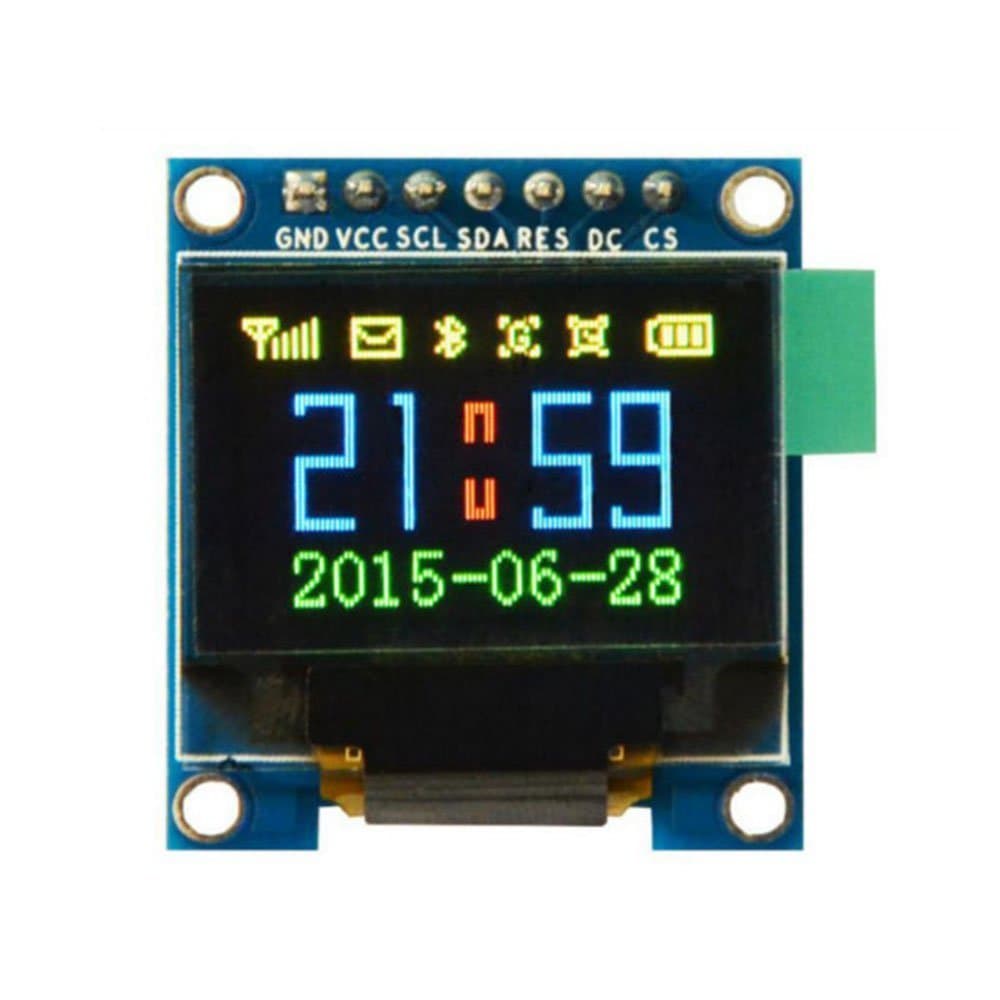
🎯 Elevate your DIY projects with vibrant OLED brilliance!
The HiLetgo 0.95" 7-pin SPI OLED Display Module features a sharp 96x64 resolution driven by the SSD1331 chip, delivering 65K full-color visuals. Designed for easy integration with Arduino, STM32, and ESP32 platforms, it offers plug-and-play setup without soldering. Its low power consumption, wide voltage range (2.8-5.5V), and fast SPI interface make it ideal for wearable tech, compact displays, and responsive embedded applications.
| ASIN | B0711RKXB5 |
| Best Sellers Rank | #814 in Single Board Computers (Computers & Accessories) |
| Date First Available | May 19, 2017 |
| Is Discontinued By Manufacturer | No |
| Item Weight | 0.317 ounces |
| Item model number | 3-01-1401 |
| Manufacturer | HiLetgo |
| Package Dimensions | 3.74 x 2.24 x 0.75 inches |
S**2
Perfect for wearables
Until fairly recently OLED screens were black&white. Now, full colour is possible with this screen. It's clear, vibrant and simply works. Ucglib and Adafruit libraries work without issue on this SPI screen. It has been tested on an Arduino Nano, Arduino Uno and Arduino Esplora, running faultlessly on all 3. The Esplora only has a 5V VCC output, no problem, the screen runs on 3.3V or 5V. It's a really good, well made product. See the video for various tests and a cheeky Halloween extra.
F**.
Works fine with ESP32 with Arduino IDE
Wrestled with this for a while then using advice from another reviewer, got it to work on an ESP32. 1. RandomNerdTutorials to get your ESP32 to work. 2. Added Libraries to IDE: Adafruit GFX and Adafruit Adafruit SSD1331 3. File --> Examples (from Custom Libraries) -->> Adafruit SSD 1331 OLED.... --> test 4. Then changed the '#define' pins to: sckl (SCL) 22; mosi (SDA) 21; cs(CS) 5; rst (RES) 17; dc (DC) 16 5. 'Selected (removed //) from the command labelled Option 1: 6. 'De-Select (added //) in front of the Option 2 command then plugged the SSD 1331 into the proper pins, uploaded the sketch and it works great. It's sharper in real life than on the attached video. I think you could do about the same thing to get it to work on an ESP8266 but I think you also need the #include <SPI.h> instruction. I'm pretty sure the SPI stuff loads with ESP32 but you have to specify it for an ESP8266.
S**I
Good display, bright and consistent colors.
This is a very good replacement for SSD1306 monochromatic OLED, even if it has a bit lower horizontal resolution. I clock SPI line at 19 MHz provided by Silicon Labs ARM micro-controller board, so the display image appears practically immediately. Currently the display is used for games development.
R**G
Nice OLED color display that is easy to use!
This review is for HiLetgo 0.95" Inch 65K SPI OLED display. In term of hardware, the oled display has seven pins in total and five of the pins are used for the SPI interface. In term of software, if you plan use Arduino IDE, Adafruit has good driver support on this. Just search for "SSD1331" under library manager, you can install the driver easily. The nice thing about this driver is that it supports software SPI meaning that you can use any pins for the SPI interface. Of course, it will be slower than hardware SPI. However, for the sake of sanity test of this color OLED display, I just want to make the wire connections as easy as possible. Initially, when I received the display, I was worry that the screen is too small, but it turns out both color and text from the display are very sharp and crispy. Due to the high contrast, the viewing distance is quite good despite the screen size is only 0.95 inch. It also has wide angle range of display. I would highly recommend this color display for any project that requires a small color display (e.g. wearable, IoT).
C**R
Poor build quality
Using with Arduino. It initially didn't work. While I was fiddling around with it, it flickered. Investigating further, I found that it would work if I firmly held the flex cable against the PCB. Looks like a bad solder joint between the flex cable and the PCB. While it's on, though, it's a nice display. Very bright. I decided to take a chance and retouch the solder. It seems to work OK now, but I really shouldn't have to do this. Knock off 2 stars for quality control.
A**E
Programming =performance
Nice display, if programmed “correctly”-
D**R
Eye candy for the IoT world
A tiny color OLED? What's not to love. This thing will work with virtually any microcontroller, as programming libraries are widely available. OLEDs have the distinct advantage of using power only for the pixels that are illuminated, so you may be able to save battery power with this. Of course, an e-paper display would be even better, power-wise, if you can cope with the very slow refresh rate. But color is just SO nice to make it quick and easy to draw your eye to a particular reading, and if it's flashing red- go turn off that boiler that you're monitoring (well, maybe don't use it for that). Get this one here on Amazon, don't wait for the slow boat.
O**S
Ordered 2, one dead
Ordered two of these. First one installed worked great. Just now got around to a project for the second display and it does not work. Even replaced the working unit with this one and this one is dead, or displays for a millisecond then goes black. If you buy more than one, test both right away. I will from now on. Probably too late to ask for a replacement. Live and learn.
R**N
My first unit came defective, but HiLetgo solved it immediately! Very friendly and prompt action from their side. Thumbs UP!! New unit came in and works great! I love these small displays! Its super bright and clear! I use it to display PID variables from a BLDC motor. Connected to a Arduino Nano You can add them to all your projects.
A**ー
ドット落ちなどもなくしっかり動作しました。 Arduinoではu8g2などライブラリも豊富で使いやすいです。 ライブラリを使わなくても範囲を指定し、各ドットのデータを送信するだけで描画できます。 また、直線や資格、塗りつぶし、コピーなどのコマンドが用意されており高速で駆動することもでき、便利です。
ろ**ー
通常のOLEDだと白黒のOnかOffかで、中間のグレーが出ないのですが、 これは中間調も出てそのうえRGB565のカラーも出るため、とてもお得です。 ただし、ラズパイカメラの動画表示に使いましたが、 SDA、SCLにノイズが乗るわけではないのに、WiFi通信すると画面が乱れました。 ラズパイ側の問題なのか、このOLEDの問題なのかは不明ですが、そこが残念。
K**様
ドット絵を表示して遊ぶために購入。 小さい箱に梱包されて届いたので、配送時の破損は心配なさそうです。 ArduinoUNO、Raspberry Pi Zero Wに繋げて普通に動きます。 Raspberry Pi Zeroの場合、ライブラリはWiringPi、raspberry-ssd1331を使用。 配線は添付図参照。 以下、自分がハマッた箇所。 ※コンパイルは"-lwiringPi"を付けないと通らないので注意。 例)gcc ssd1331_test.c -lwiringPi -o spi_test ※bmpファイルは「GIMP2」等で16bitBMPファイルに変換すること。(ペイントでは変換不可)
G**ア
納期までに受領完了した旨の連絡と下記問題の問い合わせをしたが、1週間たっても何の音沙汰も無いので☆2とします。 1) ESP32に繋ぎ、適宜必要なライブラリー等をgithub等からDL導入し、VSPI接続にてデモの表示サンプルスケッチで動作確認したところ、「赤色」の全面表示モードで右上側にドット落ち(添付写真参照)を発見。(青色と緑色は正常と思われる。) 2)基板裏側に実装されている黄色いタンタルコン(?)'475'が容易に脱落した。(半田付け不良?)
Trustpilot
2 weeks ago
4 days ago