Buy anything from 5,000+ international stores. One checkout price. No surprise fees. Join 2M+ shoppers on Desertcart.
Desertcart purchases this item on your behalf and handles shipping, customs, and support to Kyrgyzstan.
⌨️ Elevate your number game—wireless, precise, and always ready to crunch!
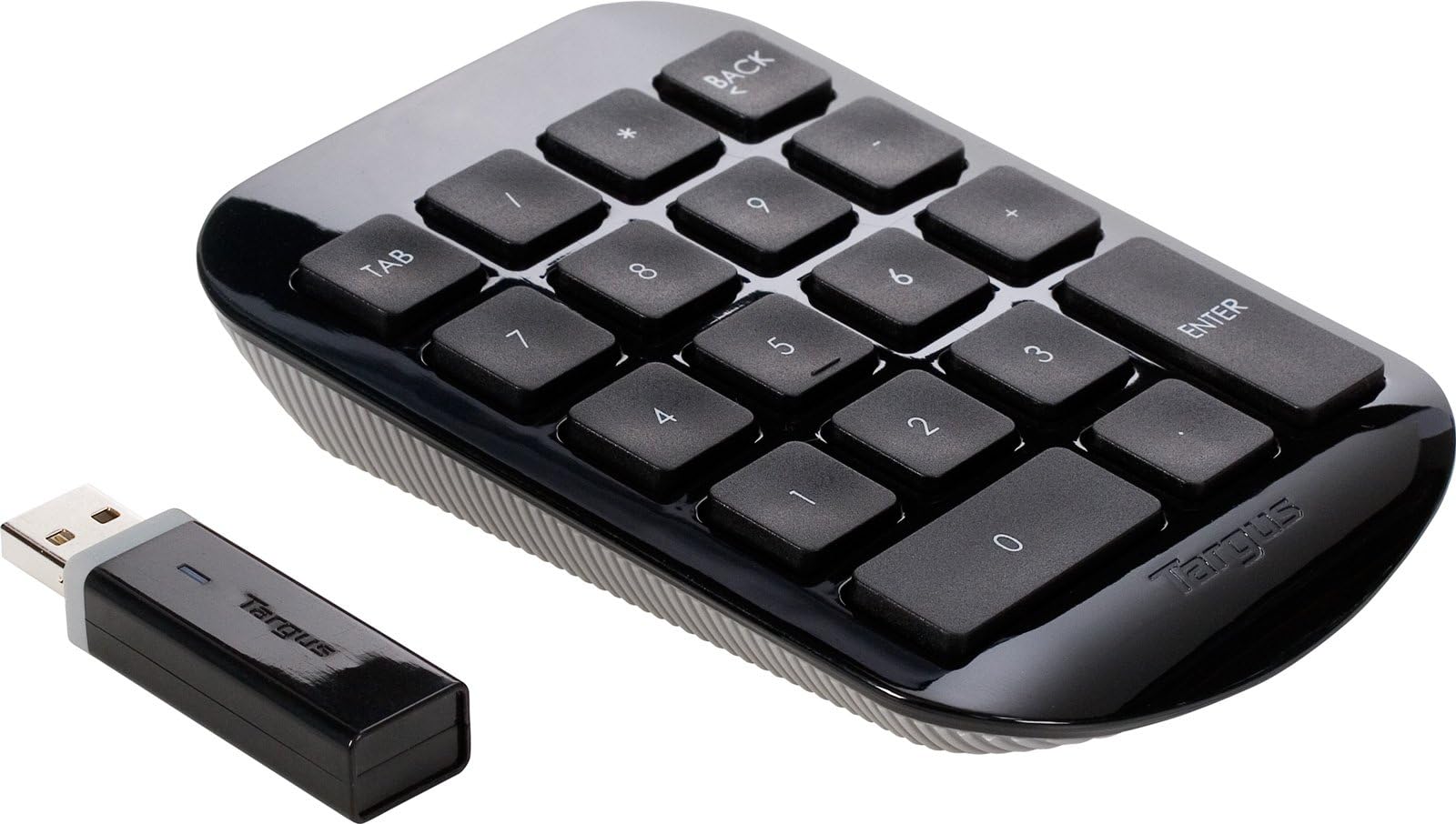
The Targus Wireless Numeric Keypad (AKP11US) is a sleek, full-size 19mm key numeric keypad featuring 2.4GHz wireless connectivity with a 10-meter range, compatible across Windows, macOS, and Chromebook. Designed for professionals who demand speed and accuracy, it includes an ergonomic tilt to reduce wrist strain and a built-in battery life indicator to keep you powered up. Its compact nano USB receiver conveniently stores inside the device, making it perfect for office, home, or travel use.


| ASIN | B002NUYTCA |
| Additional Features | Ergonomic |
| Antenna Location | Office |
| Brand | Targus |
| Built-In Media | Protective case, case |
| Button Quantity | 19 |
| Color | Black |
| Compatible Devices | Laptop |
| Compatible Operating System Family | Windows |
| Connectivity Technology | wireless |
| Customer Reviews | 4.2 out of 5 stars 476 Reviews |
| Enclosure Material | Noy applicable |
| Global Trade Identification Number | 00887606182862 |
| Hand Orientation | Ambidextrous |
| Item Dimensions L x W x H | 4.96"L x 3.46"W x 1.18"H |
| Item Type Name | Targus Wireless Numeric Keypad (AKP11US) |
| Item Weight | 132 Grams |
| Keyboard Description | QWERTY |
| Keyboard Layout | QWERTY |
| Language | English, French |
| Manufacturer | Targus US LLC |
| Mfr Part Number | AKP11US |
| Minimum Required Operating System Version | ChromeOs 134, Mac OS 10.15 Catalina, Windows 10 |
| Model Name | Wireless Numeric Keypad |
| Model Number | AKP11US |
| Number of Keys | 104 |
| Number of Sections | 1 |
| Power Source | Battery Powered |
| Processor Count | 1 |
| Recommended Uses For Product | Office |
| Special Feature | Ergonomic |
| Style Name | Wireless Numeric Keypad |
| Switch Type | Membrane |
| Theme | Office |
| UPC | 168141474880 001910344222 151903022283 803982739650 926362464642 887606182862 172302699029 069060096699 872182817116 041114200740 999992309447 057475307486 617407429343 126501647251 072101116577 763615797641 666670041660 071030518209 999994656167 999993502380 777787371073 092636246464 132017754451 163120275038 523160897988 012300308663 |
| Unit Count | 1.0 Count |
| Warranty Description | Limited One Year Warranty |
| Water Resistance Level | Not Water Resistant |
B**E
Works great--BUT it's meant for PC, not Mac
I'm a Mac user, and I bought this for use with Sibelius, a music composition program that relies heavily on a keypad--not for number input, but to control a toolbar. I was dismayed when I realized this keypad had a Windows layout and therefore a few of the keys were being interpreted incorrectly by my computer. After trying just about everything, I was finally able to solve this problem (for me) by using key remapping software. But that problem arose from my own stupidity--just wanted to clarify this for anyone else who might run into a similar issue. (shouldn't be a problem for number crunching, just realize it will have a Windows layout) Anyway, other than that things are great. As long as it is relatively close to the USB dongle this thing works like a charm. Durable, nice design, and even though I always accidentally leave it on the battery hasn't died on my yet (it uses a single AA battery.)
W**N
Built well, excellent price, works perfectly.
It works great! The tab key is a huge lifesaver. I would have liked the USB receiver to be smaller but that's really my only complaint. Every wireless keyboard has some delay but this one is minimal at its worst. It was a great price, it works wonderfully, and the USB component fits into the keypad itself when I'm not using it so I don't have to worry about losing it. Initial start up wasn't as smooth as it was supposed to be but the troubleshooting provided in the user guide worked like a charm and I've had no problems since. I am using this device with a Lenovo Yoga 11s with Windows 8.1
C**G
Great keypad
This is a great addition to those who regularly type in numbers on their laptops. I work with numbers quite a bit, and it's pretty annoying when you have to type in a series of numbers on your laptop's keyboard. Even when you use the numeric keypad function on the laptop, the diagonal setup of the keys makes it pretty hard to get used to. This little gadget helps solve that problem and makes inputting numbers on your spreadsheets bearable. However, there are some differences between this and your usual laptop keypad. The biggest differences is that there is a backspace key and a tab key. Since I've only gotten this recently, I still haven't gotten used to the fact that I can use the backspace key as well as the tab key to move around. In Excel, you can tab to move right and hit enter to move down. So, you can imagine that this must be a pretty nifty feature if you can get used to this. The wireless aspect of this is also a plus. I often work on my recliner, which makes it difficult to find a spot on which to put the keypad. I can comfortably put it on the armrest and click away with no problems. I have not had any reception problems, but that's probably because I would need to be at a close distance from the screen anyway for me to be able to read whatever it is that I typed. You can stow away the receiver at bottom of the unit. The receiver fits snugly into its spot, which minimizes the likelihood that the receiver will accidentally fall off. Finally, at the bottom of the unit, there is an on/off switch, which will help save on the battery. I don't know if this is common in other wireless keypads, but certainly not all my wireless devices have an on/off switch.
G**N
but aside from that it's fine without them
Works perfectly (so far!). No complaints whatsoever. I don't share any of the negative experiences of any others .. I have no problem with the keypad on my right and the transceiver plugged into my computer on the left. One niggly change I'd make to the product is that I would add memory or "clear" keys for when its used with a calculator app, just for convenience, but aside from that it's fine without them. Serves my purposes just fine.
J**N
Best 9 key ever!
The particular key layout for this numeric calc pad is genius!! The Tab and Back buttons on the very top row....man, I couldn't do what I do without them. I've already worn one unit out after 4 years and just got a new one. It's just the best 9 key any data processor could ever want!! Thank you Targus!!
F**S
Works, if line of sight is clear
So this touch pad works just fine, if you have the dongle pointed directly at the keypad unit. After reading the reviews, I was curious to see if this keypad was really as bad as they say. I have a USB extender cable, so having only a couple feet between the dongle and keypad isn't an issue. I connected the dongle to the extender and placed it on my desk. Placed the keypad on my lap (about 2 foot distance). Doesn't work. I place the keypad on my keyboard tray and place the dongle DIRECTLY ABOVE the keypad, on my desk. I have a glass top desk, mind you. Does not work. Seriously 2-3 inches between dongle and keypad. But if I take the dongle and aim it directly at the keypad, it will work. What a piece of junk. Don't even think about plugging this into the back or front of your tower. Won't work. Targus usually has a good product. Unfortunately, this one missed the mark, by a long shot.
B**K
OK for my purposes, but a more demanding user might balk
I never have enough workspace (and always too many wires) in my home office. So I wanted to dump my USB keypad and try wireless. Other reviewers' complaints about range are valid; I've found that if the keypad isn't within a couple of feet of the receiver (and not much blocking in between), it will drop keystrokes. OTOH, within those limits the convenience of the keypad is quite usable, and the convenience of wireless is great. But I don't really "work with numbers" -- just frequently need to enter a numeric passcode and prefer the external keypad over the laptop keyboard. For occasional use, it's fine; not recommended for a real number-cruncher, I'd say as even in range it will *occasionally* drop a keystroke.
A**E
BEST accessory for business travelers frustrated with laptop keyboards
When traveling for work the thing I used to miss the most is the keypad on my keyboard. I was jealous of co-workers who had the larger laptops with a keypad built in (but knew those were too heavy and large for me to haul around!). I found this on amazon and bought it on a whim. It setup quickly and I was using it within minutes on my next business trip. Within an hour I had multiple co-workers who travel stop in and ask where I had found such a cool accessory. I've purchased corded keypads in the past and been disappointed, but this model being cordless totally fit the bill. Since my original purchase I've ordered a few more of these and handed them out to co-workers who are heavy travelers as Christmas presents!
J**S
El TECLADO NUMERICO DE TODO CONTADOR !
Con un diseño moderno y discreto asi como vanguardista Targus nos ofrece esta herramienta que no solo te ayudara con tus trabajos de contabilidad , si no también con tus tareas mas exigentes , ya que es wireless puedes pasarlo de lado a lado sin problemas , es muy practico y dura para toda la vida , no compres los baratos comprate este teclado si necesitas una herramienta que te dure y a un excelente precio , por que en México están al doble de caros esta de lo mejor
C**P
but for some strange reason they don't export them to Canada - and if you find a Canadian supplier they want something like 4 ti
Would have preferred the Logitech number pad, but for some strange reason they don't export them to Canada - and if you find a Canadian supplier they want something like 4 times the price Logitech lists. I do draw some lines and this is one of them. This unit is reasonably priced and performs the necessary function, since the keyboard I preferred had no number pad on the right side.
S**R
Great Quality
Would buy again
C**S
El adaptador USB es mejor del que presentan en la imagen
El producto se ve de buena calidad y el funcionamiento es optimo. **NOTA** El adaptador USB viene de mejor tamaño, es muy discreto.
M**K
Great Keyboard !
Great keyboard, its very useful if you work with a lot of number and you don't have the cord in the way. The only drawback is that the keys are a little sticky and make a little noise when you are typing away on them.
Trustpilot
2 weeks ago
1 month ago