Buy anything from 5,000+ international stores. One checkout price. No surprise fees. Join 2M+ shoppers on Desertcart.
Desertcart purchases this item on your behalf and handles shipping, customs, and support to Kyrgyzstan.
🚀 Upgrade Your Connection, Upgrade Your Life
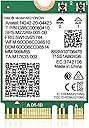
The Intel AX210 NGW WiFi 6E Wireless Card delivers tri-band speeds up to 5400Mbps and Bluetooth 5.3 support, designed for laptops with M.2 NGFF slots running Windows 10/11. It offers stable, low-latency wireless performance, easy installation, and enhanced power efficiency, making it the ultimate upgrade for professionals seeking cutting-edge connectivity.


| ASIN | B09WQSNMCT |
| Best Sellers Rank | #4 in Internal Computer Networking Cards |
| Brand | NICGIGA |
| Color | multicolor |
| Compatible Devices | Laptop |
| Compatible Operating System Family | Windows |
| Customer Reviews | 4.6 out of 5 stars 1,743 Reviews |
| Data Link Protocol | Bluetooth |
| Data Transfer Rate | 6 GHz |
| Hardware Interface | 802.11 ac/b/g/n, Bluetooth 5 |
| Item Dimensions L x W x H | 1.18"L x 0.87"W x 0.08"H |
| Item Weight | 37 Grams |
| Manufacturer | NICGIGA |
| Mfr Part Number | NIC-AX210 |
| Minimum Required Operating System Version | Windows 10 |
| Model Number | NIC-AX210 |
| Product Dimensions | 1.18"L x 0.87"W x 0.08"H |
| UPC | 756166630611 |
| Unit Count | 1.0 Count |
| Warranty Description | 1 Year |
E**D
Nice upgrade to keep my laptop alive
I recently switched to a new Internet provider and got a faster connection and the wifi card on my laptop wasn't able to utilize as much of the speed, with this new card, my laptop is able to connect at a far faster speed and I also appreciate the upgrade I got with Bluetooth as well, it was a cheap and easy way to upgrade my laptop and keep it running, my laptop runs on Linux and it detected it no problem.
H**W
Upgrading My 2014 Dell All-in-One to Wi-Fi 6E with AX210NGW
I purchased the Intel Wi-Fi card AX210NGW to upgrade my 2014 Dell All-in-One Desktop Inspire 23 5348. Previously, I upgraded the system by replacing the HDD with an SSD and increasing the memory to 16GB, which made it reasonably usable. While looking for one final upgrade, I noticed that the built-in Wi-Fi card was still Wi-Fi 5, an older standard. I hoped that switching to Wi-Fi 6E would improve my network speed. Before replacing the Wi-Fi card, I read that it’s best to download drivers from Intel or Dell’s website to avoid losing connectivity, so I downloaded them in advance. The AX210NGW was compatible, so I removed the original Wi-Fi card and disconnected the antenna cables. I inserted the new Wi-Fi 6E AX210NGW into the connector. Although the shape was slightly different, it fit without any issues. However, I ran into a problem with the antenna cables. I tried to reconnect the white and black cables correctly, but the white one didn’t fit properly. As a temporary solution, I taped it in place. Apparently, some Wi-Fi cards also require new antenna cables for full functionality. Even with the tape, the network is currently working and the card is recognized as Wi-Fi 6E, but the speed isn’t as high as I had expected. To fix this, I ordered a Wi-Fi 6E Antenna IPX MHF4 Tri-Band from Amazon to replace the antenna cables. I’m looking forward to seeing how much the speed improves once the new antennas are installed. One thing to note: my home network still uses Google Wifi, which is Wi-Fi 5. Therefore, even with the AX210NGW, I cannot achieve the full potential of Wi-Fi 6E. Once I successfully replace the antenna cables, I plan to upgrade my home Wi-Fi router to fully take advantage of Wi-Fi 6E. It’s not working perfectly, so I’m giving 3 stars, but this is not the fault of the product. Unfortunately, the cables were not compatible. Update: As of November 15th, 2025, I have installed a Wi-Fi 6E IPX MHF4 tri-band antenna on my PC, which is compatible with the AX210 NGW, and I now use a Nest Wifi Pro 6E at home. The PC is placed in the kitchen, about 20 feet away from the Nest Wifi Pro, so it doesn’t connect to the 6 GHz band. However, the speed is still more than sufficient. My internet speed test results are always between 300 and 600 Mbps. This PC is very old, but the internet connection is very stable, and I can watch YouTube and Netflix without any issues. This is a huge upgrade for a 2014 PC, and I’m really happy to report it! I definitely have to give it 5 stars.
P**Z
Easy swap that fixed an unstable MediaTek wifi card
I replaced the misbehaving MediaTek wifi card that came in my 2025 Asus ROG Zephyrus G14 GA403UI. This card (WiFi 6E Wireless Card Intel AX210 NGW Bluetooth 5.3 Tri-Band 5400Mbps) works perfectly and cost about $20. I downloaded the driver from the Intel website before I swapped this new card. The little kit that came with this new wifi card included two screws (which I didn't need because I just reused the old screws), a small screwdriver which was pretty low quality so I used some other cheap tiny screwdriver I has lying around), and the wifi card. I don't open laptops or upgrade computers very often so my skills are pretty weak. This is still a simple job that took less than an hour and careful slow pace. I did not disconnect the laptop battery before swapping the cards but I was careful to ground my fingers before touching stuff. Getting the old wifi card out and the new card installed was super easy. Note, I have no idea why the MediaTek wifi card that came with the laptop failed; it developed weird connectivity issues that disappeared when I turned the laptop sideways. When I swapped the wifi card, I double checked that the 2 antenna wires were perfectly connected. Weird failure. But the this cheap $20 Intel replacement and 1 hr or work saved me the hassle of dealing with a warranty issue. No issues at all with the new card...super stable connection. It may even be faster...but that could just be in my head.
P**I
Perfect replacement and upgrade for my laptop
Restored Bluetooth and WiFi to my laptop, and also upgraded to almost the latest standards. Much faster WiFi speeds my network if 6E anyways so it’s always maxed out. Great value for the money, and got it quickly. Has been very stable connections.
R**B
This Card Jams in an old HP Pavilion 509-p0066 PC
I want to say installation was a breeze but It wasn't bad considering how tight my ATX case was. The hardest part was getting the screw in place. I also went from a single antenna card to this AX210 card. I unplugged my ethernet cable as I didn't want any questions on my data. I first tested it on my 2.4GHz network and saw speeds increase from 40Mb/s (old card) to about 110Mb/s (new card). Then I tested it on my 5GHz network and saw over 900Mb/s. My ethernet gets about 945Mb/s so the Wi-Fi speed has improved substantially. As for longevity, well I will have to wait and see.
E**.
Great WiFi Card! Fast!
Works amazing! Lightning fast. 2,100 up and 2,200 down
2**N
Works great, but Wifi cards don't last long
Easy to replace and they have been plenty fast, but this is the 3rd Intel chip Wifi card I'll have installed in my Lenovo Legion 5 in 24 months. They seem to last only about 12 months, then both Wifi and Bluetooth fail.
A**H
Great Wi-Fi 6e performance!
Working great so far. I had to buy this because a refurbished Dell Optiplex 5070 I bought on here did not come with the Wi-fi/BT card as advertised. I bought a "WiFi 6E Antenna Tri-Band 6GHz 5GHz 2.4GHz RP-SMA Male + 10in U.FL MHF4 to RP SMA Female Extension Cable + Computer Back Slot Cover Bracket" to go with it and it's in another room (with the door open) but has practically line of site to my router. It's about 14 or 15 feet away from my Asus RT-AXE7800 and I get great speeds and connection. I have 750Mbps Fiber Optic Internet (Fiber is symmetric and full duplex, but yeah, it gets those speeds up and down and I actually tend to get 788Mbps down/799Mbps up on Ethernet or Wi-Fi) and this card with that antenna is giving me those speeds. The truth is, I use Ethernet BUT I wanted Wi-Fi/Bluetooth for the other Windows features, like Phone Link so I can have my phone linked with the PC and make phone calls, use my phone on the PC, etc. The Bluetooth is great... which, again, I dunno whether to attribute that to the card, the antennas or both, but either way, I'm getting excellent range and performance. It was easy to install and was just plug and play. I did update the drivers with the latest from Intel, but still, it's just compatible if you plug it in and let Windows install the drivers. As long as it doesn't burn out on me down the road, I have zero complaints.
B**N
Thanks
Thanks.
C**E
Fonctionne sur pc hp laptop 17
Salut, je l'ai installé sur un pc HP LAPTOP 17-CP2031 NF carte rysem 3. 7000 série avec une antenne supplémentaire eMagTech Antenne Wi-FI Interne IPEX4 pour PC Compatible avec Intel Les Cartes AX210 AX200 NGFF M.2 Wi-FI 6 et elle fonctionne à merveille. Débit de 180 mo/s passé à 530 mo/s. Connexion Bluetooth très rapide. Beaucoup mieux que la carte d'origine. Télécharger les pilotes sur le site avant le changement de celle-ci. Je l'a conseille vivement.
S**S
Compatible and stable
Fully compatible with old card I had, that was based on some Mediatek chip (can't exactly remember which one it was). As with most of things when it comes to PC architecture, it was a matter of simply opening the computer and replacing the module. And it works. And it works pretty well! 10/10
J**N
Muy buen producto
Producto bien presentado con un buen embalaje (trae incluso un destornillador y los tornillos para fijarlo a la placa). He reemplazado una tarjeta Intel 3168 NGW que tenía en un portátil MSI GL62M, y funciona a la perfección, una vez instalado el driver y hecha la configuración, que es bastante sencilla. He conseguido que me llegue toda la velocidad que tengo contratada, incluso en un router HGU ASkey de Movistar, que no tiene wifi 6. Una opción estupenda para aprovechar mejor la velocidad. Puedo recomendar su compra sin dudarlo.
1**8
ok pour moi
facile à monter...fonctionne comme prévu sur un Dell 3793
Trustpilot
3 weeks ago
2 weeks ago