We remain fully operational. Our teams are working around the clock to ensure your deliveries continue safely.

DOWNLOAD THE APP


Customer Services
Copyright © 2025 Desertcart Holdings Limited
DOWNLOAD THE APP
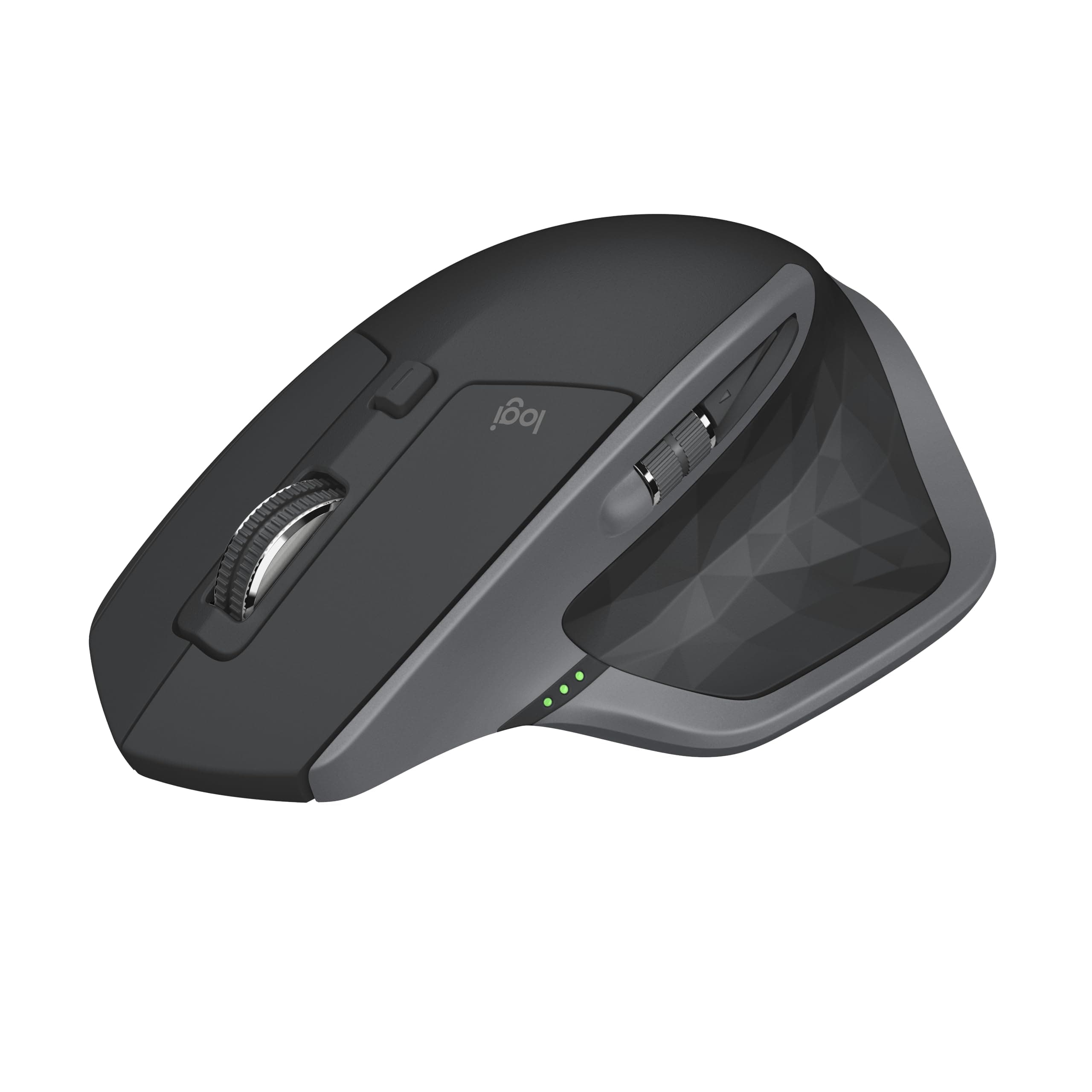

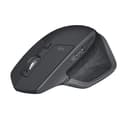
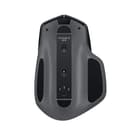
🖱️ Elevate your workflow—master every click, scroll, and swipe with MX Master 2S.
The Logitech MX Master 2S Bluetooth Edition is a premium wireless mouse engineered for professionals who demand precision, comfort, and versatility. Featuring a rechargeable battery with up to 70 days of use, 7 customizable buttons, and Logitech FLOW technology for seamless multi-computer control and file sharing, it delivers unmatched productivity on virtually any surface. Its ergonomic design and hyper-fast adaptive scroll wheel make it the ultimate tool for multitasking millennials who refuse to settle.
| ASIN | B071YZJ1G1 |
| Additional Features | Ergonomic Design |
| Antenna Location | Office |
| Are Batteries Included | Yes |
| Are Batteries Required | Yes |
| Battery Average Life | 1680 Hours |
| Best Sellers Rank | #257 in Computer Mice |
| Brand | Logitech |
| Built-In Media | Micro-USB cable for recharging, Mouse, User documentation |
| Button Quantity | 7 |
| Color | Graphite |
| Compatible Devices | Personal Computer |
| Connectivity Technology | Bluetooth |
| Customer Reviews | 4.5 4.5 out of 5 stars (16,217) |
| Enclosure Material | Plastic |
| Global Trade Identification Number | 00097855131034 |
| Hand Orientation | Right |
| Hardware Platform | Laptop, PC |
| Item Dimensions L x W | 4.9"L x 3.37"W |
| Item Type Name | Logitech MX Master 2S Wireless Mouse with FLOW Cross-Computer Control and File Sharing for PC and Mac - 910-005131 |
| Item Weight | 145 Grams |
| Manufacturer | Logitech |
| Model Name | 2017 Model |
| Model Number | 910-005131 |
| Movement Detection | Trackball |
| Number of Batteries | 1 CR123A batteries required. (included) |
| Operating System | Windows 10, Windows 8 |
| Power Source | Battery Powered |
| Range | 10.0 meters |
| Style Name | MX Master 2S |
| UPC | 097855192509 097855131034 097855160454 |
| Unit Count | 3.4 Ounce |
| Warranty Description | 1 - year limited warranty |
D**L
This mouse is incredible
Occasionally I will buy a more expensive item for my computer just to see if the increased cost is worth it or not. Sometimes it is, and sometimes it is not. When I had gotten a new laptop I wanted to get a new mouse with it, and the only features I was really looking for were bluetooth, and the ability to use it on basically any surface. I have had this for nearly a year as of posting this review. So. What did I end up getting? For starters, I did test the mouse on all kinds of weird surfaces, such as glass, my hand, or my computer monitors, and it worked pretty smoothly on every surface I tested. So it nails that. The bluetooth works amazingly well as well, and the battery life is incredible - requiring charged only after weeks of use. I have had problems with wireless mice having a delay on initial movement, which sounds like a minor problem until you are experiencing it. No delay with this mouse. It is very responsive. The mouse wheel was a nice surprise. It has some special thought put into it. It has the ability to roll like most wheels do, the ability to free spin, and a button to toggle these modes. What it also has is the ability to do a hybrid of these where, if you spin it with a low amount of force it spins normally, but if you spin it harder it toggles to free spin. If you install the mouse's software, you can configure how much force it takes to smoothly transition into the free spin, or to effectively disable that feature. On the side of the mouse is a scroll wheel that controls side to side movement in the way the scroll wheel handles up and down. Very useful for applications like spreadsheets where sideways scrolling is a thing. The mouse has a number of buttons on it that can be configured in the software. One of those buttons is actually underneath where your thumb rests, and is resistant enough to prevent accidental presses, and not so resistant that it is a pain to use. One of the things you can configure in the software is what that button does when you hold it and move the mouse. Holding it and swiping the mouse down might minimize everything on your screen, while an up or sideways motion, or a direct tap is configured to do something else. Neat feature set, right? Well that isn't even all it can do. It has another feature in which you can connect it to multiple computers, and then you and move the mouse around between them like they are all multiple monitors. You can also move files between the computers this way. The feature is a bit on the slow side, needing time to disconnect from one computer and connect to the other when switching, which isn't as smooth as you might hope. However, it is still a very useful feature if you have multiple systems and often move files between them. Great quality of life feature! Overall, this mouse far exceeded my expectations. I was not expecting to say that this mouse is worth every penny of its fairly high cost, but that is what I am saying. Yes, it is a bit costly for a mouse, but it is very, very worth it.
K**N
Superior!
I got my first one of these in 2020, and six years later it was time for a replacement. I was so happy with the first one that I skipped the upgraded/latest version as I haven’t tried them and just know this fits and works absolutely great. Not noisy. Compatible with all my devices. No lag, and scrolls fast! Also. The battery life is absolutely amazing, like I said, my old one had been used extensively for six years.. that’s quality.
M**J
Impressive battery life
Battery lasts for literally weeks of daily use between charges. Can be used while charging as well. Perfect work mouse. 2 years in use daily and going strong, no deterioration.
J**.
upgrade and i am happy.
Logitech Wireless Performance Mouse MX for PC and Mac, Large Mouse, Long Range Wireless Mouse First, i have been using the MX 2S for a couple of weeks now, and I want to start off by saying the MX 2S is a solid device. It is well built and has a solid feel in the hand. Even with the points I make later the device deserves 5 stars to me. I am upgrading to this mouse from a PERFORMANCE MOUSE MX from Logitech. So, there will be some comparison between the two. And over all I am very happy with the upgrade. With two exceptions that I will get to in a min. so let’s start with the good stuff. First and foremost, in my mind is the new software and being able to link the mouse to multiple computers and if set up to be able to use the mouse across 2 computers as if you had a dual monitor set up. This was the main reason I decide to give this mouse a try, and it did not disappoint. The next big reason was the ability to program any button individually as well as set up gestures. This has made my work and gaming much more enjoyable. Getting into more of a comparison now and the slight negatives that I have noticed. These are in my opinion and pertain to how the mouse feels to me. Over all the feel is great and Logitech put out a good design. The downside to this design to me is that the mouse feels heavy. Even knowing that the MX 2S is lighter than my previous PERFORMANCE MOUSE MX mouse, it still feels much heavier to me. I think this is in relation to how well the PERFORMANCE MOUSE MX fit my hand, it was almost effortless. Especially since I do a lot of lifting the mouse in my normal use of it. The new MX 2S because of the new design of the thumb rest makes it easier to access the scroll wheel and buttons but makes it fell less stable in my hand if I lift the mouse. All that means that this is a great tasking mouse especially if you keep it firmly on the desk. The mouse looks great and the options that you have through software are outstanding. And if you like scroll wheels the main wheel is the best feeling and functioning scroll wheel I have used.
J**S
Died after almost 3 years – Great mouse, but shortcut buttons behave erratically on Windows 11
The Logitech MX Master 2S is a very comfortable and well-built mouse. The ergonomics are excellent, the scroll wheel is smooth, and overall it feels like a premium device. However, I experienced a recurring issue when using it with Windows 11, particularly when configuring and using the shortcut buttons. Instead of performing the assigned shortcuts, the mouse would sometimes behave erratically and trigger unexpected actions, causing multiple windows to move or switch at once. It worked well for basic use, but the problems with the customizable buttons made the experience frustrating at times. Unfortunately, it stopped working completely after almost three years of use. Overall, great design and comfort, but the shortcut functionality with Windows 11 was unreliable in my case.
S**N
The Logitech MX Master 2S is an excellent wireless mouse, particularly if you have very large hands. The shape is generously sized with a supportive palm profile, and it feels stable and comfortable for long sessions—especially for productivity work where precision and control matter. The scroll wheel is smooth and accurate, all the other additional buttons for me are just annoying and i don't use them, but that is just me. One point worth calling out is connectivity. The MX Master 2S that i bought can connect via Bluetooth directly to your PC, which is convenient if your computer already has Bluetooth built in. However, it does not come with a Bluetooth USB module that you plug into a port to add Bluetooth to a non-Bluetooth machine. So if your PC doesn’t support Bluetooth, you’ll need to either use the included Logitech receiver (if your model includes one as you can buy this mouse with one) or supply your own Bluetooth adapter. Overall, if comfort is a priority—particularly for larger hands—the MX Master 2S remains a standout choice: ergonomic, precise, and ideal for everyday professional use, with the main caveat being to ensure your PC has a suitable way to connect.
K**R
Great mouse. Battery gets wiped after around 2-3 weeks though. But the mouse works fine.
R**.
Espectacular tacto, maniobrabilidad y ajuste a la mano. Sin duda uno de los mejores ratones que he comprado.
T**G
this mouse is perfect for those who need to deal a lot of data or read PDF
J**B
Sur Mac, en remplacement d'une MX Master originale ayant subi les outrages du temps. Qu'est-ce qui pourrait mal se passer? Une souris non reconnue ni en bluetooth, ni en Unifying (dongle Logitech, non fourni avec cet article mais déjà en ma possession). Il m'a fallu passer par l'utilitaire Logitech Options, trouver l'option "Add devices" > "Add Unifying device". Et voila, les deux souris, l'anciene et la nouvelle, fonctionnent sur le dongle. Vous n'aurez peut-être pas ma chance, et les instruction Logitech ne vous seront d'aucun secours. Une étoile de moins pour un plug-and-play mis en échec pour des raisons obscures.
Trustpilot
3 weeks ago
4 days ago