

Optane Memory M10 16 GB PCIe M.2 80mm
Product ID: 42607207
Details
- BrandIntel
- Compatible DevicesDesktop
- Computer Memory Size16 GB
- Memory Speed900 mt_s
- Special Feature
⚡900 MT/s blazing speed
💾16 GB high-performance cache
🔗PCIe M.2 80mm compact form
Desertcart purchases this item on your behalf and handles shipping, customs, and support to Kyrgyzstan.
🚀 Upgrade your PC’s brainpower — faster, smarter, smoother!
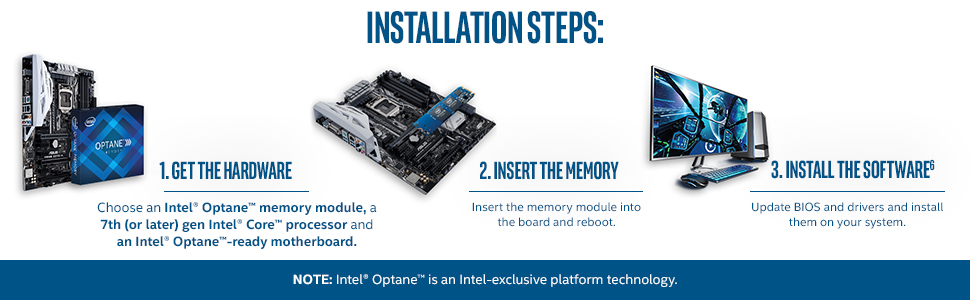
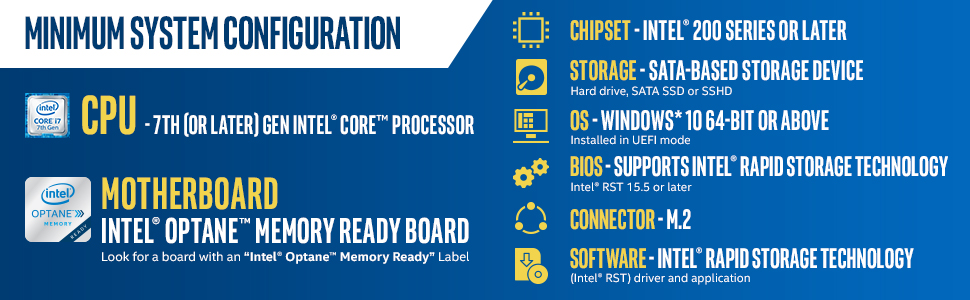
Intel Optane Memory M10 16 GB PCIe M.2 80mm is a high-performance caching module designed to accelerate system responsiveness by pairing with traditional storage drives. Compatible with 7th Gen Intel Core processors and Optane-ready motherboards, it delivers up to 900 MT/s memory speed, drastically reducing boot times and application load delays while maintaining full storage capacity. Ideal for professionals seeking a cost-effective, seamless performance boost in gaming, browsing, and daily computing.



| ASIN | B06XSMTN31 |
| Additional Features | High-performance |
| Best Sellers Rank | #763 in Computer Memory |
| Brand | Intel |
| Built-In Media | Manual, PCIe M.2 Memory Module |
| Column Address Strobe Latency | 15 |
| Compatible Devices | Desktop |
| Computer Memory Size | 16 GB |
| Customer Reviews | 4.2 out of 5 stars 691 Reviews |
| Data Transfer Rate | 900 megabits_per_second |
| Form Factor | M.2 |
| Global Trade Identification Number | 00675901462334, 00735858337847, 00735858349383, 05032037099912, 05032037099950 |
| Item Type Name | Optane Memory Module 16 GB PCIe M.2 80mm |
| Item Weight | 1.6 ounces |
| Manufacturer | Intel |
| Memory Speed | 900 mt_s |
| Mfr Part Number | MEMPEK1W016GAXT |
| Model Name | 1 |
| Model Number | MEMPEK1W016GAXT |
| Number of Items | 1 |
| Number of Packs | 1 |
| Number of Pins | 78 |
| RAM Size | 16 GB |
| Special Feature | High-performance |
| UPC | 675901462334 735858337847 735858337076 735858349383 |
| Unit Count | 1 Count |
| Voltage | 3.3 volts |
| Warranty Description | 5 years Limited - Part replacement only |
J**W
Cheap upgrade with questionable gains
A cheap simple upgrade to my Dell mini PC that had an open M.2 slot. These Optane modules only work with certain CPUs and motherboards, so check your computer to make sure it will be recognized by the BIOS and the OS. You also have to use the Intel Optane driver package which can be finicky to install. I had to install and reinstall a couple of times before the software recognized the Optane. I also had to go into the BIOS and select the correct HDD settings for Optane (it's kind of like a RAID setup, but not). Once configured, everything seems to be working great. There's no noticeable difference in PC performance so the gains are questionable. But for less than $20 it's a fun PC hardware upgrade.
A**N
Worth the cost and get the job done for TrueNas Scale
Got two of these as a boot drive for TrueNas Scale, work great and the cost together was less than 50usd. I'm happy.
A**N
Cache drives in a Synology NAS
I'm using a pair of these small but fast SSDs as cache drives for my Synology NAS. The Synology OS uses one for write caching and one for read caching. This makes transferring lots of small files much faster than before. While these drives are not on Synology's official compatibility list, I've heard from other Synology users who have also had success with these drives. At their current price, it is worth it! Edit: Upon update to the latest Synology software, one of the cache drives was either unsupported or died. This caused a major issue that required a complete reinstall of the Synology software on my NAS. Fortunately, this did not lose any of my data but did require that I re-install all my packages and re-configure everything. It could have been worse.
M**A
A must have for gamers playing games stored in an HDD
I have a 512GB M.2 SSD as my primary drive and a 4TB HDD where I store all my games. I purchased this 16GB Intel Optante cache drive without having any expectations. At the current price (around $30), it was almost an impulse buy. Since I got this drive for gaming I thought 16GB wouldn't be enough to make a noticeable difference, but boy was I wrong. The speed improvement really cannot be overstated. All of my games load much quicker, especially when you die and reload or play the same game over and over. It's much faster than my SSD in fact. In one game in particular (Rising Storm 2), I loaded into the training area, went back to the menus to tweak some settings, and when I went back into the training map, it was nearly instant - I mean like 1 - 2 seconds loading time. Without the cache drive it took 10 - 20 seconds minimum. This is an amazing technology, I'm very pleased with my purchase, of you play games off of a mechanical hard drive, I'd consider this a necessity. The 16GB Intel Optante drive made a huge difference in loading times for me.
H**I
I will update if i ever get it to work.
WARNING!!! This chip is for HDD, not SSD! This chip AND program has been fighting me since day 1! I got it for crazy cheap so there is no point in getting a refund but my god is it such a waste of my time! I'm understanding at this point in my installation experience that this is a pre-build add on. that is the BIGGEST confusion that I have come across. over HUNDREDS of help posts in hundreds of forums and I still have not found an answer to my problem. So I'm going to try to make this review as easy as possible to understand! NO : This chip is for the building process of your PC, NOT for a PC that is already running an operating system!! NO : If you are building a PC this will not make an SSD any faster for you, There is little to no improvements it brings to your SSD. YES : Building a PC with a very big Hard Disc Drive(HDD) will make it feel like you are running off of a Solid State Drive(SSD). NO : Although I have found forums stating that an update was done to the software, I am still not able to get a secondary Hard Drive to work with this chip. YES : The M.2 slot DOES interfere with your SSD in a way that makes it unbootable if you don't have the right BIOS setting preset. I have no idea how but I read it's because the M.2 port runs on the SATA connection so the Optane chip interrupts the SSD and the SSD doesn't fight, it just stops communicating. It doesn't damage anything as I know of, it only stops communication on boot up, not while it's running. YES : You need to update your BIOS in order to support this chip as it is a program much like RAID in a way that makes it a pain in the *** to get running properly. YES : I am almost certain you need to mess around with Command Prompt in order to get your system to recognize the chip, program, and run the Optane smart storage manager properly. NO : This M.2 is not NVMe, it is PCIe. NO : This is not a plug-and-play chip! You NEED to know how an operating system works and you will have your patience tested many times over! YES : You need to touch your motherboard in order to get the Optane chip connected and you need a small but long and preferably magnetic Phillips screwdriver. (Mine DID NOT come with hardware but as I said, I got this secondhand and YES the chip/Hardware is working fine) YES : 7th gen Intel CPU is what this is supported by and that doesn't mean i7's, I am using an i5 and I am understanding that my CPU is supported even though I can't get it to work with my HDD. I think I covered everything I came across so far and hope I help you with your purchase of the Intel Optane Memory M10 16 GB PCIe M.2 80mm.
D**S
Excelente producto pero debes saber esto, antes de comprar
Es un increible producto, cambio el comportamiento del disco duro ( Me refiero a los discos duros de platos los de baja velocidad), acelera la carga de informacion del disco duro, hizo que mi disco duro de baja velocidad se comporta mejor que un SSD , optane es un intermediario entre el disco duro o SSD y almacena los ulitmos 16GB utilizados,(esta accion la hace demanera desatendida, sin que debamos hacer nada, lo hace completamente debajo del sistema) Debes de leer la guia de como se configura e instalar el software, que se descarga en la pagina de intel, no debes usarlo como disco duro, cuando el sistema optane esta correctamente instalado, no es visible como unidad de disco/almacenamiento, simplemente no se ve, algo super importante es que debes hacer ingresar a la BIOS de tu equipo y cambiar la configuracion de tu administrador de disco duro a tipo RAID, si no sabes que es RAID es simplemente dividir la carga de informacion en dos o mas discos de almacenamiento y esto permite acceder a ambos discos como si fuese uno solo, lo que hace esto es dividir toda informacion , pero en realidad preriza la informacion al disco SSD de optane y despues cuando esta ya no es requerida se entrega lentamente al disco duro que es mas lento , pero al hacer la lectura es como si el optane se quedara con una copia, de la primera lectura del disco duro y cualquier consulta de los ultimos 16 GB utilizados se mantienen el el SSD entregando la informacion realmente rapido, si tu equipo tiene mas de 8GB de te recomentaria comprar mejor el optane de 32GB ya que esto significa que tu equipo utilizara mas memoria de lo que el optane puede mantener de los archivos recientes. PRECAUCION si tienes la funcion de hibernar en uso, cada vez que mandes a hibernar el equipo, el sistema guardara la informacion de la RAM en el disco duro, pero esto hara que los ulitmos 16 GB de archivos recientemente utilizados, se pierdan, optante funciona muy bien, repite si las actividades que realizas, no utilizan una carga demandante de informacion del disco duro no supera los 16 GB, yo lo veo un producto maravilloso, siempre y cuando tu actividades en el equipo no supere 16 GB de lectura de archivos, es ideal para juegos, diseño, y ingenieria, pero no para edicion de video, por que por lo general la edicon de video utiliza mucho disco duro, para eso mejor usa el tamaño adecuado de disco duro como la version de 32 GB
B**T
Check with your motherboard manufacturer for instructions. Install the Optane software last.
The difficulties I had installing Optane were all due to the motherboard and Windows 10. For some odd reason I couldn't update the BIOS using the motherboard's software until I activated Windows 10. Then I was able to update the BIOS and then change the required settings to make Optane work. I had already installed the Optane software and I got an error after all the settings were in place. Unfortunately the error code doesn't tell the user what to do so after searching on the forums I found out everything was fine I just needed to uninstall the software and reinstall it. After that it worked fine. With that said it's only slightly more expensive to just buy a 120GB SSD and use that as a boot drive instead of a 16GB accelerator to accelerate a HDD.
F**S
My brother is fifteen. He got it to work and loves what it does for him.
Alright, so, I got this for my brother as he wanted it for Christmas. His computer is built with a hybrid drive that stores all of his data and after configuring the drivers in the BIOS, the Intel Optane produced a noticeable difference in loading things. For one, he was able to launch games and applications faster. For two, on large map games like PUBG, Fortnite, DayZ, H1Z1, and a few others, the map's "chunks" loaded in much faster than without. The device seems to be most compatible with DDR3 and up boards, but it will not improve your performance much if you have a performance hard drive like a WD Black or an SSD as your storage medium. If your board runs something higher than DDR3 RAM, then the Optane will produce less noticeable results. It should also be noted that every board is different and every bios configuration is different. Some people do not have the experience or skills to setup this device correctly, although you can learn how. Said people are often the ones who leave bad reviews and answer questions with "I couldn't get this to work." As another side note, the Intel Optane is not a replacement for RAM or more permanent storage mediums. You still need the hard drive(s) and/or SSD(s) in your computer. Actually just used this to answer a question, but thought you all should see it.
M**A
Excelente produto.
Excelente produto qualidade Intel. Não consegui configurar tive de levar em uma assistência! Mas ficou melhor , mais rápido apesar de que já tenho SSD INSTALADO. RECOMENDO.
N**Y
Gut
Weiß nicht genau für was das ist, aber ich kann auf jeden fall sagen das sich Sachen wie spiele etc. schneller damit laden :)
M**D
Boost un PC sans SSD
Cette mémoire intel optane intermédiaire joue bien son rôle. Mon PC démarre comme si j'avais un SSD (13 secondes) avec un HDD Thoshiba 1To !!! pour pas chère.Toutes mes applications démarre en 1 ou 2 secondes quand avant il fallait 5 à 10 secondes !! En plus, il y a très peu de manipulation à faire pour rendre fonctionnelle cette mémoire. Rien à dire, elle fait très bien son boulot. Pour info, je possède un optiplex 3050 avec 8go de ram, et cette mémoire a double effet me permet en plus de me passer d'une 2ème barrette de ram super chère...donc économie effectué avec cette achat : ~80€ (ram) + ~150€(ssd nvme) - 50€(optane) = ~180€ !!!
A**S
Mejora el rendimiento notablemente en una Legion Y530.
Compre este producto no muy seguro si serviría; antes vi varias revisiones acerca de las memorias optane en YouTube, todas llegaban al mismo punto, mejora el rendimiento de un HDD. Esta fue instalada de manera rápida y sencilla en una laptop Lenovo Legion Y530; la maquina recomienda actualizar la bios, pero sin ella la motherboard la reconoce de manera inmediata; el arranque del OS antes de instalar la era lento en comparación a mi antigua laptop con SSD; una vez instalada tiene un desempeño parecido a un SSD de acuerdo al programa crystalDiskMark en lectura, se nota la diferencia en el arranque del sistema. Una excelente opción para mejorar el desempeño de una maquina con HDD y con un puerto m.2 pcie libre; sin la necesidad de gastar alrededor de 1500 pesos por un ssd de 512 gb o más de 3000 pesos por un m.2 nvme pcie de 512 gb; obviamente únicamente podrás mejorar el desempeño que pocos programas (aleatorios o más usados) por la capacidad de 16 gb, tomen en cuenta eso ya que solo las memorias optane de mínimo 32 gb permiten marcar aplicaciones para mejorar el rendimiento.
C**T
Perfect for home NAS write cache
I added one of these to my home NAS running TrueNAS (formerly FreeNAS) as the ZFS ZIL SLOG write cache disk. The three features you want for this purpose are: fast random write, high endurance, and power loss protection - Optane has all three. The SLOG disk only needs to be big enough to store 5 seconds of incoming data, so 16GB is enough for a 10Gbit network (assuming your main disk array can keep up). You don't need a special Intel CPU, it's just a NVMe disk. Works perfectly in my old AMD Opteron server with a PCIe-M.2 adapter in a PCIe slot.
Trustpilot
3 weeks ago
1 week ago