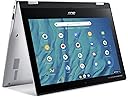
🚀 Power through your day with style and speed!
The 2022 Acer Spin 311-3H is a lightweight 11.6-inch 2-in-1 Chromebook featuring an 8-core MediaTek MT8183 processor, 4GB RAM, and 64GB eMMC storage. It offers up to 10 hours of battery life, dual USB Type-C 3.1 ports for fast data and charging, an IPS touchscreen with stylus support, and runs on secure, fast-booting Chrome OS—ideal for home, education, and on-the-go professionals.
| ASIN | B09NYCP2YG |
| Audio Output Type | Headphones, Speakers |
| Audio Recording | Yes |
| Automatic Backup Software Included | Gmail, Google Drive |
| Available M2 Slot Count | 1 |
| Battery Cell Type | Lithium Ion |
| Battery Life | 10 Hours |
| Bluetooth support? | Yes |
| Box Contents | Adapter, IST COMPUTERS stylus pen, Laptop, Manual |
| Brand | Acer |
| Brand Name | Acer |
| CPU Model Generation | 8th Gen |
| CPU Model Number | MT8183 |
| CPU Model Speed Maximum | 2.6 GHz |
| CPU model | Celeron N |
| Camera Description | Front |
| Colour | Pure Silver |
| Compatible Devices | USB and Bluetooth-enabled devices |
| Control Method | Touch |
| Customer Reviews | 4.2 out of 5 stars 500 Reviews |
| Display Technology | LED |
| Display Type | LCD |
| Form Factor | Convertible |
| Graphics Card Ram | 4 GB |
| Graphics Coprocessor | ARM Mali-G72 MP3 Graphics |
| Graphics Description | Integrated |
| Graphics Ram Type | DDR4 SDRAM |
| Hard Disk Description | Emmc |
| Hard Disk Interface | Solid State |
| Hard Disk Rotational Speed | 7200 |
| Hard disk size | 64 GB |
| Hard-Drive Size | 64 GB |
| Hardware Interface | USB 2.0, USB Type C |
| Has Color Screen | Yes |
| Human Interface Types | Keyboard, Touchscreen with Stylus Support |
| Item Dimensions L x W x Thickness | 29L x 20.6W x 1.9Th centimetres |
| Item Weight | 907 g |
| Keyboard Description | Chiclet |
| Keyboard Layout | QWERTY |
| LAN Port Bandwidth | 10/100 Megabits Per Second |
| Manufacturer | Acer |
| Maximum Display Resolution | 1366x768 Pixels |
| Memory Clock Speed | 2400 MHz |
| Model Name | Spin 311 2H |
| Model Number | CP311-2H-C7QD |
| Model Year | 2021 |
| Model name | Spin 311 2H |
| Native Resolution | 1366 x 768 pixels |
| Network Connectivity Technology | Bluetooth, Wi-Fi |
| Number Of Cells | 2 |
| Number of Ports | 2 |
| Operating Systems | Chrome OS |
| Optical Storage Device | No Optical Drive |
| Other Special Features of the Product | Support Stylus |
| Processor Brand | MediaTek |
| Processor Count | 8 |
| Processor Series | Celeron N |
| Processor Speed | 2 GHz |
| RAM Memory Installed | 4 GB |
| RAM Memory Technology | Lpddr 5 |
| RAM Type | DDR4 SDRAM |
| Ram Memory Maximum Size | 4 GB |
| Resolution | 1280 x 720, 1366 x 768 |
| Screen Size | 11.6 Inches |
| Screen size | 11.6 Inches |
| Specific Uses For Product | Education, Multimedia, Student |
| Total USB Ports | 2 |
| Touch Screen Type | Capacitive |
| UPC | 755379237556 |
| Video Output | USB Type-C |
| Video Processor | MediaTek |
| Voltage | 3.7 Volts |
| Warranty Type | Limited |
| Webcam Capability | Yes |
| Wireless Compability | 801.11ac, Bluetooth |
| Wireless Technology Type | Bluetooth, Wi-Fi |
ع**غ
الرياض
لايوجد قلم للابتوب اين القلم
J**L
Pésimo teclado, sin funciones, es mejor una laptop de segunda mano
El teclado no sirve, si tecleas una letra la escribe casi 10 veces, no puedes usar word, excel, powerpoint o cualquier otra aplicación, es mejor comprar una laptop de segunda mano
J**N
Update*** 5-16-23 BLACKOUT! !
Update 5-16-22 I checked online regarding the screen going black. It turns out that this is a common Chromebook issue. I followed the YouTube video and the screen came back. Ironically I ran across the Chromebook I replaced with One. I say ran across because I really thought I had thrown it away a long time ago. Well I'll apply the same information from YouTube and mysteriously the Chromebook that I thought was long on came back to life. So I'm saying all of this to say I guess it's not a company Chromebook issue is the Chromebook itself that has the issues So I'm still loving my Chromebook. Update- 3-7-22 THE SCREEN WENT BLACK WITH NO EXPLANATION RIGHT IN THE MIDDLE OF ME TEACHING! SO HURT The computer itself is nice. It's been a while since my other Chromebook died. This has new features so at first it was like starting over, but I like it still. I always wanted a flip screen. BUT THE STYLUS SIMPLY DOES NOT WORK!! I press the button on the side and nothing, absolutely nothing happens. Apparently, I didn't read enough reviews because this is a common problem. I am requesting a real stylus-maybe a rubber tipped one. Update** 12-27-22 Still going strong. Thank you to YouTube showing me what to do WHEN the screen goes black. I revived my other Chromebook that was dead for almost a year. Ironically, that was the reason I bought this one. Oh well, now I have 2.
A**A
Junk
This little chromebook is junk. You have to repeatedly open and close it, turn it off and on, off and on.. until you can finally get the screen to work. You can see a back light come on.. but the screen stays dark. The screen NEVER turns on correctly on the first try of opening it. It takes a few minutrs of opening and closing, turning it off and then back on before it will actually turn on. Waiting it out has never worked for me. I always have to turn it off and on along with opening and closing it several times in order for it to actually come on. I am pretty disappointed because this is my first acer product that has been bad.
M**L
Great computer
This is a great chromebook. Got this for my daughter to do her homeschool work on and love that it’s small and portable compared to the large chromebook we were using before. Works quickly and the screen quality is so clear. The touch screen feature is so handy. Especially for many of the kids programs out there or if you forget a mouse. I love that you can turn the screen when needed and prop it on the keyboard or turn it into a makeshift tablet. Kind of want one for myself!
Trustpilot
2 days ago
3 days ago