We remain fully operational. Our teams are working around the clock to ensure your deliveries continue safely.

DOWNLOAD THE APP


Customer Services
Copyright © 2025 Desertcart Holdings Limited
DOWNLOAD THE APP

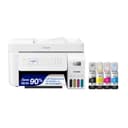
🖨️ Print smarter, save bigger, and stay effortlessly connected.
The Epson EcoTank ET-4800 is a versatile all-in-one inkjet printer designed for home offices, featuring cartridge-free high-capacity ink tanks, wireless and Ethernet connectivity, a 100-sheet auto document feeder, and a high-resolution flatbed scanner. It delivers sharp text and vibrant color prints while reducing waste and ink costs, supported by smart app controls and voice commands for a modern, efficient printing experience.


| ASIN | B09P45LR5T |
| Additional Printer Functions | All In One |
| B&W Pages per Minute | 10 ppm |
| Best Sellers Rank | #843 in Office Products ( See Top 100 in Office Products ) #3 in Ink Tank Printers |
| Brand | Epson |
| Built-In Media | EcoTank ET-4800 all-in-one, manual, CD-ROM for product setup, power cord, 1x bottle 522 Black (65 mL) and 1x bottle each 522 Cyan, Magenta, Yellow (65 mL) |
| Color | White |
| Color Depth | 48 Bits |
| Color Pages per Minute | 5 ppm |
| Compatible Devices | Laptops |
| Connectivity Technology | Wi-Fi, wired |
| Control Method | Voice |
| Controller Type | Android |
| Customer Reviews | 4.0 out of 5 stars 5,396 Reviews |
| Display Type | Color display |
| Dual-sided printing | Yes |
| Duplex | auto |
| Hardware Interface | Ethernet, USB |
| Ink Color | Black |
| Is Electric | Yes |
| Item Dimensions D x W x H | 13.6"D x 14.7"W x 9.3"H |
| Item Type Name | Inkjet Printer |
| Item Weight | 11 Pounds |
| Manufacturer | Epson |
| Maximum Copies Per Run | 100 |
| Maximum Copy Resolution Black and White | 360 x 360 |
| Maximum Copy Resolution Color | 360 x 360 |
| Maximum Copy Speed Black and White | 10 ppm |
| Maximum Media Size | 8.5 x 14 inch |
| Maximum Print Resolution Black and White | 5760 x 1440 Dots Per Inch |
| Maximum Sheet Capacity | 100 |
| Maximum print Resolution Color | 5760 x 1440 Dots Per Inch |
| Model Name | EcoTank ET-4800 |
| Model Number | C11CJ65201 |
| Model Series | EcoTank |
| Number of Ethernet Ports | 1 |
| Number of Trays | 2 |
| Other Special Features of the Product | Refillable Ink Tank |
| Output sheet capacity | 100 |
| Paper Size | 8.5 x 14 |
| Power Consumption | 12 Watts |
| Print media | Paper (plain) |
| Printer Connectivity Type | Wi-Fi, wired |
| Printer Output Type | Color |
| Printer Type | Inkjet |
| Printing Technology | Inkjet |
| Processor Count | 1 |
| Resolution | 4800 x 1200 |
| Scanner Type | Flatbed, Sheetfed |
| Series Number | 65201 |
| Special Feature | Refillable Ink Tank |
| Specific Uses For Product | Home, Office |
| Total USB 2.0 Ports | 1 |
| Total USB 3.0 Ports | 1 |
| Total Usb Ports | 1 |
| UPC | 010343957879 |
| Warranty Description | 1-year limited warranty |
| Warranty Type | Limited |
| Wattage | 12 watts |
I**Y
ET-4800 EZ PZ set up and start up. Prints and scans just fine
An excellent home printer. And why did I purchase such? I had an Epson WF-520 for nearly ten years. But neglect and lack of use caused the printer head to get gunked up. I cleaned the print heads using a solution of 95% Etoh and glass cleaner (about fifty/fifty), a syringe with a plastic tube attached and LOTS of paper towel strips. It was moderately successful but I was never able to get it back to like new printing. I looked over several new printers and wanted to stay with Epson because of ease of use (copy, scanning, printing). Seems as tank printers are the way to go these days. So I ordered the ET-4800. Got here in only a couple of days. Setup was pretty easy, just follow the instructions either via the documentation included or online version. I have pinted and scanned a color test page. I used the built in SmartScan feature without having to think about it much. I am quite satisfied with the results. By the way, there is no automatic two side printing. You actually have to get off your b---, take out the first printing, turn it over and refeed the stack. I was used to doing that with the old WF-520 and never had a problem. I will now set up a once a week, automatic scheduled printing task. I will just have to make sure there is paper on hand. Lack of use is the killer of these inkjet machines regardless of manufacturer.
T**Y
A great printer with lower pricing
I am quite happy with my ET-4800 purchase. From wirelessly connecting to my Mac to software installation to adding the ink, it was easy to set up. I feel you can't go wrong with this level of ink capacity. It holds so much ink without the bother and added expense of frequently replacing cartridges. I will never go back to a cartridge machine. I don't care who makes it! I've used my printer several times so far, and each time it has done a great job by giving me the colors and clarity that I expected. This is the first printer that I've owned that wasn't a front-feeder. I wasn't sure how I would like that, but I've found that holding the paper straight and then dropping it into the slot rather than placing it, gives the best result for paper alignment. For my needs, I have only used it one sheet of paper at a time. So if you are wanting to load several sheets at once, your loading experience may be different from mine. But just make sure that you do not load more than 100 sheets at a time, per the manufacturer's instructions. Also, be sure that the movable paper guides are in the correct spots for the size of paper being used, without any buckling. To date, I have not used the scanner, but it is definitely a feature that I did not want to be without, so I'm looking forward to using it. The display window, though small, is simple to follow along with, and I appreciate that the angle of the keypad can be adjusted. Working with the Epson Smart Panel app gives a bit more flexibility, particularly if you're not right next to your printer and want to check the ink levels or start a printing job. To use the app, be sure that you turn on your printer first and that both the printer and your device are set to the same wi-fi, so that the app can find your printer and you can begin operating it from afar. Once inside of the app, be sure to check out the "Other Features Menu" from the app's homescreen. There is a link to another Epson app that can be used to boost your creativity and streamline layouts for collages, and a colorful guide full of project ideas that outline everything that you need for each project and how to execute them. There's even a feature for sharing what you've scanned and submitting it as an assignment. This is something that you'd want to read more about to see if it is an applicable and helpful addition for you. You can use the search term, "google classroom in epson smart panel app," to find out more. There is only one downside that I have found at this point. The pull-out paper catching tray in the front feels flimsy. It seems out of place on an otherwise sturdy machine. But so far, I've had no problems with it. I just take my time pulling it out, flipping down the end, folding it back up, and pushing the tray back in. I figure if I baby it a bit, then all should be well. Overall, I really like the Epson ET-4800 as much as my ET-5170. I feel it performs well at an acceptable price point.
R**.
JUNK, Cheaply built, Feed Scanner fails and falls apart in less than 5 months and only 4 uses.
Absolute piece of Junk! Built cheaply. Feed Scanner has never worked properly from my first scan (only did 4) and now falls apart completely, in the roller section. It falls out after it jammed for the 7th time today, this time with a SINGLE piece of paper. If you have a piece of paper that has a fold in it, forget about it. That will never feed through. I had 6 sheets I had to get out today, I had to do manually via the flat bed, both sides. It took 23 minutes to get done. Should not have taken 2. The last time I used it same issues but less sheets. The paper is SO TIGHT in the feed section it is hitting BOTH walls. You could not slip a piece of paper in there if you wanted too, most likely one of the reasons it does not feed correctly. While on the phone with support (I am right now, 4th call today and 3 emails of pictures they wanted later, the hoops they put you through is ridiculous!) Of course overseas support and has little to no knowledge of being Tech support, I asked for supervisors only to have my first call disconnect at 1 hour and 20 seconds. Then the next call was 24 minutes, then another 32 minutes and now this one still ongoing (56 minutes and still going). Now after 3 hours and 5 minutes, they are "holding" my credit card for 179.99 + tax to get a REFURB unit! So much for a 5 year Warranty. Oh they acted like it was out of date on Warranty, it has NOT been in EXISTENCE for 5 years , it came out in 2022. Did I fail to mention you WILL be dealing with Overseas people who have you repeat the same thing over and over and over and over again. They wonder why I was getting upset...hmmmm . As they pass you along the ranks you have to repeat EVERYTHING all over again. As I was on the phone and they were asking me to open WRONG doors to find the serial #, I lifted once again the Jam area and guess what, the parts fell out. Just PLOP! Other issues while I am at it, the Picture quality is "OK" nothing special. I bought it to save ink as HP gouges you to death and destroys your print head if you use a knockoff. The Ink has been "OK", but I haven't really had it long enough to tell as most everything has been Black and White, so all are still full except the Black (3.4's). Its a rear feed, I miss the HP draw on that, the print speed again is not fast, just OK. Though never really in a rush with it. I cant say it enough, this is cheaply built, and my experience with Tech Support was a HORRIFIC. I never like dealing with Over seas support as it is, but what they wanted pictures of as proof was mind blowing (pictures of the tubes that go to the ink wells? What does that have to do with the issue at hand.) The panel function is anything but user friendly. Firmware Updates, if not done, will prevent usage until done. You have to download and install ALMOST 30 different files, from drivers to firmware updates the list is endless. Never have I had to do that many of ALL printers I have had combined. Simple ZIP file and let it run on an executable file (EXE)like everyone else. That will take you over 2 hours to get all loaded. The ink wasn't bad seeing it needs to be primed first to work, I am not sure what will happen when the REFURB comes, will I get ink or just have to re-prime from the cartridges. The software for scanning is easy to use, though unnecessary, should just scan and auto save, or am I just spoiled by HP? But to send me a "REFURB" as a replacement on a 5 month old unit with a 5 year warranty is really being low. They did EVERYTHING they could to get me to NOT follow through in this return, you have ONLY 30 days on Amazon. You have been warned, I would look elsewhere, the tank issue is a great Idea, but if it doesn't work, what good does it do.
T**E
This thing can hold some ink
bought the Epson EcoTank ET-4800 after getting tired of constantly buying overpriced ink cartridges for my old printer. After doing a bit of research, the idea of refillable ink tanks really appealed to me—and I’m honestly glad I made the switch. Setup was pretty easy, even for someone who’s not super tech-savvy. The instructions were clear, and filling the ink tanks was way less messy than I expected. It even came with enough ink to last me months (maybe longer), which already makes it feel like a smart investment. I use this mostly for work-from-home tasks and occasional school stuff for the kids. The print quality is crisp for both black and white and color documents. I’ve printed everything from reports to coloring pages and even some photos—it’s not professional photo quality, but more than good enough for home use. Things I really like: Super affordable to run. Haven’t had to think about buying ink since I got it. All-in-one convenience. Scanning and copying are a breeze, especially with the automatic document feeder. Wireless printing. I can print from my laptop or even my phone, which has been really handy. A few drawbacks: It doesn’t do automatic double-sided printing—you have to flip the pages yourself. It’s not the fastest printer, especially if you’re printing a lot of color pages. The build is pretty lightweight plastic, so it doesn’t feel ultra-premium—but it gets the job done. All in all, it’s been a reliable and budget-friendly addition to my home office. If you're someone who prints regularly and wants to avoid the cartridge money pit, I’d definitely recommend giving the ET-4800 a try.
T**H
Carefully check the amazon descriptions against the Manufacturer's.
I was impressed by this printer. While I only had it a few days, I performed very well. The text print quality was great. The print speed was sufficient for my needs. However, I was misled by the Amazon description which was not correct. The page description stated emphatically that this printer "was" a duplex printer. This was my one "must have" feature. So, after reviewing all the reviews, bot 1 star and 4+ star reviews, I placed my order. Upon receipt, I set up the printer followed the set up procedure and setting up the WiFi connection using the app (why some have problems with this bewilders me), I printer about ten pages before I discovered it would not print auto duplex. After checking online I discovered the Amazon page was not correct. This is a Manual Duplex and is not what I absolutely require. So, I returned it to amazon and am awaiting my refund. I plan to purchase another Epson EcoTank printer once this refund is complete. For those who are looking for a great printer the Epson ET series would fit the bill.
M**S
First Impressions - Complete Review
Printer Review from an Artist. Printer cost with a 3-year extended warranty - $199.00. Came with four full bottles of Ink. Each bottle was huge, and enough to completely fill up the tanks. In my old Epson printer that used Epson 127 Ink Cartridges a cartridge held 8ml of ink. The cost per cartridge for the XL Black was $31.00 on Amazon. In comparison, a bottle of ink for the tank printer costs $15.00 and holds 65ml. The Epson 127 Ink Cartridge is rated at 175 pages for the XL cartridge and the Tank Printer is rated at 4500 pages per bottle of ink. So, the difference in cost is striking. Unboxing the printer was simple enough. The printer weighs about half the weight of my old Epson printer. The new printer does not have printer drawers but, back feed only. This actually worked out well for me since I was constantly taking the paper in out and out of the drawers when changing paper size. Also, with this direct paper feed, I figure it will handle my heavier weight card stock paper that I use for my art and greeting cards. To my great surprise, the printer offers two-sided printing. This is really handy when printing my Zines. The printer setup was extremely easy as they recommend a phone app, that walks you through each step with pictures. And it communicated perfectly with the phone for the setup. It takes about 15 minutes to completely set up the printer. I have learned to not rush setup. Take your time, and follow the instructions step by step, Which include filling the tanks. Features, * The printer dues Dual-Sided Print - Great for zines. * It has fax capability, but we do not have a landline, so that will not be used. * It does copying, with a document feeder or you can lift the feeder and place the document on the glass. * I mostly use my Epson Precision San copier but it is nice if you wish to make a quick copy of a document. * Some reviews complained about the very small LED display but I find that by using the app or computer I can control all that I need to do. Print Alignment. I did this test but the printer heads did not require any alignment. During the setup process, the program installs the printer driver on my computer. However I found it to be the very basic driver, and I went to the Epson Website and downloaded and installed the latest driver which is very robust and has all the settings that I needed. The printer's footprint is smaller than my old printer. And my old printer had two paper drawers, though I never used the second drawer. Negatives. The output tray is flimsy and seems like it would easily break if bumped when I walked past the printer, so I have to be careful about this. So far I do not see a way of checking the ink levels from the computer. And they said in the instructions to be sure to check your ink levels. You can see on the front of the printer, where you can see the ink levels. When you purchase more ink, you can attach the bottle and it will not overfill the tanks, and you can then use more ink from the bottle later. So I will purchase a complete set of ink and keep it and as it runs low with about 1/4 left in the tank, I will just fill it up. So far I am very happy with the investment and now printing and ink cost is not a major factor. And I figure I will do a lot of printing with this printer when the holiday season rolls around for my greeting cards. As for print quality, I will need to report on this later, though there were no negative reviews of print quality. A test print on regular paper and the colors seemed to be spot on. One note, I still will continue to use my Canon Pro-300 Wide Printer for my Fine Art Prints, but the new Tank Printer will be my studio workhorse.
A**Z
Good for basic printing, not for paper crafts
I wanted to use this printer for my paper crafts and so far I am not impressed. I cannot get it to print on cardstock, it just won't feed through the printer. Printing on regular paper is decent. I would say this is more of a general home printer and not for paper craft use. The screen on this is very very small and is difficult to navigate. There are also not many print options in the software. I do like that the ink is less expensive than others to replace.
D**L
Great tank printer
So glad i bought Epson! Medium skillset for setup but man im glad i ditched my other brand. This is a great printer and affordable to print. No more cardriges to buy, no more scammy expiration dates on ink. So far, it prints fast enough for me. Im fine with document quality. I do not think this would print photos well but it prints school stuff just fine. A little on the loud side but im happy. Shipping came quick and overall i have no complaints. I wish it was cheaper, id say in the $150 range would be good. Wireless works good but its a bit slow on scanning.
Trustpilot
2 months ago
2 months ago