Desertcart purchases this item on your behalf and handles shipping, customs, and support to Kyrgyzstan.
🎨 Elevate your art game with pro precision and lightning-fast shortcuts!
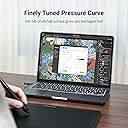
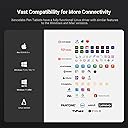
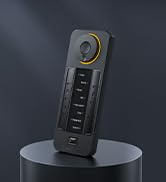
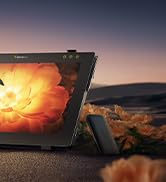
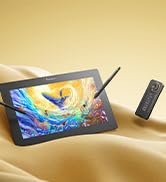
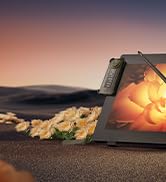
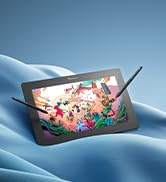
The Xencelabs Pen Tablet Medium Bundle is a professional 12" wireless graphic tablet featuring a 10.3"x5.75" active area with a true 16:9 aspect ratio, two battery-free pens with 8192 pressure sensitivity levels and tilt support, and a revolutionary shortcut remote with 40 programmable keys and OLED display. Designed for ergonomic comfort and ambidextrous use, it supports Windows, macOS, Linux, and ARM platforms, making it a versatile tool for artists, designers, and animators seeking precision and efficiency.


| Active Surface Area | 387.076 cm² |
| Asin | B09PRCZX49 |
| Best Sellers Rank | 40,280 in Computers & Accessories (See Top 100 in Computers & Accessories) 82 in Graphic Tablets |
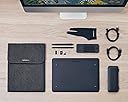
| Box Contents | Digital Pen, Glove, Pen Nib Clip, Replacement Nib, USB Cable |
| Brand Name | XENCELABS |
| Colour | Black |
| Compatible Devices | Laptop, Desktop, Mac OS X, Linux |
| Country Of Origin | China |
| Customer Reviews | 4.5 4.5 out of 5 stars (261) 4.5 out of 5 stars |
| Display Type | Digital |
| Eu Spare Part Availability Duration | 2 Years |
| Item Dimensions L X W | 23.3L x 32W centimetres |
| Item Weight | 850 Grams |
| Manufacturer | Xencelabs |
| Manufacturer Part Number | 819020327 |
| Model Name | Xencelabs Stifttablett Medium |
| Model Number | XPEN-TAB-M-BUNDLE |
| Native Resolution | 8192 |
| Network Connectivity Technology | wireless |
| Number Of Items | 1 |
| Number Of Packs | 1 |
| Operating System | Windows/macOS/Linux |
| Pressure Sensitivity | 8192 Levels |
| Product Features | 60° Tilt Support, Ambidextrous Design, Ergonomic, Extra-Slim, Shortcut Key |
| Product Warranty | 2 year manufacturer |
| Screen Size | 12 Inches |
| Specific Uses For Product | Drawing, Editing, Painting, 3D Modelling, Animation, Designing |
| Target Audience | professional artists and designers |
| Upc | 850013593552 |
User
First impressions are very positive!
I have been using a Wacom Intuos Pro medium every day for several years, and as it was looking a little tired, I was browsing Amazon to see if they had updated it at all and came across this Xencelabs product, of which I hadn't previously heard. The specs were good and the price about the same as the current Wacom product (apparently unchanged for several years) so I ordered one.First impressions are very positive. Compared to the Wacom, the positives of the Xencelabs product are1) wireless connectivity works seamlessly. I never could get the Wacom to work adequately - very laggy if it would connect at all, and I always used it wired, so the Xencelabs product is a big step forward.2) Driver - Designing a third party peripheral that has to work with both Windows and Adobe products must be challenging. I felt Wacom were always playing catchup with the other two companies, and recently I have been having to regularly refresh the Photoshop workspace as it often seems to lose connectivity with the Wacom tablet. It's early days with the Xencelabs tablet, but so far it has worked flawlessly; I guess the test will come when either or both of Windows or Adobe do some sort of update.Setting up the Xencelabs tablet was a breeze - it connected immediately via bluetooth with no problems. I am still working out the optimum configuration and placement of the little 'Quick Keys' device which contains the fully configurable scroll wheel and short-cut buttons. I love how the text updates according to which app you are using. In fairness, the Wacom system did the same, but using an on-screen display, and in some ways that was slightly better as you didn't have to look away from the monitor. Both systems have multiple pages of shortcuts that can be accessed, but I find that if I have to press more than one button to get to a function, I am more included to use the keyboard. The Xencelabs tablet also works well with internet browsers for scrolling and zooming which I never even attempted with the Wacom.So, in summary, after only a very short time with the Xencelabs graphics tablet, I find the biggest advantage over the Wacom is the connectivity - at last I can use my tablet wirelessly and the first set of drivers that I downloaded on set-up work extremely well with Photoshop and Lightroom in a Windows 10 environment. The other features - the separate button pad is a nice touch, but the functionality is pretty similar to that of Wacom, just differently presented. It's nice and fun to use with various coloured light options. The supplied 3 button pen works well, although I can only comfortably use the lower and middle buttons. They also provide a slim pen, but that's too thin for me to find comfortable. I love the glove they provide in the box - I always meant to get a Wacom one, but never got round to it. The pen case is very robust, but the only thing in it that I need to use on a regular basis is the one pen, so I have reverted to using the Wacom pen stand that I already had. They also include a very smart carrying case which will contain the tablet and the pen case and all the cables that you might need, but since I only work in one location now, I can't see me using that.Overall then - a very well implemented and functional graphic tablet. I would definitely recommend one of these vs a Wacom Intuous Pro Medium if you don't already have a tablet. If you are replacing an existing tablet, the decision is more nuanced. The properly functioning wireless connection and reliably functioning driver are the biggest plusses for me - I guess you need to decide if that's worth the money for you.
User
Excellent
I've had my Wacom tablet for 12 years and it's given a reliable and enjoyable experience for all that time. However the inevitable wear and tear had me looking for a replacement and based on extensive research and reading numerous reviews I decided to have a look at this make. I've not been disappointed. Installation and set up was much easier than my previous model. The tablet and pen work very well and on all the software I use. The drawing surface is great to use and the interaction is smooth and without lag. The quick key box has proven to be most useful and is easily configurable. The build quality of the entire bundle is excellent. Overall a really good piece of kit.
User
Zero latency on the wireless dongle. Thin pen is a great addition.
This tablet is one of the best purchases I've ever made. I was using an old wacom intuos for many years and I thought it was time for an upgrade. I was sick of wacoms shoddy software and the tablet was getting a bit worn out.This tablet has extremely good wireless latency, and is nice and compact in front of my keyboard. It's software is nice and clean and unintrusive. Also one of the best things is the addition of the thin pen, its so much nicer to use than those old thick pens. Also those white pen nibs with the slight texture are really nice to use, I ended up buying a whole pack of them.
User
Best choice for photoshop
Great tablet better than others
User
Impressed
I had been using the same brand of tablet for at least two decades and was happy for the most part with the results. However, it seemed to me that the largest tablet manufacturer in the world had become quite complacent over the last few years, and after some recent driver issues, I decided to give Xencelabs a try. I had heard good things and read many reviews. I have to say, I am very impressed. NO driver issues, everything just works. The build quality is top notch, the wireless setup works well, and my overall experience has been very good. Also love the surface of the tablet, it seems to be immune to the scratching my old model suffered from.The set I purchased came with two pens in their own case, a separate carrying case for the tablet and the Shortcut Keys device, which is very useful. All at a price better than the top brand.Could not be happier with my purchase, very glad I took the chance.
User
Xencelabs pen
I found the pen and tablet was straight forward and I didn't even download the drivers as I connected it worked straight away so I could use my Photoshop wonderful 👍
User
Dubious when ordering, but works well and pleased with it
After using a W**** for many years it is nice to find one that works straight out of the box. The two pens are useful, would have preferred it to work with the laptop's bluetooth instead of taking up one of the USB slots but happy overall.
User
Lived up to reviews
Do your research when selecting a tablet to make sure it's suitable for your budget, expertise, proposed use - reviews of this product were accurate and is a great entry level tablet that has scope to go further as your expertise grows... then you'll want to spend more on a screen tablet! Easy to set up and use. Great value for money.
User
Xencelabs tablet
Love this tablet. Easy set up and lovely to use.
User
Tablette agréable à utiliser
Très bonne tablette. Agréable à travailler avec les deux stylets. Pilotes qualitatif.Dans les revues sur Youtube on peut voir que la surface s'abîme après quelque mois de l'utilisation intensifs.Je pense que j'ai quelque année pour que ça arrive à moi avec mon utilisation un peu plus modéré.D'ici là, une nouvelle version va sûrement être proposée par Xencelab qui va corriger ce défaut!
User
Tavoletta grafica
Acquistato per mio figlio che ne è entusiasta per la semplicità dell'uso , delle applicazioni fornite e dal software applicato . TOP
User
Super recomendado (mejor calidad precio)
La Xencelabs Pen Tablet Medium Bundle es una tableta gráfica de alta calidad, ideal para ilustradores y diseñadores. Ofrece una superficie amplia y sensible, con dos lápices sin batería que brindan una experiencia de dibujo precisa y natural. Incluye un control remoto con botones personalizables, lo que mejora el flujo de trabajo. Su diseño ergonómico y materiales premium la hacen cómoda para largas sesiones. Una excelente alternativa profesional a otras marcas reconocidas.
User
思ってたより描きやすい
2日ほどで届きました。特に問題なく使用出来たので満足です。
Trustpilot
2 weeks ago
1 day ago