Buy anything from 5,000+ international stores. One checkout price. No surprise fees. Join 2M+ shoppers on Desertcart.
Desertcart purchases this item on your behalf and handles shipping, customs, and support to Kyrgyzstan.
🚀 Elevate your storage game with the ultimate 10-bay powerhouse!
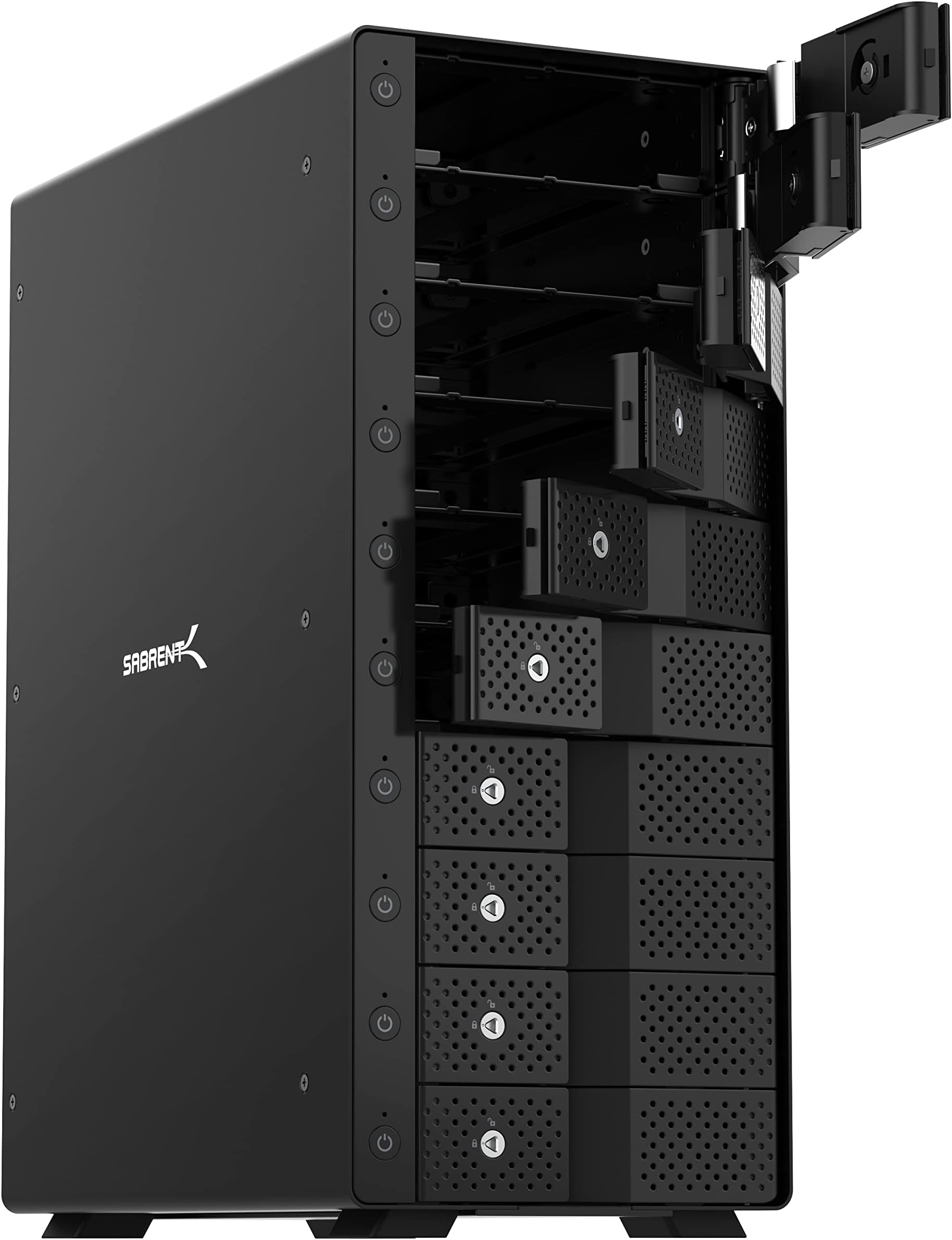
The SABRENT 10-Bay USB 3.2 Gen 2 SATA Docking Station offers professional-grade, tray-less hot-swappable access to ten 3.5” SATA drives via a single USB-C port delivering up to 10 Gbps speeds. Featuring individual power switches, a durable aluminum enclosure, and dual cooling fans, it’s engineered for high-capacity, reliable storage expansion without RAID complexity—perfect for content creators, IT pros, and data managers seeking streamlined, scalable external storage.


| ASIN | B09TV1XPDD |
| Best Sellers Rank | #9 in Hard Drive Docking Stations #49 in Enclosures |
| Brand | SABRENT |
| Built-In Media | DS-UCTB |
| Color | Black |
| Compatible Devices | Laptop, Linux, Mac, PC |
| Customer Reviews | 4.2 out of 5 stars 3,230 Reviews |
| Data Transfer Rate | 10000 Megabytes Per Second |
| Enclosure Material | Aluminum |
| Global Trade Identification Number | 00840025252943 |
| Hard Disk Form Factor | 3.5 Inches |
| Hardware Interface | USB |
| Hardware Platform | Windows |
| Item Dimensions L x W x H | 13.4"L x 10.5"W x 5.7"H |
| Item Type Name | Hard disk docking stations |
| Item Weight | 5 Kilograms |
| Manufacturer | SABRENT |
| Material | Aluminum |
| Memory Storage Capacity | 220 TB |
| Mfr Part Number | DS-UCTB |
| Model Number | DS-UCTB |
| Product Dimensions | 13.4"L x 10.5"W x 5.7"H |
| Supported Devices Quantity | 10 |
| UPC | 840025252943 |
| Warranty Description | 1 Year limited |
P**I
Perfect External Solution to once Internal 3.5" High-Capacity Performance Hard-Drives
[Overall:] If you are looking to get mechanical drives out of your system but want still use them due to their high-capacity and/or performance (in the case of my WD Black drives), this was the best quality solution. As I stated in my original review in 2020, if anything changes with my experience with this, I'll be sure to update (as long as I'm still alive for it). My experience didn't change 5 years later, my love for the drive just increased. I honestly do not expect any issues going into Year 6 (2026). [Initial/Updated Thoughts after 5 full years:] I bought the Sabrent USB 3.2 5-Bay in Jan 2020 and all bays have been in DAILY use for a full 5 years (Dec 2025). Surprised the enclousure or the drives haven't failed (especially the drives, they are well past their intended lifespan--still...don't forget to backup your drives). I dislike that all the reviews for each bay type is consolidated into one listing, but that's an Amazon problem. When I bought this in 2020, the packaging for the 5-bay stated USB 3.1 GEN 2 but the listing was for USB 3.2, which was confusing because of the USB naming schema provided by the "USB Implementers Forum". At the time, USB 3.1 GEN 2 was renamed to USB 3.2, and provided 10Gbps (which USB 3.2 [GEN 2] is and such was the case under the former name [USB 3.1 GEN 2]). Most SATA III cables are 6 Gbps, so this item was perfect for what I intended to do. Not sure what the packaging says 5 full years later, but I didn't have any major issues to warrant buying a new one (although I did think about the 10-bay several times). [Usage:] In 2020, I upgraded my PC with. I did not want to cable manage SATA cables in a smaller case and didn't want to move/copy everything to the smaller capacity NVME or SSD drives offered at the time. On the PC before it, I had many media files, documents, and games on multiple WD Black HDDs. I wanted a bay that can give me the same performance of having a SATA cable--and 5 years later, it still does so. While I don't play games off it anymore, technology as evolved, it does still store a backlog of games, media, documents, backups, etc. For 5 years, I was able to use the drives exactly how I wanted to and am getting the same performance as SATA III (especially without the internal wiring). I can seamlessly use the drives between PCs with the caveat of making sure the drive lettering is set up consistently with each machine (i.e. to avoid having to reinstall games, rewrite any hard-coding, file path shortcuts, etc.). [Quality:] This 5-bay has solid construction and is very well designed. Cool to the touch and manages power based on drive usage--but is always in the ready. The locks for each bay and the clear labeling was a very easy plug-and-play situation. While it does accumulate dust within the enclosure, a quick blow of an air compressor gets it back into looking "new". After 5 years, the only issue I had with the enclosure was that the board/circuit of the unit started making an indiscernible noise. It's not the fans or the drives, but something else. I honestly could not pinpoint it, but there hasn't been any performance issues at all. It just works. [Additional Thoughts:] 1. If you have more than 5 3.5" HDDs to use but don't want buy more bays? You can hot-swap. 2. The provided USB cables (USB-C to USB-A and USB-C to USB-C) did it's job, but were too short and thus I needed longer cables. Finding USB 3.2 cables for 10 Gbps for over 3ft wasn't the smoothest shopping experience because longer lengths have a bit uncertainty (due to how they are listed), but they are there and have worked to expectations. 3. Pretty much your own external drive solution...just have to have your own drives. :)
J**K
5-Disk Version - Built like a tank, works like a champ!
This is absolutely one of the best tech purchases I've made: I can't recommend it highly enough. I purchased this because I needed an easy-to-use external storage device capable of handling both 3.5" spinning platter HDDs and 2.5" SSD drives. The 2.5" drives need a 2.5" to 3.5" adapter, which can be had for $7 to $20-ish depending on the materials used. I'm a hobbyist photographer and I wanted an easy way to share digital images between macOS and Win10 computers. This completely fits the bill. Here's what I love about this device: - It is absolutely built like a tank - all metal, heavy, great construction - small footprint - it's roughly the size of a small toaster - no crazy or irritating drive brackets needed - you just pop open the drawer, slide the drive in, and close the door - viola! All set to use - individual power buttons! This is huge. I can load up the device with five separate drives, and select which ones I want to be active - under macOS or Windows 10, the drives are automatically detected when powered up, and it's easy to eject / unmount them when done and shut power off to the drive - the USB 3.2 Gen 2 connection provides full drive speed for HDD and SATA3 SSD drives - access is just as fast as connecting the drives directly to the SATA connectors on the motherboard - the unit also provides a USB-C connector on the back of the unit, so it's possible to attach a second device if needed All in all, I'd recommend this external enclosure without hesitation. Granted, It's a bit on the pricey side and the small, single drive external USB enclosures are much less expensive. Also, given the size and weight, it's definitely designed to be a desktop unit - you're not going to throw this in your laptop bag or take it on a flight with you. There are much better options if that's what your need is. Keep in mind that this the connection speed for USB 3.2 Gen 2 is a maximum of 10 Gbps, or 1250 MB/s, which is absolutely more than enough for SATA3 drives. This speed is ample for digital photography needs. I've used the lastest versions of Adobe Photoshop, Lightroom, ON1 Photo Raw, and the DxO NiK Collection apps without hiccup. If you're a videographer, however, this likely will not give you the speed you'll need, particularly if you're shooting in large format (e.g., 4K or greater) and/or RAW formats. In this case, a Thunderbolt 3 or 4 type drive would be a far better choice. If you're on the macOS platform, your iMac or Macbook should support these connections if you're using anything reasonably current. If you're on the PC platorm under Windows 10 or 11 and a PC builder, then your choices are a bit more constrained - Asrock has licensed Thunderbolt from Intel and several of their motherboards support TB 3 or TB 4. Alternatively, some Gigabyte MB's have a TB 3 header, which can connect to their PCIe expansion card ($89 as of the time of this review). A quick search on the internet should give you an idea of what your options are. BTW, this drive enclosure does NOT support hardware RAID. If that's what you need, you'll have to look elsewhere. Under both macOS and Windows 10, there are software RAID-ish options available - I haven't had the need or desire to attempt these, but in theory, they are possible. Good luck and hope this helps!
A**R
An excellent enclosure if you don't need RAID
This is for the 5-bay usb-c version. start with the bad, hence 4 star: 1. it drops connection sometimes when use usb-A to usb-c cable connecting to usb-A 3.0 port on a thinkpad T470. it happens when creating soft-raid and writting to 4 HDDs at the same time. I had to use usb-c to usb-c cable, which runs robustly. 2. sometimes, it will slow down for a while before picking up to full speed now the positive sides, which are quite many 1. when using usb-c to usb-c connection with thinkpad T470, it has been rock solid. I have been running windows storage space in 4 disk parity on it and wrote > 1TB to it, and never had once disconnection 2. HDD install is extremely easy and the door mechanism is strong so that I don't worry HDD falls out if move around. 3. the back circuit board does not block airflow, large opening between HDD and fan. sustained writing at full speed to 4 HDD for half hour, HDD still ~35C. 4. fan is very quiet. similar to one in my synology NAS 5. individual HDD has its own power button, you can shot-swap without worrying short-circuit anything. but it does create initial confusion as I was wondering why nothing happened after I pushed the main switch on the back 6. HDD and fan power down when HDDs are inactive and with computer power down. naturally, it resumes also with computer power-on 7. throughput has been great. can sustain writting to 4 HDD at 150MB/sec 8. usb-c hub allows expansion in future, although I have not tested it yet. 9. the led lights are quite small and do not feel disturbed by it I have looked through, twice, every single 4/5 bay usb-c enclosure; I do feel this is the best one, not one of, if you don't need hardware RAID. update after a week. moved 10TB of data both to it and from it. all done with storage space in parity, meaning 4 HDD writing/reading at the same time. rock solid. did not disconnect or slow down even once. excellent. update after 6 months. 24x7 for the last 6 months. Absolutely no problem. no single disconnect. still quiet as day-one. no complaints.
R**S
Good solid effective case
Easy to load. Just push the hard drive in gently. It will not be connected yet. Shut the door gently and you can feel and hear connection made. I have five 19tb hard-drive installed. I had to transfer all my video files off 5tb external 2.5 drives. Didn't get usb 3.1 speed. I'm running on a micro computer about 4 inch square. So I don't expect it. I had all ten drives installed the external were on a powered USB strip. Only had problems twice. One existing hard drive was at 4.7tb full. I stopped the transfer and restarted at the corrupt file. That seemed to sort the problem out. Not a raid enclosure and not an NAS. I have it available to my home network off a micro pc that I am using as a server. I have watched 3 movies at the same time with no buffering
D**D
Sabrent EC-DSK2 Dual-Dock is Severly Flawed! Poor design or Poor Quality Control -
Please note this review is for SABRENT "EC-DSK2" USB 3.0 to SATA Dual Bay External Hard Drive Docking Station and not the newer EC-HD2B version. Please also note that Sabrent has withdrawn the EC-DSK2 from the market and is no longer available. I would have given "0" stars if I could. This is a long review! My intended use for the dual SATA HDD EC-DSK2 dual-dock is to simply transfer selected data between two 4TB data backup 3.5" HDD's, but not clone disks. I purchased two of the EC-DSK2 docks and neither of them work with any SATA drive more than 1TB capacity. I have two Windows PC's and two Mac machines in my home network. When connecting and powering 'ON' the EC-DSK2, the Red power LED lights up and the side HDD1 and HDD2 LED's light up for a few moments and then go dark. 4TB drives never show up in Windows or Mac Finder. Windows and Mac OS both want to "reformat the drives" when the EC-DSK2 is connected. Both Windows and Mac show the drives as either raw drives or as unallocated partitions in their respective disk utilities. I contacted Sabrent Customer Support via eMail and eventually received a reply from a Sabrent Tech Support technician. To paraphrase Sabrent Tech Support response: "The EC-DSK2 utilizes a different chipset from other USB docks, which can lead to compatibility issues if the drives were previously formatted using a different chipset. The EC-DSK2 is operating within specifications, as it correctly detects the connected drives and reports their full storage capacity. However, drives formatted on other USB docks may not be immediately recognized by the EC-DSK2 without reformatting. To resolve this, we recommend backing up your data using the USB docks that work, then formatting the drives using the EC-DSK2. Afterwards, test the newly formatted drive on one of the single-bay docks to confirm whether the compatibility issue persists. If the drive is no longer recognized by the single dock after formatting it with the EC-DSK2, this confirms that the behavior is due to chipset discrepancies between the docking stations." Well folks, all I can say is Sabrent factory response is an example of Gaslighting at its finest. Total nonsense. The international USB standard requires that all USB devices are supposed to play nice with each other. That's it. End of my story is I didn't check out the Sabrent docks within the 30 day return period so I could not return them. I kept the power supplys and trash binned the docks. The EC-DSK2 is no longer available so if you ever get the chance - Don't Buy It!! YMMV
A**R
This does exactly what I wanted - simple, drives stay cool, easy power down option
I recently upgraded my Linux workstation to the latest Devuan. I have three large media drives (14TB) which I use for my home cinema (ripped dvd, bd etc via Kodi). The thing about those hard drives is, they are loud when running, and I am sensitive to hum, and the workstation is right next to me all day long. So I generally like to keep the drives asleep (spun down) using hdparm. That worked previously on Debian Stretch, but it no longer works on the latest stable, if I want to have utilities like k3b and rhythmbox then they also pull in udisks2, which wakes my internal hard drives up every few minutes. So aside from removing udisks2 and doing without k3b, the only way to fix this was to move the drives to an external enclosure. Most of the enclosures out there seem to either be really cheap and simple, and they literally toast your hard drive due to lack of adequate cooling; or else they are high-end NAS with their own Operating System and networking. Which you obviously pay for, and I really don't need all that. I just want an enclosure, connecting via USB 3, with good cooling. I tried a different brand unit initially by Orico, which worked fine but the drives ran very hot. So I sent that back and looked further, and found these ones by Sabrent. Encouragingly, when I searched for "cool" and "hot" in the reviews, most people seemed to say that it does have adequate cooling. And it also just "gets out of the way". Now I have used it for a couple of days, I can confirm this is probably the best drive enclosure I have ever used. It is made of metal, very solid, which is refreshing (the Orico, for example, had plastic trays). Insertion of the drives is simple, if you're careful (I read one review that talked about breaking the door latch mechanism because they pushed the drive in too much before closing the door, apparently you leave 1/4" and then let the door closing do the rest). I found that the doors have to be pressed a bit more to get that final "click", otherwise the latch is kind of loose. But once the click happens, just a little one, it's solid. I really like the power button for the individual drives. I agree with others that perhaps it would be better if the default upon powering up would be to power on all occupied bays, but this doesn't really affect me much. I usually keep the drives off anyway, except when in use. The power buttons allow me to power down the drives after I am done watching TV. I unmount all the drives (single script does that quickly) and then manually go through the buttons. You have to press for three seconds each one, but that is a minor hassle. My only minor niggle is that the power buttons are black on black, so it can be hard to find them in a dimly lit room. Basically this thing seems to work, and it's fast, relatively quiet (I am sensitive to noise, and I don't really hear the fan at all - much more noticeable is the hum from the drives themselves, which can't be helped). And it works with Linux. It just... works. Does what I want, nothing more, and looks good on the desk, and feels solid. Very happy! I hope they keep making this one and don't mess it up with some stupid redesign down the line, as many companies seem to do these days. I can't speak to any issues with using more than one drive at a time, as some others talk about. However for my use case, I am generally only using one at a time anyway. I also use one of the bays for a backup drive, but even then, it's the only one being used when I do that. So all seems well, very satisfied.
M**K
Good, but not Perfect Storage Option
I purchased a new computer and wanted to add additional storage for my photography/video files and game files. I watched a couple YouTube reviews and did some research and decided this was the best option to meet my needs. 1. SETUP: relatively simple but the supplied USB-C cable is so short as to be unusable. I knew that before I purchased based on other reviews so I ordered a USB-C 3.0 cable that would meet my needs. I purchased the USB-C to USB-C from Amazon https://smile.amazon.com/gp/product/B0874HH4ZZ/ref=ppx_yo_dt_b_asin_title_o04_s00?ie=UTF8&th=1. It was an additional cost but works great. INSTALLING: I'm a big fan of plug and play and this meets that criteria...mostly. Adding disks is easy enough, insert into the slot, close the door and turn the power on (power up the unit first, then power the disk(s) individually). I recommend installing/powering up the disks one at a time to ensure each disk is properly identified and accessible by your computer. I'll explain why next: INSTALLION ISSUES: I had four disks to install. One was from my old computer and contained photo and other files. This disk installed with no issues and works perfectly. The other three disks were removed from external Seagate hard drive storage devices. Each of those devices required its own power and USB source. They also occupied a lot of real estate on my computer table. They were also prone to falling over when the table was jostled or the cables/power cords were disturbed. Removing the HDD from the enclosures was simple enough and the drives recovered saved me from the additional cost of buying new disks. The issue I ran into when installing the drives was straight forward enough, but took some diagnostic work on my part to resolve. Two of the disks contained data/files and installed without issue. The other two were formatted and empty. These disks did not install with a popup window indicating the disks required formatting to be used. HMMM...the disks were formatted immediately prior to inserting into the drive bay, but I clicked yes and the disks installed. When I checked my file explorer properties for each disk the two empty (formatted) disks only read as 2TB drives. Knowing the disks were 4TB disks and verifying that they were fully functional prior to installing into the drive bays I was confused. I removed both disks from their drive bays and checked them with a separate drive reader. The same drive reader I used to originally format and verify the disks before putting them into the drive bays. They did read as 2TB drives...so what happened to the lost drive space? I used the windows disk management utility to examine each disk. What I found was that the second formatting required by the Sabrent disk storage unit had converted the disk from a GBT to an MBR allocation format. Using the disk management utility I was able to redefine the allocation format and recover the missing 2TB. (MBR allocation is old technology that limited disk allocation to 2TB of usable space regardless of the size of the disk). It still exists in some environments but I haven't encountered it for a long while. After the fix, I reinstalled the disk into the Sabrent drive bay and got the same "format required" popup. This time I clicked no and the disk did not show up in file explorer. Back to the disk management utility...once again the disk had been converted to an MBR allocation. After reallocating the disks a second time they worked perfectly. It seems like a lot of extra effort and for those who are looking for a truly plug and play system, this one may not be for you. Additionally, if you're not familiar with the Windows disk management utility, it may be too intimidating for casual or novice users. PERFORMANCE: After everything was installed and functioning properly I started a transfer between the disks to check the transfer speed. I moved 2.5TB of photo/video files to another installed disk. Transfer speed fluxuated between 120-130Mbs which is impressive for a consumer level device. FINAL THOUGHTS: I like the device and it suites my needs BUT the provided USB-C cable is useless and the installation process can be more than the average user will be able to resolve. The device seems well made and the performance is impressive given the price. Sabrent needs to identify and resolve the disk allocation/formatting required issue and provide a better SUB-C cable.
I**Y
Solid, stable, and fast.
The Sabrent 10-bay USB enclosure is the single best addition to my PC system in years. It's about the size of a medium-sized desktop tower pc. It is solidly built of metal, and is quite heavy. Drives simply slide in to the ten bays, each of which has its own door and it's own power switch. The controller in the enclosure handles handles access and governs traffic, requiring only a single USB-C connection to your laptop or desktop. The internal power supply is fed by a single standard three-prong grounded AC cable. I've found this to be a solid, reliable, and very fast platform for my various SATA drives, and a huge improvement over the tangled bedlam of external single drives, RAID enclosures, power supplies, extension cables, data cables, hubs, power supplies for hubs etc., etc., that had become a plague to my computer system. I see in some reviews that folks have expressed trouble with the drives disconnecting. My experience had been the exact opposite. I think the disconnection troubles I had in the past were due to running through one or more powered USB hubs just to accommodate all the external drives; I think various firmware-based power timeouts were involved. In this case, I've got the entire stack of ten connected to the OC by a single USB cable, going directly into the computer: no hubs. The drives go to sleep, certainly, but awake immediately upon demand. I've had zero trouble with disconnections. This is a big part of why I've characterized this unit as "solid, stable, and fast." This could not be more welcome. A long time pc user, I kind of moved sideways from desktops to laptops as a primary platform, gaining flexibility, portability, and convenience - in many ways. But. In other ways, the laptop form factor imposes strict limitations, most especially, in storage expansion. As a multi-decade serious photographer and at-home video and music producer, the move from analog to digital has introduced serious, grown-up, storage, archive and preservation issues, not to mention capacity issues. So what began for me as a couple of USB external expansion drives grew over time into a glutted city of USB drives and USB RAID enclosures, accompanied by an increasingly unmanageable tangle of cables, power supplies, and hubs. I was plagued with disconnects, time-outs, and other issues, intermittent, yet never ending. This enclosures has alleviated all of that. The drives simply work, and work well. I broke up the RAID-1 enclosures, and over a period of several weeks, sequentially copied all the material on them onto individual drives installed in this enclosure: a kind of extended bucket brigade process. The drives originated mostly as bare drives I already had in use as RAID pairs. As a pair of RAID drives would become empty and available, I split them up, reformatted them, and moved them into the 10-bay enclosure. What about RAID? Well, Windows does a decent job of handling RAID in software. If you think about it, all RAID is actually in software, just some of that software is installed as firmware in hardware. So far, I haven't rebuilt any of the four RAID-1 groups I had before, opting, for now, to manage mirroring and backup manually across the drives in the enclosure. If and when that becomes too unwieldy, I'll move back to RAID-1 pairs, but software-based, on drives in the enclosure. To sum up moving my drives into this enclosure has been a rigorous but welcome project. It has resulted in fewer duplicate management issues, hugely increased efficiency, and much improved reliability. I am delighted with the Sabrent 10-bay enclosure.
S**O
Risolve
L risoluzione ai problemi di chi deve avere molti dischi. Si installa in un secondo a parte l'inserimento dei dischi che per gli SSD meriterebbero dell pinzette, ma non ci importa molto. Risolve i problemi dei molti dischi.
X**X
Increíble diseño y calidad
Sin duda es un gran producto y el precio está ajustado ya que los componentes son de gran calidad.
J**H
Just hope it lasts.
Everything looks awesome just that they use stupid china fan which is totally crap. So I swapped in the famous and very expensive Noctua fan.
A**E
Glück im Unglück
Sterne UPDATE !!! Aktualisierung unten !! Habe das Gerät leider auf Grund eines defektes vermutlich Produktion Fehler zurück gesendet. Warum immer noch 3 Sterne, Design und Verarbeitung ist sehr gut und passt optische nahe zu perfekt in mein Setup wäre es noch in Weiß verfügbar würde ich mich im Kreis drehen vor Freude. Weiters in dieser Preisklasse ungeschlagen sind die verbauten AsMedia Chips die Industriestandard sind und nicht wie bei 90% in der Preisklasse die billigen JMicron die permanente ausfälle und daten Verlust mit sich ziehen, der AsMedia wirft aus verliert jedoch die Daten nicht also kein Verlust sehr positiv, leider hatte ich mehrere Probleme die ich jedoch nicht alle dem Hersteller anhängen kann, zum einen dürfte es sich um einen Produktion Fehler bei der Spannung Versorgung oder direkt am Board handeln was natürlich vorkommen kann es ist nach wie vor Massenware auch wenn es gute Komponenten und hochwertig verarbeitet ist. Ich hatte das Problem das bei hinzufügen bereits einer zweiten platte irgendwo ein Spannung spitze beim hoch fahren den Controller in die Sicherheit gezwungen hat und er die platte auswarf um daten nicht zu vernichten, leider hing er anschließen immer in einem Boot-Loop fest auch nach Neustart des PCs gleiches Problem und auch nach entfernen des Stroms vom Gerät selbst Rest Ladung raus und erneut starten trat das Problem erneut auf. Weiters bekam ich ich mit ziemlicher Sicherheit einen Rückläufer von Amazon gesendet da es bereits ausgepackt war Folie lag nur daneben in der Schachtel und es fehlten ein Verbindungskabel und das Strom Kabel. Was bei SABRENT selbst sicher nicht passiert ist. Abschließend kann ich sagen das returnieren bei Amazon ist Gottseidank ein Traum und es wurde sich innerhalb ein paar Minuten darum gekümmert und das rücksende ticket kam sofort. Ich habe es jetzt noch einmal bestellt da ich von der Marke eig. immer positiv überrascht war und ich denke das es hier einfach ein Zufall aus verschiedenen Faktoren gewesen ist zum einen bereits verwendet und vermutlich returniert auf Grund des defektes und zum andern eine vll. nicht ordnungsgemäße Überprüfung der retour Ware und somit ein erneuter Versand des Gerätes. Alles in allem ich warte auf das neue Gerät und bin dann hoffentlich genau so positiv überrascht wie von den anderen Produkten der Marke. Vll. meldet sich ja noch jemand von der Firma od. Amazon und teilt einen kleinen Bonus aus für die umstände. !!! AKTUALIESIERTE Rezension !!! So die neue Bestellung kam überpünktlich, diesmal direkt an die Postfiliale liefern lassen da ich nicht zu Hause war an dem Tag hat auch sehr gut funktioniert. Ausgepackt alles war dabei nichts war beschädigt, sofort bestückt diesmal gleich mit 4 platten, und siehe da alles erkannt keine Fehler kein Auswurf mehrmaliges starten des PC kein Problem sofort wieder da gewesen, läuft seid gestern durch um daten hin und her zu spielen auch untereinander absolut kein Problem. Kopieren auf verschiedene Platte gleichzeitig kein Problem keine Temperatur Probleme oder sonstiges. Genau das ist die Qualität die ich erwartet habe von diesem Hersteller dafür sind sie auch bekannt, dürfte sich also wirklich wie vermutet um einen entweder Produktion Fehler gehandelt haben oder der Vorgänger hat getestet und Schindluder betrieben. Abschließend bin Meeeeega Happy darum gibt's jetzt auch die vollen 5 Sterne. Danke Amazon Service für die reibungslose und sofortige Hilfe und Sabrent für das gelungene Top Produkt auch wenn es schwer ist mit dieser Qualität in diesem Preis Segment anzutreten, vergleichbare Hersteller lassen sich die verbauten Chips horrend bezahlen und liegen meist beim doppelten oder sogar 3 fachen Preis ! Also definitive Kaufempfehlung !!!
P**I
Solidna obudowa
Ciężka, solidna i działa bez problemu. Wentylator trochę słyszalny, ale nie przeszkadza. Łatwa i szybka instalacja dysków.
Trustpilot
1 month ago
1 week ago