Desertcart purchases this item on your behalf and handles shipping, customs, and support to Kyrgyzstan.
🔔 Elevate your smart security game—hear it, see it, own it!
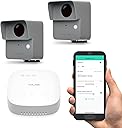
The YoLink SpeakerHub & One Motion Sensor Kit delivers professional-grade home security with a powerful ¼ mile LoRa range, customizable audible alerts, and seamless WiFi control. Designed for privacy and style, this compact smart hub integrates effortlessly with the YoLink ecosystem, empowering millennials to secure and automate their homes with confidence and flair.


| ASIN | B09W8SCF4B |
| Antenna Location | Indoor/Outdoor |
| Battery Average Life | 2 years |
| Battery Description | Alkaline |
| Best Sellers Rank | #192 in Home Security Systems |
| Brand | YoLink |
| Built-In Media | Detector |
| Color | Gray, White |
| Compatible Devices | Alexa, IFTTT, Home Assistant, Raedius Web Console |
| Customer Reviews | 4.4 out of 5 stars 262 Reviews |
| Item Dimensions D x W x H | 1.97"D x 2.6"W x 2.83"H |
| Item Weight | 14.7 ounces |
| Manufacturer | YoSmart |
| Manufacturer Warranty Description | 1 Year(Speaerkhub) 2 Year(Outdoor Motion Sensor) |
| Maximum Range | 0.25 miles |
| Mfr Part Number | YS1604+2YS7805 |
| Model Number | YS1604+2YS7805 |
| Mounting Type | Wall Mount |
| Number of Batteries | 4 AA batteries required. |
| Number of Items | 3 |
| Power Source | Battery Powered |
| UPC | 850024791824 |
R**9
Almost 4 years
After almost 4 years I figured it was time to post a review. I’ve been using the YoLink Outdoor Motion Sensor Kit since December 2022 and they have been excellent. I currently have three of the motion sensors installed—one on the front door, one on the back door, and one on my shop door. Detection is very sensitive and reliable without constant false triggers. Battery life has been outstanding. After more than three years they’re still going strong with no issues. I also use a YoLink vibration detector inside my truck while it’s parked in the driveway. It’s there specifically to alert me if anyone is messing with the vehicle (particularly catalytic converter theft). When I first got it I tested the range by placing the sensor in my mailbox about 100 yards down the street—it worked without any problems, which really surprised me. Everything is integrated with Alexa. I set up routines so that when a sensor is triggered the lights turn on and Alexa announces which device went off. When I’m out of town I still get notifications on my phone. It’s a simple but very effective setup. Overall I’m extremely happy with these sensors. They’re reliable, have impressive range and battery life, and the Alexa integration makes them even more useful. Highly recommended—I’d give them 5 stars without hesitation.
M**9
Very sensitive, fantastic transmission range
I purchased these for the 900' long gravel driveway on our acreage and have not been disappointed. Even at that distance the communication with the hub, which is located inside the house behind two walls, has been impressively reliable. The motion sensors detect differences in temperature and are usually quite sensitive; I had to re-aim one unit because it kept picking up vehicles in the neighbor's driveway over 100' away, even when set at the lowest sensitivity. I have noticed instances where vehicles leaving our property don't always trigger the sensor because they are too close to the ambient temperature (e.g. engine not warm); but again, I have to leave my sensors on the lowest sensitivity to avoid knowing whenever a vehicle transits the neighbor's driveway. Even at this setting the sensors easily trigger whenever deer or dogs come down the driveway. Reporting of triggering via the mobile app is very fast, usually within seconds of the triggering event even when the report is sent to the phone via cellular data. We really like being able to know when someone is coming down the driveway now, and the fact that they work so well at such a distance is amazing.
S**O
Speaker Hub and Motion Sensors
I am using the YoLink Speaker Hub and two Motion Sensors around my house. This system uses LoRa and has fantastic range. They have been very dependable from the very start. The motion sensors are extremely sensitive and will alert when motion is detected even if it detects a small creature like a squirrel. There are one or two things, so far, I wish were a little better. One, the lowest setting is still very sensitive. I would like even a lower setting. And although the system is extremely easy to set up, I find it difficult to set up a “disable” button to turn the system off while working around the house. These are not the fault of the equipment, so I am giving 5 stars. Overall, I am very happy with YoLink.
J**S
THIS is what a driveway alarm should be
I've used a few different versions of driveway sensors and these are by far the best. With the audio enabled base station I can set up my own notification sound for when the alarm is triggered. This is incredibly handy for me because I can switch it up when one of the dogs learns what the sound is and barks like crazy when it goes off. Setup is really easy within the app and there is Alexa and IFTTT integration if needed. I've had no issues with connectivity or range so far and that is with the base station in the basement if a brick home and the sensor 100 yards away outside. I don't get any false notifications on the medium setting and so far it hasnt missed any so it seem quite accurate.
C**K
Almost excellent but for one thing.
Works great. Love these motion sensors and the accuracy of the alerts. There is only one thing I don’t like. When installing, I have to enter my WiFi password and then I called the support team because I couldn’t get them to work properly, alerts, etc. Their solution was that not only do I have to give the app access to my location, but also to my “precise” location. Why do they need that? If I have the receivers connected to the internet and the motion sensors within their radio proximity zone, why do I have to give a foreign company in China my precise location? Makes no sense and it’s scary in WiFi security.
A**I
Absolutely flawless, I would say perfect.
I’ve had a look at a few other products like this one, but none of them quite hit the mark. It seems to have been crafted by someone who really gets it and knows what they’re doing, which sets it apart from the others. Plus, it sends you a notification about any movements right to your phone, no matter where you are.
S**E
Inconsistent, Poor Info, Maybe Needlessly Complicated?
I was really excited to see this new sensor product being offered. I am familiar with LoRa as I was trying to build my own road sensor because I was frustrated with commercial road sensor offerings. The available road sensors were either inconsistent, or they worked well but only lasted about a year before developing problems. I built a transmitter and receiver from a small microprocessor (Adafruit Feather 32u) and wandered the length of my property (~36 acres) and the LoRa connected to the house receiver and also got back a reply from the house receiver everywhere I went. This included connectivity through trees and non-line-of-sight behind hills! So I had high hopes for this Yolink product. In addition, they offer other sensors like temperature, water leaks, the ability to activate relays or outlets by sensors, etc. As you may have guessed, I've done a fair amount of program coding, building websites, setting up my multiple network devices on the farm, etc. But it took me a long time to even get the speaker hub device connected after downloading and installing their app. The main problem turned out to be that I didn't want to give Yolink my location. Their software won't connect without knowing where you are! And even after allowing it to know my location, it wouldn't connect without knowing my "precise" or exact location. Talk about a lack of privacy! But I sucked it up and gave in. After getting the hub set up, adding the two sensors was pretty simple. Programming them, not so much. I'm still confused about the settings. I've downloaded and read through their manuals, etc. for both the hub and the outdoor motion sensors. The sensors, or maybe the software, just does bizarre things. My setup had the hub on a desk in the front of the house next to windows that face both directions up and down the road to the sensors. After moving my hand in front of each sensor to make sure they were working, I placed the sensors fairly close to the house, about 500 feet away. They are pretty close to a direct line of sight in each direction but through a few branches from trees and some brush. Both sensors showed online and working through the app. Unfortunately, neither detected a car passing a while later. I also walked down to one, waved my arms in front of it, saw the LED light, yet it never activated the hub. Someone was inside and didn't hear it, and the history tab didn't show it. So I thought I must have screwed up the settings. I have it set to "always" alarm. Sensitivity set to "high". I'm only guessing at what this one does: "Time to enter No-Motion state". I originally thought it was a time-out to quit functioning after sensing for a while. I now believe it is the time after the sensor no longer senses motion, before it resets, and will again sense motion. For instance, if I set it to the minimum of one minute and a person walks by, the sensor will alarm. If another person walks by in less than a minute it will NOT alarm. Then (and I'm still unsure) it may start another minute of timeout because it sensed the second person, and so on. So if you have 100 people walking by the sensor every 50 seconds, it will never alarm until they have all passed and the one-minute time-out is complete. In this example, it would be about 84 minutes later it would start working again after all 100 people passed. I had this setting at "disabled". I have no clue whether this means it will alarm without a timeout, or it will never alarm again, because there is no timeout. I also set it to one minute. Trying to test it proved inconclusive. Looking at the history for one sensor, I saw it detected motion at about 4PM. The next entry was "no motion detected". I figured that must be the timeout, and several times it was about one minute which was where the timeout was set. Other times it was THE NEXT DAY, nearly 20 hours later. The sensor is facing a hillside. There is nothing to move except a few leaves, so why would it take a day to stop sensing motion? In addition, some settings randomly reverted to earlier default settings without any intervention by me. I would re-start the app, open the motion sensor page, and the "Time to enter No-Motion state" would be back to "Not detected over 5 mintes" or "Disabled"?????? Then there is "Alert Hold". Again, didn't get enough explanation to know what this is supposed to do. You can set it at zero or longer in minutes and hours. Is this only for an added device, such as an outlet that might turn on a light and the "Alert Hold" is for how long it is turned on? If you have no other devices and set it to zero, does the alert still work? Not enough hours in the day to try to test that. Both sensors have just randomly shown they were "offline". What is that supposed to mean? They can't be reached by the hub? They are tired and need a rest? They are too far away and lose connectivity randomly, sometimes connected, sometimes not? Are they doing some kind of internal programming and have to disconnect while doing it? Possibly any of those ... or none of those. But even when showing "online", good battery, and showing the temperature they still didn't detect movement of either cars or humans from less than 15 feet away and set on "high". That is their primary job, right? Does the app need to be constantly running for them to work correctly? Perhaps a note when you fire up the app saying "Hey, I tried to do a heartbeat with SensorOne and it did not respond. The last signal intensity was marginal. Is it too far away?". Or: "The last signal intensity was good. Did you move it or the hub? If not, your sensor may be defective". Slapping down a black box and having an expectation of how it is "supposed" to operate is not very helpful. Before receiving these, I also asked the seller if these would function without being connected to the internet. The answer was "For full functionality, our devices need to connect with one of our hubs, and that hub needs to be on the internet with a connection to our cloud server." That didn't answer the question so I then asked just "what functionality would be available without an internet connection"? That question was ignored. Go figure. I had hoped I could at least use these as "dumb" sensors after setup, and without being connected to the internet. You know, a simple alert when there is movement without all the history, or temperatures, or added scenes, etc. The odd functionality of these devices or their software, the limited sensitivity, and the partial documentation, etc., first made me frustrated, and now just makes me sad. I received these as a present, but all of the other road sensors I have bought in the past have worked much, much better than these, and most of them even after months outside in the Oregon rainy winters. Also, every other sensor I have bought has functioned at the same distance at which I set these, at least initially. Perhaps they are excellent within short ranges as is typical in a town yard. That is too limited for my needs. It is possible I received a defective device or devices. Even so, I'm not sure I can take all the time needed to set up new ones. And, if they are not tested before shipping, I don't really want to be their unpaid quality control. Bottom line is that I am VERY disappointed. I do know the LoRa technology can do better (numerous people have tested LoRa over miles, even a hundred miles line of sight, and they even connected to a satellite in orbit with LoRa). I'm guessing I need to keep working on my homemade sensor or wait for a decent commercial version that is designed for a rural user such as myself.
M**E
Customizable and dependable
The most complete driveway alwrt system.i have owned and ive had quite a few. I really like that you can customize the alert sounds to say where and which alaet is activated. No trouble.with recption either. Very good product.
E**A
Perfect
Perfect
M**A
Doesn’t work in NZ
Routines don’t natively run if the linked Alexa account is in AU Australia or NZ New Zealand. After some hunting online it seems to be an issue with YoLink not Amazon Alexa. Been in touch with YoLink and they stated they only support Amazon Alexa in the US. Expensive option for a driveway doorbell, better off going to Temu for the same result - It’s cheaper.
R**N
YoLink sensors
I have had these sensors outside on my driveway forca couple of years and they still work a treat, well worth the money.
J**N
Item was as described.
Quick delivery thank you, item was as described.
L**R
Works OK
I was pleasantly surprised that it worked on our drive - 50m from the house but the signal has to go through 3 brick and 2 very thick stonewalls so can't complain. I would imagine it would work at a much greater distance on a modern built home.
Trustpilot
1 month ago
5 days ago