Buy anything from 5,000+ international stores. One checkout price. No surprise fees. Join 2M+ shoppers on Desertcart.
Desertcart purchases this item on your behalf and handles shipping, customs, and support to Kyrgyzstan.
🚀 Upgrade your desktop’s USB game—fast, sleek, and future-ready!
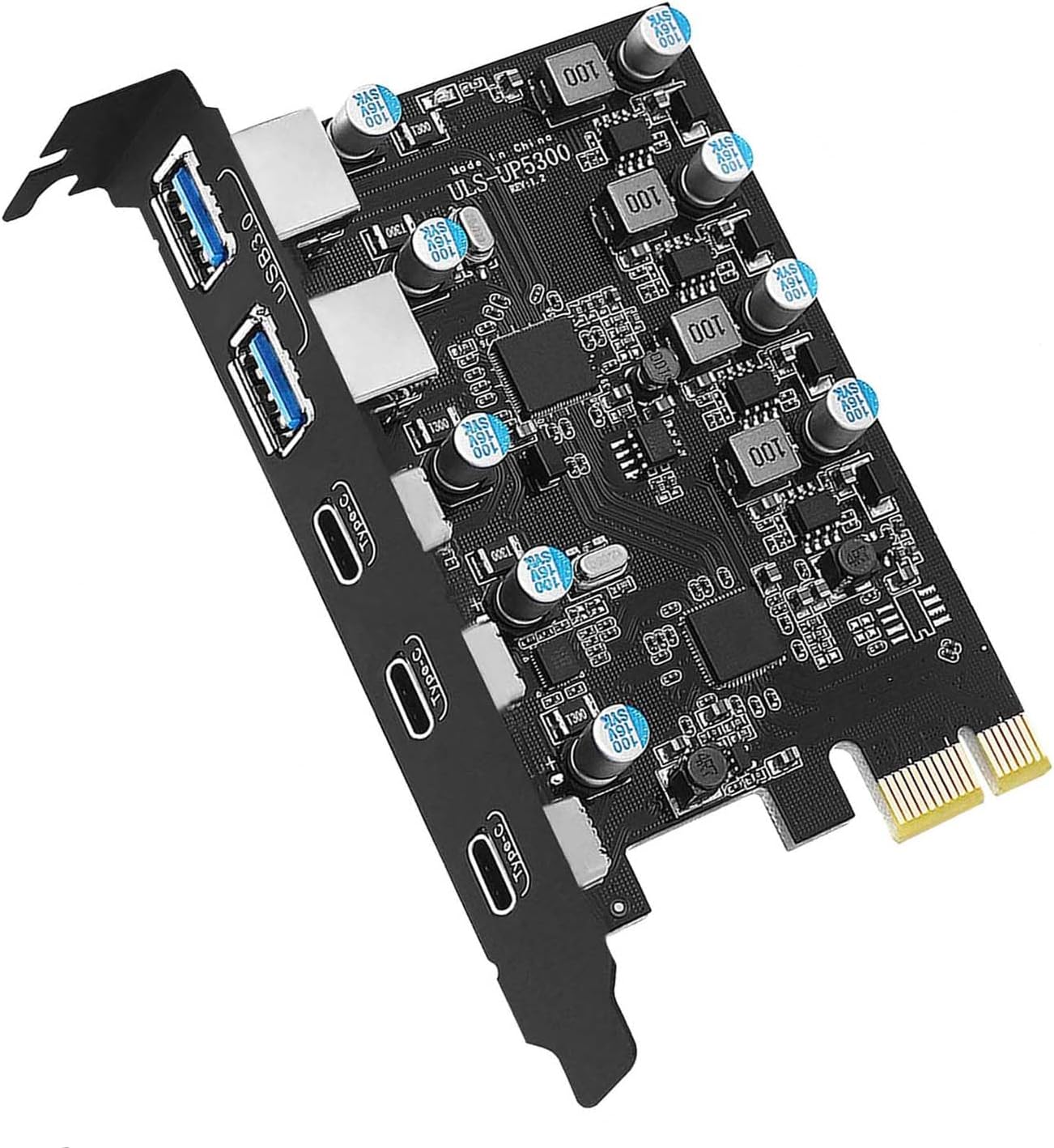
The YEELIYA USB PCIe Card is a compact internal expansion solution that adds 5 USB ports (3 USB-C, 2 USB-A) to your desktop via a PCIe x1 slot. Supporting USB 3.0 SuperSpeed up to 5Gbps, it offers plug-and-play installation for Windows 10 and Mac OS 10.8.2+, with built-in intelligent protection for safe, reliable connectivity. Ideal for professionals needing more versatile USB connectivity without external power hassles.


| ASIN | B09MFPGMH5 |
| Best Sellers Rank | #13 in Internal USB Port Cards |
| Brand | YEELIYA |
| Compatible Devices | Supports Standard Tower Case,for Gigabyte B550/B560M/B650/990FX,for ASUS AM4 / B450M/B550/ TUF Gaming X570,for MSI B450/550/X470,for ASRock B450M Motherboards etc. |
| Customer Reviews | 4.2 4.2 out of 5 stars (452) |
| Hardware Interface | PCIE x 1, PCIE x 16, PCIE x 4, PCIE x 8, USB 3.0 |
| Item Dimensions L x W x H | 4.72"L x 3.14"W x 0.72"H |
| Item Weight | 0.11 Kilograms |
| Manufacturer | YEELIYA |
| Model Number | PCI Express 3 |
| Operating System | Linux, Windows XP/7/8/10, for Mac Pro 4.1,5.1,7.1(model 2010~2020) |
| Style Name | Classic |
| Warranty Description | 360 days warranty |
B**D
Solid USB-C Expansion but be careful with devices with heavy power needs.
If you're looking to expand your system's USB-C capabilities without breaking the bank, this card delivers. Installation was a breeze, plug-and-play with no driver headaches, and the build quality feels solid, not flimsy like some budget options. Pros: Multiple USB-C ports, which is still surprisingly rare at this price point. Great value for the performance. Straightforward installation—no BIOS tweaks or extra setup required. Feels like a well-engineered piece of hardware. Cons (with a workaround): The only real drawback is the lack of external power. While it works fine for low-power peripherals, if you're planning to connect multiple high-draw devices (like external SSDs or charging hubs), you’ll hit the power ceiling fast if you use all the ports. I worked around this by plugging a powered USB hub into one of the ports, which solved the issue, but it did increase the footprint more than I’d like. Bottom line: If you’re mindful of the power limitations or already have a powered USBC hub in your setup, this is a fantastic upgrade. Just don’t expect it to power high power USBC devices on its own.
M**4
Perfect Expansion Card – Easy Installation & Flawless Performance
I purchased the USB PCIE Card 5-Port (3X USB-C, 2X USB 3.0-A) PCI Express Expansion Card by Yeelliya, and it exceeded all my expectations. Installation was incredibly simple—just plug it into the PCIe slot, and it worked perfectly right out of the box. No drivers or complicated setup were needed, which was a huge plus. The card provides a great mix of USB-C and USB-A ports, which has been perfect for my needs. Data transfer speeds are fast and consistent across all the ports, even when multiple devices are connected simultaneously. It feels well-built and reliable, and I haven’t encountered any issues since installing it. If you’re looking for an affordable and hassle-free way to expand your USB ports, this card is the way to go. Highly recommend!
P**Z
Amazing.
Got this as an upgrade for my existing pc from 2019 and it worked like a charm. The USB ports were stiff and nothing felt wiggle or loose. The piece fit perfectly and there was no fiddling with the pcie port or case slot needed (very easy install). I struggled between 5 USB-C or the 3/2, and opted for the 3/2 — it ended up being a very good choice. For the cost, this thing is a rockstar. Great transfer speeds on my external SSD drives, and it helps clean up my cables. The only weird design choice is including a CD with drivers and then printing the download link on the CD.
S**H
Solid USB-C Addition For Desktops
I went with this card because, mores than the USB-A Ports, I needed some additional USB-C ports for my desktop but only had a PCI-E X1 connection, and this has done the job quite nicely. Good time to remind people, while these are USB-C ports, the x1 interface will limit speed to some degree, so this is more recommended for devices like webcams or even a capture card as opposed to using for hard drives. They'll still be fast, but not as fast as it would be on a dedicated port on the motherboard. Also with the lack of external power, plugging in too many devices which all pull power over the USB bus might be challenging. It can support a couple on a full pull, but not all five at once. So, as long as you understand the limitations, this is a great way to add extra USB devices.
T**B
Seller sent a new item with Drivers CD
This device has been unusable since it was installed. The computer does not recognize it as a USB c device and it veryt seldom works. I have tried to find the drivers with zero luck. Not a good product Edit Seller reached out and sent a new unit with the CD that includes the drivers. Things are working Great Now. Thanks to the seller for making things right
A**L
Lasted a whole week
Its been about 45 days since I purchased this item, and I finally got around to installing it about a week ago. It worked perfectly upon installation, literally didn't have to mess with drivers or anything, windows took care of it. One week later, it will no longer recognize USB devices. It still passes power but has has no data connection, literally only worked for a week. And yes, I have gone through the classic restart, and driver reinstall troubleshooting steps. It is trash, and it is right outside the return window.
I**A
Easy to install
Easy to install
A**R
More USB ports with only a PCIe x1 slot , works on Linux too
My PC does not have enough USB slots for everything to have it's place - keyboad, mouse, webcam, mike, cellphone, cardreader, UPS. So with a single PCIe x1 slot available and useable, this card seems like the solution. It is supported by Linux - which for me is a must, but was not unexpected. This card only supports PCIe gen 2 ( 2007 standard , theoretical limit 500 MB/s ) and even for that, it's not fast. A single USB 3 device ( 624 MB/s ) doesn't come close, but runs at somewhat less than 100 MB/s. Better than USB 2.0 speeds for sure, but if you expected to max out your data transfer speed from SD card, USB stick or Camera - ah, well, what were you thinking. Given that it's the year 2024 and PCIe 6 is a thing - not that I'd expected anything better than PCIe 4 given they don't brag about the specs - and that you don't max out even the available PCIe 2.0 speeds unless you use multiple devices at once, this is a three-star product. I.e. : works, but nothing to write home about. It delivers the performance of an external USB 3 hub for the price of one, but without the extra cables.
H**N
Harika çalışıyor
I**T
Ho aqcustato la scheda basandomi sulla descrizione del prodotto, ma quando è stata consegnata ho scoperto che non corrispondeva alle caratteristiche. in particolare la corrente misurata sulle porte usb C era molto inferiore ai 3A dichiarati nella descrizione del prodotto. A mio parere si tratta di un prodotto di scarto o di seconda scelta in quanto la scheda è stata consegnata un una confezione aperta, non sigillata e la scatola presentava evidenti ammaccature, impronte e segni di usura. Naturalmente ho dovuto restituirla e sono stato rimborsato, ma non consiglio questo venditore
R**.
Fait le travail, installé en PCIe sur mon pc. Mieux qu'un hub usb
H**T
Ich habe die YEELIYA USB 3.0 PCIe-Karte gekauft, um meinem PC zusätzliche Anschlüsse hinzuzufügen, und bin begeistert. Die Karte bietet 3 USB-C- und 2 USB-A-Ports – ideal, um den wachsenden Bedarf an USB-C-Anschlüssen zu decken, während die USB-A-Ports weiterhin vielseitig einsetzbar bleiben. Installation: Der Einbau war kinderleicht. Wenn man sich ein wenig mit PCs auskennt, ist es wirklich einfach – Karte in den PCIe-Steckplatz einstecken, festschrauben und schon läuft alles. Treiber waren in meinem Fall nicht notwendig, die Karte wurde sofort erkannt (Windows 10). Leistung: Die Anschlüsse arbeiten einwandfrei, mit stabilen Übertragungsraten und ohne Ausfälle. Trotz der Platzierung direkt unter meiner RTX 3070, wo ein Lüfter der Grafikkarte sitzt, gab es bisher keinerlei Hitzeprobleme oder Stabilitätseinbußen. Fazit: Eine sinnvolle und günstige Erweiterung für jeden Desktop-PC, der mehr Anschlüsse benötigt. Besonders die drei USB-C-Ports machen die Karte zukunftssicher. Absolut empfehlenswert!
V**E
Buena tarjeta de expansión, hasta la fecha sigue funcionando!!!
Trustpilot
2 weeks ago
3 weeks ago