

Desertcart purchases this item on your behalf and handles shipping, customs, and support to Kyrgyzstan.
❄️ Keep your Xbox frosty and your gameplay legendary!
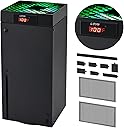
The G-STORY Cooling Fan for Xbox Series X features an intelligent 3-speed fan system with real-time LED temperature display and RGB indicators. Designed for low noise and easy installation, it automatically adjusts fan speed based on console temperature to prevent overheating and extend your Xbox’s lifespan. Powered directly by the console, this lightweight accessory ensures optimal cooling performance without sacrificing style or convenience.


| ASIN | B09P39L3KN |
| Best Sellers Rank | #928 in Video Games ( See Top 100 in Video Games ) #46 in Xbox Series X & S Accessories |
| Brand Name | G-STORY |
| Compatible Devices | Gaming Console |
| Cooling Method | Air |
| Customer Reviews | 4.5 4.5 out of 5 stars (4,373) |
| Included Components | Cord |
| Item Dimensions L x W x H | 5.51"L x 5.51"W x 5.51"H |
| Manufacturer | G-STORY |
| Material Type | Aluminum, Metal, Nylon, Plastic, Rubber |
| Maximum Rotational Speed | 2200 rpm |
| Model | 2 |
| Number of Items | 1 |
| Number of Packs | 1 |
| Part Number | 2 |
| Power Connector Type | 3-Pin |
| Unit Count | 1 Count |
| Voltage | 5 volts |
| Wattage | 5 watt-hours |
F**G
Exactly what I needed. Highly recommend!
This is the one. I’ve had many of these types of fans but this one so far has performed well above my expectations. I like that it gives you an accurate temperature read, I can confirm it is accurate as I tested with a thermometer. The fan is strong, and some level of noise does come with the territory but I’m not bothered by it. I have a very small room and my Xbox started overheating not long ago. I live in New England and would normally require heat in the winter but my Xbox was running so hot (Thank you Baldur’s Gate 3) that my entire bedroom was warm enough that I was actually opening the window at times. When the fan arrived I’d been gaming for 3-4 hours and was curious to see what the temperature was, as like I said my Xbox was essentially heating my entire room for me. The first temperature read was a whopping 112* F - I can’t believe I’ve been abusing my Xbox this way! I installed the fan right away and started a timer. Within 10 minutes the temperature dropped down to 86* and after 20 minutes we were down to a comfortable temperature down in the high 70’s. 30 degrees cooler in 20 minutes - Impressive isnt the word. I was outright giddy! I will also add, that I have a charging base already with a fan the cools from bottom up. That model cost me just over $60, however it clearly doesn’t work that well if my console is running 112* even while running it full speed. I was sure the cooling dock would be great since it screws into the wall giving the vents underneath the Xbox room to breathe but it really hasn’t done much. At double the price of this fan I have to say I wish I’d just purchased this one first! There is a huge difference between the two, I noticed right away that this fan was blowing my hair while the other one doesn’t do much at all. This one does make a bit more noise, but as someone who uses the Xbox virtually every single day for 8+ hours, I’d much rather opt for function over noise level. I was pleased that this fan came with dust covers, I have cats and it gets really dusty, I’m fairly neurotic about maintaining the Xbox so needless to say I’m constantly cleaning and dusting it. I don’t know that it works as well with the dust plate on top while running the Xbox, so I think I’ll just use it when the fan isn’t running. The other dust covers though, I installed right away. My one and probably only qualm with this cooling fan was the dust plug covers. They came molded on a single sheet of rubber so you have to cut them yourself. The process was torture for me, as nothing less than perfect was going to be acceptable for my Autistic mind. Nevertheless I did fairly well cutting them out, I just wish I hadn’t needed to do all that. I would’ve preferred they come as separate pieces. Small complaint though. I highly recommend this product. It does what it promises and at a very affordable price.
M**C
Keeps the Xbox cool during heavy use
I read tons of reviews before I purchased this top mounted cooling fan for my Xbox Series X. I was worried about the noise, possible clicking of the fan in the unit, the fan itself melting, etc. from all of the reviews I read. So far, I have had no issues with any of that. Understandably, I do not use my unit daily and do house upon hours of heavy gaming like I once did. But, after a 4 hour marathon of gaming the 1st night I got it, I never once had the temperature rise high enough on the unit for it to kick automatically into high speed (red LED colored). The unit has done exactly what it says it does, kicks on at different speeds at the temperature rises on the unit during usage. It can be switched easily to manual mode if wanted. It is not noisy at all and was a perfect fit and install took less than 10 seconds. My ONLY complaint is that the manufactured holes at the top of the fan are not cut out at the same specs as the Xbox. What this means in layman terms, is that the aftermarket brackets I purchased to hang my headset on the side of the unit to charge them no longer fits in the vent holes on the top of the unit. Small price to pay I guess. I'd rather keep my unit cool and have peace of mind of it not overheating and damaging the internal components then to be able to hang my headset so I can charge it via my USB port on the front of the unit. All in all, I would 100% recommend this device to another shopper who wants to keep their Series X cool during usage.
N**F
NO MORE HEAT SOAK
I've have bought 3 of these so far (1 for me and 2 for gifts) grate unit that keeps temps around 110 while gaining in auto mode and speed 1, very really did it jump to speed 2 and if it did it was briefly. I like the fact the fan stays spinning even after the Xbox is off witch helps in reducing heat soak and once cool the fan turns off, only thing that I don't like is the constant temp is always on but that's a small price to pay for a cooler Xbox without heat soak. I HIGHLY RECOMMEND NOT TO USE THE DUST GRILL STICKERS AS THOSE WITH CAUSE A AIR FLOW RESTRICTION WHICH WILL CAUSE IT TO HEAT UP FASTER AS THERE WILL BE LESS AIR FLOW FROM THE RESTRICTIONS. just dust of the Xbox as maintenance ever so often, no need to open it unless it's really bad inside
D**M
No overheating so far!
We bought this for our living room because we got a new entertainment center and noticed the Series X would get really hot. We tried adjusting the shelves but the fan was working overtime. This installed very easily and we could tell it worked right away. It has a nice temperature readout and a led changes colors based on the temperature, which you can turn off. Our Xbox is the entertainment workhorse for our living room so we wanted to make sure it lasted. Had this for a few months now and no issues. The fam can get noisy on the higher temperatures but not so much it is distracting and in my opinion less noisy than the Xbox fan.
S**M
Worth it
I didn't realize how bad I needed this! I got a fan when the available accessories were limited & that thing kinda sucks. The automatic fan is awesome & seeing the temperature spike on the display is very helpful! Then I know to turn on the fan at the base and remove the dust cover - it does a great job cooling my Xbox! Update: it's still getting the job done well & the manual mode has been an unexpectedly effective option for longer gaming sessions; Auto just cannot keep my Xbox series x below 95° for an extended period of time - not a complaint at all! The extra noise isn't even picked up by my headset mic with the noise gate set appropriately.
A**W
Fixes overheating!
I was skeptical at first on this, I just couldn't see how slapping a fan directly on top of another fan would help in any way. My Series X was constantly overheating to the point where it was effectively unplayable, however, so I figured it was worth a shot. I've only had it on for a few hours, but I was able to play for the entire duration without a single overheat issue. The fan cuts on at 96°F, and whe it does, it's a little jarring with the extra noise, but that noise is quiet enough to only be noticable for a few minutes. My Xbox stayed right around 107° according to the display, and the fan never switched to a higher speed. The only complaint I have at this point is the display section is rather bright and could be a distraction, especially in a dark room. I sit below my Xbox, so the LED inside the fan was above my sightline, although it does look pretty bright, so that might be something to think about as well. The cooler also comes with a handful of accessories; a cover for the top (which might cut down the light of the LED but also probably reduces cooling efficiency), some adhesive mesh to reduce dust intake (which definitely looks like it would reduce the intake efficiency), and a bunch of silicone port covers that I will make heavy use of (as I travel with my Xbox a fair bit). Solid value so far, I will modify this review if anything changes!
D**J
No doubt it is worth it!
This is a really nice cooling fan! It pulls the hot air out from the top way better than the stock fan in place, and it has a little thermometer that goes into the xbox and tells you the exact temperature of it. It just clicks right on and you plug it into a USB port in the back (if you are using both rear usb ports the front usb port also works though the instructions don't mention this) this kit also comes with rubber port covers for every open port on the xbox, even the CD drive! It also has a fine mesh cover for the 2 rear vents at the bottom to prevent any large dust particles from entering the xbox! I really like those 2 last items they include! The fan is super quiet as your can hear in the video, and you can set it and forget it on automatic and have your xbox cooled as you play with no worries. I really like the temperature gauge as well that allows you to monitor how hot the system is getting. All in all it is highly worth it and is almost a steal for the price! I got mine with same day delivery in 3 and a half hours!
C**T
Good, but could be better...
The fan has two modes, manual and automatic. The automatic mode will not run the fan until the xbox reaches 95 degrees or higher (low spin). If running in automatic mode and under 95 degrees the fan is off. Would prefer fan to run in low mode in automatic mode even when below 95 degrees. The mesh coverings went on easy and have an adhesive backing around the edge to keep them on. The rubber inserts are stamped and arrive as a single piece. You have to cut them out individually in order to use them. I was annoyed that they weren't pre cut already but it took a few minutes to do so and clean up the flashing a bit. I was able to do this with scissors, but an hobby knife would be better. The usb cable that provides power to the fan is long enough to sit in the top or bottom usb on the back. I opted to add a cable management tie down to keep the cable in tight against the back. I had them already for other projects so it would have been nice if they provided something like that rather than leave the cable offset from the xbox. Would I buy again? Yes, the main reason I bought this model is the temperature sensor and the fan auto adjusts should the unit heat up. There were others in this price point, but all lacked the temp sensor. Since the fan is pulling the air through and out I would also like to see mesh covering the under side (vertical tower) and there are intakes at each corner. I can see where dust particles might get sucked in from the bottom as well, especially if your home is dusty, have pets, etc. One item they do not include is a cover for the expansion card slot. That should be part of the rubber inserts and missing that I feel is strike against them. On manual fan (low), my xbox is running at 85 degrees with the fan on low compared to 90+ with it off, so yes it seems to make a difference keeping it cooler. I tried high fan for a couple minutes and it only dropped to 84 degrees. The noise is similar to a computer fan so noise increases in volume the faster it runs. On low it is reasonably quiet, faster speeds are noisier and probably indicate a lack of airflow coming in. ************Update Number 2**************** The temperature sensor is attached to the fan that clips to the top of the Xbox. The temp it reports when idle is 85-86 degrees. I thought that was high considering it's idle. I partially inserted a meat thermometer and it confirmed the internal temp when idle is near that number.
B**O
Resfria E marca temperatura
Produto mt bom
F**M
Owesome purchase
That is really working very well
R**O
Justo lo que esperaba
Me gustó mucho siento que se calienta menos sobretodo en la parte de arriba y eso que le tengo puesta la tapa cubrepolvo
S**E
Great Gaming Cooling Fan
It attaches easily and looks good while doing a great job. very happy.
D**A
Great cooling fan
I really like this fan set up, It works great and really cools the machine down quick. I also really like the auto and manual modes as well however it’s a little on the loud side but not too loud, especially on low. Also, the thermometer seems to be pretty accurate too for the most part. I would definitely recommend this unit for anyone looking to keep their machine cool. Also, this is an exhaust fan so it won’t affect stock fan motor or fan speed. Just simply pulls the heat out of the machine. Cheers
Trustpilot
2 weeks ago
1 week ago