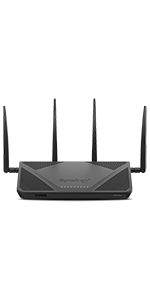
🚀 Elevate your network game with Synology RT2600ac – where speed meets security!
The Synology RT2600ac is a high-performance dual-band Gigabit Wi-Fi router featuring a 1.7GHz dual-core processor, 4x4 MU-MIMO 802.11ac wave 2 radios delivering up to 2.53Gbps speeds, and advanced security with Threat Prevention and multiple VPN protocols. Designed for both home and office, it offers smart bandwidth management, parental controls, and expandable mesh Wi-Fi coverage, all managed through the intuitive Synology Router Manager (SRM).


| ASIN | B01N5MPTG1 |
| Antenna Location | Monitoring |
| Antenna Type | Retractable |
| Best Sellers Rank | #49,396 in Electronics ( See Top 100 in Electronics ) #360 in Computer Routers |
| Brand | Synology |
| Built-In Media | 1 x AC power adapter, 1 x Quick Installation Guide, 1 x RJ-45 LAN cable, 1 x RT2600ac main unit, 4 x Antenna |
| Color | Black |
| Compatible Devices | Personal Computer, Smartphone |
| Connectivity Protocol | wi-fi |
| Connectivity Technology | wireless |
| Control Method | App |
| Controller Type | android, ios, vera |
| Coverage | Wide coverage |
| Customer Reviews | 4.3 4.3 out of 5 stars (4,447) |
| Data Transfer Rate | 2.53 Gigabits Per Second |
| Frequency | 5 GHz |
| Frequency Band Class | Dual-Band |
| Global Trade Identification Number | 00846504002498, 04711174722327 |
| Has Internet Connectivity | Yes |
| Has Security Updates | Yes |
| Is Modem Compatible | Yes |
| Item Dimensions L x W x H | 11.02"L x 6.65"W x 3.03"H |
| Item Type Name | Router |
| Item Weight | 1.5 Pounds |
| LAN Port Bandwidth | 1000 Mbps |
| Manufacturer | Synology |
| Maximum Upstream Data Transfer Rate | 797 Megabits Per Second |
| Mfr Part Number | RT2600ac |
| Model Name | RT2600ac (US) |
| Model Number | RT2600ac (US) |
| Number of Antennas | 4 |
| Number of Ports | 5 |
| Operating System | Synology Router Manager (SRM) |
| Other Special Features of the Product | Beamforming, Parental Control |
| RAM Memory Installed | 0.51 GB |
| Router Network Type | Wireless Router |
| Security Protocol | WEP, WPA/WPA2-Personal, WPA/WPA2-Enterprise, WPA2/WPA3-Personal, WPA3-Personal/Enterprise, OWE |
| Smart Home Compatibility | Smart Home Compatible |
| UPC | 846504002320 846504002498 |
| Unit Count | 1.0 Count |
| Voltage | 120240 Volts |
| Warranty Description | 2 years |
| Wi-Fi Generation | Wi-Fi 5 |
| Wireless Compability | 802.11ac |
B**K
Great router with excellent parental controls!
This is the best router that I have used that has straight forward parental controls that didn't require an extra subscription fee. The user interface is friendly, and while I am an IT professional, I believe it is simple enough for most people to be able to get it setup and configured. During setup the only issue I ran into is after the initial setup config, I could not connect my windows laptop to the newly created Wifi - it kept saying it needed a pin. Connecting a smartphone or tablet worked just fine, however all I needed to do was to run the firmware update and it was good to go - I'm not sure if other people will run into this issue, but it is the only foreseeable "hiccup" that I have noticed so far. The parental controls allow for profiles to be created, in my case I created a user profile for each family member, and of course the important "My Network (LAN)" profile for every device to get some kind of filtering. Each child user in my house then can have an individual internet schedule, time quota, web filter and safe search - which is great for my family as we have various ages and needs depending on the person. Blocking by category is also possible - if someone hits a block page, there is also the option (if enabled) to "submit a request" so if a particular website is miscategorized or it is a particular site that you wish to allow, you can do that pretty easily - Oh, and I didn't mention that when someone does hit a site that is blocked, you can get an app notification to your smart device in real-time. There is also the ability to turn on logging to see what devices are hitting which sites - this is under the network center > traffic control > monitor, and then use the drop downs to find what you are looking for. There also is a few settings that you may need to enable to get this working. Overall I have found this router a great options to keep my family safer while online - notice I didn't use the word safe. With all digital technologies, it is impossible to see / block / manage every aspect of a connection, however this product does a decent job at some of the basic blocking that many other routers seemed to be lacking. There are also other advanced features available that I am not using, including to create a media server (with an attached USB device) a DNS server, a Radius server, Cloud station and download station. I did just enable the threat protection service and am beginning to look at that now. The only downside is that this isn't a Wifi6 router, however being that it has what I was looking for where it came to parental controls - I simply set my Wifi6 router to Access Point mode, and plugged it into one of the lan ports and now I have the best of both worlds - this setup does require a good understanding of how to get an existing router into AP mode, but with the help of the web, you should be able to find a guide on how to do this. In this config anything that connects to my network, including devices to the WIFI6 (now AP) can get the parental control / protection.
S**R
Works like a champ, especially as a mesh point with other Synology products
I'm a professional network engineer and deal with commercial grade wifi installations and support every day. I literally feed my kids by using and understanding how wifi works in the real world. There are dozens of variables that influence the wifi coverage and speeds in your home or business. The MR2200AC is stellar as a home or small business wifi access point. It has almost all the commercial grade features I see in the Cisco, Meraki, and Ubiquiti gear I use every day, but it's all neatly hidden in the gorgeous little Synology interface. It also costs hundreds of dollars less while providing those features. For most single level ranch-style homes or offices with sheetrock and stud construction, a single one of these will likely be adequate for a 2000-2500 square foot home or space if you can centrally locate it. It could even provide some coverage, at a lower rate and range, for areas above or below the area it is installed in. Where it really shines though, is if your space has two or three levels and/or more challenging materials such as metal, brick, and plaster/lath. Particularly in older buildings where you cannot or do not want to modify the structure itself to run wires, you need a couple of these devices to take the place of hard wired connections. The Synology devices communicate with one another via a dedicated wifi band and can pass traffic between them with little impact to your user traffic. It's not as fast as a cable, don't be fooled. But it is far easier for the average person to implement without specialized help. I have my pick of commercial grade gear to run at home. Because commercial gear often has 24/7 hardware replacement support, it's expensive to buy and license for home use. Good news - you don't need it! My space is 3 floors with plenty of brick and rock surrounding and throughout the space. Combined with about 40 other wifi networks in my area (office park right behind my home), it's a very challenging wifi environment. I have tried many different solutions, but nothing can beat a Synology SR-2600AC with one or two MR-2200AC mesh points. So if you are frustrated with crappy wifi coverage in your home or office and don't want to pay a mint to have a commercial grade installation done, just grab yourself one or two of these, or a 2600 and a 2200 and you're in great shape. I use this combo and it is fantastic. Solved every single one of my challenges with zero fuss. They install easily and just run and run and run. They truly are commercial grade devices without the huge price tag. Buy them and give all your friends and neighbors a smug smile when they tell you that you have amazing wifi everywhere. :-)
J**N
I was looking for a good router to mange my kids. This is a great router for this and it's was why more powerfull then i thouht reading up on it. Great choise for parents who need controll over your kids and all of there devices.
M**N
No router was able to do it. It was able to block all YouTube URLs.
M**A
Cas d'usage : maison avec tablettes, pc, mac, Domotique divers lecteurs multimédia, caméra ip, TV connectées etc. (30 périphériques connectés) Une solution simple et efficace pour gérer son réseau. Contrôle parental au top. Attention c'est chaque périphérique (considéré comme individuel) qui est associé à un utilisateur/profil ... donc ne fonctionne que si vous mettez le téléphone et/ou la tablette ou PC ou Mac associé au profil "enfant". Pour être très clair : pas de périphérique partager enfants/parents ! (fonction Safe access) Evite d'installer quelque chose que l'enfant pourra/saura désactiver ... la solution est centrale et traite tout ce qui est connecté au réseau ! Je croyais cela compliqué de conserver sa box et ses services (tv et téléphone) tout en mettant ce routeur derrière pour gérer tout le filaire et le wifi, du coup j'hésitai a sauter le pas. En fait avec les bons conseils ça reste simple ... Fidèle des solutions Synology (déjà 3 NAS), je ne suis pas déçu ! pas besoin de bricoler, ça marche tout simplement, bien intégré, bonne interface etc. On est parfois un peu surpris au début de ce qui circule sur son réseau et tout ce qui est envoyé parfois considéré (à tard ou à raison ...) comme dangereux ... (fonction threat prévention)
G**R
I've bought many of the "latest superfast routers" boasting every feature and looking like a cross between a stealth fighter and a hedgehog .... and every single one of them has been disappointing! Their interfaces are dreadful, and more money has been spent on how they look than how they work. This unit has understated looks (nice, but not like a modern trainer), but the inside is what matters! Love this router! It's done everything it said it would, and more. I now have a great VPN back to my home NAS, it's fast, and the interface is seriously good. This unit is expensive, but buy well buy once! (It's cheaper than the many routers that don't work properly!)
J**K
This is a great piece of kit. Performance has been good and the price is very decent for what you get. The only gripe i have is the boot time is a little bit slow. Other than that this is a good purchase.
Trustpilot
4 days ago
3 weeks ago