⚡ Print Fast, Connect Smart, Work Green – The Ultimate Home Office Ally!
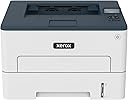
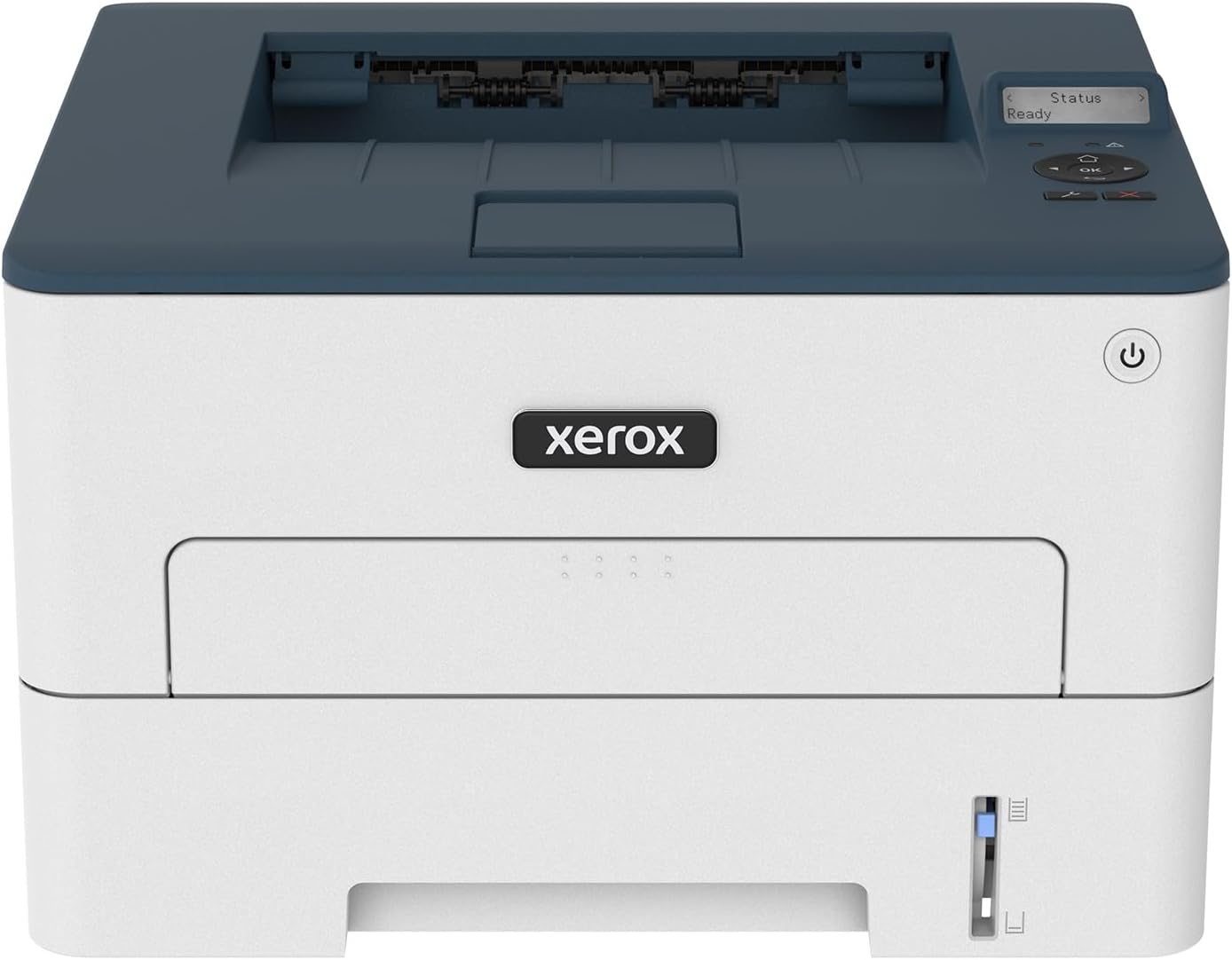
The Xerox B230/DNI is a compact, wireless black-and-white laser printer designed for small teams and home offices. Delivering up to 36 pages per minute with a sharp 2400 x 2400 dpi resolution, it supports seamless mobile printing via Wi-Fi, AirPrint, Mopria, and Chromebook. Featuring automatic duplex printing and eco-friendly toner recycling, it combines speed, convenience, and sustainability in a sleek, easy-to-install package.


| ASIN | B09HRKCKFJ |
| Additional Printer functions | Print Only |
| Best Sellers Rank | #30,331 in Office Products ( See Top 100 in Office Products ) #47 in Laser Computer Printers |
| Compatible Devices | Smartphones |
| Control Method | Remote |
| Controller Type | Android |
| Customer Reviews | 4.2 4.2 out of 5 stars (170) |
| Date First Available | October 5, 2021 |
| Dual-sided printing | Yes |
| Duplex | Automatic |
| Hardware Interface | Ethernet |
| Included Components | Printer, power cable |
| Ink Color | Black |
| Item Weight | 16.1 pounds |
| Item model number | B230 |
| Manufacturer | Xerox Office Products |
| Max Copy Speed (Black & White) | 36 ppm |
| Max Input Sheet Capacity | 250 |
| Max copy resolution black-white | 2400 x dpi |
| Max copy resolution color | 2400 x 2400 DPI |
| Maximum Black and White Print Resolution | 2400 x 2400 dpi Dots Per Inch |
| Maximum Color Print Resolution | 2400 x 2400 dpi |
| Maximum Media Size | 8.5 in. x 14.17 in. |
| Memory Storage Capacity | 256 MB |
| Model Series | B230 |
| Number of Trays | 1 |
| Print media | Paper (plain) |
| Printer Ink Type | Toner |
| Product Dimensions | 16.5"D x 17.4"W x 12.3"H |
| Sheet Size | 3.9 x 5.83 in/99 x 148 mm to 8.5 x 14.17 in/215.9 x 359 mm Inches |
| Specific Uses For Product | home office |
| Supported Media Sizes | A4 |
| Total Ethernet Ports | 1 |
| Total USB Ports | 1 |
| UPC | 095205069259 |
| Warranty Type | limited warranty |
B**S
Nice little printer
This printer is working really well so far. It was relatively easy to set up and it prints very nicely. I think it was a great value for the money.
L**N
Good printer
Good machine and easy to install
R**G
Xerox B230/DNI is the best investments.
I've been looking for a printer that is easy to install without calling a technician to help. I install it on my own with the help of YouTube videos. It didn't take long to install. It prints well with no issues.
J**Y
Absolutely most ineffective printer I have ever owned
One might not think Gutenberg’s printing press a expedient option for printing in the 21st century, but when left to the engineering prowess of Xerox, a 16th century printing press would be my preference. Not only is this printer just poorly designed given the digital capabilities of the third decade of the 21st century, but it also simply did not work and the software accompanying the printer caused my computer to freeze. One has to input any information - Wi-Fi passwords, etc. - by scrolling on a tiny screen through the entire alphabet of upper- and lower-case characters. To type a password of 11 characters takes well over two minutes! Baffling that this is the best interface Xerox can manage in 2023. Honestly, it seems like Xerox has not updated their interfacing technology since the Xerox 820 Information Processor in the early 1980s. Of course, this wouldn’t be such an issue if the printer stayed connected to the Wi-Fi, but, like most modern printers, it seems to be confused and upset by wireless internet. In the course of one day, I had to reconnect it to the internet four times, each time inputting my password one arduous character at a time. I am just thankful that my password did not contain the characters x, y, or z, otherwise I would still probably be sitting there scrolling through the alphabet on a tiny screen salvaged from what I can only imagine is a surplus stockpile from the late 1970s. So, once I got the printer set up and tenuously on the internet, I attempted to print and… nothing. So, I downloaded the driver from Xerox’s website and installed it onto my up-to-date windows operating system and… it crashes my computer. Wow! Impressive stuff Xerox; you have now reached new heights of incompetence among the modern home printing presses! So, I reset the printer, uninstalled all Xerox software from my computer, cleared all cashes, deleted all old printer data and software, and try again from the start. This time, I installed the driver and then set up the printer. All things seem ready to go, the Xerox driver installation prompt screen says “print test page” and so I print and… nothing. So, I went online to search for this issue. I find lots of people from Xerox own help forums saying to uninstall everything from Xerox, do some fancy backroom file sorting on the computer (which I do), reinstall everything, and try again. However, upon trying to access the installed software to uninstall it again, it crashed my computer AGAIN! Excellent work Xerox, truly masterful. It almost seems like you are trying to sabotage the modern home office experience, or perhaps just redefine it as a Sisyphean torture with endless password inputting, software installations, and troubleshooting without any reward. So, I contacted Xerox customer support, which of course is an AI chat bot that tells me to check to make sure the printer is powered on like I am a buffoon. I have to go through an endless litany of suggestions from this similarly ill-designed technology from Xerox before it finally tells me that it cannot resolve my issue. I have to now hunt for a support number in some vein hope of talking to a person. When I finally talk to a person, they tell me that they have no idea what is going on and that I just need to try uninstalling and reinstalling everything again. Holy s***. This is a joke right? Xerox, you are just having a great laugh at me now, aren’t you. So, instead of continuing pushing this metaphorical boulder up a hill to have it roll back down again, I returned the infernal device. I would rather hand transcribe my documents than ever buy any printer or anything at all from Xerox ever again. The laser printer was invented by Xerox over half a century ago in 1969, and today they are a company that specializes in printing technology but still cannot make a laser printer that works more reliably than a medieval printing press. Good job Xerox.
J**D
Nice office printer!
So far this is a great printer and easy to install. Quality seems to be great as well.
S**Z
Good b&w printer!!
Awesome printer! Took a few tries to set it up connecting wise but once we got it connected we’ve had no problems since! We got this because we only print in black and white and were spending a fortune on ink with our old printer, having to replace the colors when we never used them. Very good value for your buck!! Noise isn’t bad at all! Just sad there’s no scanning options.
S**R
AirPrint compatible
Love light, easy connectivity, reliability. I would def. Buy again if other, a brother fails. Not a heavy user.
T**E
A great printer! (so far)
Received this Xerox printer yesterday. It is replacing a Samsung monochrome laser printer that died of old age. It will be a back-up printer, in case our Canon all-in-one goes down. Very well packaged, box contained everything needed to get it installed and printing asap. I used the ethernet port, connected directly to our router. Used the ADD PRINTER function in Windows on 3 computers, desktop and 2 laptops. All work great, took less than 10 minutes per install. I had forgotten how excellent Zerox is at what they do. Very Well Done Xerox!
M**L
Works for LINUX!! Excellent printer! No subscriptions!! Buyer has total control over printing through web interface. Search through the small display on the printer to get the ip address, add that ip in your browser and you will have more control that you ever dreamed possible. Once in the web interface you can set a static ip to whatever you want. Do not even try to set any settings through the small printer display, just skip through all that and go directly to the web interface and see all the control Xerox provides its customers. Mine is now connected to my network and all connections can print to this printer. Install took 15 minutes with no hickups! You can also handle all security, passwords and well, LOTS more! NO drivers to download and install. I am using CUPS on LINUX and I just opened "printers" from the MINT XFCE menu and printer was recognised and I could adjust print settings there also. I opted for ethernet connection and after connecting to the printer I disabled wifi through the web interface! Believe me, when you get to the web interface you will have so much settings available to you it will be amazing! Simple printer with big impact! Way to go XEROX for putting customer needs first when it comes to simple install and printing! Why can't greedy printer manufactuerers learn from this and put customers first like XEROX does? In the future I will opt for a full color with scanner, but this XEROX B230 is excellent and I am totally happy with my purchase!
C**Z
Tiene un problema, después de un tiempo se desconecta y desconfigura del wifi. Al imprimir jala más de una hoja! como casí todas las impresoras, pero eso es molesto! el toner es bastante caro, pague al rededor de 2,500 pesos mexicanos. como unos 50 USD
J**Z
Fue lo que yo quería
A**W
Solid budget printer. Was a snap to get working in minutes over Ethernet (yep, has an ethernet port) - and bonus, no app required to get it all up. Can't speak for WiFi or the phone app or tech support, but works fine with Linux. I think it's going to be a nice companion printer to my ink jet for document printer. But I do wish it had a proper power switch instead of just going to deep sleep...
C**B
Quality of this printer is not there, it’s too light even thought the setting is set at it’s darkest setting. I phone Xerox they cannot find the S/N so I don’t know what this seller is doing to record the serial number. My return window has passed by 4 months, even thought Xerox has a one year—useless
Trustpilot
3 weeks ago
2 months ago