
Buy anything from 5,000+ international stores. One checkout price. No surprise fees. Join 2M+ shoppers on Desertcart.
Desertcart purchases this item on your behalf and handles shipping, customs, and support to Kyrgyzstan.
🎮 Elevate your flight sim game with Boeing-grade precision and immersive control!
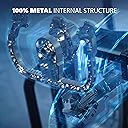
The Thrustmaster TCA Yoke PACK Boeing Edition is a premium flight simulator control bundle featuring a 1:1 scale Boeing 787 yoke and throttle quadrant. Designed for Xbox Series X|S and PC, it offers smooth pendular motion, 35 action buttons, and a durable metal build to deliver authentic, professional-grade flight simulation. Perfect for enthusiasts seeking immersive, precise control and official Boeing licensing.


| ASIN | B09DPYHM55 |
| Additional Features | Ergonomic |
| Best Sellers Rank | #2,558 in Video Games ( See Top 100 in Video Games ) #56 in Xbox Series X & S Controllers #190 in PC Game Controllers |
| Brand Name | Thrustmaster |
| Button Quantity | 35 |
| Color | Black |
| Compatible Devices | Windows, Xbox Series S, Xbox Series X |
| Connectivity Technology | USB |
| Controller Type | Flight Stick |
| Customer Reviews | 4.3 4.3 out of 5 stars (745) |
| External Testing Certification | Não Aplicavel |
| Hardware Platform | Desktop, Gaming Console, Laptop |
| Included Components | Instructions manual & flightstick |
| Item Dimensions | 19 x 15 x 19 inches |
| Item Dimensions D x W x H | 19"D x 15"W x 19"H |
| Item Type Name | Flight Yoke |
| Item Weight | 5.4 Pounds |
| Manufacturer | Thrustmaster Flight SIM |
| Model Name | Thrustmaster TCA Yoke PACK Boeing Edition |
| Package Quantity | 1 |
| Power Source | Battery Powered |
| UPC | 663296423115 |
| Warranty Description | one year |
A**C
Best yoke, throttle and rudder for Xbox Microsoft flight simulator
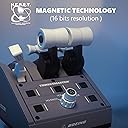
I was debating between the Honeycomb Alpha, the Turtle Beach Velocity One, and this Thrustmaster Yoke Boeing edition to practice on Microsoft Flight Simulator for the Xbox series X while enrolled in private pilot flight school in Linden NJ. Unfortunately the Xbox version for the Honeycomb Alpha was not available. The Turtle Beach seems to have quality issues according to reddit reviews. So I went with the Thrustmaster, especially since it uses Hall effect sensors instead of potentiometers. My sister gifted me a Thrustmaster HOTAS before (which I liked a lot, but the Piper aircraft I'm using in school uses a yoke, so I wanted to upgrade for more realism) and I had to resolder and clean the potentiometer on the throttle for the HOTAS after a year of use. With hall effect sensors on the Thrustmaster yoke, I won't have to do maintenance on potentiometers anymore. I AM THOROUGHLY HAPPY with this Thrustmaster yoke! The buttons and axes are so customizable for Microsoft Flight Simulator that I almost seldom touch the mouse or gamepad anymore. I was able to assign trim and flaps for the extra levers on the throttle quadrant, and the extra buttons on it make it easy to adjust mixture, toggle VFR map, ATC and parking brake. The movement of the yoke is solid even though it's not force feedback like the Moza. Best flight controls for Xbox in my opinion, and hopefully will be able to use it in VR when I save enough to get a gaming PC.
C**E
Great Yoke! not so great Throttle.
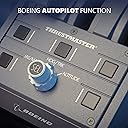
I have to agree with many of the other reviews mentioning how great the Yoke is, and how not so great the Throttle is. The Yoke is built with quality materials and the axis movement is super smooth and accurate. The Throttle feels much less sturdy than the yoke, and the levers are a tiny-bit wobbly, although the axis movement is very smooth, but I would like to adjust (none present) the tension to make the axis a little stiffer. The knob which adjusts the HDG/IAS/ALT bug is slow to adjust and really jumpy, you have to turn is very slowly for the adjustment to keep up properly. It really feels like the engineering time was spent on making a great yoke, and the throttle was hurried into production, just so both could be released as a combo together... which is sad based on the $499 price tag. Overall, if you want to simulate the yoke of a commercial jet, it's a terrific yoke and a so-so throttle. If you don't have any other throttle options, then it will work well with the throttle axis, but the autopilot knob is sketchy at best. You can also just buy the Yoke and use the two small sliders as an alternate throttle method. Maybe future drivers can help with the throttle issues.
S**R
What a yoke in 2022 should be like!
I had a chance to test the Honeycomb yoke recently, it was an insult. This Boeing yoke is gentle, very well calibrated, perfect in all respects0 and very realistic for a simulation. The yoke handles every aircraft with a very natural flow, both on difficult departure/arrival routes and during cruise. The stability is unprecedented for a yoke designed for flight simulation and I would not replace this one with any other model. I do not have an opinion on the throttle box, which I have not yet tested, but my goal was to have a superior yoke and that I have! From my initial 'look and feel' of the throttle box, I am pleased with that product as well. I am happy I was able to return the ridiculous Honeycomb cheap wheel and get this one, the serious yoke! I fly several hours every weeks and can't imagine how Honeycomb has the guts to sell their 'joke of a yoke' and expect customers to not notice how bad, unstable and unusable it is. But many fell for it...
B**U
Why Rating So Good?
If you are planning to use 4 engines, just avoid; not sure what kind of scaling Thrustmaster using to design this, you will need to have hug hand to cover all for levers because the spacing is wide. It looks like they designed it first and realize Boeing still have 4 engines plane that people might want to fly and just said you can pair a second one together. The reverser levers are unacceptable, extremely flimsy, any Etsy self 3D print can have better quality than that The throttle lever also do not line up at idle or full thrust, there is also a tiny play to it, you can see from one of the review picture easily, but no one think that's an issue? If you plan to only use one throttle quadrant, you might still be ok, it is design for single or twin engines; but you will loose one axis for 2 engines, unlike the old Airbus one there is no add on... The selector knob does give a good feel, but I will not recommend this, spend a bit more get the Honeycomb Bravo, even there customer service is horrible, but the unit is much better, and you can find tons of aftermarket levers on Etsy PS. The shipping from Amazon on this one is horrible, no box just mail out the retail box without even bother to tape the box
T**O
Fantastic Boeing Style Yoke, Ok Throttle after Calibration
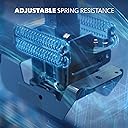
I am an expert on flight simulator yokes, I've tried them all, I've modified them, I've made videos about them. I own a top of the line Yoko+ yoke from spain and I am very picky when it comes to them. Since I also fly in real life, I can attest to the feel of at least Cessna aircraft. This yoke is very nice in feel (both movement and comfort). The pitch axis is exceptionally smooth with no annoying center detent which plagues the Honeycomb. It has a lot of travel (great for precise flying). The sensors are Hall effect (no electrical noise or "jittering" in the simulator). The roll axis is also quite smooth and 90 degrees each way. The hat switches and buttons are probably the best placed and best feeling in the market- as they should since it is a 1:1 replica of the real 787 yoke. The throttle is nothing special- it is missing a 4th axis to allow for both flaps and spoiler control- you can have one or the other but not both. The rotary knob on the throttle is not very useful at the moment in MSFS2020 because the rate at which it increments the autopilot setting is so painfully slow that it is useless. The only positive thing about the throttle is the fairly long throttle range and the smoothness- which you may argue is the most important part. The feel of the throttle handles is pretty good though and the reverser handles- which just engage basic switches- are not fancy but work pretty well. I would 100% recommend the yoke, but only 50% the throttle. However, the throttle does a good job at its most basic functions- so I would not hold off on buying the package just because of it. The yoke alone is worth the price of the package. I do think that this unit should be slightly cheaper (300$ range). But considering the niche market and the supply issues, I think the price makes sense. There are just a few minor things I don't like about the yoke however. The mounting system is good and sturdy, but due to the pendular design, the bottom "jaw" of the yoke sticks out into your stomach- depending on how close you sit this may be a problem. The unit is difficult to store- the bottom is not perfectly flat so you have to set it down carefully and hope it does not tip over. The tablet stand is nice- but should have been made to lock into place. If you forget and try to pick up the yoke using the metal stand- it will come out. The default bindings in MSFS2020 are not all correct- you will need to take some time to iron them out. Also I recommend removing the default 5% null zone in the sensitivity settings and maybe adding a -25% to -35% sensitivity reduction on the pitch and roll axes instead. I recommend adding the additional spring that is provided for a heavier feel. EDIT: I also had a problem with the throttle quadrant axes not being in sync around half throttle. I emailed Thrustmaster and promptly got instructions on how to do a factory calibration which should have been included in the manuals/online. If you need to calibrate your throttle: do the following: 1. Pull down the three levers. Do not plug the TCA Quadrant Boeing Edition. 2. Press and hold the top left button on the quadrant, while plugging the TCA Quadrant Boeing Edition to the Xbox One / Xbox Series X|S / PC with the USB cable. 3. Raise the three levers 4. Press and hold the top left and top right buttons at the same time to exit the calibration mode
D**Z
Excelente
Funciona de maravilla hasta el momento. Es fácil de usar y no requiere ningún plug-in para su uso en XPlane. Lo uso en conjunto con a Honeycomb Bravo y me ha encantado.
E**Y
Solid product
Solid product. A must have for flight simulator enthusiast especially those that fly Boeing and similar aircraft. Definitely increases the immersion. Can't go wrong with Thrustmaster.
J**A
Incredible Precision for an Excellent Price
The Thrustmaster TCA Boeing Yoke is an excellent choice for Xbox Series X MSFS 2020. Here is what I like and dislike/Improvement: Like: - Incredible performance from the Yoke with prefect precision in its movements for operation - Very sturdy and constructed to endure punishment from heavy use - Works perfect for Boing airliners, all commerical airliners, as well as GA airplanes too - Can be paired with either the less expensive TFRP pedals or the expensive TPR pedals - Yoke has plenty of buttons for programming and can be totally standalone if desired - Mounting clamps are very strong with plenty of space for adjustment - Yoke has a small cell phone stand on it, very handy when flight simming - Again, the performance!!! Its way better than many Yokes out there Dislikes/Improvements: - Just know this design is bulky and awkward as it based on a real Boeing Yoke. The base sticks out at least 8-10 inches from where its mounted on a surface and could be a painful surprise for you - The TCA Boeing Throttle Quadrant, if you buy it, isnt made nearly as nice as the Yoke - Missed opportunity to place a document clip on the center of the Yoke, Maybe next time?? Get this Yoke! I blows away the competition and the price is well worth it. Even consider the TCA Boeing Throttle Quadrant too. Its not anywhere near the league of the Yoke but its a good addition too.
Trustpilot
1 month ago
1 month ago