We remain fully operational. Our teams are working around the clock to ensure your deliveries continue safely.

DOWNLOAD THE APP


Copyright © 2025 Desertcart Holdings Limited
DOWNLOAD THE APP


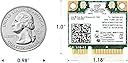
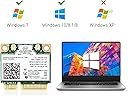


🚀 Upgrade Your Laptop’s WiFi & Bluetooth Game — Stay Connected, Stay Ahead!
The EDUP 7260HMW is a dual-band Wireless-AC 7260 Mini PCIe network adapter that delivers up to 867 Mbps WiFi speeds and Bluetooth 4.0 support. Compatible with Windows 7, 8, and 10, it fits half mini PCIe slots and is ideal for upgrading older laptops to modern wireless standards, enhancing both connectivity and productivity.


| ASIN | B09H5C7J1Z |
| Brand | EDUP |
| Built-In Media | Accessory kits, Wireless-AC 7260HMW |
| Color | 7260 |
| Compatible Devices | Desktop, Laptop |
| Customer Reviews | 4.4 4.4 out of 5 stars (118) |
| Data Link Protocol | Bluetooth, USB |
| Data Transfer Rate | 867 Megabits Per Second |
| Hardware Interface | Bluetooth, PCI, USB |
| Manufacturer | WISE TIGER |
| UPC | 793420186705 |
E**.
This was an awesome upgrade to my old Windows 7 laptop. Solved all my Wi-Fi connectivity problems
J**G
I am using a hand down laptop my daughter pass on once we bought her a new laptop. So I will admit it is about ten years old, mayber 12. We have relatively fast wifi in the house whick peaks about 400+ mbps. This old thing would only receive on the 2.4 GHz at 29 mbps. Install time was about five minutes. Laptop recognized the new card without any issues. Speed is now at 190 to 200 mbps on the 5 Ghz band. Best return on investment I have made is quite a long time. In case you wanted to know the laptop is a Dell Inspiron 17-3721, a true dinosaur!!
A**R
Less than $20 to buy and literally 1 minute to install with a noticeable improvement in speed. Definitely worth doing. Installed in a Dell 3542 running Windows 10 Home version with no issues at all. It came with a driver (a mini CD) but didn't even need to install the software. Cheers!
D**S
I only learned this trick this year, that the wifi card needs to updated as internet speeds increase. We needed to replace 3 wireless cards in computers at home and our internet problems went away. We were getting slow internet over wifi when we are supposed to have 400 Mbps service. Also, the connection would randomly drop out - at first we thought that the service was the problem. After replacing our 5 year old wireless cards, desktop speeds went from around 30 Mbps to 300+ Mbps over wifi. My HP laptop, which uses this specific card, went from 30 Mbps to over 100 Mbps. I don't know if the laptop itself is the reason that it didn't go as high as the desktop computers, but still an amazing improvement. Wireless card replacement is not much different than replacing any other computer component. This seller included a driver disk in the package.
F**S
Install was straightforward. Used the latest Intel drivers, including a Win 10 BT driver for this card that's not searchable at Intel's website. I'm pretty sure this isn't a problem with the card, but rather with an Inspiron N5040 running Windows 10 (not certified compatible by Dell, but in all other respects running like a champ). The card's BT found several devices, but not a Wonderboom or earbuds sitting a foot or so away. Tried everything I could find on the Internet, to no avail. Both the Wonderboom and my earbuds previously connected fine with a BT 4 dongle. Sigh. Disabled the card's BT drivers and reinstalled the BT dongle...all good, including restoring BT to my audio devices. Meanwhile, this card definitely perked up the N5040's wi-fi speeds. 320 Mbps through two walls to the router. Bottom line, I'm glad I installed this card, but disappointed BT didn't work as hoped in my still-dongled laptop.
Trustpilot
4 days ago
2 weeks ago