🚀 Elevate your MacBook setup with power, speed, and style!
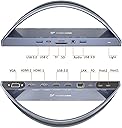
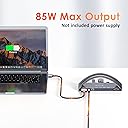
The TobenONE USB C Docking Station is a premium 13-in-2 hub designed for MacBook Pro and Air models from Intel through the latest M4 chips. It supports dual 4K HDMI monitors at 60Hz, offers 100W power delivery for fast charging, and features a comprehensive suite of 13 ports including VGA, USB 3.0/2.0, SD/Micro SD card readers, Ethernet, and audio. Weighing just 699 grams and finished in sleek grey, it’s the ultimate productivity booster for professionals seeking seamless multi-device connectivity and high-speed data transfer.


| ASIN | B09CPJLN6N |
| Best Sellers Rank | #124,501 in Electronics ( See Top 100 in Electronics ) #1,240 in Laptop Docking Stations |
| Customer Reviews | 4.2 4.2 out of 5 stars (504) |
| Date First Available | September 29, 2021 |
| Item Weight | 1.52 pounds |
| Item model number | UDS020 |
| Manufacturer | TobenONE |
| Product Dimensions | 9 x 2 x 3 inches |
R**�
Versatile docking station
The TOBENONE USB C Dock Stand is a remarkable device that combines versatility, durability, and functionality. Its exceptional features, including versatile connectivity options, sturdy design, fast charging, 4K video output, seamless data transfer, and plug-and-play convenience, make it an outstanding addition to any workspace. I highly recommend this dock stand to anyone looking to enhance their productivity and streamline their connectivity needs. One additional exceptional feature worth mentioning is the seamless connectivity between the TOBENONE USB C Dock Stand and my LG 32' monitor. I had no issues whatsoever when connecting the dock stand to my monitor via the HDMI port. The display output was flawless, and I was able to enjoy the full 4K resolution without any compatibility problems or signal disruptions. This smooth and hassle-free connection further enhanced my overall experience with the dock stand, making it an ideal choice for anyone looking to connect their LG or other monitors seamlessly.
T**G
A budget doc that feels like it's high end.
If you buy a MacBook you pretty much need a docking station. Technology just hasn't caught up yet, and 4 thunderbolt ports aren't enough for everything you might want to plug in. So the goal is to find an inexpensive and quality USBC docking station (unless you want to spend another 4-500 dollars for a thunderbolt dock) When I first received this I was pretty surprised that it had an all-metal design. The housing is a little heavy for it's size which is usually a sign of quality. and it certainly appears sturdy. It has a neat little LED that tells you when its powered up. and all of the ports are labeled. The saddle for the MacBook contains a silicon sleeve to protect your MacBook from scratches. My MacBook is in a pretty big hard case, (monso) and it wouldn't fit initially, but I pulled the silicon off (it comes off pretty easily and will go back on) the gap was big enough for my case. I assume it was planned that way, but even if not, my case still fits. The USB drives and HDMI ports all worked as expected. I didn't test the ethernet or the VGA port and I had no need of those right now. This dock has a double host cable meaning that it takes two Thunderbolt ports. That will help you get the fastest possible connection while still powering your laptop. (at least in a thunderbolt to usbc connection) and the cable is longer than I thought it'd be at least 3 feet. That being said this is a bargain doc so that are some caveats. First, it's not going to be as fast as thunderbolt, but that's probably obvious. 2 of the ports are only usb2, but if you have a USB mouse or printer you may not need something with constant fast power. There's only 1 USB in port. The biggest drawback I can see is that this doesn't come with it's own power adapter. Instead, you must use your MacBook power supply to power it or buy another USB-C compatible charger. I'm not 100% sure if this dock could power usbs out of every port and still charge a MacBook. I'd be willing to pay a little more for a dock with a dedicated power supply. Overall this dock feels like a professional piece of equipment. And it's perfect if you have a home office with two monitors but a small budget.
C**.
Good, borderline great
So, the existing reviews had me scared to buy this, but it would appear many of the issues reported might simply be due to misunderstanding how to connect the various devices and electronics as I have experienced NO issues. I do have more familiarity with home office setup, network builds, electronics, and the like than most people though. I needed this particular type of design, so I rolled the dice - paying off so far. Holds my new 14" M3 MBP perfectly and connected to all my devices and monitors flawlessly. Also purchased a KVM switch to bounce between computers/monitors and everything still works together seamlessly. So, not sure why this item gets the "frequently returned" label and the hate. Seriously helped me clean up and streamline my work environment. Another driver for my purchase was the fact this is positioned as being tailored for Mac. Also, while the pictures/details show this possibly not supporting 2 external monitors for the new 14" M3 MBPs, this is resolved once you upgrade the OS to most recent version. However, it's not all sunshine and rainbows. I didn't notice it doesn't ship with a power supply! I mean, who thinks to check that - if you buy a device that requires power you typically receive a power supply! I didn't notice until after my purchase when the company sent me an email explaining how the device works, info about it, and that it won't ship with a supply. This fact made the sale price I scored on it less impressive (as in not at all impressive) because I had to spend what I saved on a power supply. (I chose a 100W Anker, and you need AT LEAST a 65W according to the email). Thank goodness I was checking my email and was able to order the supply with advertised Amazon "overnight shipping" at no extra cost so I could receive the power supply and dock on the same day. So, I encourage you to try this if you are using Mac, comfortable with setting up a home office, and you understand how devices interface with one another, etc. However, make sure you get it on sale thanks to having to provide your own power supply - I recommend the Anker 100W PD supply (advertised as compatible for Mac devices, etc). Also, know it can support 2 external monitors on all new M3 MBPs, as well (with updated OS). So, it's good, but not great thanks to no power supply. It's just lame to not provide one - especially if customers are having issues an returning. One of the reasons for returns might be misunderstanding of power supply requirements, etc. Just seems like a no-brainer to provide the customer with a functional power supply - probably would mean less customer service issues too... 4 stars due to the annoyance of having to manage procurement of the power supply myself - annoying...
R**O
Con este dispositivo si pude conectar mis dos monitores a mi Mac Book Pro 2019, había probado con otros adaptadores pero solo duplicaban la imagen en el segundo monitor, en cambio con este puedo ver diferentes contenidos en cada monitor
R**O
The original box packaging looks like it was opened and used and repacked, although the product didn’t have any damage. The thing though is no matter what I tried I can’t get it to work. The stand powers on but nothing else connects despite giving a MacBook charger power source. The what’s app help number doesn’t exist. So I ended up checking you tube and there’s a cable missing that wasn’t in the box. I’ve attached a picture from you tube. I assumed the product would work and threw the box away. Now if it doesn’t work it becomes a glorified stand for 8k. The cable is the most critical component I feel that connects your computer to the monitor or to any device to make the dock work but that’s missing. I can’t return it now because I don’t have the box so am helpless and do not know what to do.
D**T
Works great and looks great
C**E
I recently purchased this dock because I wasn't happy with the previous one I was using from a different company. The other dock was for use with either a PC or a Mac but I didn't love it. This one has exceeded my expectations with only two issues that are minor to me. I am an office worker - I don't game or program or design. I use my mac mostly with word processing programs and email. I also don't mind that with my 2022 M2 MacBook 13, I can only have one display as I use a 34 inch LG ultrawide. This dock does not have a display port. Which would bother some, but I'm cool with the HDMI. The only other minor issue is the rubber holder on the arch is clearly made for using with no hard case. It is tight with the hard case - but does fit. I'm hoping it will stretch out the rubber a bit but it would be nice if there were inter-changeable options. As you can see from the photo, an added bonus is that you get to look at your nerdy case while you work. I really like that this is so easy to use. I have an external keyboard, mouse and USB dongle for headphones connected and they all work great so far. I also loved that I didn't have to download any software to use the dock (unlike the competitor model.) The other reason why I wanted to try this - and I'm not disappointed - is that the dock allows me to store the MacBook and really frees up space on my desk as it does double duty as the storage and the dock. With my other dock, which was not small, it took up a lot of real estate between my MacBook and the dock. Added bonus: I was also able to register for a two year extended warranty by emailing the company - which is nice piece of mind as it is not a cheap dock. All in all, especially for my needs (meaning, no biggie about no DisplayPort and only using one monster monitor anyway), this dock is perfect for me. Would recommend!
C**S
Works well, no issues
Trustpilot
3 days ago
3 weeks ago