🚀 Elevate your home security game with Wyze Cam v3 — clarity, color, and control in one sleek package!
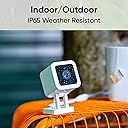
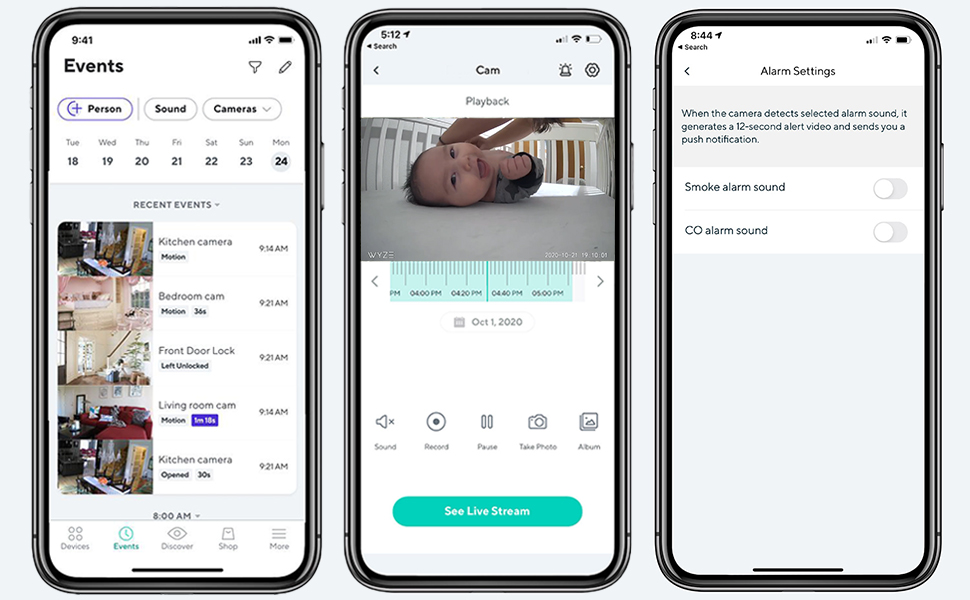
Wyze Cam v3 is a versatile 1080p HD wired security camera featuring IP65 weather resistance for indoor/outdoor use, advanced color night vision with a Starlight Sensor, and real-time motion and sound alerts. It supports two-way audio communication and integrates seamlessly with Alexa and Google Assistant, making it a smart, reliable choice for modern home monitoring.


| ASIN | B09J8KCY51 |
| Alert Type | Audio and Motion |
| Antenna Location | Baby Monitoring, Indoor Security, Outdoor Security, Pet Monitoring |
| Are Batteries Required | No |
| Best Sellers Rank | #41,559 in Baby ( See Top 100 in Baby ) #628 in Video Baby Monitors |
| Brand | WYZE |
| Built-In Media | Indoor USB Power Adapter x1/6 Feet Outdoor Rated USB Cable x1, Quick Start Guide x1, Screw Kit x1, Wall Mount Plate x1/Wall Mount Plate Tape x1, Wyze Cam v3 x1 |
| Color | White, with black accents |
| Compatible Devices | Smartphone |
| Connectivity Protocol | Wi-Fi |
| Connectivity Technology | USB, Wi-Fi |
| Control Method | Voice |
| Controller Type | Android, Amazon Alexa, Google Assistant, IFTTT |
| Customer Reviews | 4.5 out of 5 stars 4,120 Reviews |
| Effective Video Resolution | 1080.0 |
| Enclosure Material | Plastic |
| Field Of View | 130 Degrees |
| Focus Type | automatically |
| Form Factor | Box |
| Frame Rate | 30 fps |
| Indoor Outdoor Usage | Indoor, Outdoor |
| Indoor/Outdoor Usage | Indoor, Outdoor |
| Item Dimensions | 2.5 x 2.25 x 4 inches |
| Item Weight | 0.21 Kilograms |
| Light Source | Infrared |
| Manufacturer | Wyze Labs, Inc. |
| Manufacturer Warranty Description | 1-Year |
| Model Name | Cam v3_2 |
| Model Number | C3 |
| Mount Type | Wall Mount |
| Night Vision | Night Color |
| Night Vision Range | 6 Feet |
| Number of Channels | 2 |
| Number of Items | 1 |
| Other Special Features of the Product | 2-Way Audio, HD Resolution, Local Recording, Night Vision |
| Photo Sensor Technology | CMOS |
| Power Source | Corded Electric |
| Recommended Uses For Product | Baby Monitoring, Indoor Security, Outdoor Security, Pet Monitoring |
| Room Type | Living Room |
| Shape | Square |
| Special Feature | 2-Way Audio, HD Resolution, Local Recording, Night Vision |
| Specific Uses For Product | Outside, Surveillance |
| UPC | 604467915015 |
| Unit Count | 1.0 Count |
| Video Capture Format | MPEG-4 |
| Video Capture Resolution | 1080p |
| Voltage | 110 Volts |
| Water Resistance Level | Water Resistant |
| Waterproof Rating | IP65 |
| Wattage | 24 watts |
| Wireless Technology | Wi-Fi |
| Zoom Type | Digital Zoom |
M**E
Wyze Cam - great indoor security camera
I have them all throughout my house, and they work great. I have several friends who now use them. It doesn't matter where I am, I can see what's going on in my house. I even used it once to speak with a friend while I was overseas, and we couldn't get his WhatsApp to work. The picture quality and color accuracy are on point. The night vision shows great detail. It can be slightly difficult to set up, though. Inserting a memory card has been challenging. For some reason, one of my devices does not recognize the memory card. Humm!!
H**.
Best Security camera I ever bought
I like this security camera. I started using Wyze with the previous version, then this newer one come on the market. The price is very reasonable. The picture quality is very good, Day n Night. It has Night Vision feature that working very well. Motion detector working very well too. You can set the starting point. It will follow a subject until it disappears then go back to it set starting point by itself. Night vision color is perfect. It has Mic and Speaker so you can speak and hear to a person detected by the camera. Very easy to set up. Take me only 5 minutes to set up. The only cons I have is, it's not compatible with Apple Home app.
S**E
Great Basic Security Cam
Purchased this to monitor our patio area and I didn't want to bother with screws. It fits it on a slat in one of our indoor shutters. The cord was long enough to reach a nearby outlet. The quality of the video is akin to an older smartphone model but the nightvision is pretty impressive. The camera quality is sufficient for what I intended - just to see what's going on outside my door. The camera comes with a free 2-week trial of their subscription service, which is comparatively cheap to other competitors. I let the trial lapse to see what the difference is. If you have a SD card in the camera, it's still able to record events and so far, I don't see a need to continue with the subscription unless you need to keep the recordings of the previous days. Otherwise, the SD card will record over itself when it gets full. I'm pretty happy with the purchase because it was pretty easy to set up and inexpensive for the quality.
J**.
Error: Connection failed - please try force closing the app or power cycling the camera.
First - Let me say I'm satisfied with the camera in terms of value for the money. I'm considering purchasing another for the back of the house but I'm dreading another experience with the setup. Also, if you prefer the short version - read the last paragraph of my review. I consider myself pretty tech savvy. But I ran into an issue with the setup of this camera that led to a less than desirable start. Here is my experience. THE ERROR - "Connection Failed - Please try to force close app or power cycle the camera." INSTALLATION - 1) Downloaded the app and I plugged everything in. 2) Upon opening the app I was instructed me to scan a QR code with the camera to continue set up. You will be sent through multiple set up screens like you would expect - asking you to select the wifi network to connect to, and enter the name of the network, and the password etc. This is when the trouble started. I hadn't even made it through entering the wifi login credentials when suddenly the camera beeped. I received a message that setup had timed out and the camera needed to scan the QR code. There was no way for me to go back to scan the QR code again. So I finished entering in the wifi information and figured I would be able to scan the QR code again at some point. Nope. Once I got through the process, I was given an error message that told me the camera could not connect, and try putting the camera closer to the router. It was on the desk less than 2 feet from the router, but I moved it closer. TROUBLESHOOTING These are some of the things I tried: 1) Turn it off and turn it back on. Did not work. 2) I removed the camera in the app, and then started all over with a fresh setup. This time I sped through the set up and finished it before it asked to scan the QR code again. I thought maybe there was something with how long I took and things timed out. Nope. It didn't work. 3) I went on and looked in the Wyze forums to see what others had experienced. They mentioned flashing the most current firmware. Using the Wyze branded sd card I purchased with the camera, I followed the instructions and loaded on the latest firmware from the website. Restarted everything and... It still didn't work. 4) I have a dual band router, so I made sure all connections were on the 2.4ghz channel. Tried multiple attempts of removing the camera from the app, and starting from scratch. RESOLUTION The odd thing was, even though the camera gave me an error message and said it could not connect when attempting to access the live feed, it WAS recording and detecting motion the whole time. I checked the memory card and it even recorded when I was scanning the QR code during the set up process! I gave up and sent an email to customer service and went to sleep. And you know what? When I woke up - it magically fixed itself? I got out of bed and went to my computer to see if customer service had responded. Before I could check my email, I received a notification on my phone from the Wyze app. It didn't have any information in the banner notification - I clicked on it to see what happened. It opened directly to the live feed and was functioning perfectly. TL:DR - Received an error message that the camera could not connect. Make sure you are connecting the camera to the 2.4ghz (not 5G channel of your router.). Double check in the app the version of firmware is up to date. If all of this is in order, check and see if your camera has a blue light on. If so, it may be in the process of updating. If all else fails, email the customer service team - they did respond quickly, but by then my issue had resolved itself. 2 YEAR UPDATE PROBLEM: Camera went offline and would not reconnect, made clicking noises when plugged in. SOLUTION: Try another power block or usb cable. In my situation, the power block failed. Camera still working fine!
T**Y
Seems to be good
I've used this camera for 2 weeks now. When I first set it up I had to do several updates but not a big deal. The first day it acted weird where it stopped and I had to restart it but that hasn't happened since. I read lots of reviews and found out you could use a 256gb high endurance sd card to keep a month's worth of recordings at all times. A lot of people in the past reported problems with that size sd card saying that it would only record up to a little under 100gb, around 98gb, but not any more than that, but at least with mine that's not true and so far the sd card is using about 110gb and growing so it seems to be working fine. I use this camera to continuously record my front door and yard and I use an old android phone to view the feed in my bedroom 24/7 while it records and it's working fine so far. Would recommend.
J**N
So Impressed!!
I got one of these years ago to keep an eye on my cat food dispenser when we were on vacation to make sure it didn't malfunction. We recently got a puppy so I got another one to keep an eye on what he's up to in his crate while gone for the day. It is really easy to set up the camera using the app, and just as easy to add additional cameras. The app itself is easy to use as well. The picture quality is phenomenal, and the night vision is excellent. I've never used it outside, but the cord has a rubber sheath over it where it disconnects to keep moisture out. It's simple to mount anywhere using the magnetic mounting option. That also makes it detachable so you can move it around easily. I've also never used the SD card option to be able to save the video and review it, but it's nice to know that function is available if I wanted to. Also, I love that you can remotely listen to, and even speak to anyone (or any dog) who is near the camera if you wanted and the motion detector works great too. I've used it to see my cats when they come to the food bowl so I know they are still eating and happy, and haven't locked themselves in a closet accidentally or gotten out when the cat visitor comes and goes to clean their litter boxes. It's an easy thing to turn on and shut off too because it can get distracting if you don't want to hear it all day every day. Get these cameras! They are awesome!
C**N
This is a great camera for home/property security.
I ordered two of these cameras per a co-worker's recommendation and I've found them to be awesome. They are pretty small, just a 2" cube. I wired in a new outlet in the corner of my shop roof and have one camera mounted under the soffit with the front of the shop in the very right field of view and the back yard in the left field of view with the house and driveway in the center. It has 3 picture quality settings and I run it on medium definition which is plenty to see who is driving up, what they have in their hands, etc. It records pretty well under very minimal lighting conditions. I was able to tell it what areas of view that I don't want triggering recordings (like the nearby county road or the U.S. flag on my garage waving in the breeze). The factory motion sensing is pretty sensitive and blowing leaves, birds, etc. would start recording. I was able to set it to 30% sensitivity and now it only records for dogs, cars, people, very close birds, etc. I love being able to go back in time and watch my son and his friend cutting school to work on car projects then calling them a minute after they get there and ask them where they're at so see what they say. I also like being able to talk back and forth, though there's a bit of a lag. The other camera is in the shop way up high in a corner but I don't have it connected yet, need to get power there. With these two cameras I'll be able to watch (and hear) what goes on outside and inside the shop and see many other things. I'm about to order a black v3 camera and drill a hole in the dark red frame of our 48" diameter wall clock and mount it behind the frame in a downward angle overlooking the whole living/dining/kitchen/entry/hallway area. That will cover all of the common areas in the house.
J**N
Total Garbage. Wyze is the Worzt
Roll the dice. Some of them you get will have trouble maintaining connection. For a lower price i might go with a tapó instead. Maybe hang a ziplock bag over the tapó to weather proof it lol. Would interfere with the audio though but I'm sure it would work just fine... Just replace the ziplock bag every few months or so. *Update after almost a year* Reducing from 3 stars to 1 star. I'll paste my review below that I just left in the Alexa app for the wyze skill. Bro this thing, nothing works right. I'm telling you literally nothing works, literally everything is broke as heck on the apps, the firmware won't hold, it keeps reverting, and now problems in the API? Problems with their Alexa functionality, problems with losing connection, the app doesn't work on 3 of the 4 devices I have, it's just the worst thing ever man. I'm adding my Alexa skill review below. Trust me, the positive reviews happened to have a device that the software wasn't completely broken on. If you buy these cameras, you have a huge chance of having problems with them. Sure you could be one of the lucky ones, who just set it and forget it. Nope not for me. For me, I bet it and regret it. I have 3 cameras and 4 different phones and tablets. It's not just a one-off. I have a big enough sample size to say that wyze is bad. It's been a huge hassle and I threw all of them in the trash earlier and I'm gonna buy something else. They can spy on the trip to the dump. -- Error message adding. wyze was a big waste of money. you get what you pay for. all they are is good hardware. everything else is 1 star, one of the worst I've seen. Just bad products. Nonstop connection issues with the cameras, nonstop bugging me about firmware, the app doesn't work on 3 out of 4 of my devices, the Alexa skill just gives me an error when I try to connect. Bro this company came, grabbed cash, and left. This companys tech department is horrible bro. Nothing works right. As a person with a long tech resume... I just think this service and their software is an absolute nightmare. You're getting what you pay for. 15 dollar camera, 15 dollar tech department. Bad software with nonstop problems. I don't care what their service department is doing, if their tech dept is abysmal, and nothing works right, the baby goes with the bath water.
Trustpilot
3 weeks ago
3 weeks ago