Desertcart purchases this item on your behalf and handles shipping, customs, and support to Kyrgyzstan.
♻️ Print smarter, live greener — the future of home printing is here!
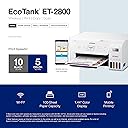
The Epson EcoTank ET-2800 is a wireless all-in-one color inkjet printer featuring high-capacity refillable ink tanks that replace up to 90 cartridges, Micro Piezo Heat-Free Technology for sharp, vibrant prints, and built-in scanning and copying. Designed for home and office use, it supports mobile and voice-activated printing, offers up to 10 black & white and 5 color pages per minute, and helps reduce cartridge waste with its eco-friendly design.


| ASIN | B096N8CNBZ |
| Additional Printer Functions | Copy, Scan |
| B&W Pages per Minute | 10 |
| Best Sellers Rank | #1,773 in Office Products ( See Top 100 in Office Products ) #5 in Ink Tank Printers |
| Brand | Epson |
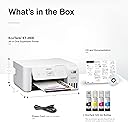
| Built-In Media | 1 bottle each of 522 Cyan, 1 bottle of 522 Black (65 mL), CD-ROM for product setup, Magenta, Manual, Power Cord, Yellow (65 mL) |
| Color | White |
| Color Depth | 48 bits |
| Color Pages per Minute | 5 pages_per_minute |
| Compatible Devices | Laptops |
| Connectivity Technology | wired, wireless |
| Control Method | App |
| Controller Type | Push Button |
| Customer Reviews | 4.1 out of 5 stars 9,978 Reviews |
| Display Type | LCD |
| Duplex | Manual |
| EU Spare Part Availability Duration | 2 years |
| Hardware Interface | USB |
| Initial Page Print Time | 10 seconds |
| Ink Color | Black |
| Item Dimensions D x W x H | 14.8"D x 22.8"W x 10"H |
| Item Type Name | Inkjet Printer |
| Item Weight | 11.6 pounds |
| Manufacturer | Epson |
| Maximum Copies Per Run | 99 |
| Maximum Copy Resolution Black and White | 720 x 720 dpi |
| Maximum Copy Resolution Color | 1200 dpi |
| Maximum Copy Speed Black and White | 10 pages_per_minute |
| Maximum Media Size | 8.5 x 14 inch |
| Maximum Print Resolution Black and White | 5760 x 1440 dots_per_inch |
| Maximum Sheet Capacity | 100 |
| Maximum print Resolution Color | 5760 x 1440 dots_per_inch |
| Model Name | ET(EcoTank) ET-2800 |
| Model Number | C11CJ66202 |
| Model Series | EcoTank ET-2800 |
| Number of Licenses | 1 |
| Number of Trays | 1 |
| Other Special Features of the Product | Mobile Printing Capability, Refillable Ink Tank |
| Output sheet capacity | 250 |
| Paper Size | 4" x 6", 5" x 7", A6, Half Letter, Letter, A4, Executive, Legal, User definable (from 2.2" x 3.4" to 8.5" x 47.2") inches |
| Print media | Envelopes, Glossy photo paper, Paper (plain) |
| Printer Connectivity Type | wired, wireless |
| Printer Output Type | Color |
| Printer Type | Inkjet |
| Printing Technology | Inkjet |
| Processor Count | 1 |
| Resolution | 2400 x 1200 |
| Scanner Type | Flatbed |
| Series Number | 2800 |
| Special Feature | Mobile Printing Capability , Refillable Ink Tank |
| Specific Uses For Product | Home, Office |
| Total Usb Ports | 1 |
| UPC | 010343957893 |
| Unit Count | 1 Count |
| Warranty Description | 1-year limited warranty |
| Warranty Type | limited warranty |
B**E
GET THE DAMN PRINTER WORTH IT!!!!!!
To start, I brought this Espeon printer to replace my HP Inkjet 8010 series and THANK GOD I bought it! I cant stand how much money I lost alone from the ink for the HP Inkjet printer! HP is a complete scam. $50 every two weeks for a year replacing the colored ink ALONE! Not including Black ink LOL! The setup was horrible compared to the Espeon setup which took 10 Mins max! Extremely professional set up once you download the app! The amount of ink that comes with this printer is CRAZY GOOD! To replace all 4 inks is only $20! Ive printered around 30 stickers so far for the past first week that ive had it and the ink hasn't even moved!!!!!!! Easy at printing, quick, no issues, and the App is amazing! Sticker paper works beautifully, Glossy and Holo! Also amazing at printing regular documents!
G**Y
Good
Finally got time to do a review for this printer. Has it for a few months now and so far everything works great. The ink setup is super nice compared to my old Canon printer that kept drying up tho it wasn't used much. Setup with this Epson is easy. Wireless connection is nice these days as anyone on the same wifi network can use a phone and print directly via wifi without having to connect any cables nor need a computer. Paper capacity is decent, but wish the way it held the paper felt more study.
H**G
My Epson printer is total junk!
I have had many printers over the years. I started with Canon dot matrix printers, and then ink jet printers. In the old days, and ink cartridge contained all the colors, so if red was out, you tossed away the rest of yellow and blue too. They were pricey and wasting ink wasn't something I was OK with. I would pull ink cartridges from dumpsters outside office supplies stores, take them home and draw the ink from them to fill my cartridges with. Then Epson came up with a cartridge for each color and black . That's when I switched to Epson and have used them ever since. I did have an HP in there when I got such a deal I couldn't pass it by, but after several years it died and I switched to Artisan printers. I still have an old 810 that is finicky and I don't want to have to coax it just to print a few pages. I got a WorkForce printer ,used it several times after I got it, and then it sat idle for 5 years or so. I moved recently and decided to set up the WorkForce printer. The new ink cartridges were practically new, but sat for 5 years maybe, so the nozzles and print head needed cleaning, I expected this. It uses mass amounts of ink to do this so then I was out of ink. I ordered new cartridges, and back to cleaning when they were inside. I never got anything to print, plus, the new paper I ordered was as glossy and slippery as photo paper, and the rollers couldn't grip it. I gave up and ordered this printer as a replacement. Setup went OK until I put paper in, then the rollers were slipping and I got jam messages, even though nothing was inside. I pulled the paper and let it finish the initial process. Then I put paper in when it wanted to align the print head. It fed paper OK for now, so I guess maybe I didn't get hosed on this Epson as I did buying the WorkForce Epson. UPDATE November 1st 2025 This is a frustrating printer!!!! I'm using WIFI network to connect the printer to my laptop computer. I like to be able to print or scan from anywhere in the house. If you purchase this frustrating Epson printer, you now have a ball and chain around your leg. You can't print a simple document without some kind of error code popping up and requiring that go look at the minuscule little screen and try to figure out what button you must press to get the document printed. If I have to be right next to the printer, I might as well use a wired connection. I am disabled and it's a real inconvenience for me to have to go to the printer and squint at the tiny screen to try to figure out why it's been ten minutes of my time and I still haven't gotten my 1 page document in my hand. High speed printing is not high speed when you can't get a printed page without having to make several trips back and forth to the printer. I set the default paper to the standard plain white letter paper, only to find it wants to scan to photo paper, so it just sits there like a block of cement and nothing gets done. I had an Epson Artisan 810 that I really liked, except for the automatic feeder quit working so you had to stand there and feed each sheet to be scanned by hand. I didn't want a sheet feeder on the printer because they break down and the you're feeding by hand anyway. I just hate printing anything at all now because of this printer. I wasted several hours one day trying to print documents that I downloaded and needed a physical copy to present in person for a project I'm doing. Normally I would send a PDF file, and let someone else bother printing if that was necessary. After years of purchasing Epson printers, this is absolutely the last Epson I have spent my money on. Never ever again. The first clue should have been when the quick start guide suggested using a smart phone to set up the printer. I'm not going to work from my 5 x 7 phone screen when I can instead use a 15 inch laptop screen, and keyboard. It's simply a stupid idea. Sorry, but no more Epson for me ever!!!! Update: 4/10/26 This is absolutely the most useless and frustrating Epson printer that I have ever ever owned. I cannot see good close up I need reading glasses to read. The digital screen on this printer is minuscule it's like a postage stamp size absolutely worthless. I have to carry a magnifying glass over to the f****** printer so that I can see what that little miniscule screen has to say on it. The most frustrating thing is every time I want to print something which is rare I don't print things every day the printer is not available is the message I always get I go over there by the printer I turn it off I turn it back on, that should clear out any crap that's on it so it's ready to print right? No you would be dead wrong! Instead you get a stupid little mini School screen and wants to be set on copy mode. I don't want to copy anything I don't want to scan anything I just want the damn thing ready to print. Anyway you come back to your your phone and you want to print and a printer still not available. I literally destroyed my phone I was that pissed off. I'm too old to be frustrated like that all the time. At 75 years of age I have had my share of printers over the years starting with the original dot matrix ones. Absolutely none of them were as difficult to use as this stupid printer I got now from Epson. When you want to print something you should be able to send it to the printer and it should print. You should not require a phone app to set the damn thing up! One thing I'll say, it's pretty good on ink because you can't make the damn thing print when you want it to !!!!!!!
E**S
Most reliable for ink and connection!
I bought this printer in June of last year. Prior to this, I bought several others over the year and have connections issues, issues buying ink monthly.. they were costly and unreliable. This morning we were talking about how long since we bought ink. It’s been a year. It comes on the minute you print, prints perfectly and has been the most reliable printer I have ever owned. I will always recommend this printer and it has been the best money we have spent.
K**.
***UPDATED***Horrible product and customer Service on ALL fronts...including Amazon!!
Updated 4.29.2026: from zero to 4 stars. I felt compelled to update because Amazon did make things right! However, it's not because they made it easy. One should never underestimate a perimenopausal woman. We’ve survived mood swings and night sweats, and we're done entertaining the audacity of people. Our patience? It's limited. Our tolerance for nonsense? Has expired. Our ability to speak our minds? Fully activated. ...we’re not to be messed with. I pursued Amazon and finally got a full refund on a product that was clearly defective and not even a year old. Thank you, Rick S., in Amazon customer service, for showing there is still good in people and making a wrong situation right! Absolutely ZERO stars. But I had to pick one in order to submit! This review is for both Epson Customer Service and Amazon. I’ve had this printer for less than a year. It worked fine until about a week ago when it jammed. I cleared the jam, and it printed normally—briefly. A few days later, it started failing to feed paper properly. It pulls the paper in about a quarter of the way, then stops and bunches it up. Trying to get support has been beyond frustrating. Epson won’t assist because the printer was purchased on Amazon through HiTouch Business Services (a Staples subsidiary). The seller can’t help because the order was fulfilled by Amazon. When I contact Amazon, I’m either disconnected or left on hold—only to be told they can’t help and someone will call me back (which hasn’t happened). I’ve never experienced such poor customer service or been given the runaround like this. Extremely disappointing.
G**.
Better then other brands.
So far this is saving me a very good amount of money and time vs HP printers. I do not use the printer much and the other brand would make me wait for ever for it to do a test prior to printing. Then there was the dry ink problem. I have not experienced any of this with the Epson. So far has not jammed. It is easy to use and looks good. The only 1 complaint I have is the screen size is so small you have to get down on it to see what it is saying.
P**D
ET-2800
I needed a basic home printer and after hours of research decided on this one and so far it's been a breeze to use. I've only had it for a few weeks so can only assess on it's out-of-the-box performance and am quite happy with my purchase so far. It takes a few minutes, but setting up with the ink was fairly easy, although the written instructions were not as clear as they could be so I went to YouTube for a quick tutorial. I don't have any interest in WiFi printing, so just plugged into my laptop and everything was good to go - both on my Mac and PC (no disc or app required for either). It was surprisingly easy, although a USB cable is not included so if you go this route, you will need to get one (I think it's the C2G type). I purchased this for occasional home office use and does not need to be high quality - so for taxes, bills and basic printing needs this works great. I've only used with basic inkjet paper, so can't comment on how good the printing would be on a a higher quality paper. The color is not as vibrant as the the professional laser jet printer I use at work, but I suspect that has more to do with the paper. The printing speed is about 10 seconds per page, so it's fine for my purposes but not might work as well for high-volume applications. And as there is not a duplex option, a double-sided print would need to be re-loaded on top of another 10 seconds of print time. Scanner works fine for basic book-work but have not yet used for more artistic purposes so can't comment on it's quality in that respect. Bottom line: If you're looking for a high-production printer, there are probably better options ($$$), but if you're looking for just a basic home office printer with scanner and trying to keep on budget, I would strongly recommend this one. It's light-weight, easy to use and doesn't take up much space on the desk. The ink and paper are easy to load and if you prefer plug-and-play equipment, this is perfect.
Y**O
Excellent Printer for Home Use
This printer is easy to set up and delivers sharp, vibrant prints. The EcoTank system saves a lot of money on ink, and the wireless connection works great. Scanning and copying are simple, making it a perfect all-in-one printer for everyday home use. Highly recommended!
A**E
Amazing
Good 🤗
E**O
Buena impresora
Ya tiene tiempo que la tengo, y está súper bien para el precio
E**N
Power cable
I need some one from amazon to contact me, as I need only to replace the power cable it’s not as per UAE standard Please advice what to do as I can’t return all the printer
P**L
Epson EcoTank ET-2800
My old Cannon printer was almost 20 years old and I finally decided to replace it. I decided on this one and have now had it for 3 1/2 weeks. I don't generally print much but I have put it through its paces some and am very happy with it. Installation was easy and flawless. I have it hooked up via USB cable to my desktop, so I can't comment on printing from a phone or tablet. I love the ink tank system. Because I don't print much I have a weekly reminder in my calendar to print a page. I found a test graphic that uses a little color from each of the tanks and black. So far so good. There are also some great guides online on how to clear badly blocked nozzles. Printing text is fast and the quality is IMO excellent. Text with light graphics on plain white paper is also fast and the quality is also great. I bought some 8 1/2" x 11" Epson glossy photo paper and some Epson ultra premium glossy to test out for pictures, just to see what this puppy could do. The reviews lead me to believe this printer performed poorly at this. I downloaded some HD, good quality photo files and picked a few of those to try out. I printed the same picture on ordinary white paper and the two photo quality papers using Paint Shop Pro 2023. I have been an amateur photographer for decades so I know what photo quality prints look like. The prints with the photo quality paper are way better than I expected. Yes, the shadows and highlights loose some detail, but it is working with three colors and one black. And if I look at the resolution and sharpness through a magnifier I can see the difference compared to photo printer output, but again, this is not a photo quality printer. I can also not comment about color fidelity because my monitor is not currently color calibrated (hoping to fix this soon), but IMO it's not bad. In the end this is a printer that is really inexpensive to run and can print pictures that look really good unless you judge it against a better, way more expensive system. The only negatives I've found so far is in the software. I am running an old computer on Windows 10 Pro and this could be one issue here. I have had a few print files get stuck in the print queue and could not delete them. This seems to be an issue for some people because I found a couple of workarounds online for it and one is working well for me. Another one is the print driver seems a make choosing my photo print quality options a little finicky. Regular printing is easy. I'm pretty computer savvy so I don't usually have problems like this, but it is getting better as I learn the driver's quirks so maybe it's just me. I have not needed to contact Epson about anything yet to solve a problem and I'm still getting better at working with it. I just wanted to mention these to round out my experience with this machine so far. All in all, I'm loving the ET-2800. If this changes I'll come back with an update.
I**N
Recomendado
Cumple con su función, le adapté tinta para sublimar y funciona perfectamente
Trustpilot
1 month ago
2 months ago