We remain fully operational. Our teams are working around the clock to ensure your deliveries continue safely.

DOWNLOAD THE APP


Customer Services
Copyright © 2025 Desertcart Holdings Limited
DOWNLOAD THE APP
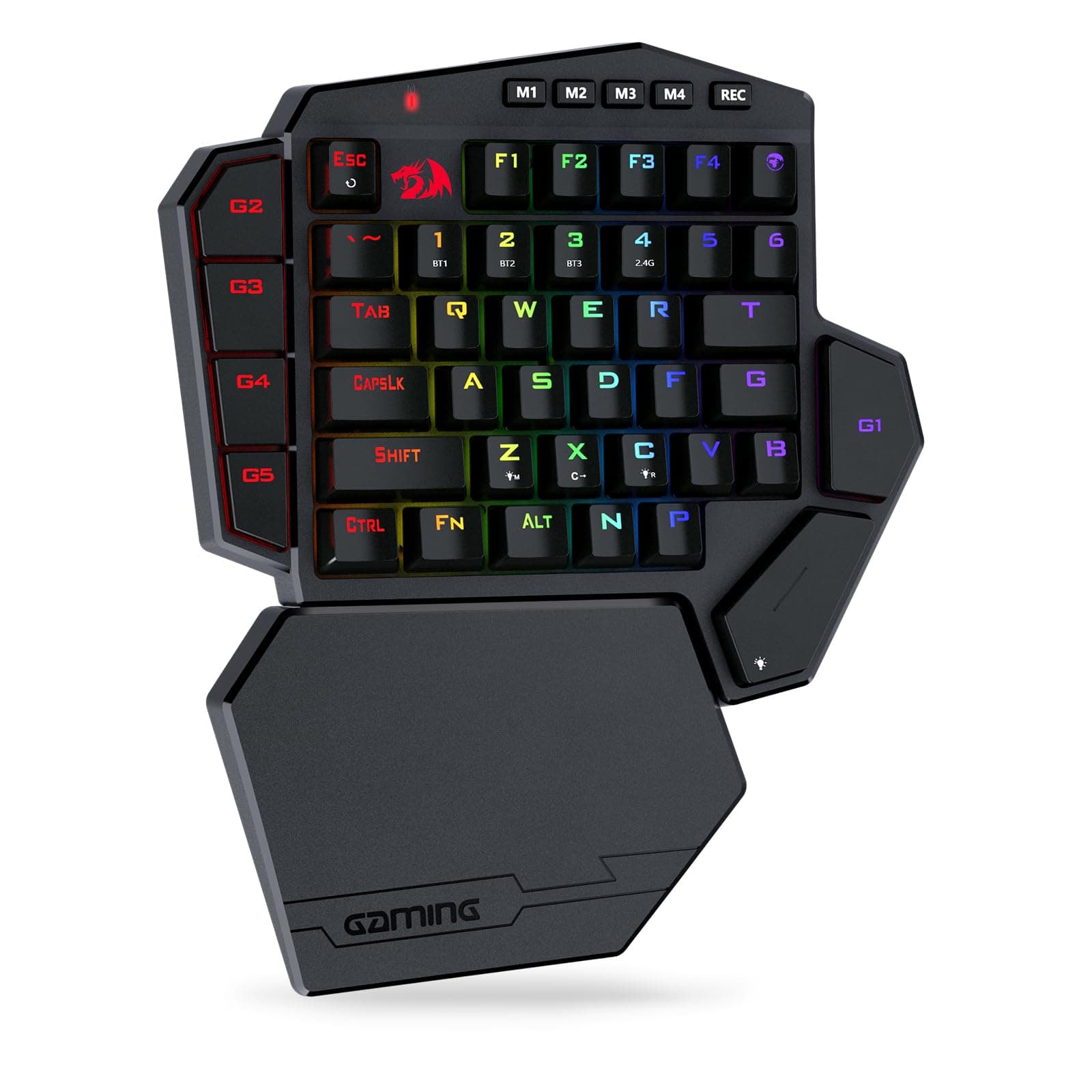
🎯 Dominate your game zone with wireless precision and pro-level macros!
The Redragon K585 PRO is a compact, wireless one-handed mechanical keyboard featuring 42 keys with 3-mode RGB backlighting and 7 programmable macro keys. Equipped with quiet linear Redragon Red switches, it offers up to 20 hours of battery life with fast USB-C charging. Its ergonomic design includes a detachable magnetic wrist rest, making it ideal for focused gaming sessions and professional setups.


| ASIN | B099W5MSFM |
| Additional Features | 3-mode Wireless, Ergonomic, Hot-Swappable |
| Antenna Location | Gaming |
| Best Sellers Rank | #1,805 in Video Games ( See Top 100 in Video Games ) #160 in PC Gaming Keyboards |
| Brand | Redragon |
| Built-In Media | USB Cable |
| Button Quantity | 5 |
| Color | Red Switch |
| Compatible Devices | PC, Laptop, Tablet |
| Connectivity Technology | Wireless |
| Customer Reviews | 4.3 out of 5 stars 1,686 Reviews |
| Enclosure Material | Plastic |
| Hand Orientation | Ambidextrous |
| Item Dimensions L x W x H | 10.83"L x 9.06"W x 1.57"H |
| Keyboard Backlighting Color Support | RGB |
| Keyboard Description | Wireless One-handed Gaming Keyboard |
| Keyboard Layout | QWERTY |
| Manufacturer | Redragon |
| Mechanical Keyboard Switch Model | OUTEMU Red |
| Model Name | DITI |
| Model Number | K585 |
| Number of Batteries Required | 1 |
| Number of Keys | 49 |
| Number of Sections | 1 |
| Power Source | Battery Powered |
| Recommended Uses For Product | Gaming |
| Series Number | 5 |
| Special Feature | 3-mode Wireless, Ergonomic, Hot-Swappable |
| Style Name | Contemporary |
| Switch Type | Linear |
| Theme | gaming, red |
| Warranty Description | 1 year |
R**T
Software to program works. Many features
This keyboard is shockingly good for the price. It feels very solid to use and the switches are smooth. The software is not easy to find, install, or use but it gives more features than most high end keyboards. It allows you to remap every key, change the colors to however you want, and each M# button at top can contain a different key mapping and/or color setup. It is fairly easy to use once it gets running. Now to install and use the software. First you have to go to red dragons web page and go to the download at top of screen. Search of the k585 and make sure you pick the wireless one. You get some zip file that has a couple of directories. Inside one directory is another archive (a rar instead of zip). If you are running the latest version of windows 11, it can handle extracting from the rar otherwise you’d need winrar. Once you extract the exe file from that rar, you run it to install the software. Then you launch the software. It seems to not load or do anything. But actually it does start running, but only shows up in your taskbar corner icons. The icon will only be in the hidden area so you have to click on the up arrow to expand those. It will be just a grayed out symbol that you can right click on. Now you have to plug in the keyboard directly via usb cable. Once the keyboard is plugged in, that task bar icon for the red dragon software will go to red from gray. You now can right click on and then click on configure. Not an easy process for sure. But it does work and is excellent once it gets going.
B**T
Great for PC gamers.
This is the second time I have purchased one of these units. The first one was wired. I liked it so much, I purchased this wireless one. It is very easy to setup. Dragon has a software package you can download from their site that allows you to setup the extra keys. Then it works like any other keyboard. Like most of Dragon's keyboards, this one is very solidly built. I use it in my recliner, and have already dropped it once. A key popped off, but it was easy to pop it back on. The LEDs ae convenient for helping identify keys in the dark while you are getting used to it. It does come with a palm rest, but I don't use that. I find it uncomfortable. I have 4 Dragon keyboards, and will continue to use them. Their quality and support are unbeatable.
J**9
Overall great, but not perfect
I've been using this as a replacement for my standard keyboard due to the extra room on my desk for my mouse and it's been working great. I've even used it for couch gaming with my Xbox with no problems. Though, as with any product, there are pros and there are cons, so quit wasting your time and get into that since that's what most people care about anyway. Pros: - No noticeable latency - Mechanical switches are clicky yet quiet (Brown switches) - Keycaps feel nice (Sounds weird to list but this really does make a difference if you've ever used a keyboard with crappy keycaps) - Included cable is nice (It's braided and doesn't bend weirdly like some cheaper cables) - Macro buttons are really nice to have and have a lot of functionality - RGB can be customized in software, or through presets built-in by default - Hot-swappable switches (In the case that either you break a switch or just want to change them out to freshen up your keyboard, you can. Additionally, they even include a few replacement switches in the box along with a keycap puller and switch puller) Cons: - No place to store the wireless dongle (I had planned to use this for going back and forth from my dorm to my house because of the small size, though it lacks a place to store the dongle so I'm always afraid of losing it. As an engineering student, my next personal project will likely be to modify the wrist rest to include a small gap for the dongle.) - No mention of the software at all (Neither on the outside of the box nor inside the included quick start guide does it mention the existence of software for this. Unless you look online for the software yourself (on RedDragon's website), the only way to change the key binds is via the recording button on the keyboard itself, but then you can't bind buttons that don't exist on the keyboard). Speaking of buttons that don't exist... - Buttons that don't exist, but should: - Windows Key (I feel like any keyboard intended for gaming (which primarily takes place on Windows) should have a Windows key.) - Enter Key (I've set the password to my computer to consist of only characters on this keyboard, but that doesn't matter if I can't press enter. Yes, I can just use my mouse but that takes away the streamline-ness of logging in. And yes, you can bind the enter key to a macro button, you just need the software to do that.) - M??? (It includes N and P, but not M???. To clarify, the M key is bound by default to the "map" key next to F4, but it's weird to reach that far for a fairly common button in games.) - Cheapish feeling plastic (For the most part, the product feels pretty premium, though the magnetic wrist rest feels kinda cheap) - RED RedDragon logo (This one really doesn't matter, but if you're gonna have a product that can change colors through software, i.e. RGB lights, you shouldn't have any non-monochrome on the product. Even Razer with their obsession with the color green knows this). Overall, I'm really happy with this purchase, but if RedDragon ever refreshes this product, I hope they can make changes to the things mentioned here. None of the cons that I've found are dealbreakers since all of them are basically just personal preferences and can be fixed either through the free software on their website or with some creativity.
H**G
If your new to this brand please read
Okay so this was my 3rd attempt to accomplish what I was looking for. I was looking for a one handed wireless keyboard to use with my steam link setup in my bedroom. I have a 3k gaming PC setup in my basement with Razer keyboard and mouse, however now that I have kids I hardly ever have the chance to escape downstairs so steam link has been my saving grace. A coworker told me about this brand so I decided to give it a shot. First I bought the Red Thunder r60 keyboard (mixed up red Thunder with red dragon). This keyboard arrived dead/defective so I wasn't able to test it out, however it was very cheaply made, you could tell just picking it up how light it was. Keys felt loose and cheap. Next I bought this keyboard, however I was unaware of the different switch types. I ordered the first option which was "blue switches". Holy cow talk about loud, this thing was like popping bubble wrap each time a key was pressed. After talking to my coworker he explained there are different switches available. After a quick search on their website I saw the 4 different types of switches and decided that the red switches were for me. Since I play at night I needed the keyboard to be quiet. The red switches fit the bill. Paired with a silent mouse and Bluetooth headphones I can game through out night without disturbing my spouse or children. As far as the keyboard itself - it's nice, I wouldn't call it Razer quality but at a quarter of the price it works for me. Buttons feel great, the magnetic wrist support makes it easy to deattach and store in my nightstand. The wireless transmission has a pretty impressive range, my TV is about 20ft from my bed and I have no issues with connectivity. Can't say much about the macro feature yet, but it works great for hours of playing Satisfactory on my big screen while laying in bed.
N**K
Under rated, comfortable, hot swappable switches
The only other one handed mechanical keyboard I know is the Razer orbweaver, which I believe Razer does not make anymore. I didn't expect much from this keypad, however I do know their mechanical keyboards are pretty popular because they are pretty good value. However, this thing exceeded my expectations greatly To set the premise, I already own a full custom mechanical keyboard, with lubed switches and aluminum body. Though its awesome to type with its not the best to game with since the keyboard sits at such a high height and the key caps are made for a better typing experience than gaming. I owned the Orbweaver, however the green switches the Obrweaver used started to loose their mechanical integrity (green switches are clicky) and majority of the keys on the Orbweaver stopped clicking and felt more like rough red switches. Lets start with the build quality, its solid. No flex, no rattling, all the mechanical switches feel great, the magnet for the wrist rest is insanely strong and wont slip out. Layout is great, basically has all the keys that the left hand needs for any type of game. The Razer Orbweaver had unmarked keys that mapped many of the keys on the left side of the keyboard, however for many of the games I played I needed to change the layout, the downside is that the Orbweaver is considered a legacy device so basically you needed to install the latest razer synapse and razer synapse 2.0. Having two software programs running just for that keypad was ridiculous. Here basically you don't need to remap anything. - one handy thing with this layout the N and P buttons are very close to the thumb and are very easy to use. I have mapped these to some keys for Apex and its pretty awesome. Ergonomics, large wrist rest well placed spacebar button, allows for comfortable hand position. Though there is no contour to it like the Orbweaver, I feel like this one is a lot more comfortable. Due to its simple shape, I found a 3D printed file to angle it at a certain angle for even better ergonomics. Switches and keycaps, first off this thing has hot-swappable mechanical switches!!! and its not proprietary and 3 pin key switch will fit. I have replaced the blue clicky switches with Holy Panda lubed switches. Just a note, its recommended that you take every single keycap out and then take out the switches. Overall I give this a 10/10
M**N
Software is unfinished (like Buggy Beta)
I ordered the brown switch version. I like the feel and can detect no lag. The battery life and range is good. The HW is pretty good! Customer service is available and responsive. People seem to love or hate the odd placement of the spacebar. I don't like it but they built the "P" key right where the spacebar is on a normal keyboard and I remap it to the spacebar in the respective game settings and it works for me. THE SOFTWARE IS BAD! An included tiny foldout says to plug it in and software will install. No software/drivers installed when I plugged it onto my new MSI Windows 11 gaming laptop. I contacted CS and she sent me the software to install myself and I did. The help "?" is a dead link so there's no way to teach yourself. Clicking the "RESET" button hangs the program indefinitely and gives you an endless hourglass. It disconnects randomly (or predictably if you slide any slider quickly). The corner "X" makes the program disappear but it won't restart because it's actually still running in the background. You must kill the program via task manager (and I noted it using excessive resources while hung) and restart it to re-establish a connection. Like the help link, many functions simply don't work: there's checked boxes that can't be unchecked (backlight effects) residual functions that the wired version of this device have but this wireless one doesn't (customization of keys other than the few G keys) that still let you choose the keys but they don't "take" the new function. It seems like Redragon expected the software from the wired version to work with this wireless version but it doesn't and they don't care. It feels incomplete, incorrect, beta and buggy. I replied to a diligent CS representative 17 times over weeks, made videos of my problems as she requested and tried everything she suggested to no avail. She sent software to update firmware but her (google drive) link was an unrecognized file to me. She said, "This situation has never happened before" and "The software might encounter a lag when the operating system is too fast". That confused me. She asked me to try it on another device. I used my old laptop (Dell on Windows 10) and it behaved the same. I returned the K585 and she sent me a new one. After uninstalling everything, I plugged it in to my new laptop and it too behaved the same. The software is simply garbage. I guess most of the customization can be done without the software and people don't care if the software is buggy??? If that's you, here are the keyboard shortcuts she shared with me: 1)Press REC key, get ready for recording: G1-G5(G1-G5 default as F1-F5),~, T 2)Select the light modes by pressing M1-M4 3)Select the macro key from 7 buttons(G1-G5,~, T) 4)Input the keys to be recorded(7 Macro keys G1, G2, G3, G4, G5,~, T are not available for recording) 5)Press REC to save the recording If you want full customization via software, maybe buy the wired version? Responsive customer service and decent hardware each earned an extra star but it seems like Redragon's software programmers could save their CS reps a lot of work.
H**2
Good purchase
Great keyboard!
T**K
Wireless is abysmal
I really want to love this keyboard but I just can't because it's main feature doesn't work. It looks nice, feels well built and has great features but it may as well be wired due to the poor range of the wireless feature. This is my experience using windows 11 The maximum range is only 5-7 feet from the dongle with a completely unobstructed view. If *anything* is between the KB and dongle the connection is completely lost. I already boxed mine up for return but decided to take some photos for a review. Circled in red is where I tried the dongle with my laptop. Both in a USB hub and connected directly to my laptops usb C port. As you can see in the photos it would not work on the white table as my legs are in between the keyboard and dongle. If I put the KB on my lap, elevated on a higher table or even lifted it up a few inches from the table it would begin working. As soon as I set it back down it would stop. I did more testing by walking towards and away from the laptop while holding the KB in hand with no obstruction. Signal would drop completely around 7 feet. Additionally if I stood about 3 or 4 feet away and turned my back to the laptop with my body blocking the dongle, the signal was also lost. I updated keyboard drivers thru windows with no change. I downloaded red dragons software hoping that i could update the firmware and/or drivers to improve signal quality. *the software would not even launch once installed. * TLDR: If using wired it's a 4/5 but the wireless signal is maximum 7 foot range and you can't have anything obstructing line of sight from the dongle. Red dragon software does not work. Avoid buying.
Trustpilot
1 month ago
1 month ago