🎮 Plug into nostalgia, play like a pro!
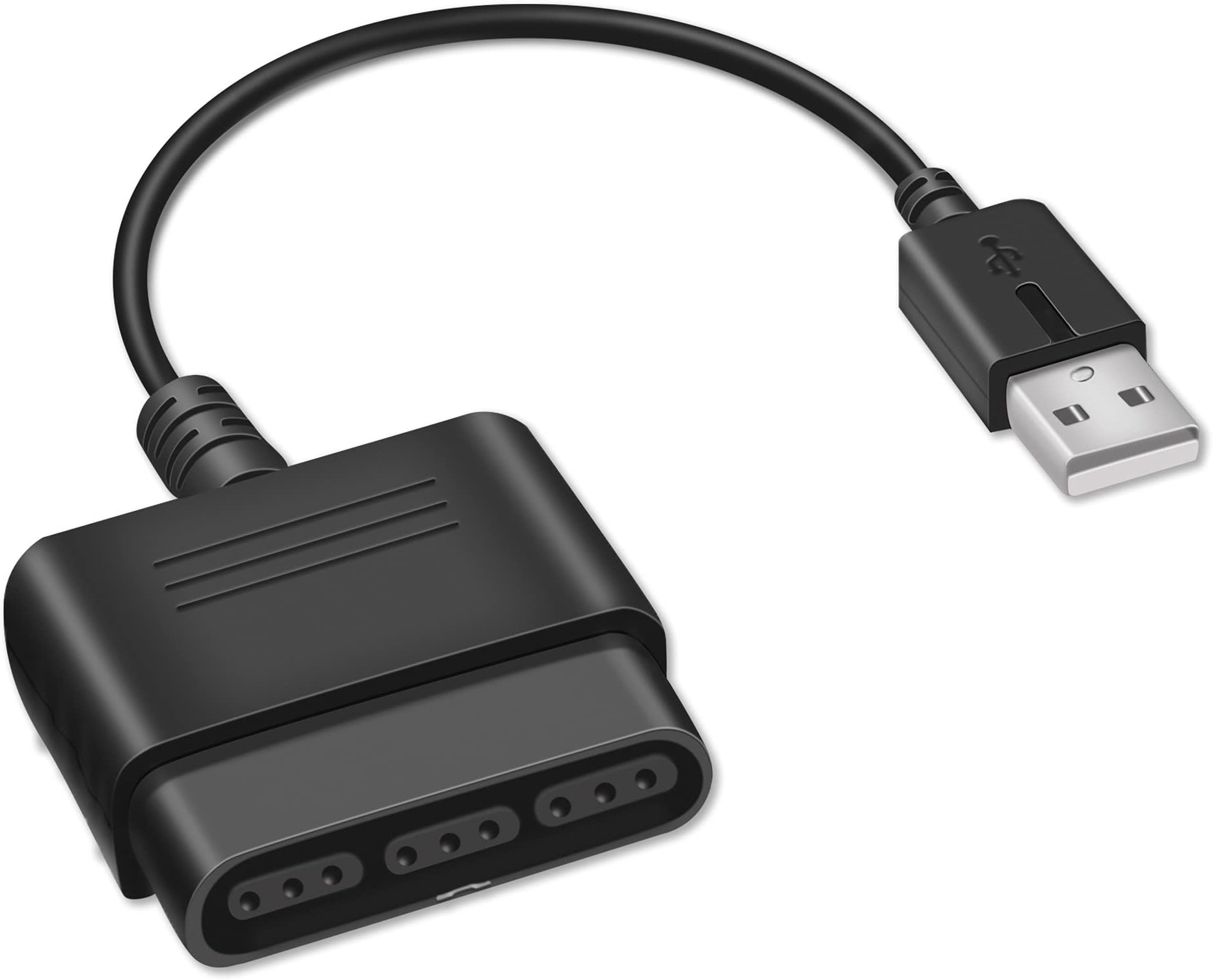
The Xahpower PS2 Controller to USB Adapter lets you connect original Sony PS1/PS2 controllers to PS3 consoles and PCs via USB. It supports Windows 98 through Windows 10 with automatic setup, offers double shock vibration on compatible games, and requires no driver installation. Perfect for gamers seeking a cost-effective way to relive classic controller feel on modern systems.


| ASIN | B097MXJ1BW |
| Best Sellers Rank | #4,563 in Video Games ( See Top 100 in Video Games ) #39 in PlayStation 2 Accessories |
| Customer Reviews | 4.1 4.1 out of 5 stars (992) |
| Date First Available | July 20, 2021 |
| Item Weight | 1.13 ounces |
| Item model number | 32e328f6-55f1-4369-ab66-3fd1e31dca27 |
| Manufacturer | Xahpower |
| Product Dimensions | 4.1 x 0.65 x 5.3 inches |
D**O
Love Playing With A PS2 Controller On PC
I purchased this at the same time I bought a new PS2 controller from Ebay. Was excited to be able to use that controller on my PC. It's great that this was so easy to find at such a good price. Felt like a good, solid piece of hardware when it arrived, and for the most part it works with my gaming programs. However, I must say the one thing it does NOT seem to work with is Steam. I got a PS4 controller that works fine with Steam, so it can't be just because it's a Playstation controller, but I guess a PS2 controller with this adapter will require extra programs in order to make it compatible. Still would recommend regardless.
T**N
Works perfectly for PS3!
I mainly purchased this as I was curious to see if it would work with my fight stick that only has a PS2 connection and right out of the box it worked flawlessly. I have a steering wheel coming soon and will check to see if that connects but overall I am happy that the product works and was well worth the value/price!
G**Z
Jank when it worked, and now it doesn't
Product stopped working after about a month or two, and even when it did work there was a lot of jank. It would switch from d-input to x-input when I pressed the analog button, which would be a cool feature if it actually worked properly. Once you switched to x-input there was no going back to d-input until you unplug and plugged in the adapter to the PC (for obvious reasons, this is pretty annoying). Overall didn't work well when it did work, and now it doesn't work at all. Also no vibration support wish that was listed in the item description. Pressure sensitive buttons worked but only in d-input mode and ahhhhhh I'm so tired of this adapter IT IS SO JANK, BUY ANOTHER ONE PLEASE LORD I HATE THIS THING.
J**P
Great for Guitar Hero fans with PS2 controllers
Works perfectly for anyone looking to get into guitar hero with a PS2 controller. Ideal if you want to play clone hero on your computer, and connects well. I have never had any issues with this adapter, and it’s compatible with both Mac and PC
R**N
Clone Hero works w/ PS2 Guitar Hero controllers (and whammy bar*)
Pros: Cheap, cable isn't too flimsy, not too much input delay Cons: Cable could be a few inches longer so the adapter doesn't hang from the back of some PCs. (Clone Hero setup instructions below) Short description: This will work with PS2 Guitar Hero controllers on Clone Hero, but needs some additional setup. You will need JoyToKey software for button mapping and DsHidMini drivers to separate the up strum from the whammy bar. I set this up on Windows, I'm not sure if you can do the same on Mac or Linux. ONLY DOWNLOAD FROM THE OFFICIAL SOURCES. I haven't quite figured out how to get the tilt to work. Long description: Right out of the box, this will not register proper guitar hero controller inputs and should show up in Windows as a "PS3 controller". To remap the buttons, you will need software called JoyToKey which will allow you to assign controller inputs to keyboard or mouse inputs. Pressing a button on the controller will highlight which input it is, and from there you can choose which key will be tied to it. After remapping the buttons, you'll notice the whammy bar and up-strum are registered as the same input. To separate these you will need a 3rd party driver called DsHidMini, which is a rework of the discontinued PS3 controller drivers by Virtual Gamepad Emulation Framework (ViGEm). The source project can be found on Github (under ViGEm, uploaded by user "nefarius"), or on the vigem website. ONLY DOWNLOAD THIS FROM THE OFFICIAL GITHUB OR VIGEM WEBSITE. After installing the two drivers (and rebooting the computer), the up-strum and whammy bar will be separated allowing you to assign the whammy bar. Clone Hero will also now recognize the guitar buttons as actual "controller" buttons, which will conflict with JoyToKey, so you will want to unbind the controller buttons in the Clone Hero settings. Then just set the Clone Hero keyboard buttons to what you mapped in JoyToKey, and start playing! These were what my guitar buttons corresponded to in the JoyToKey inputs (after the DsHidMini driver install): Green = Button 12 Red = Button 2 Yellow = Button 4 Blue = Button 1 Orange = Button 3 Start = Button 7 Select = Button 8 Up-Strum = POV: ↑ Down-Strum = POV: ↓ Whammy Bar = Stick1: ↑
A**N
Works great with Guitar Hero Controller
Works great with a wired SG Guitar Hero controller, including whammy and tilt, after mapping controls in PCSX2 on an M4 Mac Mini. I am satisfied with the performance there given the price. That said, tilt and whammy did not work on YARG and Clone Hero was an unplayable mess where down was always being pressed and up strum couldn’t be mapped. I picked up a Blue Indigo for YARG & Clone Hero but rhythm gamers should feel confident buying with full functionality in PCSX2.
F**G
Very good!
Product came in fast and in perfect condition!
T**N
You need a fix for this to work on PC properly with Dualshock 1/2
If you just plug the adapter into the PC, the controller will have issues. mainly, the left d-pad will be read as a left analog stick, and the right analog stick will be borked, rumble won't work either. This is an easy fix, you need SCPtoolkit, a Dualshock 3 driver for this adapter to properly work and have all the buttons be recognized, this will also have the side effect of disguising it as a 360 controller allowing you to play almost every PC title, as long as it doesn't require analog triggers.
D**E
Used it to connect a wired PS2 guitar hero controller to my laptop for clone hero. No issues whatsoever, just had to map the buttons in the game setrings.
A**S
Se supone que debería funcionar con tansolo conectar el control al adaptador y el adaptador al playstation3 (tengo la versión slim) pero no detecta el control. Intenté muchas cosas como conectarlo antes de prenderlo y limpiar las conecciones con una brocha suave. Al presionar el boton de "imput" a veces se prende y a veces no se prende la luz roja. Si llega a prender la luz, esta se apaga en unos momentos. Aún cuando ha llegado a prender más tiempo siempre sucede lo mismo: la pantalla no responde a ningun botón. Ocasionalmente aparece la leyenda "An unknown USB device has been connected." pero sigue sin responder. Un desperdicio de dinero.
S**W
不通に動きます。買って良かったです。
ハ**ワ
買ってはいけない。PCに繋ぐとPS3コントローラーと認識され、しかも、十字キーも左レバーと認識されるので使い物にならない。 ソニー以外のメーカーのPS2コントローラーも繋いでみたがどれも同じ症状が出るので犯人はコントローラーではなく、こいつ。 ドライバーをダウンロードして使うものなのかもと思ったが、説明書も付いてないので分からない。 PS2コントローラーが差せるアダプターなのになんだこりゃ? 絶対に買ってはいけない。
A**S
Works great, nice to use wired controller without having to recharge, opertunity to use genuine sony ps2 controller if you have them and dont want to spend money on original ps3 controllers
Trustpilot
2 weeks ago
1 month ago