Buy anything from 5,000+ international stores. One checkout price. No surprise fees. Join 2M+ shoppers on Desertcart.
Desertcart purchases this item on your behalf and handles shipping, customs, and support to Kyrgyzstan.
📡 Cut the cable, not the connection — wireless radio programming made effortless!
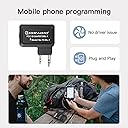
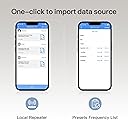
The TIDRADIO BL-1 Wireless Programmer Adapter revolutionizes Baofeng UV-5R and multiple model programming by eliminating cables and driver issues. Compatible with Odmaster’s PC and mobile apps, it offers seamless Bluetooth connectivity, 24-hour battery life, and instant syncing of frequency data across devices. Designed for professionals and enthusiasts who demand quick, reliable, and customizable radio programming in the field, it supports a broad range of radios and enables one-click import of local repeater settings for enhanced communication reach.


| ASIN | B098SM9FVL |
| Best Sellers Rank | #51 in Portable FRS Two-Way Radios |
| Brand | TIDRADIO |
| Built-In Media | USB cable, User Manual, baofeng uv-5r programmer |
| Color | Black |
| Compatible Devices | PX-888S, RT22, 888S, UV-5R, Mini, UV5R, 5RM(AR-5RM) |
| Connector Type | Kenwood plug for baofeng uv-5r |
| Customer Reviews | 4.2 out of 5 stars 3,457 Reviews |
| Item Dimensions | 0.3 x 0.2 x 0.5 inches |
| Item Package Quantity | 1 |
| Item Type Name | BL-1 for ham radio |
| Item dimensions L x W x H | 0.3 x 0.2 x 0.5 inches |
| Manufacturer | TIDRADIO |
| Mfr Part Number | BL-1 |
| Model Number | TD-BL-1 |
| Number of Items | 1 |
| Package Quantity | 1 |
| UPC | 713923481985 |
| Unit Count | 1.0 Count |
| Warranty Description | 6 |
J**S
TIDRADIO Excellent wireless programming option...
I saw some videos on the TIDRADIO wireless programming device and i was curious, so I ordered it. I was pleasantly surprised. It paired up quickly with the Odmaster app and when you download the radio settings to the app it is faster than doing it on the computer. I could immediately see how this could be useful when camping or off roading etc. It makes it simple to clone or program radios when you are in a situation where connecting to a computer is not practical or even possible. It's true that radios like the Baofeng UV-5R can be programmed from the keypad, but that can sometimes be tedious. Moreover, some older radios have firmware bugs that will allow you to change some settings, but those settings will revert back the next time you turn the radio on. With the TIDRADIO wireless option, the settings stick. There are a growing number of radios supported by Odmaster, but not every radio is. Most popular models and even some more obscure models are supported, either outright or in a beta form. The software interface is a bit involved and if you're used to CHIRP, there will be a bit of a learning curve regarding location and wording of some settings, but you can do a lot with the software. Once you have your Odmaster account set up you can also access your frequency lists from a web browser if you like. You can save different configurations to your phone and the Odmaster portal. I liked that. I feel that for the price this is a very good programming option. It isn't necessarily the best or easiest option for every circumstance, but in certain situations this is outstanding. They have been updating the software regularly and the number of supported radios continues to grow. I highly recommend this, especially if you find yourself in situations where you wish you could quickly change the radio configuration in the field where traditional cloning is difficult if not possible. For example, if you want different repeaters in different remote locations and your radio doesn't support custom channels, you could create multiple configurations and simply upload them to the radio when needed. No internet, phone service or computer needed. Just your phone, the Odmaster app and the TIDRADIO programmer. Make sure to charge the TIDRADIO Bluetooth programmer before hitting the road. It isn't powered by the accessory port. It has it's own battery. They include a cable, but you will need to use your own charger. Even if you wouldn't need this on a daily basis, it is a nice-to-have for those situations where you might need it for a specific situation or location. I have used it many times since I purchased it and it has not failed or glitched once. It works perfectly. Just make sure to be careful plugging it into the accessory port because it is lopsided and I could see where pushing too hard on one side could possible cause a problem. Just push it in directly above the pins. Also, make sure it is all the way in. Sometimes it feels like it's in, but can go in a bit further. Excellent device. 5 Stars.
E**R
Bluetooth adaptor
It works well. Good for portable radios. Works as Bluetooth.
R**K
Beware: Not for use with TidRadio H3
I bought this thinking that I could use it on both my Baofeng V5 radios and my TidRadio H3. I missed the fine print that you are supposed to the TIDradio app to program the H3 directly over bluetooth rather than use this device. This device is primarily for the Baofeng types. Had I realized that it was not only redundant, but, in fact, would not work with the H3, I would not have purchased it. It did work fine on my old Baofengs, though.
K**N
Works as advertised
This tiny package arrived in what was probably Amazon's smallest shipping box but it was secured so it wouldn't "bounce around" during shipping. :) The wireless programmer box has styrofoam inlay with cutouts for the programmer and the included foot long USB cable. The cable has USB-A on one end and USB-C on the other end. As soon as I got it the first thing I did was plug it in to the wall outlet (you must provide your own 5v plug adapter or you can plug it into a USB-A port on your computer) and in less than 30 minutes it was completely charged (The green light on the front will signify when fully charged). The instructions are easy to follow. If you don't want to use CHIRP to program then you can use their recommended app Odmaster which can be found in the App Store (I have an iPhone). BTW you do not need to create an account in order to use the app. Just saying. :) When ready you plug the programmer into the HT, turn on the programmer then your HT, open the app, follow the instructions on selecting your HT model by manufacturer (there are a lot of manufactures listed but surprisingly they don't have Yaesu, Kenwood, ICOM, etc.) then download the current channels from your HT to the app. From there you can make changes (i.e. adding a new repeater), press Done when complete and then press the Write button to upload the file back to your HT. The download process takes about a minute as does the upload process. If you prefer to use CHIRP on your laptop then you can connect the wireless programmer to your laptop via bluetooth (provided your laptop has bluetooth) and program your HT that way. The storage box is small enough to fit in your shirt pocket or a backpack, etc if you want to take it "on the road". I've only used it the one time but it did work as advertised. For the price I cannot complain. Good luck and 73's.
M**S
TIDRADIO Wireless Programmer makes field programming easy
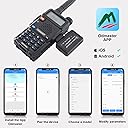
Usually I program the Baofeng UV-5R using CHIRP especially when I am doing a batch programming using a programming cable connected to a computer. Every now and then, I am out in the field and I need to add a local repeater that is not loaded in my radio (when I am traveling or out of my area that I have programmed for). The TIDRADIO Wireless Programmer makes it easy to program on your phone or tablet. The Odmaster app is available on Android and iOS, and having used the app for the TIDRADIO H8 radio in the past, they have made a lot of improvements and additions to its features and functions. When I first received this device, I plugged in the USB-C cable and charged it. After charging the wireless programmer, here is all I need to do to get to the programming screen to start adding/editing channels 1. Plug in the Wireless Programmer 2. Power on the radio 3. Open the Odmaster app on your phone or tablet 4. Turn on the Wireless Programmer 5. Select Program (near bottom right) on the Odmaster App 6. Click on Connect Bluetooth 7. Select TIDRADIO KIT 8. Click on Select Model (in my case it was the Baofeng - UV-5R) 9. Click on Read 10. Select the top option: Channel And you will see all of the programmed channels (green Data) and any empty ones (red Null). Select an empty one or one you want to edit, and start programming the configuration. Once complete, you can save the entire configuration or select Write on the bottom right of the Program & Setting screen. You can also configure other radio settings under Function. Make sure to power off the radio before removing the Wireless Programmer from the radio or powering off the Wireless Programmer as it may transmit on the channel you are on. It was very easy to start using after charging the wireless programmer, and I was editing or adding channels or updating the radio configuration in a couple of minutes. If you don't have Odmaster on your phone or tablet, you do need to take some time downloading the app and configuring app preferences. This is a must have if you need to edit or add a channel on the fly (though I have learned to do that on the radio using the menu options, but it takes longer). If you have one of the Odmaster supported radios, this should be in your travel kit in the event you need to make changes away from the computer. I hope this review is helpful.
G**N
Not what it's supposed to be.
I purchased this item to be an easy item to work better then Chirp. We'll so much for that. I have tried it with 3 different models several times and no success yet. To many errors to mention. It's a no buy from me.
H**O
Perfect!
It works like it should but a little complicated if you’re a noob haha. Good quality product and fits great in the radio. Highly recommend getting this for your HAM.
J**R
Device works fine, but highest rated Baofeng not supported by app
I bought this device because I purchased the TIDRadio H3 and already was using the Odmaster app on my phone to program it. I thought it would be great if I could use this adapter to also program some of the other Chinese radios I have. Let me be clear, my issues here are NOT with this device, they are with the program developed to work with it. This is a simple Bluetooth device, and it does its job. As for the Odmaster app (at least the Android one): It will program the Baofeng UV-82. It will not program Baofeng BF-F8HP, the most and highest rated Baofeng radio on Amazon. It will also not program the Baofeng GMRS v1. I think if they made the radios that this thing supported a bit more ubiquitous, this would be an awesome adapter. Being able to program the Chinese radios on the road / on the fly is great for traveling, emergency comms situations, and things like race support where you may need to switch frequencies on short notice.
W**I
ADAPTADOR SEM FIO PARA BAOFENG
Bom custo-benefício
S**B
Excellent bit of kit
Excellent bit of kit .plug it in load the app and program away.
M**T
Funcional
Faltan algunos modelos en la aplicación. El dispositivo funciona perfectamente.
A**S
Bueno
Lo practico
A**R
Very good
Easy to use
Trustpilot
1 month ago
2 weeks ago