Buy anything from 5,000+ international stores. One checkout price. No surprise fees. Join 2M+ shoppers on Desertcart.
Desertcart purchases this item on your behalf and handles shipping, customs, and support to Kyrgyzstan.
๐ป Cool your rig, crush the workloadโwithout the noise!
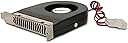
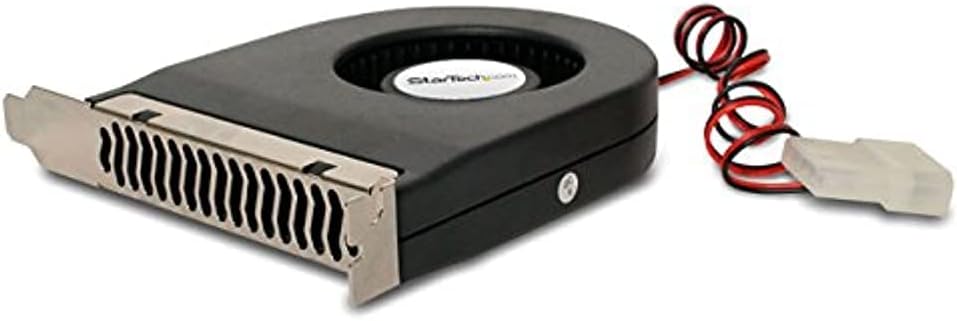
The StarTech.com Expansion Slot Rear Exhaust Cooling Fan is a compact, high-performance PCI slot fan designed to reduce heat buildup on expansion cards like GPUs. Featuring a 6.9 CFM airflow at 2200 RPM and a quiet 32 dBA noise level, it connects easily via LP4 power and offers a reversible bracket for customizable airflow direction. Built with durable ball bearings and backed by a 1-year warranty, this fan is a smart, low-power (1.8W) solution to extend the life and performance of your desktop components.


| ASIN | B0000510SS |
| Air Flow Capacity | 6.9 Cubic Feet Per Minute |
| Best Sellers Rank | #1,677 in Computer Case Fans |
| Brand | StarTech.com |
| Brand Name | StarTech.com |
| Compatible Devices | Desktop |
| Cooling Method | Air |
| Customer Reviews | 4.4 out of 5 stars 778 Reviews |
| Global Trade Identification Number | 00065030782739, 05051749372618 |
| Included Components | 1 Expansion Slot Exhaust Fan |
| Item Dimensions L x W x H | 6.61"L x 1.08"W x 7.87"H |
| Item Weight | 0.1 Kilograms |
| Manufacturer | StarTech.com |
| Material Type | Plastic |
| Maximum Rotational Speed | 2200 RPM |
| Model | FANCASE |
| Noise Level | 1 Decibels |
| Number of Items | 1 |
| Part Number | FAN-CASE |
| Power Connector Type | 4-Pin |
| Product Dimensions | 6.61"L x 1.08"W x 7.87"H |
| UPC | 065030782739 |
| Unit Count | 1 Count |
| Voltage | 12 Volts |
| Warranty Description | 1 year warranty |
| Wattage | 1.8 watts |
L**Y
Simple, yet effective
I had an old legacy graphics card running on my dual-boot Win 10 Pro 64 bit & Win XP Pro 32 bit. The card, and motherboard, started creeping into the high 70s, even with mild internet browsing or video watching - NO games or intensive power-hungry programs. While watching videos, or with more than two browser tabs open, the PC would crash. Installed two of these fans and the graphics card and motherboard are now operating around 40 - 50 degrees under load. The packaging was minimal, which is great for the environment, and the install was easy. I flipped the fans the opposite direction by inserting a narrow, flat-head screwdriver under the frame and using the screwdriver as I pry bar while simultaneously depressing the tabs which attach the frame to the fan body with a secondary screwdriver - you'll understand when you look at the units. Even with flipping the fans, install, including powering down and rebooting the PC, was less than ten minutes. Although there was a mild whirring sound, that soon faded. In fact, I no longer heard the fans after a couple hours; probably I had become inured, but it was a fairly quiet drone, nothing annoying. Purchased two SATA to LP4 adapters to power the units, an additional $14 total, with my entire outlay being less than $35. My system no longer crashes due to overheating components and my graphics card will easily last a few more years. Highly recommend the seller and these specific fans. Even if you've never cracked a PC case before, these fans are easy to install.
D**E
Absolutely worth how little it costs
Threw it on top of my GPU and it dropped my temps by 4C under load. Way more than I expected for how inexpensive it is. Moves more air than either of my other exhaust fans. Super easy to install. You'll need a molex to 3pin adapter if you want to hook it up to a fan controller. You can also easily take off the little metal mounting piece and put it back on upside down if you'd rather have the fan intake from the bottom. As to how loud it is, it isn't nearly as bad as other reviews led me to believe. It's definitely audible, but nowhere near the jet engine I was anticipating. It's a little thicker than I thought it would be, but I was still able to mount it in the PCI slot directly above my GPU. It would probably be even better if I could move the fan up a slot and have an empty PCI slot between it and the GPU, but my configuration doesn't allow for it. Would definitely recommend for any niche air cooling application.
R**R
Amazing! But to make it great requires more parts.
If you have a hot videocard that is not a blower this thing can really work wonders, very powerful! But running at full speed it is noisy and likely will not last as long as it could. Get a Molex to 3-pin adapter wire. You will want to plug it into either a fan controller or a PWM case fan that has a 3-pin piggyback. If the device is speed-controlled by either of those means you may find that it is significantly more powerful than most conventional case fans and not particularly loud for the amount of work it gets done. I highly recommend this for any conventional ATX/MATX case but with a dremel you can even fit it in that grill to the left of your PCI slots and the mounting bracket does come free from the fan meaning you can change its direction. This configuration instantly took 10C off of my peak GPU temps. A more complete kit would get five stars from me but I absolutely do not regret buying! Be aware that you might want to rethink your fan layout after adding this because it will likely create a negative pressure environment and this means more dust in the case. Upgrade to the best intake fans you can find and you'll be glad you did. If the day ever comes that they make a PWM version of this unit I will buy several of them. Please make a PWM version!!
D**.
Works very well. Great price. Simple to install!
This is what I needed. EXACTLY what I needed. I have an IBuyPower built gaming computer that's a couple of years old (A great computer by the way). I've been updating/upgrading it recently and needed to find a way to cool it down internally. I was going to install a couple of internal fans to move the air around and one external fan to blow the cool air into the cabinet itself. I jumped online to price things out and saw this StarTech Slotfan so I thought I'd give it a try. It's doing the job and doing it very well! I've only had it installed for several days now so if anything goes haywire on the ol' 'puter because of it I'll post another comment but I don't see that happening anytime soon. Now the specs... I have a gigabyte motherboard, an R9 level GPU, 16 gb RAM, 2TB HDD, Rosewill 850 W power supply and a bunch more I've tinkered on and upgraded, Windows 10, the entire BF series (except Hardline), Titanfall, Inquisition, etc. and before the fan it warmed up fast... after the fan it stays below the high threshold. It's a bit noisy but not near as noisy as the external fan I was using to keep the whole thing cooled off in the interim. I noticed an immediate 7-10 degree (F) drop internally. Which is good! Long winded but there's my review... I recommend getting it if you're looking for a cheap, simple resolution to controlling the internal heating of your computer.
D**N
great for LSI Megaraid sata controllers
Previously I've used 40mm fans mounted by forcing screws in to the heatsink fins, but I recently upgraded to a 16 drive controller that has a giant heatsink with smaller fins. These controllers are designed for high volume server fans. I tried using a dual 90mm pcie fan mount bracket, but it was just pushing hot air around the case and not really doing much good. It was better than nothing but I went on the hunt for something better. Then I came across this fan. Like everyone else, I wish they would update the design and get rid of the molex connector but I dug out the cable for the PSU and hooked it up. For the people claiming its loud, sure it's louder than a noctua fan running at 1000rpm, but it's not THAT loud. I have a spare bedroom where I keep all my pc's and I don't notice this fan over the other fan noise in the room. With the door open I can barely hear the pc's running, and this fan doesn't stick out above the rest. It does move way more air than I expected it to. When I put my hand behind the case I can feel the warm air it's sucking out from the sata controller I have it mounted next to. It has lowered the temps of the controller. It's not substitute for having a 3000+rpm fan blowing air over it, but it's enough for me to be comfortable with it. If you need something to keep the temps in check for a card like this I would recommend it, if you don't have access to a 3d printer so you can make a proper fan shroud. The fan takes up exactly one pcie slot, so you aren't giving up more space than that.
M**R
This is loud
This fan moves air very well. This unit is also very loud. It was louder than tri-cool 120mm and 92mm blue fans. I ended up removing power from the unit because it was louder than the other 5 fans in my case combined. If you NEED cooling then this will help to get front to rear airflow added to your case. If you have other case options then I suggest using them first. For graphic card overheating issues you should add internal fans in the case to move the hot air away from the graphic card. This can be done by adding a fan to push extra air across the cooling fans of the graphic card. Using the "pull" system of this rear exhaust fan to take away hot air from the card is very inefficient. First task is to cool the card then the second task is to remove the hot air. This fan will remove the hot air from the case. Try using a dual 70mm card slot fan or a fan pointed at the graphics card to push air into your graphic card. I used the vantec card for that purpose.
J**E
it works pefectly and great way to keep the pc from heating
fixing my old pc from early 2010, and it's a decent 32 bit system that works wonders with old games that don't run very well on 64 bit pc's, but overtime it needs some maintenance, one of my biggest issues was obviously cleaning and restoring the motherboard, graphics card, cpu, heatsink and fans. the fans are the generic ones that do the job, but airflow is kinda weak by comparison to the more powerful ones, i don't really need them because it's an old pc, kinda expensive and not really necessary. When i finished cleaning/fixing my pc I did some testing to check if thereโs any issues and thankfully it works perfectly fine but the air flow especially around the bottom of the graphics card is very weak, so people have recommend this Exhaust Cooling Fan to me. for 8$ its a steal, very easy to set up, the only thing you need is a nail that fits into the metal fan case. works perfectly and now the pc finally has proper cooling that prevents overheating.
J**R
Went in expecting nothing, but it's actually pretty great.
I build a sleeper gaming rig in an old rack mount server case. I was concerned about airflow, as the case isn't as wide as modern cases, and cable management is nigh impossible. I got this little fan on a whim, expecting more or less nothing. I was quite surprised how much air this thing moves. It moves significantly more air out of the back of the machine than my two Noctua exhaust fans. As to how loud it is, that's harder to say, because I'm using the original 25 or so year old intake fan on the case, because it's so much more potent than modern fans I've tried, and that fan is loud enough that it drowns out all the other fans on the machine. So, this fan is less loud than that fan, which isn't very specific. Anyway, it works great. Just make sure you have a spare molex plug, and you're good to go. Well worth the very modest price.
T**A
Fantastic performance at low price
Have mounted this beside my PCIe NVME 1 TB SSD PCIe adapter add on unit. These drives tend to run hot. Immediately noticed the lower temperatures of my SSD after installing the PCI slot fan. Currently running about 20 degrees F cooler than before the fan was installed. Exceeded my expectations.
G**Z
Muy efectivo
Bajo 4-5 grados Celsius la temperatura de la tarjeta grafica, en m caso esta se ajusto perfectamente debajo de esta, basicamente ayuda a recircular el aire de adentro del gabinete hacia afyera de este mismo. Es importante que se use asi como se indica, de esta manera evitas que entre polvo dentro del gabinte.
P**T
Excellent Case fan for cooling your video card.
Bought this after searching for a while to get aCase Fan that can sit below your video card. Its the only one I could find to suck hot air straight out the back of the case. My only criticism is the power connector is old school - like me. Suggest it get switched to a more modern 12 v plug...otherwise it does a great job and my case runs much cooler now - even when playing hi res games.
G**U
Good budget expansion slot fan
A little bit noisy but it gets de job done. The price is good so no complain here.
T**Z
Does what it says; manufacturer's customer support was good
Device does what it is supposed to. I wanted to mount it drawing air from below rather than above, but the manufacturer's website did not say whether the bracket was reversible. Not wanting to damage it, I asked the question of the online support chat person, who was able to answer before long that it was indeed reversible.
Trustpilot
1 week ago
2 months ago