Buy anything from 5,000+ international stores. One checkout price. No surprise fees. Join 2M+ shoppers on Desertcart.
Desertcart purchases this item on your behalf and handles shipping, customs, and support to Kyrgyzstan.
🔋 Power Up Your Smart Home with Style!
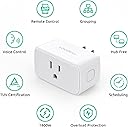
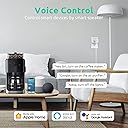
The VOCOlinc Homekit Smart Plug is a versatile and compact device that allows you to control your electrical devices effortlessly through voice commands with Siri, Alexa, or Google Assistant. With a 15A power rating and 2.4GHz Wi-Fi connectivity, it ensures reliable performance while being eco-friendly and energy-efficient. Perfect for any modern home, this smart plug is easy to set up and certified for safety, making it an essential addition to your smart home ecosystem.


| ASIN | B091T81H7M |
| Amperage | 15 Amps |
| Best Sellers Rank | #285,418 in Tools & Home Improvement ( See Top 100 in Tools & Home Improvement ) #370 in Electrical Outlet Switches |
| Brand | VOCOlinc |
| Brand Name | VOCOlinc |
| Color | white |
| Connector Type | Plug In |
| Customer Reviews | 4.2 out of 5 stars 2,385 Reviews |
| Included Components | wifi-plug |
| Manufacturer | VOCOlinc |
| Material | Plastic |
| Material Type | Plastic |
| Model | VP5X |
| Number Of Poles | 3 |
| Number Of Wires | 3 |
| Number of Poles | 3 |
| Part Number | CA-VP5X-4 |
| Plug Type | Type B |
| Smart Home Compatibility | Smart Home Compatible |
| Specification Met | CE |
| UPC | 631851544803 |
| Unit Count | 4.0 Count |
| Voltage | 120 Volts |
T**E
Seamless Integration and Reliable Performance
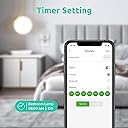
My experience with this product has been outstanding, and it has become an essential part of my smart home setup. The integration with Apple HomeKit is seamless. Setting it up was a breeze; it was as simple as plugging it in and adding it to my HomeKit through the app. The smart plug responds promptly to commands, whether I’m turning a lamp on or off or setting a schedule for my appliances. It’s impressive how well it integrates with the HomeKit ecosystem, allowing me to control my devices effortlessly with Siri or through the Home app. Apart from HomeKit, this smart plug is compatible with Alexa and Google Assistant, which is great for households using multiple smart systems. However, my primary use with HomeKit has been flawless. The ability to control devices with voice commands using Siri adds a level of convenience that I greatly appreciate. The build quality of the smart plug is solid, and its design is compact enough not to obstruct adjacent outlets, which is a thoughtful design aspect. The WiFi connectivity is reliable, ensuring that the plug remains connected and responsive. Another feature I find particularly useful is the electrical timer outlet. It allows me to automate devices like my coffee maker and lights, adding to the convenience and efficiency of my daily routine. The fact that no hub is required is a huge plus, reducing clutter and the need for additional hardware. The simplicity of plug-and-play makes this smart plug a great choice for those who are new to smart home technology.
L**Z
Love the Apple HomeKit Integration
Set these up relatively easily and incorporated them into my Apple Homekit. I've been using four of them for about 20-22 months or so. I don't use the Alexa integration, only mainly concerned with the Apple home and integration with Siri, and Apple's Home app. Works seamlessly with automations. I have one set up to run my VERY dumb coffee maker, and I can have it shut off after a set time (ie one hour after making coffee). One small glitch with the VOCOlink app is I can't download the latest firmware on two of them, but the other two worked fine. I have every confidence that it will finally work for me, or ... I guess I just won't update the firmware? Not a large cause for concern for me. At this price point, it has the features I need and has worked flawlessly. Just a sidenote: Another thing I like about this, is that after the power comes back on after an outage, it reverts to the off state. Which is convenient since I don't want it accidentally turning my coffee maker on and just letting the hot plate run with an empty carafe ... because that would be baaaaaad ... probably ...
P**F
**Smart and Seamless Integration with Every Ecosystem**
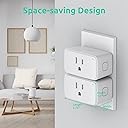
I’ve been using the **VOCOlinc Homekit Smart Plug** for a while now, and it’s hands down one of the best smart plugs I’ve owned. It integrates flawlessly with **Apple HomeKit, Alexa, and Google Assistant**, making it a versatile option no matter what ecosystem you prefer. Setup was a breeze, especially with Apple HomeKit. I love that I can control the plug from my phone or through voice commands with any of my smart assistants. It responds quickly, and the connection is always reliable. I also appreciate the compact design—it's small enough not to block the other outlet. The **energy monitoring** feature is a bonus, helping me keep track of power usage, and I can easily schedule the plug to turn on or off at specific times, which is great for automating my devices. If you're looking for a smart plug that works with all the major platforms and is easy to use, this is a solid choice!
A**R
Simple Smart Plug
There's not much to these, they're smart plugs that turn something on and off when you program it to. The only "smart" items in my home are my lights and a Nest Thermostat. So I have been very interested in trying out "Smart" home technology, but never really had a need for a power outlet. The Christmas, I got annoyed going behind the tree and plugging/unplugging the tree. I also felt like I wanted the tree lights on every time we were home, to maximize our efforts in even putting up the tree. So, I added this plug to my network and eventually into Amazon Alexa as well as my Apple Homekit. Once all connected, it hasn't had any hiccups or issues. It's pretty reliable, granted it's right next to my router, so I cannot speak for range. I had some issues connecting. Not sure why... I'm fairly tech/network savvy. Eventually, I got it setup. Now I have another one doing nothing right at this moment and I keep trying to think of things I can use it for and what I'm going to do with the one for the Christmas tree once it's gone. These definitely are a luxury for me. The reasoning behind the tree are really for convenience. So I only really recommend this if you have a clear need and reason for automating one of your plugs.. or else it's a waste of money.
D**C
Product failed and so did support.
I have many smart plugs. Needed one to power back on after reboot without WiFi. Thought this would be it. Wow. Tried every way possible to get it to connect just to my phone. This never worked. I reached out to support and the resolution they gave me is below. I will return and look at another brand. Never again this one. Email received from support: Please use one phone as a hotspot and use another phone to connect to the hotspot to add the device. Phone used as hotspot: iPhone needs to turn off the switch of the "Maximize Compatibility" option in the personal hotspot settings. (5G when turned on, 2.4G when turned off). You can change the WiFi name and password of the hotspot to the name and password of the router. If the iPhone is connected to the hotspot and the device can be successfully added, the device will connect to the WiFi of this router after the hotspot is disconnected. If you have an Android phone, you can also try to add the device using the Android phone to see if it can be added successfully. Steps to add Android phone: (1) Open VOCOlinc App (2) Click the "+" in the upper right corner of the Home page (3) Select "Model", and then select the device Model to be added (4) Follow the page prompts to restore the device to factory settings, and prepare 2.4G Wi-Fi. (5) Click "Confirmed" (6) Click "Next" (7) Click on the searched device to be added (8) Enter Wi-Fi name and password (9) Click "CONEECT TO ACCESSORY" (10) If the "Device to use with VOCOlinc" message pops up during the adding process, please select "Connect". (11) If during the adding process, in "Connect to Wi-Fi:xxx", please manually connect the system Wi-Fi to xxx (12) Wait for the addition to be completed (13) Modify the device name and set the family room information where the device is located (14)Complete If you cannot connect to the device after entering the WIFI password, you may need to manually connect to the WIFI set by the system (Android 10 or above does not allow the App to automatically connect to WIFI). This means that when the prompt "1.0 Connect to Accessory: VOCOlinc-XXX-XXXXXX" appears, switch to the settings page and connect the WiFi to your WiFi. If you have manually connected the WiFi of the mobile phone to the WiFi of the added device, but the addition still fails. There is no need to reset the device. Please return directly to the "Add Device" page to see if the device is found. If the device is found and the device name turns yellow, please directly click the device icon to add the device. Waiting for your reply
J**S
Simple, well built, and works as advertised.
Why did you pick this product vs others?: I love this. I chose this kind because it works with HomeKit. I used it to solve a specific problem, but with the Ninja Creami, it has like a safety feature that works like an internal "Circuit Breaker", so I needed a way to shut off the power to the Creami and turn it back on when I wanted to use it.
S**S
Vocolinc Smart Plug - Best I have found for the Money for HomeKit Integration
The Vocolinc Smart Plug is very easy to setup and use. You can use the Vocolinc App, Apple HomeKit, Alexa, etc. I am using many of these throughout my home and they work flawlessly. I have now used multiple products from the Vocolinc Brand with my Apple HomeKit Integration and they work well and are some of the easiest to install. If you are looking to start setting up a Smart Home, this is one of the most economical and reliable products going. Remember to use 2.4 Hz to setup, but then it works well with Apple HomeKit running on 5G. If you encounter any problems with it functioning, you just have to do a reset and also reboot your phone to make sure its cleared out of your app. Turn it back on, hold down the button and it will connect. The Smart Bar is very simple to install and will provide a lot of satisfaction as you begin to turn lights, etc. on an off without even getting up!
T**N
Heavy duty smart plug
Compatible and easy to use with Apple Home. Switches a full 15 amps, making it suitable for controlling a small heater or large halogen lights. A fun, inexpensive way to try home automation. I’ve had these for a couple years controlling fans and lights with no issues.
C**N
A fonctionner 1 journee après un peu de difficuter pour installer mais elle fonctionne
H**A
Increíble relación precio calidad.
Increíble relación precio calidad. Y sí funcionan con HomeKit cada adaptador tiene impreso su propio código de Home Kit. Han superado mis expectativas y los he colocado como favoritos.
A**W
Works with Siri!
Work with HomePods and apple products. Love the ability to control the outlet from my iPad, phone and HomePod.
A**R
Easy to set up. Good value.
Works with home kit. Down load the voco app to set the timer. Easy peasy. HomeKit picks up the plug and then use independently or group them. Hey Siri, turn off the Christmas lights.
L**A
These are great for thos eplugs that are behind the couch or a shelf!
I LOVE THESE. They are super useful for those lamps plugged into outlets behind a shelf or couch. It's also great for turning lights on an off when you're not home. 10/10 we have like 10 of these throughout the house.
Trustpilot
5 days ago
1 month ago