Buy anything from 5,000+ international stores. One checkout price. No surprise fees. Join 2M+ shoppers on Desertcart.
Desertcart purchases this item on your behalf and handles shipping, customs, and support to Kyrgyzstan.
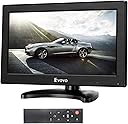
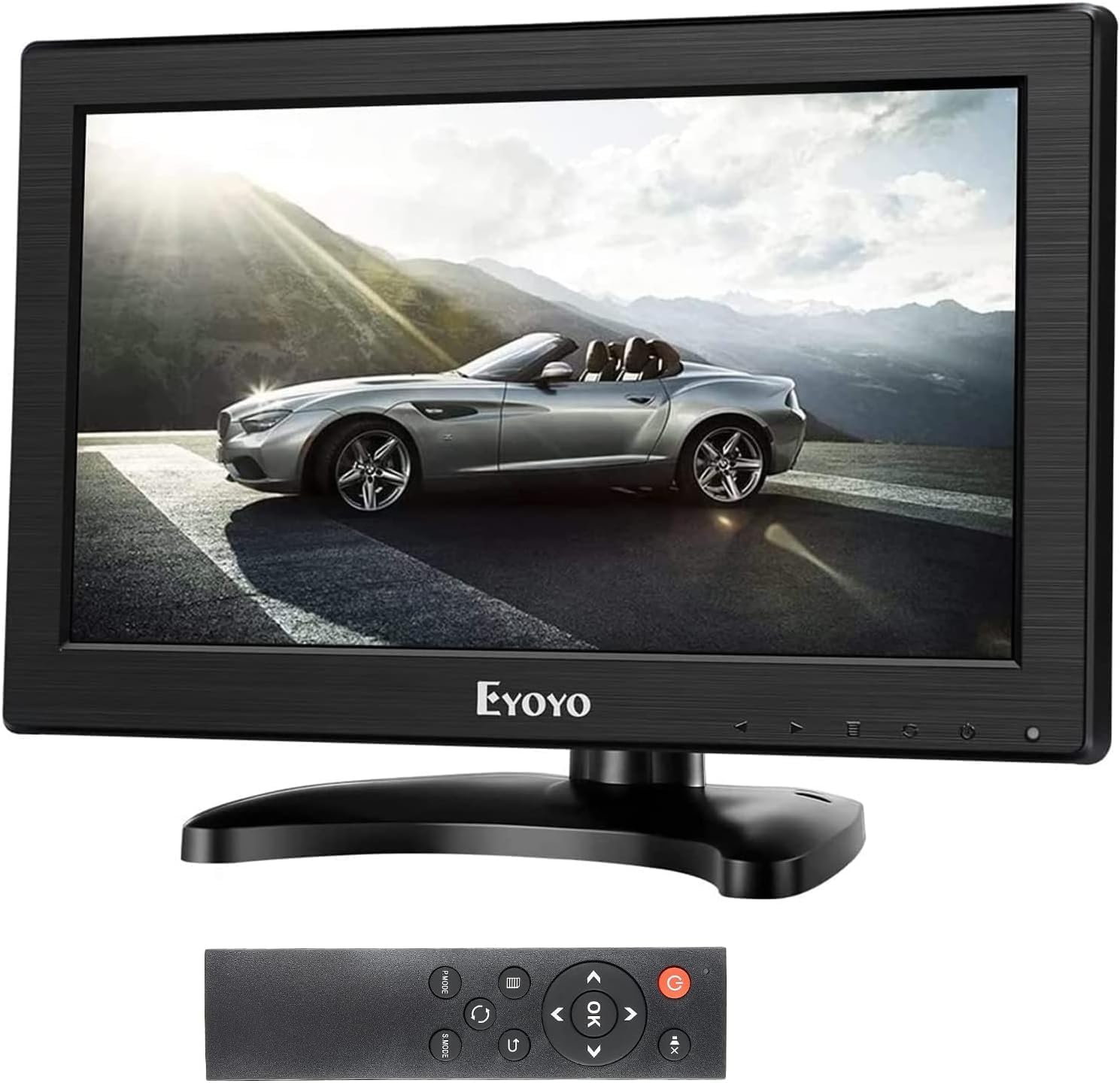
🚀 Elevate your workspace with Eyoyo’s versatile mini monitor — big impact, small footprint!
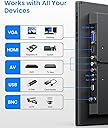
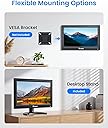
The Eyoyo 12" TFT LCD Monitor offers a sharp 1366x768 HD display with a 16:9 aspect ratio, enhanced by TFT technology for vivid colors. It supports four versatile input ports (HDMI, VGA, AV, BNC) to connect multiple devices, making it perfect for professional, security, or entertainment use. Featuring built-in dual speakers and a remote control, it ensures immersive audio and convenient operation. Its flexible mounting options, including a rotatable stand and VESA compatibility, provide ergonomic viewing in any environment. Lightweight and portable, this monitor is a smart choice for multitasking millennials seeking style and functionality.


| ASIN | B01KJVERF8 |
| Additional Features | Blue Light Filter, Built-In Speakers, Height Adjustment, Remote Control, Wall Mountable |
| Aspect Ratio | 16:9 |
| Best Sellers Rank | #20,832 in Electronics ( See Top 100 in Electronics ) #568 in Computer Monitors |
| Brand | Eyoyo |
| Brightness | 280 Candela |
| Built-In Media | 1 x 12" Small Monitor Screen with Stand, 1 x BNC Cable, 1 x HDMI Cable, 1 x Power Adapter, 1 x Remote Controller |
| Color | Black |
| Color Gamut | 100 |
| Compatible Devices | CCTV Security Camera, Desktop, Gaming Console, Laptop, Speaker |
| Connectivity Technology | Auxiliary, BNC, HDMI, USB Type A, VGA |
| Contrast Ratio | 600:1 |
| Customer Reviews | 4.2 out of 5 stars 1,139 Reviews |
| Display Resolution Maximum | 1366 x 768 Pixels |
| Display Technology | LCD |
| Display Type | LCD |
| Hardware Connectivity | 3.5mm Audio, AV Port, HDMI, Micro USB 2.0 Type A, VGA |
| Has Color Screen | Yes |
| Image Contrast Ratio | 600:1 |
| Is Electric | Yes |
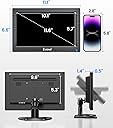
| Item Dimensions D x W x H | 1.4"D x 11.6"W x 7.4"H |
| Item Weight | 3.6 Pounds |
| Manufacturer | Eyoyo |
| Model Name | EM12B |
| Model Number | EM101AD |
| Mounting Type | Desk Mount |
| Native Resolution | 1366x768 |
| Number of Component Outputs | 1 |
| Picture Quality Enhancement Technology | TFT LCD |
| Pixel Pitch | 0.21 |
| Power Consumption | 24 Watts |
| Processor Count | 1 |
| Refresh Rate | 60 Hz |
| Resolution | HD |
| Response Time | 1 Milliseconds |
| Screen Finish | Glossy |
| Screen Size | 11.6 Inches |
| Screen Surface Description | Glossy |
| Shape | rectangular prism |
| Specific Uses For Product | Desktop, Entertainment, Surveillance |
| Total Number of HDMI Ports | 1 |
| Total USB 2.0 Ports | 1 |
| Total Usb Ports | 1 |
| UPC | 889251366239 |
| Unit Count | 1.0 Count |
| Viewing Angle | 160 Degrees |
| Voltage | 12 Volts |
| Warranty Description | 1 year warranty |
| Warranty Type | Product Warranty or Limited Warranty |
C**S
A frugal and rather good monitor
I am not so sure what a 4K monitor would see as the benefit in a 9" diagonal screen, but the current 1024 x 768 is fine with a good sharp view and I have had no clear evidence of any issue with the flickering of the screen described by some with the use of HDMI linkage. I used my own HDMI cable and maybe the one I placed aside as supplied is rather of a poorer quality or maybe the people with such units experienced an issue not so universal. For the cost the monitor provides crisp color and brightness and contrast. The remote is useful where the light monitor might be tipped over due to its lower edge controls, but a cautious user can adjust these from below if holding the monitor. The user is not likely to get much of a view of any screen contents at more than 4-5 feet so that distance is far from a consideration in reaching the monitor while it is in use. I have had only maybe 5 hours of use, if that, but I see no problems thus far. I hope not to need to update this review.
J**N
There it is.
I guess I’ll keep it. Seems to rest on my SNES there although it’s hard to see the action from far away, works ok as far as I can tell but maybe not perfect.
A**W
Perfect for 4:3 content.
Comes with all of the cords. HDMI, VGA, RCA, BNC, and of course the power cable. It's ready to be used right out of the box. The picture quality is very good, saturated and sharp. The viewing angle is great, and the sound is usable. The 4:3 ratio is perfect for older technology and 4:3 video files. Everything seems well built and good quality, especially for the price. If you need a small 4:3 monitor with a decent overall picture and built in sound, this is a good option. This would be great for retro gaming. I intend to use it to make a retro mini CRT tv with a 3D printed shell and a video player.
M**C
Buy the older TFT version of this monitor if you need PAL compatibility
I had the (I assume, older) TFT version of this monitor for 5+ years and it has a relatively bad picture and the colors are way off (especially blue). It is still available: https://www.amazon.com/dp/B01FHDL1DE. Viewing angle was also bad. The LED indicator of the monitor ON/OFF arrived broken. However I was using it with my Amiga 600 over Composite and since its small footprint it was sitting on the computer giving it a nice laptop feel. Yes, it was not 15KHZ compatible over RGB to VGA cable BUT it had a fantastic feature: automatic NTSC/PAL detection and proper display ("shrinking") of the PAL signal, with PAL colors, which is super rare these days. At that price there was simple nothing better on the market. I started looking for a more modern replacement with a better picture. I bought several small CCTV monitors from by companies on Amazon (all available at the moment, August 2025) and returned them all -- some could not even sync to the Amiga's Composite signal and none was able to detect PAL signal at all. So I decided to give Eyoyo another try and get the IPS version of my TFT model. I assume it will be the same features but with a better screen. And picture is way better in any way and again at a terrific price. However, the company sadly decided to cut some very important corners for my use case. PAL is detected but the picture is black and white and it stutters so it is unwatchable. The AC adapter is now 1.2A (not 1.5A) and it is lighter and feels cheaper and has a way shorter cable (I had to order an extender on Amazon for $6). There is no VGA 15KHZ support but I was not expecting that. They do give you now a bunch of cables (HDMI, BNC, RCA, VGA), the stand is different (and I couldn't figure out how to attach it to the monitor but i ended up using it without the stand anyway since I have a custom setup), and even a remote is included (some weird generic one with bunch of unnecessary extra buttons... 2AAA batteries are required to operate it but not included and i don't really need it so i ended up not even trying it). Haven't tested sound at all -- I assume it is inadequate for my purposes and I am using external HIFI for my Amigas. Now, I still decided to keep this monitor for now and use it on my stock NTSC Amiga 1000 which has no PAL capabilities because there is nothing better at this price point and it has a way smaller footprint than the old LCD monitor i was using. But I am really sad the super nice features were removed. I went ahead and just in case ordered another older Eyoyo TFT monitor (I pasted the link earlier), the same one I already have, because I really like its feature set and maybe the picture will be better with a newer TFT panel after all. But also to have a spare PAL-capable small LCD monitor in case they stop the production. It is very hard these days to find a small LCD monitor capable of seamless detection of Composite PAL signal and proper display of the PAL picture with PAL colors and no sync issues or artifacts and the TFT version of this monitor has that killer feature and it is still an incredible deal for the price. If you don't need PAL signal, this monitor has a better picture though.
A**Y
The 8" is not the resolution or aspect ratio stated.
I bought this for an old retro computer, as the 1024x768 claimed resolution is exactly 4 times the screen resolution of the computer which is 256x192 so it should scale perfectly to fill the whole screen. The screen is nice and sharp and displays the computer screen, but it has massive borders, implying that the screen is a lower or drastically different resolution than claimed. Note if the screen was 1024x768, then the game screen shown should be centered and full screen with no borders. Looking at my photos, If 4:3 and 1024x768, the 1024x768 and 800x600 should fill the entire screen, and the 1280x720 and 1920x1080 should have borders at the top and bottom of the screen which they do not. So from my testing, this is a physical 4:3 ratio screen, but the pixel resolution in that screen is actually 16:9; the internal panel states HW800 which to me could imply it is actually a 800 wide resolution, possibly 800x450. Also note that on VGA, the unit will scale any resolution you throw at it and scale it to full screen, implying the unit in VGA captures the screen, then scales to fill the whole screen regardless of what aspect ratio you set. In VGA I recorded a 4 to 6 FPS delay from the source to it outputting to the screen.
R**.
Love This Monitor. I bought Three of Them.
Over the last two years, I have purchased three of these Eyoyo monitors. I use them with my security camera system so I can have visual access to my camera outputs in the three rooms in my house where I spend most of my time. They are excellent monitors. They produce very sharp images with vibrant colors. Furthermore, these monitors have all the input and output capabilities and features of a large, pricey HDTV at a very economical price. I very much recommend them if you are looking for a small, handy, quality monitor at an inexpensive price point. I am a big believer in Eyoyo products. Not only are they high quality but, also, they have excellent customer service. I wish all vendors would be as nice. They are responsive, supportive and dependable. They have helped me immensely with the setup of my products and I really appreciate it.
J**H
I waited to use it - My Fault
I had this for a few months before I connected it on the project. BNC input does not work - no signal. Had to convert HD Coax to HDMI to us this monitor. The remote that came with it does not match the one in the product images. The one I have does not control the monitor. So far HDMI image looks good enough to use. Low rating for sound as not using sound. Next time note to self- open and test immediately before return window closes. Follow on: I did find the correct remote. It works. That was my mistake. Eyoyo contacted me for a refund and I declined. The BNC port has not worked on any CCTV signal. I did use a coax to HDMI converter and am using the monitor on HDMI input. So it works and is now serving the purpose.. I added two stars. Excellent response.
S**S
There's a Trick to Get it to Work
This item doesn't work. I received it, plugged it in, and it won't display a signal for anything that I plug into it. The little manual doesn't seem to match the product, since the manual gives a different description than the actual device. This wouldn't be a problem, since it appears to have basic controls. However, it just doesn't work. The manual has no telephone number, or any contact information. It simply came with a little card which basically says that if you have problems, you must contact the seller, via Amazon support, and wait up to two business days. I haven't contacted them yet, but I'm already very disappointed. I just paid over $100 for an item that doesn't work, and I wasn't even given a phone number. So by default, that already spells "bad support". My feeling is that if you're going to sell a product, and provide no phone number for technical support, then that item ought to be so good that no one will ever need technical support. That's certainly not the case here. I'll contact the seller via Amazon. However, I'm already irritated that I bought an expensive device that simply doesn't work. No matter what I do, it simply displays a blue screen which says "no signal". This is independent of any device that I plug into it, or any setting I try. Buy at your own risk. %%%%% Update I contacted the seller and they were relatively quick to respond to my issue. Apparently, there's a little trick that you have to do in order to get this monitor to work. First of all, if you run into the same issue that I ran into, you have to make sure that a signal is going to the monitor first -- before you plug it in. Once you have a signal going to the monitor, plug in the monitor and then press the power button. Once the power indicator turns from red to blue, press the button, which is just left of the power button, until you switch to the correct input. Then you have to play with the buttons until you get to the volume. Once you start to turn up the volume, the picture should emerge. I turned off the monitor, and turned it on again. I didn't have to go through all of the above steps after turning it back on. I don't yet know whether or not this is a permanent fix, but at least I know how to get it to work. I'm glad the seller responded to my message in less than 24 hours, and that they gave me a solution so that I could get this monitor to work. The picture looks wonderful. I'll give this review two more stars because it appears be working well now. It would be helpful if this information was in the user's guide, front and center, in bold on the front page. But instead, like I said, the instructions have no mention of this trick. I had to contact the seller, through Amazon, in order to get it to work. The seller, however, was able to give me a solution, and now it looks great. They provided the attached picture along with their response.
A**R
Le moniteur fonctionne raccordé à un splitter et donne une belle image.
Ce moniteur a été utilisé via un répartiteur d'un PC vers un splitter 2 sorties : une vers le moniteur, une autre vers un projecteur vidéo. Le tout a bien fonctionné sans problème.
A**É
Outil intéressant
Petit mais intéressant avec plusieurs différentes entréesé Bonne qualité
田**弘
小さいモニタ
小さい、軽い、高解像度。 USBでこれを買って見て色々試させて頂きました。 VGAをUSBで高解像度を望むならUSB3.0のこと。 DVIならOK。 HDMIなら更にOK。(USB3.0か本体のこと) モニタの勉強させてもらいました。
J**N
Tut was er soll, mit ein paar "Macken"
Für den Preis tut der 11,6" Screen was er soll und er ist mit den Anschlüssen gut ausgestattet Ich verwende diesen aktuell in einer Fotobox auf Hochzeiten und Events. Er wird jedoch zum zweiten Monitor degradiert und muss einem mit Touch-Screen weichen. Installation, Handhabung, Einstellungen (bis auf Ton!) und Demontage des Ständers sind alles in allem gut gelöst. Was mir nich gefällt: - Blickt man nicht direkt auf den Screen, dann kommt rs zu deutlichen Farbverzerrungen, sodass das Bild z. B. extrem viel Magentaanteile hat - Der Ton klingt sehr blechern und lässt sich leider nicht abstellen (in einer Fotobox mit alternativen Lautsprechen gar nicht gut!)
D**Z
David
Monitor de reducidas dimensiones perfecto para el uso q le damos, el cual es meterlo dentro de un rack en instalaciones de Videovigilancia en comunidades de propietarios y para los técnicos poder configurar las cámaras y video grabadores. Ligero, no ocupa y tiene buena resolución. Además tiene un soporte que hace que se pueda apoyar fácilmente.
Trustpilot
3 weeks ago
1 week ago