


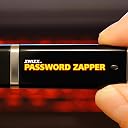


Password Reset USB Flash Drive Compatible With Windows 11, 10, 8.1, 7
Product ID: 312733002
⚡Boots from USB in seconds
💻Compatible with Windows 7 to 11
🔐Resets Windows passwords instantly
Buy anything from 5,000+ international stores. One checkout price. No surprise fees. Join 2M+ shoppers on Desertcart.
Desertcart purchases this item on your behalf and handles shipping, customs, and support to Kyrgyzstan.
🔑 Unlock your digital life effortlessly—never get locked out again!
The ZWIZX Password Zapper is a bootable USB flash drive designed to reset Windows user account passwords on PCs running Windows 7 through 11. Compatible with both UEFI and Legacy BIOS, it supports 32-bit and 64-bit systems, enabling quick password recovery without reinstalling the OS. Note: It does not work on BitLocker-encrypted drives or PCs with outdated BIOS that cannot boot from modern USB devices. Comes with free tech support and detailed instructions, making it an essential tool for IT pros and anyone prone to password lockouts.


| Brand | ZWIZX |
| Format | USB Memory Stick |
| Operating System | Windows 10, Windows 11, Windows 8, Windows 8.1 |
| UPC | 195893679201 612637804007 |
H**Y
Awesome product - scary results! Yikes!
I randomly found a Dell laptop running Windows Vista in the dumpster at my apartment complex. It was in decent shape. It was a bit dirty and missing the charger but it looked to be in working order. I figured I could always just wipe the hard drive clean and do a fresh install of Windows 11. But the hardware didn’t meet the requirements for Windows 11 when I tried. That was disappointing, to say the least. I didn’t really want to sink money into a fresh copy of Windows Vista, but figured, why not try this product? Worst case, I send it back if it doesn’t work. I tried a few things, even randomly guessing the password based on someone's password hints, but no luck. What ended up working was this device! It required almost no effort to use (and I’ve been fixing computers for decades), it was pretty straightfoward. I even was able to turn on the Administrator account (which was previously hidden). I was surprised by how quickly and efficiently this got me into the machine. I wasn’t interested in whoever’s laptop this used to be, so if I had wanted to dig around, I absolutely could have. It’s scary how well this worked... I plan to keep this handy for future laptops / passwords I might find myself needing to get around in the future. I highly recommend this product as it worked great. I only tried it on a Windows Vista machine. I haven’t tried it on anything else yet, but I’m impressed so far. It says it does Windows 10 and Windows 11, so I'll be grateful I have this around when I need it again, if I need it again.
L**N
This works!
I have an old laptop computer which I hoped to revive. It needed a new battery and a power adapter. Once up and running, I needed to reset the password. After several failed guesses at the old password, I turned to this passwod reset USB drive. I am not a computer whiz, but I followed the instruction sheet and had success. The instructions are clear and easy to follow.
M**3
It doesn't work
This outright did nothing. This is months after my purchase and attempts to use on an old Windows Vista machine which had a surprisingly good security system considering how trashy an OS it was overall. I forget if I saw in fine print later that it said would work for any windows system except vista. But at any rate if you can't get past win 8, 10 & 11 without the use of such a device in the stroke of 2 keys and a mouse click then I'm sorry about your luck. Anyhow back to the subject of this device. It's just a useless thing that does nothing it claims it will do
A**L
If you've ever tried to unlock your windows system with anything else - you'll love this little USB!
Over the years I've tried dozens of softwares and hours of frustration. In earlier cases, after hours of trying, I sometimes just gave up completely and reinstalled Windows losing everything. With this fantastic software, the time has finally come. Once I was able to have my HP 690-0072 boot from their USB, a matter of five minutes later everything was great. My password completely reset and there was NO DATA LOSS. For the novice user, if your system does not boot up the first time, hit DEL or F10 or whatever your system says to do right after you turn it on in order to go to settings menu. It usally hit DEL a bunch of times. Then you get to the bios menu and choose 'Boot Order'. You should have USB / Memory on that list.. move it up to the top. F10 to save and then reboot. This software is seemless and work for me the first time without the least bit or worry. All I have to say is that this product is well worth the money. It could save you hours of time AND all the data you might lose if you had ended up having to reload windows.
G**E
A Winner: Excellent Product AND Customer Support
We lost/forgot the password to our Dell laptop running Windows 10. After contacting Dell tech support, who could not really help, I thought for sure that we either had to take it to the Geek Squad ($$$ plus they would probably end up wiping out the data in the process) or 86 the laptop entirely. After a bit of Googling and research, I ran across the Password Zapper. I generally worry about using/installing/downloading 'unknown' programs, but after reading mostly glowing reviews of the program and the support offered, I decided to give it a whirl. And, I am so glad I did. The Password Zapper WORKS and though I did have to figure out how to boot from the USB, it was a piece of cake after that. The enclosed instructions are detailed and accurate, but I would definitely recommend reading them several times before actually proceeding and then proceeding slowly and with care. I did email Customer Support (that info is included with the Zapper) and got a very prompt reply from Matt with an offer to walk me through the process via phone call. I ended up not needing his assistance, but it was consoling to know that he was there if I needed assistance (Thanks, Matt). I know that there are some negative reviews of this product, but I sincerely think that if your password isn't working, you're running one of the listed Windows systems, and you take the time to fully understand the instructions, this program is a winner.
A**R
Works as advertised.
Good product.
A**E
Amazing, Simple, Worked on my HP Laptop
I own an HP laptop running window 10 pro. I had been using the login PIN for years and never remembered the Admin password. My laptop is slow. So I got into "Safe Mode" to diagnose the issue. Guess what , in safe mode, Windows only uses the password to login. I hadn't used my password in like 3 years . I cursed Microsoft all night for making me depend only on the windows pin then slap me with a password out of the blue Then I saw this USB product on Amazon, bought it, made adjusments in my bios settings and then booted the OS from the USB. The instructions are very straightforward and I was able to reset my password. Would reccomend this product 100%. P.S. please don't fully depend on the windows login PIN, always write down the admin password for the account somewhere. "Safe mode" will lock you out if you dont have your password. Then you will have to buy this USB product to fix it.
W**E
It does work.
I bought the ZWIZX USB Password Reset Boot Flash Drive for my Lenovo laptop Windows 11 computer because I could no longer log into the computer. The product did what it was advertised to do. It did take a bit longer than expected to accomplish. One thing I'd like to correct from other reviewers is that this program will work with Windows computers that are protected by Bitlocker. My computer is protected by Bitlocker and it worked. What you will need is your Bitlocker 48 digit recovery key from Microsoft to give you permission to boot from the ZWIZX USB Password Reset Boot Flash Drive. What I didn't like about the program was that once into it the mouse pad was no longer active ( the accompanying instructions assume you have a mouse). I took several hours of trial and error to learn what keyboard keys to use to navigate in the program to get it to work. The instructions did not address this issue and that is why I am only giving three stars. For the money this is a good program and is worth it. I will end with saying no mater what program you choose if your computer is protected by Bitlocker you will need the recovery key.
N**S
USB
The product fix the problem and I am so happy and grateful
S**S
it works for me
tested it when it arrived. u have to boot from the USB for it to work. need to bypass BIOS passwords or MS Bitlocker. after than, smooth operation.
ل**ي
استلام منتج مخلتف كليا
لقد استلمت المنتج غير مطابق للشكل المعروض ولاحتى الماركة وقمت بطلب ارجاع
Trustpilot
2 months ago
1 month ago