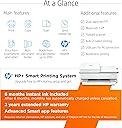
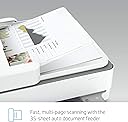
🖨️ Print smarter, live freer — your all-in-one creative command center!
The HP Envy 6455e is a versatile wireless inkjet printer designed for home use, offering print, scan, and copy functions with automatic duplex and borderless printing. It delivers up to 10 ppm in black and 7 ppm in color, with a high color resolution of 4800 x 1200 dpi. The printer supports mobile printing via the HP Smart app and includes a 3-month Instant Ink trial with HP+ smart features for seamless updates and security. Compact and energy-efficient, it’s ideal for busy households needing reliable, high-quality output.


| ASIN | B08XYRDKDV |
| Additional Printer Functions | Copy, Scan |
| B&W Pages per Minute | 10 ppm |
| Best Sellers Rank | #73,747 in Office Products ( See Top 100 in Office Products ) #100 in Inkjet Computer Printers |
| Brand | HP |
| Built-In Media | 223R1A HP ENVY 6455e All-in-One Printer; HP 67 Setup Black Cartridge; HP 67 Setup Tri-Color Cartridge; Regulatory flyer; Setup guide; Reference guide; Power cord [For ink volume and page yield information, visit http://hp.com/go/learnaboutsupplies] |
| Color | white |
| Color Pages per Minute | 7 ppm |
| Compatible Devices | Laptops, PC, Smartphones |
| Control Method | Touch |
| Controller Type | Android |
| Customer Reviews | 3.7 out of 5 stars 6,936 Reviews |
| Dual-sided printing | Yes |
| Duplex | Automatic |
| Hardware Interface | USB 2.0 |
| Ink Color | White |
| Item Dimensions D x W x H | 14.21"D x 17.03"W x 7.64"H |
| Item Height | 7.64 inches |
| Item Type Name | Inkjet Printer |
| Item Weight | 13.58 Pounds |
| Manufacturer | HP Printers |
| Maximum Copy Resolution Black and White | 300 x 300 dpi |
| Maximum Copy Resolution Color | 300 x 300 dpi |
| Maximum Copy Speed Black and White | 7 ppm |
| Maximum Print Resolution Black and White | 300 x 300 dpi |
| Maximum Sheet Capacity | 100 |
| Maximum print Resolution Color | 4800 x 1200 dpi |
| Media Size Maximum | 8.5 x 14 inch |
| Model Name | ENVY 6455e |
| Model Number | ENVY 6455e |
| Model Series | 6450 |
| Number of Trays | 1 |
| Other Special Features of the Product | Auto Document Feeder, Cloud Print Enabled, Energy Star, Network-Ready |
| Paper Size | 3 x 5 to 8.5 x 14 |
| Power Consumption | 4 Watts |
| Print media | Envelopes, Glossy photo paper, Labels, Paper (plain) |
| Printer Connectivity Type | USB, wireless |
| Printer Output Type | Color |
| Printer Type | Inkjet |
| Resolution | 300 x 300 |
| Scanner Type | Flatbed, Auto Document Feeder |
| Specific Uses For Product | Home |
| Total Usb Ports | 1 |
| UPC | 195161625039 |
| Unit Count | 1.0 Count |
| Warranty Description | HP standard 1-year limited warranty, extended to 2 years with HP+ registration |
| Warranty Type | limited warranty |
| Wattage | 4 watts |
L**Y
Must have a paying account to print
I agree with previous users. While i had no problem setting this printer up and printing. As soon as I cancelled my account when the free time period was up my printer would no longer print. I resigned up and it prints like a charm. I cancelled it again a month ago and bang same thing. I cannot print no matter what I do. Signed up again for the 0.99/ month plan and was instantly able to print again . I do not want to be held captive by this company. As soon as I can I will buy another printer. I am not going to pay even 0.99 a month just to keep a printer active and support something that is such a rip off! Update on this —- after much research you can use this printer after you cancel your instant ink or paper membership. You do need to set up an account to set up printer. What they do not make clear is that the ink cartridges included in the box are special.(they say instant ink on them). Once your free 6 months is up you need to either sign up for one of their plans to continue using these cartridges. They communicate with HP as to when to send you more ink. If you cancel the plan the communication stops immediately and the ink cartridges will not print. Its not the printer its the cartridges. If you decide to not pay for an ink membership you must take out the original ink cartridges (throw them out) and replace with regular HP ink cartridges for your specific printer. This was not originally made clear when I bought this printer, but this last time when I cancelled the plan they asked me to confirm that I understood the instant ink cartridges would not work and I would not be able to print with out replacing the cartridges etc. I am no longer on their plan and I am printing fine with this printer.
T**2
A Struggle Even for Tech-Savvy Individuals
I read many of the poor reviews, but decided to cross my fingers and plunge forward with the purchase anyway. One review particularly stood out to me prior to the purchase because it made an offhand comment that those who wrote poor reviews must just not be tech-savvy. If you want to save time, the long story short is that this printer is of extremely poor quality and doesn’t interface well with any of my devices (Windows PC for work, personal iMac/iPhone/MacBook Air), and I would highly recommend to pay more heed to the poor reviews. Additionally, the ink smears quite easily, both with fingertip touch and/or highlighting (regardless of highlighter used or how much time has passed since printing). The longer version is that I set up the printer with ease when it arrived, but after only a short amount of time, my documents stopped printing and the scanner function wouldn’t work. When attempting to scan, I receive error messages indicating the printer isn’t connected to the network. This is despite the printed information form (printed by holding the i information button) indicating that the printer is indeed connected to the network with strong signal and also despite the HP Smart app indicating that the printer is online and ready to be used. I just spent 1 hour and 39 minutes on the phone with a technician who tried all of the things (literally none of them worked, or they only worked for a short while), and ultimately tried to tell me that the problem is that the printer is connected to the network, but that I will need a USB cable to be able to install the driver on my computer. I didn’t recall receiving a USB cable with the [WIRELESS] printer, nor could I find one. I advised technician that I would need her to hold a few minutes while I tried to search for one. Within 30 seconds of this request, the call was mysteriously disconnected. While hopefully awaiting for a call back (the technician confirmed the correct call back number should we be disconnected at the beginning of the call), I confirmed on the item description that a USB cable was most certainly not provided. Upon arriving back at my computer, I noted that it was still being controlled remotely by the technician, who did not call me back after being disconnected. I messaged on the remote support app to clarify, but didn’t receive a response initially. I left this window open just in case, and I did receive a message and then a call back after about 10 min of being disconnected. The technician again explained to me that I would need a USB cable. When I informed her that the reason I couldn’t find a USB cable is because one wasn’t supplied with the printer, she said “Yes. I know. We try to promote a wireless environment.” (WHAT? A USB cable isn’t supplied, but I’m being advised that this is the only way to install the driver???) She went on to tell me that once I obtain a USB cable, I can call support back to have the driver installed. I advised that I would not be purchasing a USB cable for my wireless printer (as it turns out, I too prefer a wireless environment), and we ended the call. Bottom line: try something (ANYTHING) else!
C**E
Great Printer
Great printer. Easy to use, easy to set up and functions exactly as it should. It prints with great quality and easy to connect to devices or internet connections.
J**M
ChromeOS
Purchased this to use on a ChromeOS computer. The process was fairly simply, you need to use the HP app on your phone, I wish you could have used the computer browser instead which makes this process a bit more complicated. The setup process took about 10 minutes ( after the app was installed on the phone ). Tested printing single sided, double sided, color, b&w, scanning and all worked rather well. The screen on the printer is different and will take some getting used to. There is a b&w and a tri-color cartridge, I suppose since it uses a tri-color cartridge you will save money because you do not have to purchased three different color cartridges however it one of the three colors runs out then the entire cartridge will need to be replaced instead of replacing that one color. Also, if the cartridge expires then it will be cheaper to buy the single tri-color cartridge. Wireless printing was rather quick to get to the printer, the actually printing is rather slow however this is a low end printer and I knew the about the printing speeds. All in all if you need a basic wireless color printer ( auto duplex ), scanner and copier for ChomeOS this should be fine as along as you do not need to print a lot within a month and have patience for the printing speed, all in all for low end printing I would recommend this printer.
J**Y
DO NOT BUY
DO NOT BUY! When I first got this it was great. I didn't mind the subscription because we were print more and I hate finding ink. It was handy having it come when it was low. with out even doing anything. Now three years later I spend around an hour every time trying to fix this stupid thing so that it will print. It is always off line and I can't get it to come on line. Even when I check and it says that it is online and ready it still doesn't print. Go by a Brother or something. The Value for the money is not worth it. The quality seems strudy but the Product itself is trash HP has gone way down hill.
J**Y
A Very Good Small Home Office Printer
First off let me state some facts regarding the initial setup process of this printer. 1. It couldn't be any easier. Simply download the HP Smart app to either your smart phone/iPad or your PC/Mac and follow the step by step directions. 2. You DO NOT have to sign up to the HP Instant Ink program to setup this printer. Simply decline the offer when it is offered during the setup process. 3. You DO need to be connected to the internet to setup this printer. Okay with that out of the way, the Pros and Cons. Pros: 1. A very nice design that looks great on my office desk, I like the fact that the printer is small compared to other inkjet printers that simply take up too much space. 2. The print quality is excellent for a printer at this price point, this includes text and photos. See the test photo I included in this review. I printed the photo on glossy photo paper at the highest resolution setting and then I scanned the photo at the highest resolution scan setting (1200 x 1200). 3. The auto document feeder and the scanner/copy functions work great as well. 4. It does what a printer is supposed to do and it does it well. Cons: 1. The power button is on the rear of the printer above the power cord. They should have placed the button on the left side of the front display panel. 2. This may or may not be a con to everyone, and that is there's no LCD screen on this printer. Instead, on the lower front right side of the printer there are 5 touch sensitive buttons that do the following: A information button (This prints out a information page containing the status/info of the printer), a cancel job button, a resume job button, and 2 buttons to make a copy, one for color and one for black & white. There is also a Wi-Fi indicator light above the buttons and a digital number display to indicate the number of copies that are selected by the user. All other printer functions are accessed via the HP Smart app or via other applications (Microsoft Word, photo apps, etc.). I like the simplistic controls of this printer as I seldom used the hard to read LCD screen on my old HP printer. My only concern regarding this printer as well as another HP printer (HP Envy Inspire 7255e) that I returned that was doing the same thing, the scanner bar is constantly flashing when ever the printer is powered on. The HP customer service rep I spoke to on the phone told me that this is not normal and instructed me to return that printer. I returned the other printer (HP Envy Inspire 7255e) and purchased this printer and the scanner bar does the same thing as the other printer. So is this normal or not? At this point I'm not too sure. However both printers functioned without any errors so maybe it is normal for the scanner bar to constantly flash on the newer HP printers. I'd sure like to know for sure though.
G**Y
Not worthy of the HP brand
I moved into an apt after 20 years in a beautiful house. I've always used HP computers and printers with very satisfying results. I have a 2022 Chromebook and had a HP 2132 printer less than 4 years old. This printer all in one was nice and compact and worked great using recycled cartridges that were less than $30 for a 2 pk. After moving into the apartment my printer suddenly was not compatible with the Internet service provider? I was able to finagle it for about 2 months by unplugging it, loading new cartridges and re booting my Chromebook. I had to unplug it to attach another device in April and after that I couldn't get it to print anymore. I was forced to buy another printer even though the 2132 worked great. I reluctantly bought one that was on the HP list that conveniently showed up every time my printer failed. The 6450e which I spent 5 hours trying to connect to the Chromebook. Gone are the days of plugging everything in, going into your settings and clicking on "install new printer" in the connect a new device drop down. So I go online to 123.hp.com where I m instructed to go to my cellphone, download the SmartHp app, go back to the computer go to settings, check that my wifi, Bluetooth and Internet were all on, go back to the cell answer all the questions, going through all the steps, back and forth. I get an error code that the printer isn't connected, their system can't make a wifi connection and I should try again later. I did this 4 more times finally getting the cartridges installed, but where there is a piece of cardboard jammed in the end of the the carriage case, taped in. No mention of that in 3 hours while installing on their helpful site. I fixed it and got it to correct and got a congratulations message on nearly completing the install. It was now 2:10pm when I started at 1030am. I continued to go through the entire Smart Hp process again for another hour with no success. At 3:10 decided my time was too valuable to spend on this mindless, infuriating endeavor just to become a slave to HPs locked in for life ink cartridges scam. I read the reviews on Amazon and Office Depot sites, that all had very bad experiences trying to connect new printers. I thought with my fantastic wifi and having windows 11 and an HP Chromebook I would have a better experience, but frankly this is the worst computer related problem I have ever had. I am going to switch brands for the 1 St time in 25 years because this is an absurd waste of time. There must be other printers that are easier to set up, in fact I read that the Brother 104 was the best and easiest for a non business printer. It costs $40 more but I will gladly pay to have my life back and a printer that works.
B**.
HP Envy Color Printer
Is a great printer, scanner. Love the app that helps you fax through the Internet. Prints perfect photos.
Trustpilot
3 weeks ago
1 week ago