Buy anything from 5,000+ international stores. One checkout price. No surprise fees. Join 2M+ shoppers on Desertcart.
Desertcart purchases this item on your behalf and handles shipping, customs, and support to Kyrgyzstan.
❄️ Stay Cool, Game Hard, and Shine Bright with KLIM Mistral!
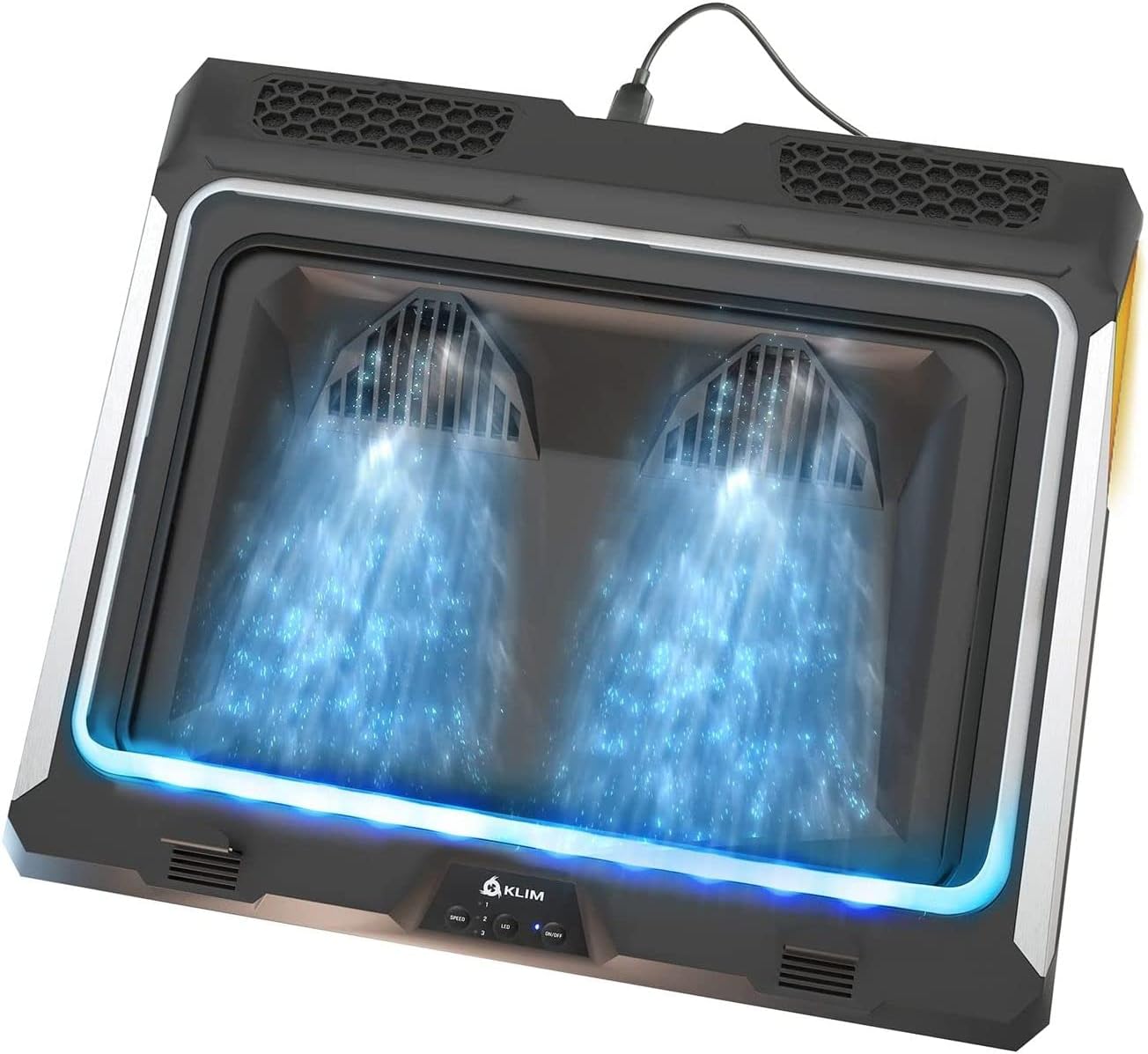
The KLIM Mistral Laptop Cooling Pad features dual turbo fans spinning at 4500 RPM, a rubber seal for enhanced airflow pressure, and dust filters to protect your device. Designed for laptops sized 15.6 to 17.3 inches, it offers three adjustable fan speeds and customizable RGB lighting. Built with durable silicone and backed by a 5-year warranty, it ensures long-lasting performance and expert support, making it a top choice for gamers and professionals seeking to prevent overheating and boost laptop longevity.


| ASIN | B08P8LCCPM |
| Best Sellers Rank | #55,700 in Electronics ( See Top 100 in Electronics ) #93 in Laptop Cooling Pads |
| Brand | KLIM |
| Color | Black |
| Cooling Method | Two turbo fans at 4500 RPM |
| Customer Reviews | 4.4 out of 5 stars 2,236 Reviews |
| Enclosure Material | Silicone |
| Item Dimensions L x W x H | 16"L x 13.92"W x 2"H |
| Item Type Name | laptop-cooling-pads |
| Item Weight | 1.2 Kilograms |
| Manufacturer | KLIM |
| Material | Silicone |
| Mfr Part Number | M01 |
| Model Number | k90 |
| Number of Fans | 2 |
| Product Dimensions | 16"L x 13.92"W x 2"H |
| Warranty Description | 5 years warranty |
R**T
Great product. Great Support.
Ordered this product along with a different one to replace my old laptop cooler. Both products had great reviews but this one beat the other by a few degrees :) Very happy with the purchase NOW but wasn't initially. Read on for full details but in short, this product was worth the price and keeps my laptop cooler than any of the 4 coolers I have now. This repeatedly beat the second best cooler (and not a cheap one either) by about 8 degrees Celsius on the CPU, 11 on GPU, and about 8 on the system overall. It is well built, well engineered, and has some important little features I like (i.e. the rear air deflectors that seem cheesy but actually make sense). The support that KLIMA provides is first rate and I'd buy from them again in a heartbeat. The full story: Ordered a NEW KLIMA Mistral from Amazon. Package gets here and it was obvious I had been sent a previously sold and returned cooler. The cooler was NOT packed into anything other than its original vendor box. There were old shipping labels cut off that box. The box itself was torn in a few areas and showed obvious signs of handling and wear. I opened the box and pulled out the contents. There were 2 cables loose inside the box, the air deflectors had the backing taken off for the sticky area, and the glue itself was all balled up and nasty. The rubber o-rings were also loose within the box. Nonetheless, I hooked everything up to see what it was like. One of the LEDs up front was not working and one of the fans, at idle and at level 1, was VERY rough sounding. At level 2 and 3 it matched the sound of the other fan though. I contacted KLIMA via their online support page and also sent them pictures. I expected to wait 2 or 3 days for a response and also expected to have to explain things multiple times. I had a response the next morning and right off the bat they apologized and offered to send me a new one. They explained that they did not control what Amazon sent out and that they truly were disappointed and apologetic. "They" was a support representative named Marja and she did a great job over the next few emails, albeit her native language was not English, communicating what was going on. 5 days after my initial contact with them I had my new cooler and I am loving it. Kudos to Klima and Marja for standing behind their product, righting a wrong, and showing that their stance on support isn't just words but actionable truth.
A**G
This thing works. Just buy it now!
Don't worry, even though it might look it, this isn't some paid review. I paid the full $60 to own this thing. It hasn't even been a day owning this and I already feel compelled to write a review. Once the warmer weather rolled in, my gaming laptop started to have major thermal throttling issues when gaming. This caused the frames to dip massively every other second which made playing games almost impossible unless I set the graphics quality lower to save resources. The laptop does fine during the cold winter months, but during the summer, it's a completely different story. I bought one of those cheaper HAVIT coolers from years back. It didn't really stop the throttling and after a while it just broke and didn't work anymore when plugged in. I decided enough was enough and I had to do something. I took a leap of faith on this product that only had one other review at the time and just bought it for the full $60. Two days later I received the box. It was left under my front porch in the heavy rain, but it was not a problem. It was decently packaged and the box for the product itself immediately gave off a premium impression and told me, that yep, this is the real deal. After unpacking everything, I saw it. To some, it might look funky, but I think it looks cool, even beautiful. Keep in mind, your laptop is going to be on top of it for most of the time anyway. Figuring out how to work this thing wasn't too hard: You put on some doo dahs to let the heat escape without getting sucked back in, place the laptop on the rubber thingy and adjust these doo hickeys to secure the laptop in place, then plug in the USB into the slot and into your computer, turn on the on button and voila, it works! With your laptop on max fan speed combined with the max fan speed on the cooler, it's a loud setup, but with headphones while gaming, it's tolerable. I immediately tested this thing out by trying to play one of the worst games I owned for thermal throttling on ultra, and I immediately noticed a difference. A big one. The game was running smoothly without any throttling or any dip in frames, AT ALL. Yes, that's right. And I played for like 4 or 5 hours straight. Oh, did I mention the beautiful RGB lighting? They're awesome, but not too ostentatious and you can change the colors to whatever you want by simply pressing the "LED" button next to the power button, or keep it on the default color changing setting. In short, this product works, and it works great, at least it did for me, and it looks to be well built and sturdy. Nothing about this product comes across as cheap or feeling like something's going to break. Of course, since it's only been a day, if things change, I will update this review. I have a good feeling that I won't need to though. To be honest, I did not expect this thing to work as well as it did. But then again, for $60, it better be good! And it is. Thanks for a great first impression and a great product Klim! If you're a doubter, stop doubting and just get this thing now. TLDR: Have gaming laptop. Major thermal throttling issues. Horrible frame dips while playing games. Bought this cooler for $60. Looks cool. Throttling and frame dips went bye-bye. Plus pretty lights. What more could you want? Just get this thing now.
S**.
More pricey, but better thermals? Worth it?
Short answer to the title question. Yes. Worth the extra money compared to the cheaper cooling pads. First, I love the placement of the intakes for the fans on the cooling pad. The intakes are on the back instead of underneath unlike most cooling pads. Maximizes air flow especially if you're like me and have it on my lap instead of a table, desk, or some other flat surface. They also have some fairly thin foam for filters, which is fine. Time will tell how well they will work and hold up. I can see where they were going with laptop, "chamber". They provide two rubber or silicone seals(different sizes for smaller and larger laptops) that a laptop would sit on top of. Closing that gap and giving the only choice for air to escape is through the laptop's intakes, then of course to exhaust. Now, if your pc is like mine when you open the lid. It will lift the back end of the laptop to provide more air flow when it is sitting on a flat surface. Due to that, I can't get a closed seal leaving a gap at the back. No fault to the design of the cooling pad. Just something you should keep in mind if you're looking at this, but does that mean you should not consider it if yours is like mine? Not at all. It still works very well. I have a 2021 Asus G15, equipped with a Ryzen 9 5900HS 8 core 16 thread cpu along with the RTX 3070. They are undervolted due to them being in a thin and light, "notebook" but still get pretty toasty. I only used Cyberpunk 2077's and Tiny Tina's Wonderland's benchmarks to test the thermals. Both games at max settings they could be set, at 1440p. Using the preset turbo mode through Asus' armoury crate software. I did multiple benchmarks on both games with the pads fans off and the fan's on max speed. With the very first test I did on Tiny Tina's Wonderland with the Klim's fan's off. The CPU reached 97C, but I couldn't get it that hot again. Might've been a issue with the laptop fans not reaching the right speeds. So the highest temp I was able to record consistently was at 87C. With the Klim's fan's set at max, the hottest it got was 77C! 10 degree difference! The average temps without the extra help it sat around 77C. With the extra help it was hovering around 68-70C. That's a pretty big important difference in temps for a thin and light. Cyberpunk 2077's benchmarks in the same order. Max temp without the help had reached 90C. With the extra air flow, max temp reached 81C. Nine degree difference, but pretty huge nonetheless. It was averaging about 77C before and 70C after. I didn't think I would find a cooling pad that would make that big of a difference. Keep in mind I'm not able to get a mostly closed seal for air to escape. So you're mileage may vary depending on what you have in terms of thermal performance. I'm impressed and happy with it. I wasn't sure I was going to like spending the extra money on it, but it's so worth it. It easily outperforms my Havit cooler that I spent around $25 on. Obviously the fans can get loud, but it's a nature of the beast type of thing and I can easily overlook it. Also, the provided cable is unnecessarily long. I wrapped up the extra slack and zip tied it to the grill on the left intake grill.
S**E
Nice and sturdy, fan a little loud
I love it, fan is a tad bit louder than expected but it works really well. The seal they gave will not work for my laptop based on where my fans are located but that does not take away from the product itself. Feels light weight and sturdy. I love the stickers they have and the RGB light is cute too.
R**E
Perfect for my gaming laptop!!
I had been looking for a cooling stand for my Acer laptop for a couple months and wasn’t finding anything that lasted long enough or did much of a good job at actually keeping a laptop cool. After reading reviews on this one I decided to spend the money & take a chance since I thought it may be worth not having to have my mini fan facing my laptop every time I decided to game. AND BOY am I glad I bought it! My laptop would get pretty hot when I game & this has helped so much to keep it cool it properly! Before if I touched the top of it - it practically would burn my fingers off! Now it gets slightly warm but hasn’t ever gotten to that burning hot temp since!! My fans are situated on the bottom of my laptop so that may be also a big reason why it helps so much but even so it has improved the heating/cooling of it immensely!! Now for sounds wise- I use to play games on my ps4 so honestly the sound of something like a jet engine was pretty normal for me but this is way quieter than I thought it’d be! For some it may not be quiet enough but considering I game with headphones on - I don’t ever hear it even if I have my volume at it’s lowest and only barely do if I take them fully off my head! (This may also be because my laptop fans are a little on the louder side aha) The different speeds of the fan also work amazing even when I’m not gaming to keep my laptop at a cooler temp so over all I’m extremely happy with my purchase! The LEDs still work perfectly and the color changing is really pretty! I have mine set with blue just cause my set up is mostly white, black, and navy blue so it fits in with my set up really well! Even if it didn’t have LEDs, I still would have bought it just to try it out after seeing so many people like it. I definitely recommend if you haven’t found a cooling stand for your laptop that works well enough and to try it out because this is worth the money and works just like it’s described!
A**R
Excellent cooler that will keep your Laptop cooler than any other
After unboxing I must say this is a well built and very nice cooler. My new Lenovo would run hot around 36 showing the battery in the red zone. With that being said, that temp was a Targus cooler with dual fans. So to start the build quality is excellent. Very sturdy and nice additional of the LEDS. Just a note if you have a bigger laptop is a 16 inch the front will cover the LEDS but you still are able to see them. It feels very firm and no to big to be able to sit on your lap without issuie.So i changed the seal which was painless and fired it up to see what it could do. After properly seating it and adding the little heat shields on the back I can say Im more than impressed. My battery now shows stable temps of 32 and well below the threshold of being in danger. It has dropped about 5-6 degrees and has no problem holding it there stable. These temps are on setting 2 and not even all the way up top the 3 setting so that should say how good of a job this cooler does. Its night and day difference between the top of the line Targus cooler absoutely no comparison if you want to keep your laptop at a cool temp. On to the noise. Setting 1 you dont hear much of anything. Setting 2 you hear a slight fan noise nothing that is unacceptable ny any means. When I have the TV on I dont hear anything on my lap. Setting 3 you can hear the fans running and is louder but not crazy by any means. With my laptop on my lap and watching a movie I could only hear a slight fan noise. So to sum it uo on certain settings can you hear the fans yes. Is it anything to loud that I wouldnt buy this cooler again absolutely not by any means. Its a very quality cooler that does the job better than any cooler I have seen or used. Its worth every penny and if your considering buying it do it you will not regret it. I defintely give it a 5/5 rating.
J**H
Good for daily tasks, not for heavy loads.
At the time of writing this review, I have had the cooling pad for over 1 year, with a purchase date of December 2023. I run a Lenovo Legion 7i laptop, with a 4080 Laptop GPU, core-i9 13900HX, and use the laptop screen and an external 4k LG TV as a dual monitor set-up. Not the best thing in the world, but definitely beefy enough to cause some heat when running games at high quality. I did make sure the vents and filters of the laptop and cooling pad were both clean and clear to optimize air flow for these tests. I'll firstly say that they do an adequate job at letting you know this thing will be noisy. And they're right to do so, because it is. Any kind of regular over-ear headphones will 100% drown it out, but know that if you use open-ear, Apple-style earbuds, external speakers, or something else without ANC, the noise level is indeed noticeable, but not off-putting, I found. For the cooling, the pad has 3 levels, and it seems to work well for everyday web browsing and movie watching, but not so much for any kind of heavy usage like gaming. The short of it is when I was doing my Uni work while streaming a movie on the side (with high-performance mode already running), I saw temps go from 76 C (approx. 169 F) with the cooling pad off, down to 71 C (approx.160 F) with it on max speed. Not the most amazing thing, but not so bad either. What was really surprising was how it did virtually nothing for gaming. You can see in my picture that, running a pretty light-weight game (Team Fight Tactics), whether the cooling pad was on level 1 or maxed out at level 3, it didn't make a difference. I didn't take screen caps of it, because you get the point, but I ran the same test with Elden Ring at High setting and I got the same results. When I originally purchased, it was listed for, I believe, $70. I can't say I'm in anyway upset with this purchase; it has served me faithfully and is still going strong (assumedly). However, my general take-away is that I'm not so sure spending $50-$70 to have a laptop run about 10 degrees F cooler is a worthwhile purchase, in the end. I am not so confident that I'll be looking at this one again down the road.
A**R
KLIM Product Specialists, A+
[My Story]: Referencing my previous Summer Seasons my laptop(s), while connected to an external Monitor, Keyboard, Mouse and other computer peripherals, would automatically shut down quickly after startup. My initial approach was to preform routine maintenance by disassembling my laptop's bottom case housing in order to vacuum areas of accumulated dust and clean the cooling fans. Moreover, with my laptop's warranty expired, I decided to implement a thermal solution that also required me to disassemble the heat sink in order to remove the OEM then reapply an aftermarket thermal compound that will continue to preform for years at a higher thermal conductivity as measured in watts per square meter (W/mK). A passive cooling pad, that was easy to store in my backpack, was utilized to lift the bottom of my laptop during my student attendance in college when accessing air conditioned rooms. However, at home, I do not have Air Conditioning (A/C) installed so I rely on an active cooling pad for my laptop(s) and Full-Size Whole Room Fan for ambient air circulation. With my previous KLIM K19 replaced by the Mistral K90 I kept my 15" laptop's bottom exposed, to do at your own risk, then carefully positioned it over the silicone seals while implementing blue painters tape to secure internal components that were originally held in place when the bottom case housing was installed (See Photo) For me to know when to increase the Fan Speed, I browsed the internet, then downloaded & installed a 3rd-party software application to constantly measure the current thermal status. An audible alert, through my externally connected speakers, would occur when my monitored laptop's CPU and/or GPU temperatures exceed the default setting of 90-degree Celsius. Rated at 4-stars: [2021 Version] 1) The Noise Level did NOT significantly distract my attention at ALL Fan Speeds but may emit a "grinding" noise during very hot and/or humid (raining) weather conditions (see NOTE). 2) The KLIM Mistral K90 was twice the amount of my K19 but was TWICE AS EFFECTIVE at COOLING. Rated at 5-stars: [2021 Version] 3) Definitely recommend implementing a cooling strategy when Gaming (running Resource Intensive Applications while connected to an external monitor at 2k to 4k UHD resolutions) supplemented with a KLIM Mistral K90 Cooling Pad. [NOTE]: Do NOT disassemble but contact the KLIM Product Support Specialists (Customer Service) for further product related assistance.
A**I
Best thing ever happenned to my laptop.
Great quality product! I have a mid-range gaming laptop. It heated up to very high temperatures quickly caused really low fps in any game basically. With this it is 100% smooth and with even the most demanding games it stay warm, and warm only. I could have fried some eggs on the surface before. The sound of the device is a little bit loud, but i cannot say any other downside to it. Must have for gaming laptops!
H**N
Un must have si juegas en laptop gamer
Si tienen una laptop gamer, necesitan sí o sí esta base enfriadora. Muy buena inversión. Algo ruidosa, pero que se puede esperar de tanta potencia que brindan las turbinas. Nada que unos audífonos no cubran sin problema. Muy buena calidad de los materiales, y se siente que me durará mucho tiempo. En el video muestro la base con el nivel máximo de enfriamiento para que se den una idea cuánto ruido hace.
P**T
Great for a budget laptop cooler.
I’ve had this for over 6 months and it doesn’t disappoint. I own a HP Omen 16, which asides from being a beast at gaming, can get to CPU temperatures of over 80 degrees. This Cooling Pad has decreased my temperatures from 80C to around 68C which is extremely impressive. I typically play Valorant and average around 500FPS, so not only has this decreased my CPU temperatures, but it has also increased my FPS by around 60. It’s compatible for a wide range of laptops and is made of hard plastic, making it reasonably durable. The fans can get loud after level 2 however the cooling it provides makes it worth it. Overall, if your looking for a laptop cooler on a budget, this is a great value for money and is essentially everything one could need.
R**I
super rekomeduje
solidna
C**.
Très bon ventilateur
N’avais pas beaucoup d’attente sur ce produit ayant eu beaucoup de ces ventilateurs. Celui-ci en particulier fonctionne réellement je l’utilise tout le temps lors de mes montages vidéo et les jeux vidéos. L’ordinateur est largement moins sollicité sur les ventilateurs internes. Je gagne 4 degrés en moyenne sous n’importe quelle utilisation. Le seul souci qu’on pourrait lui reprocher c’est le bruit qui est pas à négligé mais pour ce que ça souffle ça se comprend il envoie énormément d’air à la louche 5x plus que n’importe quel autre ventilateur ! Niveau prix c’est vraiment cher les matériaux sont vraiment pas à rougir, c’est que du plastique on s’attend à mieux pour le prix ! Update après 1 an d’utilisation et un test OCCT sur le CPU : Avec le ventilateur : Température entre 78-81°C et 85° en peak (atteint une fois) 3100 RPM en peak ventilateur interne (très léger) 3800Mhz Sans ventilateur : Température entre 80-83°C 4700RPM ventilateur interne 3500Mhz On remarquera que le CPU chauffe plus à raison de 2 degrés et perd en performance suite à un bridage à cause de la température. Conclusion du produit : + Performance - Température + Bruit (défaut) Attention également le câble USB A fourni avec est fragile le mien a un problème de faux contact sinon RAS.
Trustpilot
1 month ago
2 weeks ago