We remain fully operational. Our teams are working around the clock to ensure your deliveries continue safely.

DOWNLOAD THE APP


Customer Services
Copyright © 2025 Desertcart Holdings Limited
DOWNLOAD THE APP

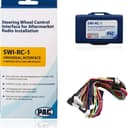
🎯 Upgrade your drive with flawless control—because your car deserves smart tech.
The PAC SWI-RC1 is a compact, universal steering wheel control interface designed to retain factory steering wheel functions when upgrading aftermarket radios. Compatible with over 3000 vehicle models and major radio brands, it supports multiple bus systems including CAN-Bus and analog, offers customizable button programming, and provides a 2 amp, 12V accessory output. Its quick DIP switch setup ensures a smooth, professional installation, making it the go-to solution for millennial professionals seeking seamless tech integration and enhanced driving convenience.


| ASIN | B004HKBY8G |
| Batteries | 1 12V batteries required. |
| Best Sellers Rank | #15,930 in Automotive ( See Top 100 in Automotive ) #14 in Automotive Replacement Radio Electrical Accessories |
| Brand | PAC |
| Customer Reviews | 4.0 4.0 out of 5 stars (3,657) |
| Date First Available | December 30, 2010 |
| Exterior | Smooth |
| Is Discontinued By Manufacturer | No |
| Item Weight | 3.52 ounces |
| Item model number | SWI-RC-1 |
| Manufacturer | pac |
| Manufacturer Part Number | SWI-RC-1 |
| Model | SWI-RC |
| Product Dimensions | 1 x 3 x 1 inches |
| Special Features | Wireless |
| Voltage | 12 Volts |
M**A
amazing adapter for a great price!
simple to install and allowed me to install alpine double din in my 17 Nissan frontier without a problem controls worked flawlessly and I was able to do the program manually. Its not too bulky and fits behind pretty much any radio. would recommend to anyone looking for affordable module that can adapt to multiple vehicles without spending a fortune.
Q**Z
pulling the factory radio is pretty easy, you just use the trim removal tool ...
I fitted into my 2013 Dodge GrandCaravan and also added a rear view camera! Everything works exceptionally well including the factory steering wheel control I am now Wazing and enjoying my music in my car!! here are my parts used (sorry, being a new user means I can't post any links) 0: Atoto A6 2GB/32GB Unit -- 1. Steering wheel control -- 2. Rear View Camera -- 3. Dodge Installation Trim Kit including Antenna adapter 4. Soldering iron and solder 5. PAC Radio Replacement Interface -- 6. Trim Panel removal tool -- 7. Dremel tool set (You need some cutting) -- 8. Wire stripper -- 9. Multi meter -- 10. Electrical tape -- 11. 3.5MM jack to three pin connector, (look for it in Radio Shack) Now, get to installation, 1. pulling the factory radio is pretty easy, you just use the trim removal tool to get the radio panel off and then unscrew the four screws holding the radio in place. Once remove the screws, gently pull the radio out and disconnect the factory harness and radio connector, the radio connector is pretty fragile, be careful not to break it... 2. Connect the harnesses, open the PAC harness package, you need to determine which harness to use, for my car, it was the one with slightly bigger connector, try it on the factor harness first. Then lay down the color/wire mapping on your desk and start connecting the wires, PAC did not actually strip the wires so you need to do it, after strip the wires, gently twist so they connect better, then chris cross on with the ATOTO wires and solder the wires on, I like to put my soldering gun under the wire to heat them up and let them soak the solder rather than melt the solder using the iron, better conenction.. After solder, use tape to mask up the bare wires, you will connect all wires except three, the thin Ground wire, KEY 1, and KEY, go ahead and cover up KEY 1, you dont need that . Like picture 1 3. Wrap the harness, go ahead and wrap the harness so the wires dont go crazy 4. Install Steering wheel control (optional), open the PAC SWI unit package, and turn the dial to 7 before you do anything else, TURN THE DIAL TO 7 first. Then connect the 7pin connector (white) comes out from your PAC interface to your SWI unit, go to your vehicle, connect to factory harness and follow instructions from PAC (every car is different, you need to follow the factory instructions) and program it, then use the multiulmeter to find the pins output the resistive differences (this is a bit tricky, my suggestion is to solder wires to each pins on the 3.5mm connector (see pic 2) and then use your multi meter find which two wires output resistive values when you press a button) after you find the two wires, connect them to thin black ground wire and KEY wire (NOT KEY1), and then fire up the ATOTO unit and go to DEFAULT SETTINGS -- STEERING WHEEL CONTROL and see if it registers the presses, if not, swap the wires (because there is no clear way to tell which one is ground...) after you confirm its working, solder the KEY and ground wire 5. Placing the antennas, place them anywhere you like, even including inside the radio hole, but I went ahead and place the antennas across the trim and near the wind shield on the driver side so they get better reception. 6. Actually installation, because ATOTO is slightly higher than stock unit you need to do a bit cutting, first cut the TRIM Kit side panel about 2mm from both sides, then use Dremel to trim down the top and bottom notch of the stock Trim piece or until it fits 7. Back up camera is also fairly easy, hook it up with the reverse light and tuck the cable under the trim and you are good to go Hope it is helpful, please leave me a message if you need any help!
A**E
Full/midsized gm trucks, Atoto unit. *long post* useful info
I brought 3 of these. The first one i received did not work and had the smell of being burnt coming out of the box. Instructions are completely vague and totally useless for any full sized General Motors truck from 99-2002. This section is for all the gmt400 folks who do the UK3 steering wheel control upgrades using buttons from Bravada,Blazer, Jimmy, S-10, Yukon Denali and Escalade. Or If you own a 99-2002 Bravada, Blazer, Jimmy, S10, Yukon Denali, Escalade with Factory UK3 steering wheel controls This unit can work but not with the given instructions from the website. If you want this unit to work properly when you go on the website and set the vehicle for a 1994-1996 Oldsmobile nintey eight or Eighty eight. Both of these vehicles had factory steering wheel controls. The Dipswitch setting for the 8 switch location is absolutely WRONG. The unit will not recognize the button inputs. What I did was set my Dipswitches as if it was in a 1996 Oldsmobile Nintey eight and finally I saw results. The Dipswitch setting they recommend for all the full and midsized trucks is 1 down, 2 up, 3 up, 4 down, 5 up, 6 down ,7 up, 8 up. You will not get results with this. Or at least I did not. I used the Oldsmobile set up which was 1 up, 2 3 4 down, 5 up, 6 down, 7 8 up. This section is for all with an Atoto A6, a6 pro and probably just about any Atoto Android radio. The Dip switch section here is also wrong on the website. This is a 4 switch section that is to pair with whatever radio you are using. For atoto the Dipswitch setting on the website reads out 1 up 2, down, 3 down, 4 up. THIS IS WRONG!. In fact so wrong that the unit does not even recognize input from and of your buttons. The red led light will not turn green confirming that it recognized any inputs from your steering wheel controls. I got mine to work using the Dipswitch settings of 1 2 3 down, 4 up. As stated by PAC This setting is most commonly used by pioneer units. On the Wiring harnesses there are no instructions out of the box that will tell you what wire does what. The website does give you most of what's important such as ground, 12v accessory and 12 v analog (positive wire from your steering wheel control) but that harness has like 12 or 13 other wires so your kind of left with confusion for a bit. Hooking this up to an Atoto unit The other wire harness has a 4 wire harness with a blue/yellow wire, Brown wire, a ground, and a 3.5 mm jack. That 3.5 mm jack is useless, even though I've seen a video on YouTube pairing this unit with an Atoto a6 and the guy states that the 3.5 mm jack is all you need 🤦🏾♂️. I've left several questions on said video about how it was hooked up but no answers of course. You will take the blue/yellow wire, brown wire, and connect them. Now from the atoto radio you will have a brown steering key #(+) and orange with black stripe Steering wheel key (+) connect those together. Now you will take all four of those wires and connect them together and it should work. Again the website tells you none of this and I had to spend hours finding out for myself. I have noticed it works but is very laggy. The unit recognizes the input and will turn green as the buttons are pressed but it doesn't do that great of a job communicating with the radio. This is the first interface I have ever used so I cannot compare it to others, but I will say if you have the extra money get a few universal interfaces and see what works best for you. Or at least use one that has clear correct instructions. I'm not displeased with the interface nor am I completely satisfied. But I am displeased at the blatant wrong information being put out on their website. I was told "Pac" was top teir when it came to this kind of stuff but obviously they missed their mark on this one. Sorry for the long review but if I can help someone out then all this time spent was worth it.
H**I
PAC JAPANの商品ではありませんでした。商品はPAC JAPANとあるのですが。性能は問題ないですが、日本語取説がPAC USAの製品であるためありません。PAC JAPANの保証も受けれません。その違いがあるので、注意が必要です。
A**R
I used it to have steering control in a customised car that is using a mitsubishi eclipse steerng wheel with a JVC headunit it worked as advertised with the correct dip swtiches setting but if you want to do a custon setup, like I wanted first due to the fact that the eclipse wheel only had 6 buttons and I wanted them personalied, programming the unit is not an easy task in the end I left it as is
N**4
Works perfectly and very flexible.
C**O
En verdad funciona estupendamente bien, sin necesidad de andar detectando ni reconfigurando nada. Tenía instalado el Metra Axxess ASWC-1 en una Jeep Patriot, pero nunca funcionó bien. A veces estaba funcionando, apagaba el vehículo para recoger algo rápidamente, y al volverme a subir ya no funcionaba absolutamente ninguno de los controles del volante. Incluso cambié el dispositivo pensando que tenía un modelo defectuoso, y el siguiente siguió haciendo lo mismo a pesar de que todas las conexiones se hicieron por medio de conectores por soldadura caliente y era casi imposible haber tenido un falso contacto. Este PAC es exactamente lo contrario: lo conectas, y sin configurar absolutamente nada funcionan TODOS los botones del volante (contestar llamadas, activar Siri, cambiar canción, cambiar volumen, etc.), y no se "desconecta" jamás. Es muy importante ir a su página de configuración e ingresar los datos exactos del vehículo y marca del estéreo para que se indique cómo deben de ir las palancas del DipSwitch. Adicionalmente, se indica exactamente a qué cables debe conectarse del vehículo. En el caso de esta Jeep simplemente fueron los de energía y el cable rosa a un solo punto del vehículo. Voilà ! Funciona perfectamente. Quizá el único punto que puedo mencionar como "malo" (pero no es malo en absoluto) es que sus cables están muy largos y que tiene dos grupos de cables que se conectan a ambos lados del dispositivo (hubieran cabido en sólo uno). Esto no tiene nada de malo per se, pero si alguien tiene un tablero pequeño, un estéreo estorboso, y muy, muy poquito espacio para instalación, posiblemente se le complique un poquito encontrarle lugar. (por los cables largos es fácil ponerlo en otro lugar del tablero donde sí quepa, y siempre hay posibilidad de recortarlos, pero lo menciono simplemente como un aspecto a tomarse en cuenta). No es el caso de la Jeep donde sobra espacio y cupo perfectamente. En este caso particular está conectado a un estéreo Alpine iLX-107.
F**K
A very nice product with easy to follow instructions
Trustpilot
4 days ago
2 months ago