Desertcart purchases this item on your behalf and handles shipping, customs, and support to Kyrgyzstan.
⌨️ Elevate your typing game—comfort meets productivity in one sleek package!
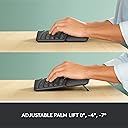
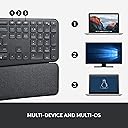
The Logitech ERGO K860 is a premium wireless ergonomic keyboard featuring a split curved layout and pillowed wrist rest designed to reduce muscle strain. It supports seamless switching between three devices via Bluetooth or USB, offers adjustable tilt legs for personalized comfort, and uses quiet scissor-switch keys with durable, clear legends. Ideal for professionals seeking enhanced typing comfort and productivity.


| ASIN | B07W6JLQCY |
| Antenna Location | Büro, Gaming |
| Best Sellers Rank | 2,618 in Computers & Accessories ( See Top 100 in Computers & Accessories ) 37 in Keyboards (Computers & Accessories) |
| Box Contents | USB Cable |
| Brand | Logitech |
| Brand Name | Logitech |
| Button Quantity | 87 |
| Colour | Grey |
| Compatible Devices | PC |
| Compatible Operating System Family | Windows |
| Compatible Tablet Computer Models | AAUB P30 |
| Compatible devices | PC |
| Connectivity Technology | Bluetooth, USB |
| Connectivity technology | Bluetooth, USB |
| Country of Origin | China |
| Customer Reviews | 4.4 out of 5 stars 721 Reviews |
| Enclosure Material | Plastic |
| Hand Orientation | Ambidextrous |
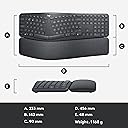
| Item Dimensions L x W x H | 45.6L x 23.3W x 4.8H centimetres |
| Item Highlight | Wrist Rest, Natural Typing, Stain-Resistant, Bluetooth, USB, Windows/Mac, QWERTY English Layout |
| Item Weight | 1160 Grams |
| Keyboard Backlighting Color Support | Single Color |
| Keyboard Description | Standalone |
| Keyboard Layout | AZERTY |
| Keyboard description | Standalone |
| Manufacturer | Logitech |
| Manufacturer Part Number | 920-010107 |
| Minimum Required Operating System Version | Mac OS 14 Sonoma, Windows 11 |
| Model Name | 920-010107 |
| Model Number | 920-010107 |
| Number of Batteries | 2 |
| Number of Items | 1 |
| Number of Keys | 104 |
| Number of Packs | 1 |
| Number of Sections | 1 |
| Power Source | Battery Powered |
| Product Features | Ergonomic, Split Keyset Design |
| Product Warranty | 2 year manufacturer |
| Recommended uses for product | Büro, Gaming |
| Series Number | 920010107 |
| Special feature | Ergonomic, Split Keyset Design |
| Style Name | ERGO K860 |
| Switch Type | Scissor mechanism |
| Theme | Ergonomics |
| Unit Count | 1.00 count |
| Water Resistance Level | Not Water Resistant |
B**S
Best keyboard I've ever had
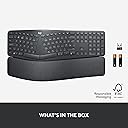
TLDR: Superb keyboard, 6*. Get the BT receiver out of the packaging! In the last year, I've bought five keyboards. In my 48 years of playing with computers, I must have had dozens of different keyboards. This Logitech K860 is easily the best. Beautifully comfortable to use, the palm rest is really comfortable to use. In the pictures, it looks as if the palm rest can be separated from the keys - in fact, they are all one unit, joined underneath. The ergonomic layout really is natural to use - my son, who hasn't used an ergonomic keyboard before, just sat down and typed on it (winning an online typing-speed competition!). Importantly, Logitech has kept the standard layout of the Insert/Home/PageUp/Delete/End/PageDown keys, and the inverted-T shape of the arrow keys. If you're used to using these keys as a touch-typist - which many programmers will be - then you'll still find the keys in the right location. On many split-keyboard ergonomic layouts, the widened layout of the main keyboard means that the middle-set keys are rearranged. The Logitech designers have done a great job here; the numeric keypad is the same size as on normal keyboards, yet the overall keyboard size is the same as normal keyboards (it's 18" wide, and 91/4" deep, including the wrist-rest). Again unusally for ergonomic keyboards, the keyboard angle can be raised at the front so that it slopes away from you. This is the most natural position for your hands, yet so many keyboards only have raiser-feet at the back. There are in fact two levels of raising you can use - there are two diffent length feet you can choose to extend. The markings on the keys are very clear, seemingly cast into the actual key, and show the Windows and Mac differences. I recently bought a Logitech K850 keyboard (a 3-computer Bluetooth switcher) but the markings on this look like transfers that have been pasted on, and therefore might rub-off in the long-term). The keys have a good feel and distance of travel and are quiet to use. Don't just throw the packaging box away! The keyboard is Bluetooth, and is easy to link to three computers (I have two Windows and one dirty Mac), with three dedicated keys (with a nice LED indicator) to switch machines. But inside the box, stuck separately and easily missed, is a Bluetooth receiver that you can use too. I don't need to use it; there is a neat slot inside the battery compartment where you can store it. Logitech provide a download - "Logitech Options" - that allows you to configure the keyboard, and gives a guided tour. It's worth downloading this, and clicking around to explore. You can program the actions of the back-row keys - for example, set up keys for Cut/Copy/Paste, and you can make these key definitions specific to individual apps. Areas for improvement? There is an LED on the Caps Lock key to show when it's on; however, there isn't one on NumLock, which is a shame. Also, you can't download a PDF manual - you have to click around in the Options program, or hunt around on the web. These are produced to a good standard, but for all technology I still prefer to have PDF that you can scan, bookmark and annotate. In summary: it's expensive - but really outstanding. Worth every penny.
D**P
What a keyboard!!!
I never thought a keyboard could make such a difference in my daily life until I got my hands on the Logitech ERGO K860. As someone who spends countless hours typing, this ergonomic marvel has been a real game-changer for me. The first thing that struck me was its sleek, modern look. But don't let its good looks fool you – this keyboard means business when it comes to comfort. The split layout felt a bit weird at first, but after a day or two, I found myself typing more naturally than ever before. Let's talk about that wrist rest for a second. It's not just an afterthought – it's an integral part of the design that provides just the right amount of support. And get this: it's covered in a stain-resistant fabric. As someone who's guilty of the occasional coffee spill, this feature is a lifesaver. Now, onto the typing experience. Oh boy, it's smooth! The keys have this satisfying click to them that makes typing feel almost... fun? I know, I never thought I'd say that about a keyboard either. The curved design and adjustable tilt options let me find that perfect position where I can type for hours without feeling like I've run a marathon with my fingers. Connectivity is a breeze too. I've got it hooked up to my work laptop via USB and my personal tablet via Bluetooth. Switching between devices is so easy, I sometimes forget I'm using the same keyboard for both. And don't get me started on the battery life – I've had this thing for months and haven't had to charge it once! Is it perfect? Well, there was a bit of a learning curve at first. My typing speed took a hit for a few days while I got used to the split layout. But once I adapted, my speed was back up and my comfort levels were through the roof. Bottom line: if you're serious about your typing comfort and want a keyboard that looks as good as it feels, the Logitech ERGO K860 is worth every penny. It's not just a keyboard; it's an investment in your daily comfort and productivity. Trust me, your wrists will thank you!
T**H
Worked for 3yrs
Stopped working after 3.5 yrs. I loved it while I had it. I just don’t want to pay this much for something that breaks. It was the odd letter. I tried to take it apart to fix it. 20 screws later and picking off plastic to try and get to the circuitry I just gave up. 5 stars for 3 yrs but honestly think it should have lasted longer.
L**Y
Excellent Keyboard
I bought this, probably like many others, after suffering an onset of keyboard+mouse related RSI. As a tech worker I'm no stranger to RSI, in fact I use several techniques to avoid it, such as using an ambidextrous mouse and regularly switching hands. I was using a good quality mechanical keyboard (Ducky One Two) before I switched to this, so wasn't sure how good it would be in comparison. First impressions were good - the whole unit is nicely curved and solid, but not overly heavy. The fabric-like material on the wrist rest is comfortable and stays cool during long periods of use. It did take a small while for me to get used to the flatter keys after using the Ducky, but now that I am, I can type quickly and accurately on it. The wrist rest holds your wrists quite high, which can feel odd at first, but it quickly becomes comfortable. The angle it holds your wrists at is far better than standard straight keyboards. I'm writing this review on a laptop and can already feel my wrists missing the better position of the logitech. It stops the slight 'bending inwards' that your wrists do without realising, and lets your wrists, arms, and elbows relax more. It pairs quickly to the logtech receivers with an encrypted connection, and I can easily share it between 2 computers by tapping the '1' or '2' device keys to switch between them. The lack of wires means I can just lift it to my other desk and carry on typing. Overall, I'd highly recommend this even (especially!) if you aren't suffering from RSI right now. In my experience, RSI creeps up over weeks/months, and then takes weeks/months to go away. So taking steps to stop it early by investing in a keyboard like this can only be a good thing.
S**6
Excellent keyboard
My old Microsoft ergonomic keyboard broke after years of use and needed replacing. I looked at so many options but settled on this as I liked the overall look of the design, the button layout.and angles were similar to my old one so I thought it worth a try. I use it without the legs extended (though for those who need them it raises the side closest to you so a good option if you need your wrists really straight) and find it really comfortable to type on. It has soft keys too so I can type quickly with less pressure required and there are no infuriating clicking noises! I love that it's wireless, and it is quite lightweight despite being well made. It's far from the cheapest option out there but for me it has been money well spent.
D**A
Nice hardware, bad design decisions, terrible software
Physically it's nice, but it's hamstrung by terrible design decisions and lazy software development. I'm going to return it. The keyboard layout is mostly normal, except the Mac layout has no right ctrl key, opting to place the fn key where alt should be, and moving alt to the lower-right corner where ctrl should be. I've tried but can't retrain decades of muscle memory. If you either don't use that key, or can manage to learn a new keyboard layout, this is quite nice. The Logitech Options software is absolutely terrible. You literally can't pair your device unless you install Google Chrome or Microsoft Edge. What about Safari, the OS browser? Or Firefox?! Whoever's in charge of this software needs replacing.
A**I
Excellent Keyboard. Bluetooth ensures no typing lag.
Really good UK keybaord. I tried 3 other keyboards as I used to use the Microsoft Ergonomic one which they have discontinued. This is a really good professional keyboard. Bluetooth is much more stable than wifi - no typing lag etc. The only annoying thing is that I keep hitting the print screen function instead of backspace. Highly recommened keyboard.
E**C
Quality, quiet, and it works
I had a microsoft massive ergo keyboard for a while, and it was so loud people would complain at me. It took up far too much desk real estate, and I hated it, even though I had to use it to stop my wrists hurting. This Logitech Ergo K860 is only 1cm wider than a standard keyboard, and the rise across the middle is far less acute than the Microsoft one, however it is extremely comfortable to use, the keys fall under my fingers exactly where I expect them to be, and it's an absolute pleasure to type on, being quiet but responsive. The on/off switch is not immediately obvious, being underneath at the top edge of the keyboard, but once you know it's there you can find it easily enough. The wrist rest is attached permanently, and is pleasantly cushioned. Most importantly, my wrists are supported and the pain has completely disappeared within minutes of starting to use it.
S**C
Great - economical
I like everything about the keyboard-the only challenge is that with the numeric part it’s quite wide which makes the mouse management a bit less comfortable.
B**N
Daily typer
This keyboard it great. I use it constantly. I bought it when I was trying to find a replacement for my Microsoft Comfy Curve keyboard. I'm happy to recommend this if you're looking for a great ergonomic keyboard.
T**R
Always the greatest keyboard
It's my second Ergo Can't type it when your drunk as always but perfect when your sober
J**L
när kommer returpengarna
undrar när pengarna sätts in på mitt konto? Returnerade detta den 27 januari Nu är det den 5 februari och pengarna har inte kommit in på mitt konto
A**N
This is UK layout ERGOK860
The ERGOK860 is a fantastic keyboard. However, if you are purchasing this particular product, you need to keep in mind that this product has a UK keyboard layout. The difference between US and UK keyboard layouts is important especially for those purchaisng this product from outside the UK. What is the annoying factor? The UK layout has enter key that is too small and it is highly annoying. There are other differences which you may or may not like. Please Google to know the difference US and UK keyboard layouts.
Trustpilot
2 weeks ago
2 weeks ago