Buy anything from 5,000+ international stores. One checkout price. No surprise fees. Join 2M+ shoppers on Desertcart.
Desertcart purchases this item on your behalf and handles shipping, customs, and support to Kyrgyzstan.
🚀 Elevate your data game with speed, space, and seamless networking!
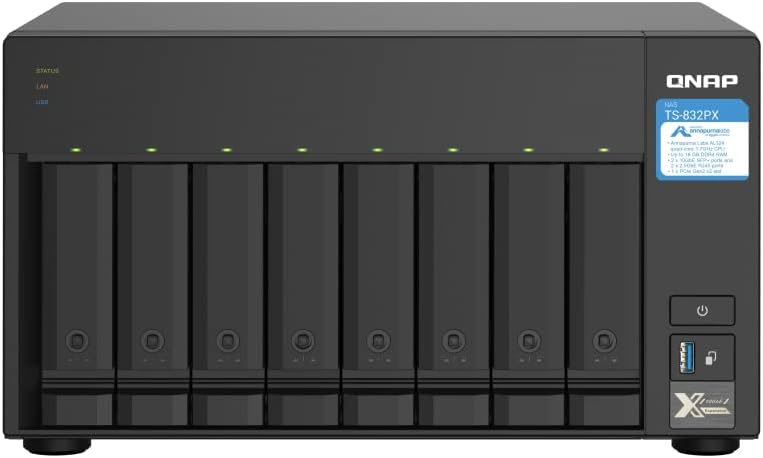
The QNAP TS-832PX-4G is a high-capacity 8-bay NAS featuring a quad-core 1.7GHz ARM Cortex-A57 processor, 4GB DDR4 RAM (expandable to 16GB), and versatile storage options with SATA 6Gb/s drives. Equipped with dual 10GbE SFP+ and 2.5GbE LAN ports, it supports next-generation network speeds ideal for bandwidth-intensive applications. Additional features include SSD caching support and Qtier auto-tiering for optimized performance, all housed in a durable metal chassis with a 2-year warranty.


| ASIN | B08P42JR89 |
| Best Sellers Rank | #53 in Network Attached Storage (NAS) Devices |
| Brand | QNAP |
| Built-In Media | Drive tray keys x 2, Ethernet cable x 1, Flat head screw (for 2. |
| Compatible Devices | Server, Desktop |
| Customer Reviews | 4.3 out of 5 stars 287 Reviews |
| Enclosure Material | Metal |
| Is Assembly Required | No |
| Item Dimensions D x W x H | 7.4"D x 12.95"W x 11.06"H |
| Item Weight | 6380 Grams |
| Manufacturer | QNAP |
| Material | Metal |
| Mfr Part Number | TS-832PX-4G-US |
| Model Number | TS-832PX-4G-US |
| Mounting Type | Tabletop |
| Product Dimensions | 7.4"D x 12.95"W x 11.06"H |
| Size | 8-bay (Unav.) |
| UPC | 885022020201 |
| Warranty Description | 2 Years Warranty |
R**G
It works!
For those who want the quick bottom line...it simply works and I've had now issues after 4 months at the time of this writing. Some observations and reservations might be useful to others, however. So, here goes... Some things to consider straight up: * Get the additional ram and max it out. With the 4gb that comes with the unit, the interface is sluggish. It does work and you can do things with the NAS, but not the best experience. For the extra $35 (ish), well worth the upgrade. You need to access the RAM by removing the left (from the front) couple of drives. I have medium size hands finding it a little odd but serviceable. Someone with bigger hands might find it tougher. * Plan on getting (or repurposing) some SSD drives for cache. Only when you use cache does this NAS really reach full potential. I was planning to use SSD drives for cache from the start, so never really tried any testing without the cache. With 4 older enterprise SSD drives I was able to get read speeds that completely saturated my10gbe line (1.1GBs). Write speeds were somewhat slower topping out around 750MBs, with a more general speed around 640MBs. For my network situation and planed usage, more than good enough. * IMHO, this is really a RAID 5 device, so if you want RAID 6 or RAID 10, think you have better options. Yes, if you have several 2 1/2 inch drives around, I am sure you can make things work. However, because 5 drive bays are 3 1/2, the other 4 are 2 1/2 inch, getting drives with the same specs for the 2 1/2 inch bays I see as being problematic. And, for maximum space (and at least some protection), RAID 5 seems the best option for this device. Other observations: I only heard of the processor (AnnapurnaLabs Alpine AL324 ARM Cortex-A57) in passing, so was skeptical, but the full speed read (from cache) only resulted in CPU usage in the mid teens, and writes pushed the processor up to an average 50-55%, with a peek around 75% for a few short bursts. These numbers suggest you could use other capabilities of the NAS without issue. Even with the additional memory, the interface is still a bit sluggish (though much better) and I personally feel the Synology interface is better organized for my taste. Still, the interface is well done and I've had no problem finding my way around, though it took a bit more time. For me, because I had some SSD drives hanging around also having the hard drives this was really a no-brainer based on the cost of the next best option, that options being almost double to get the additional memory, 10Gbe card, and NVME drives. If you are planning to do more things with the NAS (perhaps needing a more robust processor, more memory), want a different RAID setup (raid 6/10), or simply need the space of 8 or more bays, this is not a good choice. Also, if you are starting from scratch needing to get the drives, the drives can easily cost (depending on capacity) as much or more than the NAS itself so for a few hundred dollars (a small percentage of the total cost), I would suggest going for the 8 bay units. However, for home backup being fast enough (at least on a read basis) to saturate an 10gbe line, and as long as you know the limitations up front, I think this is a great deal. I had a few unknowns (like the processor, and if you could really get the line speed) going in. But, based on my experience to day, this really hit the spot and so far have had no issues. AFTER ONE YEAR.... Still think this is a great buy, but I did think of a couple of a couple of up and down sides that may be of interest. On the down side: * This unit only has USB 3.0/1 (5Gbe) ports that limit the speed for any type of extension. So not the best choice if you plan to add drives to this unit with a storage extender. That was not my plan so was not an issue for me. * Not a good choice for use with any extension cards. This model does not have that capacity...period. If you are looking to do something like add a faster network card in the future, no option here. * You need to use older SSD storage for cache so can not use more recent (and faster 4-5x) NVME drives making migration harder moving forward. In my case had this stuff lying around so really just using what I already had. However, for others I can see hesitation at needing to buy the "older" technology at nearly the same price as newer NVME drives. On the (possible) plus side: It occurred to me implementing RAID 6 might be possible if you go all flash (SSD) drives. This is something I would like to try if SSD drives for 4TB would come down to approximately $100/drive. If this works (and you don't mind the older technology), think it would be a great option. Conclusion: Think my conclusion is still the same: for small business not needing drive extension, family backup, playing movies, for photo or video collections, and for video surveillance this is a great device. For expansion, not so much. Basically, even being a tech guy, I was looking for the equivalent of a toaster to just plug in and do the basic functions I was looking for lasting 7 even 10+ years knowing until the next incarnation comes along it will continue to just make toast.
B**R
A Powerful and Versatile NAS for Personal Cloud and Beyond
Cutting-Edge Performance, Thanks QNAP! My experience with the QNAP TS-932PX has been fantastic, earning it a resounding 5-star review. With its 9-bay capacity, it offers a secure and reliable alternative to personal cloud storage, putting users in complete control of their data privacy. Its powerful applications further elevate it beyond just a storage solution. Beyond Personal Cloud: This NAS goes beyond basic storage with a vast range of applications: Centralized music library: Access your music anywhere on your mobile phone. Personal movie theater: Stream your movie archive directly to your TV or mobile device. Seamless data backup: Protect critical data with automatic backups for peace of mind. Tech-Savvy or Beginner? No Problem: Even if you're new to NAS systems, the TS-932PX-4G is surprisingly user-friendly. Security Considerations: While I'm impressed with the QNAP TS-932PX-4G's capabilities, it's important to acknowledge past security vulnerabilities faced by some QNAP models. However, it's commendable that QNAP regularly releases security updates. Additionally, proper user configuration plays a crucial role in bolstering NAS security. Here are some security tips to keep in mind: Keep software updated: Regularly update both the NAS firmware and applications to benefit from the latest security patches. Use strong passwords: Choose complex and unique passwords for all NAS accounts. Disable unnecessary services: Deactivate any services you don't use to minimize potential attack vectors. Enable firewall and access control: Implement these features to restrict unauthorized access. Final Verdict: Taking security measures into account, the QNAP TS-932PX-4G remains an outstanding NAS solution, offering power, versatility, and ease of use. It's a perfect choice for those seeking a secure and feature-rich personal cloud experience. However, remember to prioritize security by following best practices and keeping software updated.
M**X
Good NAS so far...
I got this unit in used acceptable condition. Looks new, but missing screws and keys. I received only the unit with power supply in a badly taped up retail box. The unit in perfect condition with nothing missing internally. All plastic parts! I got 5 MaxDigitalData refurbished drives with all SMART data reset to 0. They were WD HC530 drives under the MDD label. Setup 7 days ago using RAID 6 and has been copying data to it over WiFi on and off since! Setup was easy but requires Internet because it connects back to mothership for access and configuration initially. QNAP offers much more features than Synology in terms of apps and drive bays. I hope reliability is good too!
M**D
A great system at a decent price
This is the most convenient and up-to-date way I have found so far to set up a NAS system. Qnaps software support and collection of plug-in applications and utilities is the best on the market right now. I especially like the provision for both three and a half inch spinning drives and two and a half inch ssds and the ability to allocate some of the ssds to support the OS and utility storage. I also found it's really easy to upgrade or replace a drive even if you are changing to a drive with more storage space than the previous one.
M**.
A great NAS at a great price
I purchased this QNAP NAS to upgrade from an Eight Drive Drobo that I had for 12 years. My Drobo had 8 3TB drives circa 2009 that finally started to give out. Drobo is past tense so I looked for a replacement. I compared Synology and QNAP and like the QNAP better. For the same price, I got two 10 GB ports and 9 drive bays. This allowed me to add five 12TB drives and four 1TB SSD’s for caching. Setup was very easy with hundreds of YouTube videos to help with the configuration. Took about an hour for setup and then 2 days for the RAID 5 to be built. Once done, it was very to setup the shares and then the sync software with my Mac Studio. I am using the 10GB connection with my Mac Studio into a 10GB NetGear Switch. Performance is excellent when transferring large files and crazy fast for smaller ones. I move gigs back and forth is light speed times. The OS it comes with is very easy to manage and complete. The tools that are built in are mor than enough for the general to power user. Bottom line is this is a very good NAS that I highly recommend .
M**)
Caveat Emptor, Tech Support for this product seems to be incompetent
I am a video producer with a 4k/6k multi-camera workflow so a very high capacity storage device is essential. When you look at the specs for this device it seems just perfect. Indeed, when I populated it with (5) 12TB enterprise class SATA drives and four 1TB SSDs, the performance was excellent. At first I had it connected wirelessly but the first time I tried to upload a day's shoot it took four hours and that didn't include the .BRAW files from the cameras yet. So I looked more deeply into the network bandwidth. At that point I had a "convenience" configuration with the NAS plugged into one of my Orbi mesh-network satellite nodes. The Orbi is a 1Gb/s network and being wireless it can never achieve that actual speed. I learned that the RJ-45 ports on the NAS were capable of 2.5Gb/s and wired it directly to the RJ-45 on my Mac Studio. When I repeated the upload it now took only an hour instead of four hours for the same upload. Pretty nice. But then I learned that the Mac Studio's RJ-45 was capable of doing 10Gb/s ethernet and the idea of a 15-minute upload sounded real attractive. I ordered a 10GTek 10Gb/s SFP+ transceiver from Amazon along with some Cat 7 ethernet cables and we were off to the races. It did not get the full 10Gb/s bandwidth, instead of getting a 4X speedup it only got a 30% speedup indicating that either the Mac or the NAS did not have the processing power to handle actual 10Gb data rates. But 40 minutes instead of 4 hours is real nice and I settled in to enjoy my configuration. After about six weeks of correct operation the NAS started emailing me error notification saying that the SFP+-port ethernet was disconnecting at random intervals. This was after six weeks of 24x7 correct operation, indicating a hardware failure somewhere in the system. I opened a ticket with QNAP support and they informed me that copper SFP+ transceivers were "Not Supported" on this TS932-PX device. I argued with the tech that they specify SFP+ connectivity for the device indicating that any SFP+ transceiver module should just work. And that it had worked correctly for over six weeks. The guy was adamant that they would not support it so I did the support research myself, ordering additional SFP+ modules from other vendors and also one with the same transceiver chip (Marvell AC113) that Apple uses in the Mac Studio. I also ordered an external 10Gb/s transceiver from OWC that connects to the Mac via a ThunderBolt4 port (USB-C) so I could bypass the Mac Studio's built-in ethernet chip in case it was the problem. The errors continued regardless which configuration I used indicating that the only common factor was the NAS device itself, every other part of the setup having been swapped out. This is clearly a hardware failure and I am deeply disappointed that a modern tech company would still stonewall a warranty replacement or repair after I have done the actual support work for them. At this time I cannot recommend this otherwise excellent product for use by video producers when their Tech Support is unwilling or unable to actually support a failure of their technology. Caveat Emptor.
W**N
Best NAS for the price
Switched from Synology as they are still using 1 and 2GB ports. Our network is comprised of CAT8 and 10GB switches. The QNAP TS-932PX-4G is much better suited to the faster network and the RAM is easily upgradable. I went ahead and upgraded the memory from 4GB to 16GB for around $35. Overall, for NAS functions such as mapped network storage and system backups the QNAP is flawless. Some of its software is severely lacking when contrasted to the Synology offerings having the same name and function, such as Note Station -- wherein the Synology version has desktop applications for Windows and Linux Ubuntu. Overall, the NAS is excellent. It just doesn't feel as end-user friendly when one considers some of its software. For the majority of people, this NAS will perform very well for them.
A**F
Good Basic NAS
I have been a Synology user for some time. I have a DS218+ and DS220 but when I saw the QNAP 9-bay at a decent price, I had to try it. As a NAS, it works great. Setting up disks is easy and yup, you can dump files in folders. BUT beyond that, it is not as 'polished' as the Synology (IMO). It takes about 10 minutes to boot/reboot, which is obnoxious. Also, EVERYTHING in the interface is a paid add-on, even parts of the UI. For instance when you create arrays / volumes, there are links that appear as a built-in feature, but nope. you get a 30 day trial when you click the link. Also, when you download apps from the App Center, most of the ones I was interested in are too 30-day trials but you only find this out after you install the app. With Synology, the apps I was interested in were free except for obvious ones like the surveillance station app (which was WAY better than the QNAP surveillance solution btw) Also, I was super excited about the SFP option, but it refused to work with three different SFP modules. They sell one for about $150 bucks tho. Figures... Again, overall it's great for a file repository and that's about it. If you want to get tricky with a NAS like automation, backups, python, etc., consider a Synology (again, IMO)
J**L
Easy to Setup, Business Ready
Very impressed with this product. Be sure to get the expansion card for the cache. I got 2 x 1TB Nvme, set for RAID1. This substantially boosted the performance. This unit is built for speed. With 2 x SFP connections, you can get some crazy fast speeds for transfers. Great for using as external attached storage for Hyper-v or perhaps other virtual solutions. Also with the 2 x 2.5GB Ethernet ports, this makes it quite compatible with whatever you might have for existing networking. It also is feature rich - can be used for a ton of applications (i.e. Web server for example) which I won't be using. But the functionality is there. The QNAP cloud also opens the door for all kinds of options/solutions. I will probably be using the media server that comes with it. Looks pretty robust. I have nothing but great things to say about this product. Overall quite impressed. I will be using this for many years to come.
A**D
ممتاز
كانت ممتاز
J**E
Lo compre para ver diferencias con synology
Es bueno nada de quejas sobre el equipo pero lamentablemente synology tiene mejores servicios en la appstore
S**N
Viel NAS fürs Geld
Hallo, nach fast einem Jahr Nutzung des TS-932PX-4G kann ich eine sehr positive Bilanz ziehen. Das fühlte sich letztes Jahr noch andes an. Denn das zu dieser Zeit recht neue TS-932PX-4G, hatte mit der alten 4er Firmware einige Probleme. Dazu gehörte eine mittelschwere Amnesie, die die SATA SSDs gelegendlich vergessen lies. Jedoch schon die Beta des TQS 5.X beseitigte das Problem. Ich betreibe das TS-932PX-4G mit 16GB RAM anstatt mit den 4GB. Das hat gründe, denn nur so lassen sich 4 TB SSD cache ansprechen und stellt zugleich die maximale Ausbaustufe dar. Mein Windows Rechner, als auch mein Backup System, sind mittels 10GBit Lan angebunden. Die gemessene Lan Perfomance ligt in einem Raid 5 mit SSDs bei etwa 1200MB/s beim Schreiben. Jedoch baut die Geschwindigkeit typischerweise bei höheren Füllstand des Raid ab. Ich setzte diese Konfiguration nicht mehr ein, sondern nutzte den SSD Cache für 4x 10TB HGST im Raid5, das sind Netto ca.27TB. Hier habe ich 2 Thin-Volumes für meine Freigaben. Eine CIFS Freigave ist das Datenvolume ist mein Arbeitslaufwerk auf meinem Windows System. Transferraten von > 800MB/s werden mit Cachedaten erreicht. Dies ist guter Wert, da die SSDs leider nicht per NVME sonder über SATA angesprochen werden (pro SSD nur max 520MB/s über SATA möglich). Hier wären doch zwei NVME Slots wünschenswert gewesen, dafür aber auf die 4x, 2,5 Zoll Slots zu verzichten oder eben 2 x M2 SSD zusätlich. Warum SSD Cache und QTier? QTier ist meiner Meinung nach nicht wirklich performanter und Qtier schränkt die flexibilität der Volumes ein. Denn nicht wie beim Cache kann QTier nicht gelöscht werden sondern ist fest mit dem Volume verbunden, was auch Sinn und Zweck dieser Technologie ist. Natürlich können Raid Gruppen migiert werden wenn eine entsprechende Anzahl von Drives vorhanden sind und oder die zur verfügungstehende Kapazität es zulässt. ZB ein Rebild wenn HDDs durch größere HDDs ersetzt werden und man sich eine Platte sparen möchte. Denn mit jeder HDD mehr im Raid5/6, sinkt die Performance. Robust: Allen Unkenrufen zum trotz, das TS-932PX-4G tut was es soll und das auch bei apprupter Unterbrechung der Stromzufuhr kam es zu keinem kritischen Raid Status. Ein datenverlust ist bei mir noch nie aufgetreten. Um jedoch einen Ausfall zweier Paltten zu kompensieren, spiegel ich meine Daten alle 24h auf ein weiters NAS (TS-431XeU). Aus heutiger Sicht wäre das TS-435XeU das NAS meiner Wahl. Bessere CPU, mehr Ram und 2 NVME Slots mit kurzer Einbautife für keine Netzwerkschränke bei nur einer Höheneinheit. Netzwerkseitig habe ich einen 5 Port 10Gbit Switch von Mikrotik. mit einer MTU von 9000 lassen sich die o.g. Werte erreichen. Ich finde das Qnap TS-932PX ist ein gutes Gerät aber von der Zeit eingeholt. D.h. für ein kleinen Aufpreis gibt es die zeitgemäßere Ausstattung. Wer braucht das Qnap TS-932PX? Das Qnap TS-932PX ist kein high performance NAS. Meiner Meinung ist es geeignet für Arbeitsgruppen oder kleineren Unternehmen oder auch im Homebreich fürs Speichern großer Datenmengen. Einwiterer Einsatzzweck ist das bereitstellen von Daten per HybridMount in einem Branch Office. Negativ: Ja der AnnapurnaLabs Alpine AL324 ARM® Cortex-A57 4-core 1.7GHz processor ist nicht die "über-CPU", jedoch völlig ausreichend für dieses NAS. Leider sind viele Apps für x86 Systeme entwickelt und somit nicht lauffähig auf dem TS-932PX. Damit bleibt das Angebot auf den QNap Store reduziert. Ja und 2 Jahre Garantie Upgrade für 200€ ist in meinen Augen zu teuer bei von QNAP.
J**S
Einfach gut
Wurde kurzfristig geliefert, funktionerte auf Anhieb und war günstig, also alles bestens.
Trustpilot
1 week ago
1 month ago