Buy anything from 5,000+ international stores. One checkout price. No surprise fees. Join 2M+ shoppers on Desertcart.
Desertcart purchases this item on your behalf and handles shipping, customs, and support to Kyrgyzstan.
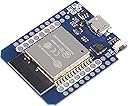
๐ Power your IoT dreams with the ultimate ESP32 mini powerhouse!
The 6Pcs ESP32 D1 Mini NodeMCU boards feature the latest ESP-WROOM-32 dual-core 240 MHz processor, combining WiFi 802.11b/n and Bluetooth connectivity in a compact, pin-compatible form factor. Ideal for professional-grade IoT development, these lightweight boards support FreeRTOS and Linux, enabling rapid prototyping and seamless integration with existing WeMos shields.


| ASIN | B08ND91YB8 |
| Best Sellers Rank | #2,568 in Single Board Computers (Computers & Accessories) |
| Brand | DORHEA |
| CPU Speed | 240 MHz |
| Compatible Devices | WeMos mini shields compatible devices |
| Connectivity Technology | Bluetooth, GPIO, I2C, USB, Wi-Fi |
| Customer Reviews | 4.2 out of 5 stars 100 Reviews |
| Manufacturer | DORHEA |
| Memory Storage Capacity | 4 MB |
| Model Name | ESP32 D1 Mini |
| Operating System | FreeRTOS, Linux |
| Processor Brand | Espressif |
| Processor Count | 2 |
| Processor Speed | 240 MHz |
| RAM Memory Installed | 4 MB |
| RAM Memory Technology | LPDDR3 |
| Ram Memory Installed Size | 4 MB |
| Total Usb Ports | 1 |
| UPC | 701715440425 |
| Wireless Compability | 802.11b, 802.11n, Bluetooth |
C**N
Solid enough that I have bought the 8-pack five times
These are absolutely rock solid. I actually wish I could buy them in bigger quantities for a better discount, even though $5 apiece isn't bad at all. Out of the forty of these I have purchased, not one of them was DOA. To program them from the Arduino IDE, you have to install Espressif ESP32 support. Use "AI-Thinker ESP32-CAM" or "ESP32 Dev Module" as the board in the Arduino IDE, and it'll program perfectly. The "worst part" is that Windows assigns a new COM port number to each board you connect, so it can be a little awkward to figure out which one is the right one - this is a Windows problem, not a problem with these boards. I haven't had any problem at all with them being detected by Windows or Linux. I haven't had any interest in programming them in Micro Python so have no suggestions for doing so. These are actually ESP32s. The vendor's description is a little confusing by saying it is ESP32 and ESP8266. They use the ESP-WROOM-32 module. They use the same pin footprint as the ESP8266 version of the D1 Mini - the eight pins marked with the white bar on the silkscreen have the same general functions and spacing as the ESP8266 D1 Mini. 5v, 3v3, Ground, Rx/Tx, RST are the same pins, and the remaining pins are GPIO pins (albeit different GPIO numbers). I have done a lot with home automation (at home and at the small business I work for), creating my own devices, saving quite a bit of money in the process. I have had a lot of fun with serially-addressable LED strips (WS2812). I am building a wheelchair bot, using two of these as the "brains," and one of them in the remote control. I have created a HUD in my vehicle, and am able to lock and unlock the car doors via Bluetooth or WiFi. I created an access control system for a local makerspace, allowing general members to connect via WiFi to the ESP and activate the electronic lock when a managing member is present. These are beautifully capable with a high clock speed and a nice amount of flash and RAM available. With many of my projects I feel like I'm underutilizing them, since they are capable of much more - but for the price, I don't feel like I'm wasting money when I only use one or two GPIOs. The ONLY functional problem I have had with these, which frustrated me for a bit, is that the ESP WiFi radio overloads PIR sensors, making them constantly false-detect movement when they're put into a small case - separating them by about three feet resolves the problem. I prefer these over other ESP modules because they are the smallest form factor with access to more GPIOs than any single project has needed and they are reliably 5v tolerant (two devices have been running constantly with 5v sensors connected and no level translation for 18+ months). I have a large collection of 5-volt devices, so really don't want to have to switch to 3v3 yet. These fit perfectly into 3/4 inch or larger PVC electrical pull conduit bodies, which is a cheap and easy way to make projects portable, protected, and even waterproof, and I can pick those up at the local home improvement store. I bought some 2x10 DuPont connector housings, which are great for making cable connections to the other components these will interface with (using the wire and DuPont cable terminals I also have). I made a couple of cables specifically for breadboarding that I reuse when I finish a design and make it permanent. I almost always solder pins to the side with Vcc and ground next to each other, and attach pins on the other side when occasionally needed.
N**.
Great ESP 32 Camera for lots of cool projects
ESP32 Cam is an amazing hobby cam for many applications. I really like the versatility and small form factor of this board. The companion MB board makes programming and powering the cam very easy, and is essential for some of my projects. I do have one tip to share, is that there are 3 GND pins, however if one is labeled GND/R (above the Flash LED), do not ground this, the chip will not boot. Especially important if you are making a PCB.
A**M
A meager investment for a big helping of peace of mind.
Let me say first off, this board wouldnt be as good without great software support. To all the programmers and devs that have made sofrware for this, thank you. Finding code for this board was easy... literally... easy_target on github. Uploading the code was easy, download the arduino IDE, get the board definitions, download and unzip the code. Double click code, it moves the sketch into a folder named sketches, move the rest of the files into the same folder. Set the settings for the board specifics, and click upload, and it works. Just works, like magic. I didnt expect much from the ov2640 cameras considering Ive tried processing on other esp32 boards and even if next to an AP you cant expect much throughput off the PCB antenna trace. These do OK at this actually, 5-10 meters from the router you can get 3-5 FPS at 800x600 resolution, raise the resolution up and you run into processor limitations. Add an external antenna (not the bingfu ones other sellers package them with, signal declines with them) and you get up to 10 fps at the same distances. The lenses themselves are a miracle on their own but if you get the 160 FOV one it gets crazy. You can clearly see things 90 degrees to the right of the camera module. so 20 for 3 pcs here+ the suggested stuff bought with it and you get a fairly good security camera. All the images have a... nostolgic quality to them, like watching a vacuum tube television, I imagine its the glass in the lense but who knows, looks great, less filling. All in all Espressif outdid themselves with this design, and I cant wait to check out some of their newer chips.
G**C
Took some work to get programmed
Ran into all kinds of issues. Read all the forums with people having issues with these boards. I experienced everyone of them. First complaining there was no coredump partition. Put in parameters for a coredump partition in the partition.csv file. No matter what I tried I ended up with a board constantly resetting itself upon boot. Or, when I tried reuploading the code I just got ............ Never getting to the point where I got an IP address to connect to the ESP32 to see any camera images. Finally I tried nixing the USB shield and programming the ESP32 Cam board through an Arduino Uno. Programmed without a problem. Removed the rst to ground jumper, powered the board off and on again and the board booted up just like it's supposed to. Got the IP address, connected through Chrome, pressed Start Streaming and everything just worked. Not sure what's up with the USB shield. Reset button stuck? Who knows. Why was it complaining about no coredump partition when it doesn't need one? Don't know that either. Super frustrating, nights of troubleshooting. Almost gave up. But programming through the Nano instead was easy as pie. Just Google how to program an ESP32 Cam with Arduino Nano and follow the instructions for pin connections. It's easier. I suggest just buying the ESO32 Cam board without the USB shield to save yourself a buck and lots of hair pulling frustration. . Attemting to use it was enormously frustrating. Am I clear about how frustrating it was trying to program with the USB shield? It was that frustrating. Camera speed and wifi connect speed is just fine, now that the board is programmed and working. I have lines through the images now but that's because I am powering the board through the Nano from a USB to my laptop which isn't quite enough power. Once I add a different 5v power sourse those lines should go away. Boards also not the best quality, can't read the silkscreen print or the pins. Not clear at all.
D**H
Great little boards
For those that cannot figure out how to setup the board in Arduino, you need to add a library from github. package_esp32_index.json is the file you need. Add the file url to preferences like in my screen shot. You will then have a bunch of examples show up. See my screen shot Then in tools, select AI Thinker ESP32-Cam Look at my screen shots to see how I set mine up Have fun. These are really cool boards. I have 3 of them so far.
C**S
No working software support
After three days of repeatedly trying to get these boards to work in either Arduino IDE or using custom MicroPython firmware through Thonny following countless youtube tutorials, because these boards come with ZERO documentation digital or otherwise. I was only able to get one of the three to "work", and by work I mean it functions intermittently, but it is spotty at best, not to mention one of the boards female cam ports had bent pins that i tried my best to straighten. I would avoid this product.
A**N
Quality is on par
Itโs a cheap MCU used for home assistant. Works as it should.
C**D
Functional, but ESP32-CAM-MB for programming only.
This is my first attempt at anything ESP32, so take it with a grain of salt... All boards were functional and able to be programmed (details below). Nothing appeared awry or broken, the packaging was fine, not much more could be asked for there. My expectation however was that the ESP32-CAM-MB and ESP32-CAM together would make for a functional unit that can operate from power-up without manual intervention. Other usages of similar ESP32-CAM/ESP32-CAM-MB boards on the internet implied that would be the case. In my experience, it was not. I found the ESP32-CAM-MB was good for programming only, not for general operation. Should that be true, I would expect the seller to have clearly documented that. Should that not be the case, I would expect a little documentation from the seller, indicating how these boards can operate in that manner since it is in conflict with all information I can find regarding the ESP32-CAM + MB combo. That said, after a bit of tinkering, I got all three programmed, both using the Arduino IDE's CameraWebServer example, as well as through ESPHome, so they are all functional, just not as I expected. Notes on the oddities or unexpected behaviors with these boards: 1. Most ESP32-CAM-MB boards appear to have two buttons, reset and boot. This ESP32-CAM-MB board only has one, "Reset". 2. Initial programming of these boards *always* required executing the connection step in ESPHome immediately after powering the boards with the ESP32-CAM-MB. Attempting to program after it has been connected for a while did not work, regardless of pressing/holding reset button as the instructions suggest. After initial programming, this seemed to no longer be the case. 3. Once programmed, while plugged into the ESP32-CAM-MB, functionality was only operable either immediately after programming in the Arduino IDE, OR using ESPHome, Selecting Logs > Plug into this computer > Selecting the comm port, and clicking "reset device". Closing out of the log window halted functionality. In other words, a reset via serial port was always necessary to execute, implying the ESP32-CAM-MB board will always put the module into its bootloader? 4. Once removed from the ESP32-CAM-MB board, and powered directly via the 5V pin on the ESP32-CAM board, the program reliably executed as expected, every single time. The above quirks were encountered when powered via 2A power bricks, and via PC usb ports, with different cables, so I do not suspect it is a power issue. I believe it's the design of the ESP32-CAM-MB board, which appears to differ from others on the market. Occasionally the device seemed to boot and execute simply when plugging in the ESP32-CAM-MB board, but this was not repeatable to the point of being able to determine what made it succeed or fail. It would be a 4 star product if it were possible to execute the loaded program direct from being powered on without manual intervention while using the ESP32-CAM-MB board through some trick or easy modification, and a 5 star product if the seller included the details necessary to do so in the product listing, since it clearly does not operate "out-of-the-box" that way. As-is however, since the ESP32-CAM-MB boards appear only useful for programming, and not for powering the board for general execution. I only give it 3. NOT being able to power these modules via the ESP32-CAM-MB board and execute from power-up without intervention means another power-supply is required for unattended use, which I certainly did not anticipate, and I doubt others would either. If I were to want more cameras, I'd likely search for a seller with the "two button" ESP32-CAM-MB board, and only be content re-purchasing these with the expectation that I'd be directly powering the ESP32-CAM board at its point of use.
Trustpilot
1 month ago
3 weeks ago