We remain fully operational. Our teams are working around the clock to ensure your deliveries continue safely.

DOWNLOAD THE APP


Customer Services
Copyright © 2025 Desertcart Holdings Limited
DOWNLOAD THE APP
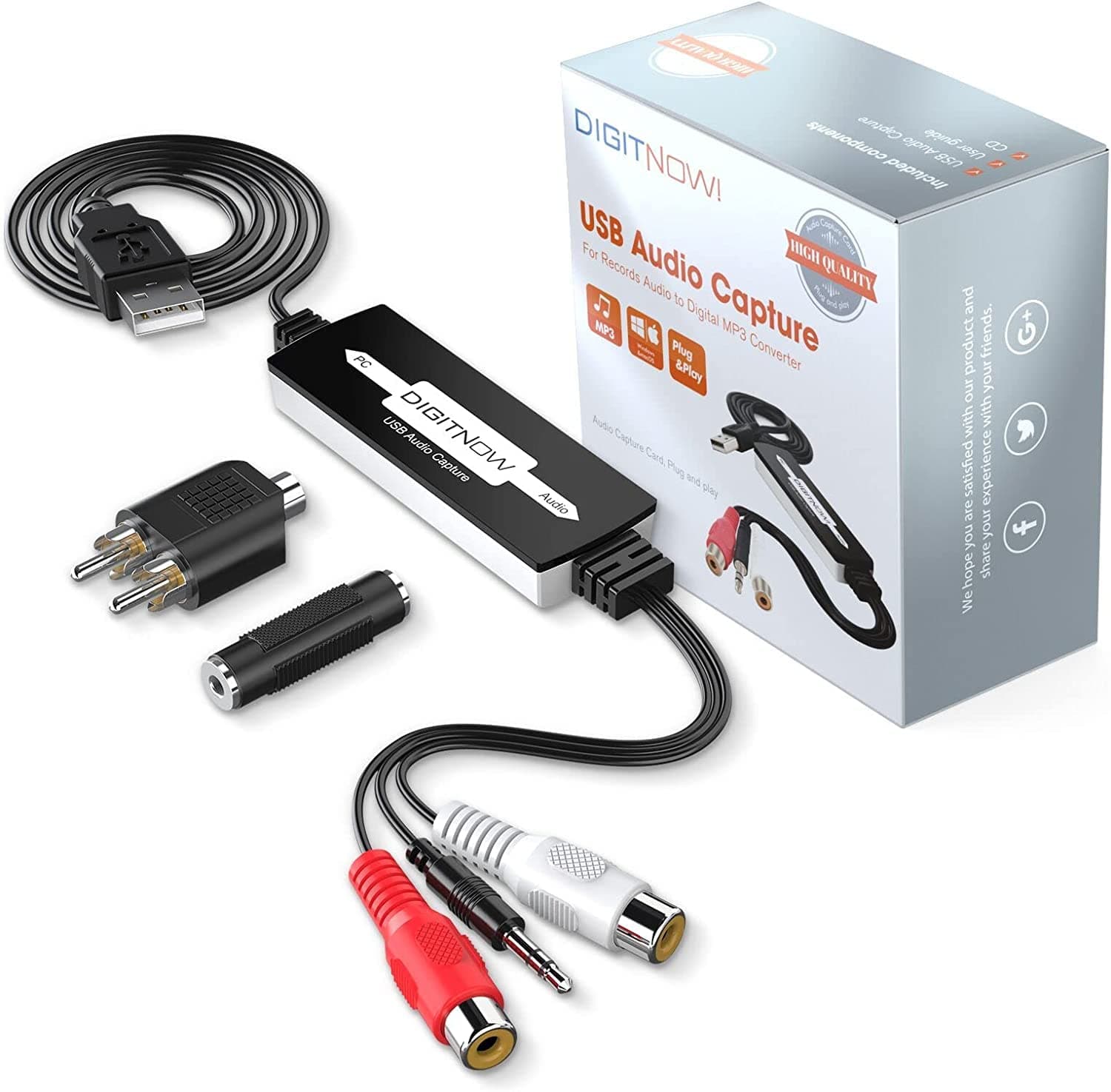
🎧 Preserve your analog treasures in digital brilliance—capture every note, anytime, anywhere!
The DIGITNOW Audio Capture Card is a compact, portable USB device that converts analog audio from microphones, cassette players, vinyl, and other line-in sources into high-quality MP3 or WAV digital files. Compatible with Windows and Mac OS, it offers plug-and-play convenience without extra power requirements, bundled with professional-grade Audacity software for seamless recording and editing.


| ASIN | B079CBGDST |
| Batteries | 1 CR2032 batteries required. |
| Best Sellers Rank | 1,045 in MP3 Player Accessories |
| Brand | DIGITNOW |
| Colour | black" or "white |
| Customer Reviews | 4.3 4.3 out of 5 stars (441) |
| Date First Available | 27 Jan. 2018 |
| Guaranteed software updates until | unknown |
| Included components | Capture Card |
| Item Weight | 73 g |
| Item model number | BR605 |
| Package Dimensions L x W x H | 10.4 x 9.7 x 4 centimetres |
| Package Weight | 0.11 Kilograms |
| Part number | BR605-US |
| Product Dimensions L x W x H | 5.1 x 16.5 x 14.2 centimetres |
| Size | Audio Capture |
| Style | Digital,Portable |
| Warranty description | 1 year |
C**S
Good for preservation of old cassette tapes
Works well with Audacity on Man and PC. Didn't need to use the included software for either. Was just plug and play. No noticeable introduction of hiss or noise in the recordings.
N**L
Promising but installing on a MacBook isn’t intuitive
I have a modern MacBook so the first requirement is to get a USB-C adapter. Having done that, there was no way of telling whether the device had been accepted by the MacBook , or whether it wasn’t necessary to install it as such, which in the end it wasn’t. The manual isn’t entirely clear on using Mac OS but seems better for Windows where an installation disc is supplied. The next issue was to install Audacity from the website, as there doesn’t seem to be an app. The installation as such was straightforward but it took some time, and several attempts to record before I was asked whether I wanted to allow use of the USB Microphone. When this finally happened, I tried a recording from a classical cassette played on a Sony Walkman, which I recorded using the 3.5mm cable, without making any adjustments to the recording level or using any of the other tweaks available with the software. The sound was excellent and could probably be improved by playing around with the software. I shall now transfer some of my cassettes to the MacBook, using my Aiwa cassette deck, which should produce even better results, and thence to my iPhone, and perhaps try a few vinyl LPs as well, and update this review at that time. However, at this stage, the device seems promising, once you figure out how to launch the software.
T**Y
good device, works as described
works well, can connect it to an android 9 and android 15 phones, via an OTG adaptor. The recording quality sound good to me, when I look at the recorded file graphically it seems to have capture the full frequency range in good detail. also works with a linux desktop, didn't require any drivers to be installed. Seems to work better with headphone level audio, I noticed on one hifi i used it with the LINE OUT seemed to be too loud resulting in clipped audio, but headphone one is fine and allows more control over the recording volume.
R**B
It works!
Superb! Been looking for such as this for an age. I used to be able to record direct down a speaker wire from Headphone socket on hi-fi to audio jack on laptop. Since updates of Realtek sound drivers, around late 2023, no longer, you need one of these. Not only that, but you'll probably be able to use your favourite recording app, and not rely on Audacity if you don't like it. I prefer Goldwave, and thought I'd lost that forever. Getting this to work via USB has got me Goldwave back. Don't worry if you don't have mini-CD for the download instructions, you can download Audacity latest version from the web, and also the tech manual on DIGITNOW'S website if you haven't a magnifying glass for their mini-booklet. A bit of a fiddle to install, don't be downhearted, get it going through Audacity first as it sets your machine up with all the right variations of settings non-audiotechs like me would never thought of. Seriously, if you already have Audacity, download the latest version. Then you're away. Also, now able to monitor recording via Bluetooth h/phones, so work quietly late at night with speakers disabled, where I couldn't before. Full praise, a genius whoever coded and developed this. I'm like pig in proverbial whatsit now. Happiness!
E**2
Simple Plug & Play on Windows 11
I have a box of old cassettes, mainly nursery rhymes and stories, that I would like to record to .MP3, but my mini-PC doesn’t have an input socket that would allow me to connect an analogue input. This seemed to be an ideal solution. I already had Audacity installed, and had a rudimentary knowledge of its use, so I ignored the mini-CD and instructions that came with the device, and simply connected it to an old portable cassette player at one end and to a USB port on my Windows 11 PC at the other. I changed the input in Audacity to “Microphone (USB Microphone)”, and started the cassette player. Everything looked OK, so I monitored the recording level via Audacity and adjusted it via the cassette player’s volume control and started recording. It worked fine. Because of the nature of the content I wasn’t really concerned about the quality, but without listening too hard, it sounded fine. In order to pick out particular sections of a tape recording, you need to turn on audible input monitoring, so that you can hear what’s being recorded. Audacity has this facility under Edit/Preferences/Recording , check “Audible input monitoring”. I’ve only used it on cassette, but I would expect it to work with any device to which it can physically connect, a turntable or whatever, and it has a very good set of connectors to facilitate that. Now that I’m satisfied that it will work, I have a winter project lined up to deal with my cassette archive. All in all, I’m very pleased with it for what it cost.
A**N
Tough to get it to work, customer support isn't getting in touch
Seeing the reviews, I was confident of being able to plug and play with this. Not so. I run MacOS Big Sur, so the instructions in the little manual for this item don't work. It says go to Apple logo/ About this Mac/ More info / Hardware /USB, but my options do not include 'more info' or 'hardware'. I wrote customer support but there was no response, ever. My tape deck was working fine but the device was not transferring the sound into Audacity. Zero customer support. After many hours and downloading different third-party apps, I finally got this to work through audacity. It works great once you figure out how to get it operating on your system, but that can be extremely difficult to do. Maybe you will be lucky and it will “plug and play“ for you, but if your experience is like mine, it will be a very long and frustrating process to get it up and running.
Trustpilot
1 week ago
2 weeks ago