We remain fully operational. Our teams are working around the clock to ensure your deliveries continue safely.

DOWNLOAD THE APP


Customer Services
Copyright © 2025 Desertcart Holdings Limited
DOWNLOAD THE APP


⚡ Power up your network—fast, sleek, and effortlessly wired!
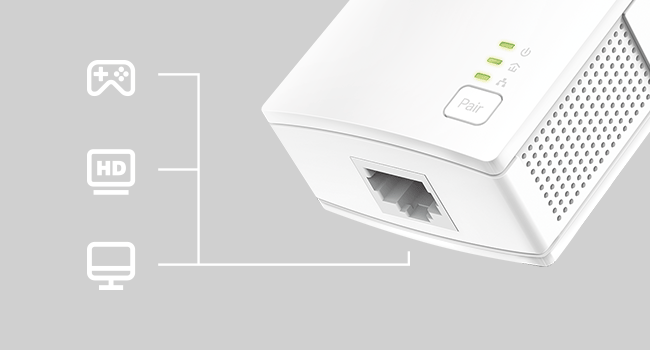
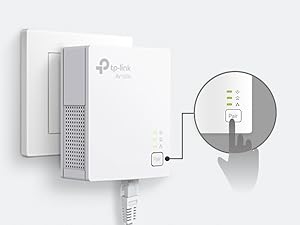
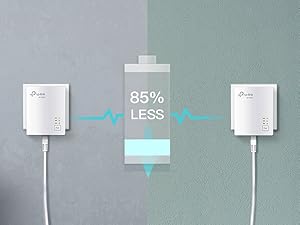
The TP-Link AV1000 Powerline Ethernet Adapter (TL-PA7017) delivers gigabit speeds up to 1000 Mbps over your home’s existing electrical wiring, covering distances up to 750 feet. Its nano size design fits discreetly into any outlet, while plug-and-play setup requires no technical skills or new cables. Ideal for multi-story homes and hard-to-wire spaces, it features a power-saving mode that reduces energy consumption by up to 85%. Compatible with all TP-Link powerline adapters, it provides a secure, reliable wired connection for desktops, smart TVs, and gaming consoles.





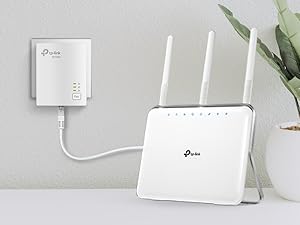
| ASIN | B08RHZN4MG |
| Best Sellers Rank | #1 in Powerline Network Adapters |
| Brand | TP-Link |
| Built-In Media | 1× Ethernet Cable, Quick Installation Guide |
| Color | white |
| Compatible Devices | Desktop, Smart TV |
| Customer Reviews | 4.2 out of 5 stars 11,297 Reviews |
| Data Link Protocol | Ethernet |
| Data Transfer Rate | 1000 Megabits Per Second |
| Hardware Interface | Ethernet |
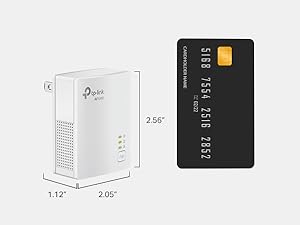
| Item Dimensions L x W x H | 2.56"L x 2.05"W x 1.12"H |
| Item Weight | 0.27 Kilograms |
| Manufacturer | TP-Link |
| Mfr Part Number | TL-PA7017 |
| Minimum Required Operating System Version | Android 10.0, Android 11.0, Android 12.0, Android 13.0, Mac OS 10.15 Catalina, Mac OS 11 Big Sur, Mac OS 12 Monterey, Mac OS 13 Ventura, Mac OS 14 Sonoma, Ubuntu 20.04 Focal Fossa, Ubuntu 22.04 Jammy Jellyfish, Windows 10, Windows 11 |
| Model Number | TL-PA7017 |
| Product Dimensions | 2.56"L x 2.05"W x 1.12"H |
| UPC | 845973010133 840460604727 |
| Unit Count | 1.0 Count |
| Warranty Description | 2 year manufacturer |
M**Y
Easy Setup and Reliable Connection—Great Alternative to Running Ethernet Cables
I bought the TP-Link AV1000 Powerline Adapter kit because I needed a stable wired connection in a room far from the router, and it solved the problem without running long cables through the house. Setup was truly plug-and-play—plug both units into wall outlets, connect the Ethernet cables, and it was up and running in minutes. The connection has been much more stable than Wi-Fi for work and video calls, with consistent speeds and no random dropouts. That said, performance does depend on your home’s electrical wiring, so speeds may vary a bit depending on the circuit. I also found it works best when plugged directly into the wall, not a power strip. Overall, it’s a practical, no-fuss solution if you need reliable internet in another room and don’t want to deal with drilling holes or running cables everywhere.
R**C
Great solution to a tricky problem
I have a garage with power about 100' from my house. I built a barn about 100' from this garage and ran a cat 6E cable between the two. On the barn I have a solar array that can connect to the internet. My problem was getting the internet to the garage. I installed an outlet in the line to the garage in my house near my router. I then plugged this power line adapter into that outlet and ran an ethernet cable from my network switch to the power line adapter. I then plugged the other end of the powerline adapter into an outlet in the garage and ran an ethernet cable from the power line adapter to the ethernet cable that goes to my barn, connecting them with an RJ45 coupler. Works like a charm. The connectivity is great and I put an Eero in the barn and internet is great. The value is wonderful as the alternative is to dig a trench and bury an ethernet cable. The ease of installation was a breeze - although I have been using power line adapters for over 10 years - always TP-Link.
K**L
Reliable Powerline Ethernet Solution – But Only If on the Same Circuit
The TP-Link AV1000 Powerline Ethernet Adapter KIT (TL-PA7017 KIT) is a solid option for extending wired internet without running long cables. I like the plug-and-play setup—you just connect one adapter to your router and the other to your device, and you’re online in seconds. The gigabit port gives fast speeds, perfect for streaming, gaming, or even powering network gear in places where WiFi isn’t stable. That said, the big catch is that it only works if both adapters are on the same electrical circuit. If they’re on separate breakers or panels, they won’t communicate. This limitation means it may not work in all homes or larger setups. ✅ Pros: Easy setup—plug, pair, and play Gigabit port for fast wired speeds Compact, unobtrusive design Energy-saving mode helps cut power use when idle ❌ Cons: Must be on the same electrical circuit to work Performance can vary depending on wiring quality Doesn’t replace running a dedicated Ethernet line in tricky cases 💡 Tips: Before buying multiple sets, test in your home to make sure the outlets are on the same circuit. Avoid plugging into power strips or surge protectors—plug directly into the wall for best performance. If you need coverage across multiple circuits, consider a mesh WiFi system instead. Bottom Line: If your outlets are on the same circuit, this kit delivers fast and stable Ethernet without the hassle of long cables. Just be mindful of the electrical wiring limitations.
M**W
Easy to set up and very helpful tech support through the chat!
I've been aware of these types of adapters for some time, but have never used them. I needed to purchase a set to provide an internet connection for one of my computers that is upstairs, not near my modem, and requires a Ethernet connection because it doesn't have Wi-Fi capabilities. So, I ordered these TP-Link adapters, which were delivered the same day, and had them connected and working with no problems within a few minutes of opening them. Very easy setup with clear instructions provided in the printed documentation included in the box, or using the digital documentation provided on the support site. I also downloaded the management utility from the support site, which is handy for checking the adapters' status, changing some device settings, and checking/updating the firmware. I wasn't 100% sure from looking at the support site if the firmware version installed on my adapters was the latest available, so I reached out to TP-Link support via the chat on the support site. The chatbot wasn't able to answer my question, but I was easily able to get through to a live support agent, Kristine Mae, via the chat. Kristine was very friendly, helpful, and able to confirm quickly that the firmware version I saw for my devices via the management utility was the latest and greatest. Very pleased with the product and the support!
C**J
Utterly useless
"Extend your network where extenders and boosters cannot go!" OK. So I'm paraphrasing. What they don't tell you is that both units need to be on the same circuit...as in the same circuit breaker...as in the same ROOM! What good is that? I know it says on the same circuit in the depths of the description, but I naively assumed, since wifi in the same room with the router isn't exactly what I'd call a problem, that that meant on the same breaker box. i.e. the whole house circuit. I could understand it not working across breaker boxes...I know some people have more than one... but I mean, give me a break. The main title for the product should be "I am useless for the purpose you think you're buying me for." I set one up in my upstairs office wherein lies the router. Got all my nice little lights. Took the second to the basement for my smart TV, plugged it in...and got a blinking powerlight. I tried pairing, thinking that would get the units talking to each other. Ha! The middle light on the router end went blank...and the power button in the basement just kept blinking. Tried unplugging and plugging. Didn't work. Tried the link button long press to reset. Still nothing. I do not understand how anyone has gotten this thing to work. Heading now to hit the return button.
B**N
Good for a wired solution
Keep in mind that any powerline adapter is ETHERNET ONLY. You cannot use a powerline adapter to extend your wifi or mesh. This is really good for somebody who really really needs a wired Ethernet connection but is too far from the router and doesn’t want to run a 100 plus foot cable onto the wall/floor and around things with a possible signal loss due to cable length. Disclaimer: Our ISP is coaxial only. We can’t get fiber at our house and cable is the next best option. My review is based on that type of connection. Here’s how it worked for me: I also ordered a couple of cat8 Ethernet cables (overkill maybe but I want the best speed and latency possible at any given time no compromises and the cat8’s were about 5 bucks each so why not go all in?) and this system. They also came with their own Ethernet cables I had no idea they would but the stock ones I’m not using. I was surprised to find that it actually worked on its own without any paring needed. At first I had the router end plugged into the far corner of the living room on its own outlet but that one was too far and the speed was pretty low. I moved it to a busier outlet that was a bit closer to my room from the living room and still managed to get it plugged in on its own and the speed jumped right back up. The other end goes to my console, and while my in-game performance was doing pretty well over wifi, there would be occasional spikes. This seems to have eliminated that but at first when i had it on the far outlet the latency seemed much much worse than wifi. In game latency at first setup jumped from 32 (over wifi) to over 70-80 with this system but then after a few days it came back down. I also do remote play sometimes so this helps a little on the sending end with stability. The consoles NATIVE speed test now shows around 28-36ms ping (I was getting that over wifi too) and about 40 or so in game. Interesting enough my in-game used to stay around 30 or so but those spikes seem to be gone so the extra 8-10 loss in my game doesn’t feel too big for the better stability that I now have. I thought this might just be a server issue but I use the same server as I did before and it’s just a little higher not noticeably. Keep in mind you HAVE to plug both adapters directly into an outlet no matter what for these to be effective. Absolutely no surge protectors or extension cords or none of that. Overall this works good for me, it fixed most of what I needed it to, and provides a wired Ethernet connection without being close to the router as I’m unable to anyway. Speeds remain the same as before though no change.
M**M
I'm a repeat customer, best thing for poor WiFi
I am back, liking this product so much, bought another to extend to my office desktop computer. In January 2023 I bought my first power line Ethernet adapter kit on the recommendation of a Spectrum installer. I live in a small brick house, and it's not great for a signal. Trying to stream anything in front bedroom was frustrating as was spooling or no signal. After finding this, Netflix came in so fast, nothing ever spooled again. Here we are 2026 and decided it was time to get the office computer off WiFi and go direct via Ethernet and ditch their POD. Easy pairing up, but make sure you have the Ethernet plugged in to device and the bottom to get the 3 lights on . I had to buy a longer Ethernet cable than what was supplied and went to a higher quality. Works perfect with 14', the signal display on computer shows wired in, just make sure you remove the WiFi so it doesn't compete and you are good to go! Super fast WiFi at a great price! I highly recommend this, best kept secret out there!! I'm very happy finally finding a better low cost solution.
M**I
Works but WiFi is better
It connects fine to router and easy plug and play. But if you run anything in the same circuit it will lose connection
Trustpilot
2 months ago
3 weeks ago