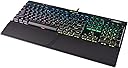
I have been using this keyboard for more than a month now and here are my thoughts: After a decade of using membrane keyboards, I finally decided to try a mechanical keyboard. For those who don't know, mechanical keyboards have switches underneath each key instead of membrane. There are many types of switches made by Cherry (Blue, Red, Brown and more). Cherry Blue switches have a tactile bump and audible click, Browns have less tactile bump and less audible click, Reds have no tactile bump and very less audible click. Reds require very little travel for their actuation point. Back to review .. Based on my requirements (i write code and game), i needed a keyboard which looks good and performs well. I looked at various gaming mechanical keyboards, watched countless videos, read so many reviews and finally decided to buy Corsair K70. Initially i thought of getting the RGB version, but because of the price i went for the LUX RED led version. Difference between LUX and standard version is only the font used on the keys. Build: This keyboard looks stunning!! Its very robust, heavy and the brushed aluminum finish is very nice. It has braided cable, smooth rubberized wrist wrest. In short, it feels premium from every angle. Keys: It took me a week to get used to this keyboard, and now i am simply loving it. I chose the Cherry MX Brown variant because i wanted the tactile bump also keeping the noise level low. The key press feel is so nice, i feel like typing on this thing whole day. The key press sound is very much present but not so loud to wake someone up :p It also comes with textured WASD and QWERTY keycaps with a keycap puller. Functionality: I chose the RED led version, so there is only one color on the keys. The LEDs are very bright and the brightness can be adjusted from the brightness button or from the software. There are dedicated media keys which works nice, volume rocker roller and a mute button. The CUE software with this keyboard gives you overwhelming amount of features. There are 6 default led modes, but you can create your own light effects. You can assign macros and shortcuts to any key, which i found very handy for opening certain programs (like calculator). Also you can set it to change lighting effect when certain program is launched. Different profiles are also supported. Conclusion: The keyboard is very well build, looks gorgeous, feels premium and is a solid choice if you want a good mechanical keyboard. Only con i see is the complicated and difficult to use CUE software. I watched some tutorial videos to get it right. And because Cherry MX Brown switches gets love from both gamers and typers, you can't go wrong on this one.